English
 Deutsch
 Polski
Securing WordPress Logins: Introducing WP Admin Captcha

Securing the WordPress admin login page (wp-login.php) is a fundamental step in protecting a website from malicious activity. Automated bots constantly scan for vulnerabilities, attempting to brute-force passwords to gain unauthorized access. The WP Admin Captcha plugin provides an efficient, lightweight solution to this problem by integrating Google reCAPTCHA v2 directly into the login interface.
How It Works
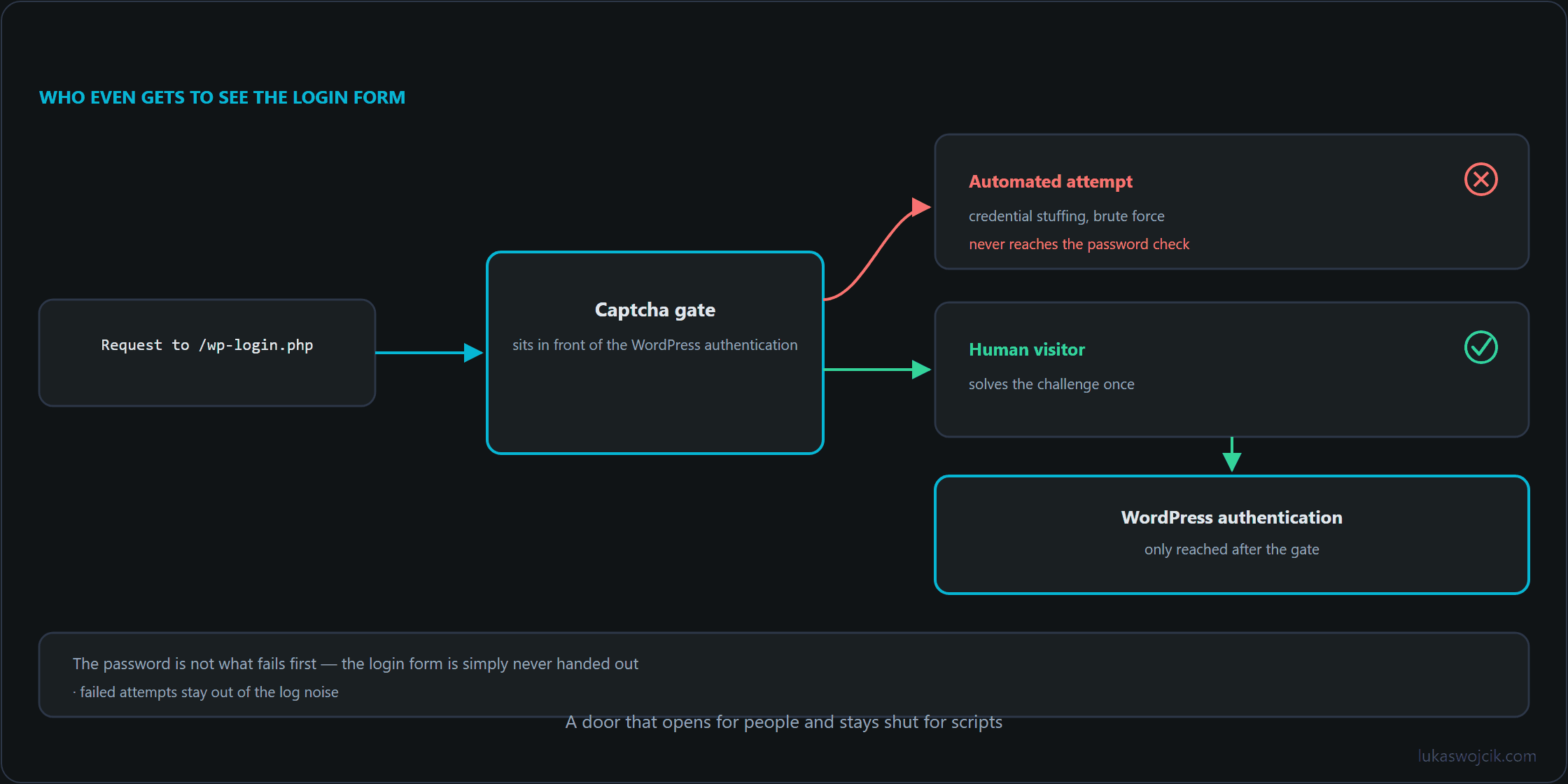
The plugin functions by intercepting the authentication process before a user is logged in. It adds the standard “I’m not a robot” checkbox to the login screen, requiring manual interaction to prove that the login attempt is originating from a human, not a script. When the user submits the form, the plugin sends a request to Google’s verification servers. With keys configured, the plugin only allows the WordPress authentication process to proceed once Google confirms a successful completion of the challenge.
Key Features
- Simple Configuration: A dedicated settings page allows the insertion of Site and Secret keys. Since the migration of reCAPTCHA Classic was completed in the first quarter of 2026, these keys are created and managed in the Google Cloud Console, and every key belongs to a Google Cloud project; the legacy reCAPTCHA Admin Console only serves to view historical data. Usage remains free of charge up to 10,000 assessments per month.
- Lockout Protection: If the required keys are not configured, the plugin skips verification, ensuring that the administrator never loses access to their own site due to a misconfiguration. Until valid keys are stored, the login page therefore remains without captcha protection.
- Minimal Overhead: By utilizing native WordPress hooks and the built-in HTTP API, the plugin ensures performance remains unaffected.
- Open Source: The code is transparent and available for review or contribution on GitHub: https://github.com/LW-IT-Solutions/wp-admin-captcha.
Summary
WP Admin Captcha protects WordPress login pages against automated brute-force attacks by requiring Google reCAPTCHA v2 verification, while ensuring administrator accessibility through a lockout protection that skips verification as long as no keys are stored.
Questions and answers
Does the lockout protection also cover an invalid secret key or a verification request that cannot reach Google?
It covers the missing-keys case only. With keys present, the challenge is enforced, and a challenge that cannot be confirmed is treated as not solved, which is the correct behavior for a security check and an uncomfortable one during an outage.
A wrong secret and an unreachable verification endpoint therefore look the same from the login page: the form refuses the attempt. At that point, you need a second way to regain access that does not depend on the plugin, whether through WP-CLI or by renaming the plugin directory over SSH. Anyone deploying a login captcha should have tried that route once, before needing it.
One quota detail belongs next to this. Usage is free up to 10,000 assessments per month, and every verification request counts towards that figure. A site under sustained bot pressure can reach it without a single successful login. What happens beyond the limit depends on the billing setup of the Google Cloud project; if verification stops confirming at that point, the failure arrives through the same door as the outage above.
Does WP Admin Captcha also cover login attempts via xmlrpc.php?
Indirectly yes, though not in the same way as on the login page. A checkbox requires an interface, and the endpoint has none, because it accepts credentials in a single call and answers machines. The plugin’s check, however, is not tied to the form but to the wp_authenticate_user filter, which WordPress runs on every login with a username and account password, including a call via xmlrpc.php. Such a call lacks the captcha token that only the login form sends, and the login fails before the password is even checked.
Two things follow. Password attempts through the endpoint go nowhere as long as the secret key is stored; without it, the lockout protection applies and the effect disappears here too. And programs that log in over XML-RPC with the account password fail as well; application passwords are checked by WordPress along a separate path that the plugin does not touch.
The load remains nevertheless: every call reaches PHP, and historically a single request could bundle several login attempts, which undermines per-request rate limits. Two measures work where the plugin does not reach. Where nothing needs the endpoint (no app, no external editor, no service that submits posts), it should be switched off; that is the most effective and cheapest answer. Where it is needed, the limit belongs one level lower, in the web server: a block after a few failed attempts per address, regardless of which file was requested.
Can a Content Security Policy (CSP) be why the reCAPTCHA field is missing from the login page although keys are entered?
Yes, a CSP is a common cause of this symptom. The widget loads scripts from www.google.com/recaptcha/ and www.gstatic.com/recaptcha/ and embeds the field itself in a frame from www.google.com/recaptcha/. A policy that does not allow these sources blocks them without any visible trace on the page.
The consequence is more serious than a missing field. The lockout protection covers only the case of missing keys. Since the keys are entered, the plugin requires a challenge nobody can see, and the form then refuses every login, including the administrator’s.
The browser console on the login page settles the question: blocked resources are listed there together with the name of the directive. Both script sources belong in script-src, and the frame source in frame-src. It is also worth knowing a way in that does not depend on the plugin before it is needed: renaming its directory over SSH restores the login within seconds.
Related articles