English
 Deutsch
 Polski
Tutorial: The Five Timestamp Formats in a Tracking Stack and How to Convert Between Them

Contents
A single click produces a timestamp in the browser, another in the tag manager, a third in the analytics export and a fourth in the advertising platform it is forwarded to. All four describe the same moment. None of them is written the same way.
Most of the confusion resolves by counting digits. The part that does not is a day boundary, and it is worth knowing about before a report is compared against another one.
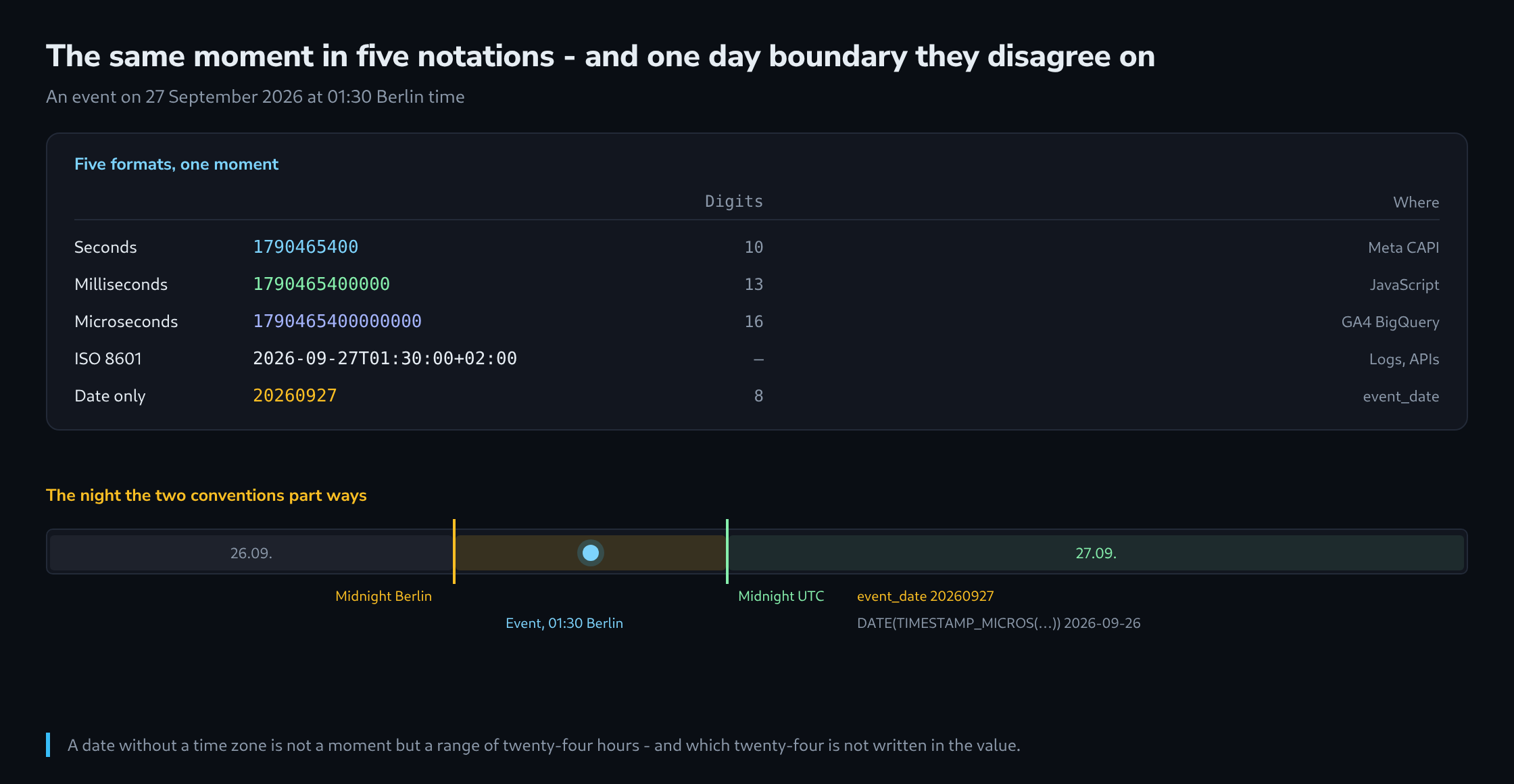
Five Formats That Meet in One Stack
All of them count from the same zero point: midnight on 1 January 1970, in UTC. What differs is the unit and the packaging.
| Format | Example | Where it appears |
|---|---|---|
| Seconds | 1790465400 | Meta CAPI event_time, most REST APIs |
| Milliseconds | 1790465400000 | Date.now(), gtm.start, most JavaScript |
| Microseconds | 1790465400000000 | GA4 BigQuery event_timestamp |
| ISO 8601 | 2026-09-27T01:30:00+02:00 | Logs, Search Console API, most exports |
| Date only | 20260927 | GA4 event_date, BigQuery table suffix |
The first three are unambiguous: they are a number of units since a fixed point, and they contain no time zone because they do not need one. The fourth is unambiguous as long as it carries an offset – the +02:00 at the end is what makes it a moment rather than a description.
The fifth is different in kind. A date without a time is not a moment but a range of twenty-four hours, and which twenty-four hours depends on a time zone that is not written anywhere in the value.
Telling Them Apart by Counting Digits
For a number found in a log, in an export or in a payload, the length settles it.
10 digits   seconds        1790465400          until the year 2286
13 digits   milliseconds   1790465400000
16 digits   microseconds   1790465400000000
 8 digits   date           20260927            not a moment at all
Two mistakes come out of ignoring this, and both produce a result that looks plausible. Reading milliseconds as seconds moves the date to the year 58 707 – which is obviously wrong and therefore harmless. Reading seconds as milliseconds moves it to 21 January 1970, which is not obviously wrong at all and appears in a report as a tiny bar at the far left of every chart.
A guard clause is three lines and worth having wherever a value arrives from outside.
def zu_sekunden(wert):
    z = len(str(int(wert)))
    if z == 16: return int(wert) / 1_000_000
    if z == 13: return int(wert) / 1_000
    if z == 10: return int(wert)
    raise ValueError(f"unbekanntes Zeitformat mit {z} Stellen: {wert}")
The Day That Is Not the Same Day
The GA4 BigQuery export carries both a moment and a date, and they use different conventions.
event_timestamp is microseconds since the epoch, and therefore UTC. event_date is a string of the form YYYYMMDD in the reporting time zone of the property. For a property set to Berlin, every event between midnight and two in the morning local time therefore carries a date one day ahead of what its own timestamp says in UTC.
An event on 27.09.2026 at 01:30 Berlin time

event_date                                          20260927
DATE(TIMESTAMP_MICROS(event_timestamp))           2026-09-26
DATE(TIMESTAMP_MICROS(event_timestamp),
     "Europe/Berlin")                             2026-09-27
This is not a bug and it cannot be switched off. It is the reason two queries over the same table can return different daily totals, and the difference is always the same size: the events of the first one or two hours of each day.
The rule that follows is short. Grouping by day uses either event_date throughout or DATE(..., "Europe/Berlin") throughout, never a mixture – and a query that joins two tables has to use the same convention on both sides. The table suffix _TABLE_SUFFIX follows event_date, which means a date filter on the suffix and one on the converted timestamp select different rows.
Converting in BigQuery
Three functions cover every case, and each takes the unit in its name.
SELECT
  event_timestamp,
  TIMESTAMP_MICROS(event_timestamp)                       AS moment_utc,
  DATETIME(TIMESTAMP_MICROS(event_timestamp),
           "Europe/Berlin")                               AS ortszeit,
  DATE(TIMESTAMP_MICROS(event_timestamp), "Europe/Berlin") AS tag_lokal,
  FORMAT_TIMESTAMP("%FT%T%Ez",
                   TIMESTAMP_MICROS(event_timestamp),
                   "Europe/Berlin")                       AS iso_mit_versatz,
  UNIX_SECONDS(TIMESTAMP_MICROS(event_timestamp))         AS sekunden
FROM `projekt.analytics_123456789.events_*`
WHERE _TABLE_SUFFIX = "20260927"
LIMIT 10;
The distinction between TIMESTAMP and DATETIME is the one worth internalising. A TIMESTAMP is a moment and knows what it is; a DATETIME is a wall-clock reading without a zone, and converting a timestamp into one is where the zone information is deliberately dropped. Storing a DATETIME and reading it back somewhere else is how an hour disappears.
In the other direction, a string becomes a timestamp only with a stated format, and the format string is where an offset is either read or invented.
PARSE_TIMESTAMP("%FT%T%Ez", "2026-09-27T01:30:00+02:00")   -- korrekt
PARSE_TIMESTAMP("%FT%T",     "2026-09-27T01:30:00")        -- als UTC gelesen
The Windows That Reject a Timestamp
Two receiving systems check the value rather than just storing it, and both fail in a way that is easy to miss.
The Meta Conversions API accepts an event_time within the last seven days. An event older than that is rejected, and a batch upload of historical conversions therefore silently loses everything beyond the window – the response reports how many events were received, not how many were kept. The check is the number of events in the response against the number sent.
A timestamp in the future is the other half of the same rule, and it happens more often than the past one: a server whose clock runs a few minutes fast produces events that the platform declines. Which means a failing conversion upload is worth investigating as a clock problem before it is investigated as a data problem.
Offline conversion uploads to advertising platforms usually want a local time with an explicit offset rather than an epoch value.
2026-09-27 01:30:00+02:00The offset is not decoration. Without it the platform applies the account time zone, and an account configured in a different zone from the shop shifts every conversion by the difference – which shows up as conversions attributed to the wrong day and, at a month boundary, to the wrong month.
The Two Ambiguities That Cannot Be Fixed Afterwards
Everything above is a conversion. These two are losses, and the only remedy is not to create them.
The first is a local time without an offset. 2026-09-27 01:30:00 is not a moment – it is a moment in some zone, and if the zone was not written down, no later processing can recover it. A guess is possible and is a guess: the same string can be two moments an hour apart.
The second is the changeover night. When the clocks go back, the hour between two and three in the morning happens twice, and a local time inside it is genuinely ambiguous even with the zone known. An offset resolves it, because the two passes have different offsets. A zone name alone does not.
Both disappear if values are stored as UTC and converted only for display. That is a one-line rule that sounds obvious and is broken constantly, because a local time is what a person wants to read – and the fix is to convert at the point of reading rather than at the point of writing.
Questions and answers
A value has 19 digits. What is it?
Most likely nanoseconds since the epoch. This format is used by OpenTelemetry, for example, and by the UnixNano function in Go; in a tracking stack it mainly turns up in server and log data. The guard clause rightly rejects it instead of guessing, and it can be extended by one line for 19 digits with the divisor 1_000_000_000.
Can JavaScript handle 16-digit microseconds without loss?
Today, yes, but only just. JavaScript stores numbers as double-precision floating-point values, which represent integers exactly only up to 9,007,199,254,740,991 (Number.MAX_SAFE_INTEGER). A microsecond value from 2026, at 1,790,465,400,000,000, is about five times smaller; counted in microseconds, the limit reaches into the year 2255.
Nanoseconds, by contrast, lie far beyond it. A 19-digit value loses its last digits when read with JSON.parse, without any error being raised. Where such values are needed in JavaScript, they are best read as strings and converted with BigInt, or divided down to milliseconds on the server beforehand.
Why not simply set the property’s time zone to UTC?
That removes the difference between event_date and the timestamp but moves the problem somewhere else. Every daily report in GA4 then starts at midnight UTC, which for a shop in Berlin means one in the morning in winter and two in the morning in summer. A purchase at half past midnight counts towards the previous day, and daily figures no longer match the till, the inventory system and the ad accounts that work in local time.
Then there is the change itself. A new reporting time zone applies only to data from the moment of the change; earlier days stay as they were. The day of the change is therefore shorter or longer than twenty-four hours, and a time series spanning the change puts Berlin days next to UTC days.
The rule from the article holds up better: the property keeps the zone the business works in, and every query commits to one convention. Grouping by Berlin days in BigQuery then has the same day boundaries as the interface, and grouping by UTC is a deliberate choice of a different day.
How can a server clock be confirmed as the cause of a rejected upload?
With two checks. On the server itself, timedatectl on Linux shows whether the clock is synchronised with a time server; if the line System clock synchronized reads no, a drifting clock is likely. The second check needs no access to the operating system: every HTTP response from the platform carries its server’s time in the Date header, and comparing it with the local time at the same moment shows the offset to within about a second.
If the offset is in the range of minutes, it disappears as soon as synchronisation with a time server is running. Events already sent with the wrong time and rejected then have to be sent again with a corrected timestamp, as long as they are still inside the seven-day window.
Related articles