English
WordPress Playground: Blueprints for plugin previews and tests

Management Summary
WordPress Playground opens a temporary website in the browser so plugins can be explored before installation on a real site. A Blueprint is a saved setup plan that prepares the required extensions and demonstration settings. Reusing that plan helps keep previews and development checks understandable. The example also explains why different test environments can behave differently: a successful preview confirms its setup, but does not prove every plugin function works in all website environments.
Contents
The Preview button on a WordPress.org plugin page opens a temporary test site in the browser. PHP and the database run through WebAssembly. A file called a Blueprint describes setup, including the PHP version, required plugins and demo values. The same file can serve the directory preview, local Playground runs and the Playground part of automated tests.
The example adds a small demonstration plugin to Contact Form 7. A second test path uses Docker and wp-env. That path has a separate .wp-env.json and does not execute the Blueprint. The difference is visible: the Blueprint sets an option to 14, while activation without the Blueprint sets 30. This article separates those paths and states exactly what the tests check. Original runtime evidence dates from 29 September 2026; the schema, sources and isolated checks were reviewed again on 25 October 2026.
Playground, Blueprints and the steps that matter
In the browser, Playground needs no separate PHP web server. PHP runs as WebAssembly, and the database uses SQLite. The command-line version uses that runtime under Node.js. The V1 Blueprint shown here is a JSON file: landingPage selects the first page, preferredVersions contains php and wp, and steps lists setup actions in order. The example enables features.networking explicitly. $schema points to the rules an editor can use to validate the file.
Supported versions depend on the Playground release. The current schema accepts PHP 7.4 and 8.0 through 8.5, among others, plus latest and next; special legacy entries also exist. Concrete combinations matter more for this example than a supposedly permanent complete list. The matrix therefore names WordPress 6.7.9, 7.0.6 and 7.1.2. These are selected test versions, not a claim about the latest release today.
Three steps prepare this example:
installPlugintakes apluginDataresource, for example{"resource": "wordpress.org/plugins", "slug": "contact-form-7"}, aurlpointing to a ZIP file, or agit:directoryreference. Activation is controlled byoptions.activate, which belongs insideoptionsand not insidepluginData. In the source code, a missingactivatecounts as true.loginneeds onlyusername, defaulting toadmin. Thepasswordfield is marked deprecated in the schema.setSiteOptionsstores the values fromoptionsas WordPress options. The example sets the site title and demo value 14.
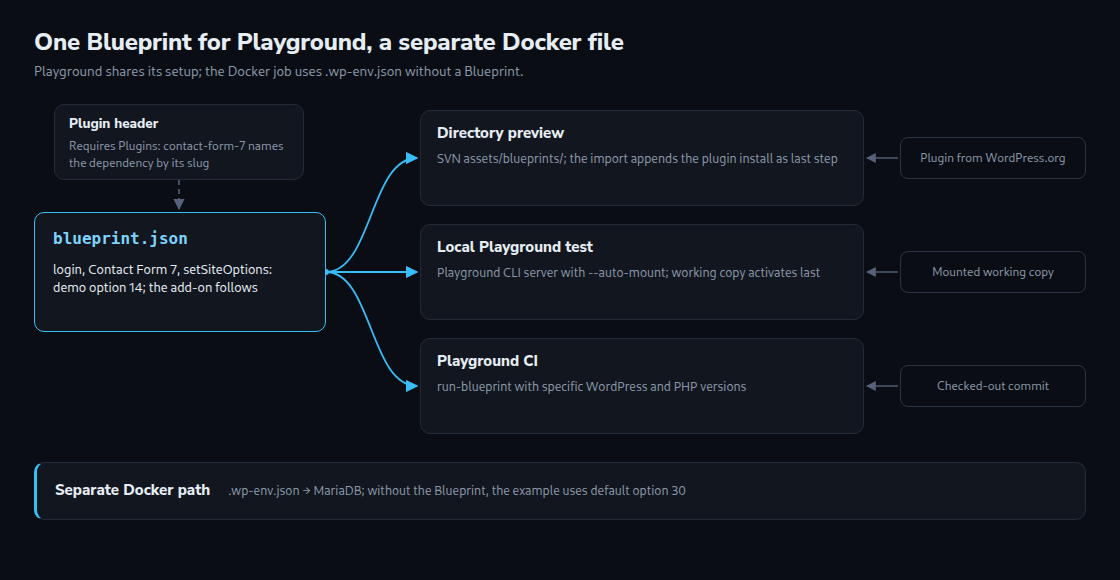
Other steps can execute PHP, install language packs or set values in wp-config.php. Older examples contain pluginZipFile and phpExtensionBundles; the current schema marks these as deprecated or unused. Dependency order is written explicitly in steps. A publicly reachable Blueprint can open through ?blueprint-url=; a JSON fragment after https://playground.wordpress.net/# is another option. The diagram separates the shared Playground Blueprint from the independent Docker configuration.
The Blueprint for the directory preview
A public preview requires a valid file at assets/blueprints/blueprint.json in the SVN directory. A committer, meaning an account allowed to write to that plugin repository, must also set the preview to “public” under Advanced. Before that, Test Preview is visible only to those accounts. An automatically generated test Blueprint can provide a starting point.
The inspected importer accepts matching Blueprint files from this folder up to 102,400 bytes each and retains at most ten. Normal previews use blueprint.json. Invalid JSON is discarded. For this example plugin, the importer appends installation of the plugin’s own slug if no matching step exists, and forces activation. Matching ZIP URLs on downloads.wordpress.org are rewritten as slug resources. A version specified in the filename can therefore be lost. Import does not simply pass the file through unchanged.
The Blueprint therefore installs Contact Form 7 and sets demo values, but does not download the add-on itself. The directory appends that download. The local Playground CLI instead mounts the working folder and activates the add-on after the Blueprint steps. A separate download step could fail for an unpublished plugin or replace the mounted working folder through the default overwrite option. The Docker path independently uses its own plugin list.
In this Git project, the file is stored at .wordpress-org/blueprints/blueprint.json. That folder name is a convention of the example. The release process then copies the file to assets/blueprints/ in SVN. A leading dot does not automatically exclude a folder from a plugin ZIP; the packaging process must actually apply that exclusion.
{
	"$schema": "https://playground.wordpress.net/blueprint-schema.json",
	"landingPage": "/wp-admin/plugins.php",
	"preferredVersions": {
		"php": "8.3",
		"wp": "latest"
	},
	"features": {
		"networking": true
	},
	"steps": [
		{
			"step": "login",
			"username": "admin"
		},
		{
			"step": "installPlugin",
			"pluginData": {
				"resource": "wordpress.org/plugins",
				"slug": "contact-form-7"
			},
			"options": {
				"activate": true
			}
		},
		{
			"step": "setSiteOptions",
			"options": {
				"blogname": "LW Form Archive Demo",
				"lw_form_archive_retention_days": 14
			}
		}
	]
}
The landing page is the plugin list. WordPress 6.5 and later show the dependency between the add-on and Contact Form 7 there. The older Handbook example contains outdated Blueprint fields and older runtime versions. The Blueprint here uses pluginData and passed validation against the schema retrieved on 25 October 2026.
Requires Plugins: declaring the dependency
Since WordPress 6.5, the Requires Plugins header names required plugins. The expected values are comma-separated WordPress.org slugs such as contact-form-7, not file paths. A slug is the plugin’s short directory identifier. Invalid spellings can disappear from the dependency list. The following add-on demonstrates only this header and a stored option. Despite the name Form Archive, the code does not archive forms or delete data after the specified number of days.
/**
* Plugin Name: LW Form Archive
* Description: Example add-on for Contact Form 7 (dependency and Blueprint demo).
* Version: 1.0.0
* Requires at least: 6.7
* Requires PHP: 7.4
* Requires Plugins: contact-form-7
* Author: Lukas Wojcik
* License: GPL-2.0-or-later
* License URI: https://www.gnu.org/licenses/gpl-2.0.html
* Text Domain: lw-form-archive
*
* @package LW_Form_Archive
*/
defined( 'ABSPATH' ) || exit;
/**
* Stores the default retention period on activation.
*
* add_option() leaves an existing value untouched, so a value that a
* Blueprint wrote earlier with setSiteOptions survives activation.
*/
function lw_form_archive_activate() {
add_option( 'lw_form_archive_retention_days', 30 );
}
register_activation_hook( __FILE__, 'lw_form_archive_activate' );
/**
* Returns the retention period in days.
*
* @return int
*/
function lw_form_archive_retention_days() {
return absint( get_option( 'lw_form_archive_retention_days', 30 ) );
}Plugin administration checks dependencies during installation and activation. A required plugin must be present and active before the add-on can activate. The interface also prevents certain deletion and deactivation actions while dependent plugins would be affected. This does not protect files against removal through FTP. WP-CLI can also install a plugin without dependencies initially; activation can then fail.
activate_plugin() is the relevant function for this flow. WordPress checks requirements for WordPress, PHP and dependent plugins. A failure produces a WP_Error. Playground then checks whether the plugin actually became active. Missing Contact Form 7 or a downloaded version requiring a newer environment makes setup fail. A successful run initially proves only that this setup completed.
add_option() leaves an existing option unchanged. The Blueprint’s value of 14 therefore survives activation; a fresh installation without the Blueprint receives the default 30. These are example values with no deletion routine behind them. A separate article in this series explains the lifecycle. The dependency header specifies neither minimum versions of the other plugin nor loading order. Code needing a particular class or function must also check availability.
Local runs with the Playground CLI
The examples pin @wp-playground/cli@3.1.56, the release used for the documented original tests. start keeps a development site between runs. server starts local web access; run-blueprint performs setup without a persistent web server. Export and individual PHP commands are also available. Fresh default runs are easier to compare than an already modified development site. Mounted working folders still contain real local files and are not automatically reset.
# Run from the plugin folder (the folder name must match the slug).
cd lw-form-archive

# Interactive: fresh site on http://127.0.0.1:9400 with the working copy mounted.
# PHP and WordPress come from preferredVersions in the Blueprint (8.3, latest);
# --php and --wp have no effect together with a Blueprint file (CLI 3.1.56).
npx @wp-playground/cli@3.1.56 server --auto-mount \
  --blueprint=.wordpress-org/blueprints/blueprint.json

# Smoke test on the oldest tested branch (patched release): a copy with other preferredVersions,
# run without a server, non-zero exit code on failure.
node -e "const fs = require('fs');
  const b = JSON.parse(fs.readFileSync('.wordpress-org/blueprints/blueprint.json', 'utf8'));
  b.preferredVersions = { php: '7.4', wp: '6.7.9' };
  fs.writeFileSync('/tmp/blueprint-min.json', JSON.stringify(b));"
npx @wp-playground/cli@3.1.56 run-blueprint --auto-mount \
  --blueprint=/tmp/blueprint-min.json
With no additional value, --auto-mount mounts the current folder. The CLI detects the plugin header and uses the folder name under /wordpress/wp-content/plugins/. Activation follows the Blueprint steps. The folder is therefore named lw-form-archive, matching the slug. A mount is not a read-only snapshot; tests belong in a disposable working copy.
In the documented CLI 3.1.56 test, --wp and --php did not take the expected precedence when a Blueprint file was supplied. The runtime used preferredVersions, even though a startup message showed other values. The example therefore writes a copy with the intended combination for each test. A failed setup ends run-blueprint with an error status. This short setup check does not test form processing. Browser tests through ?blueprint-url= also need a reachable file and appropriate CORS permission for retrieval.
wp-env: fixed versions in Docker
The second path uses @wordpress/env@11.16.0 with Docker and MariaDB. This is useful for database queries whose behavior can differ from SQLite. .wp-env.json names the WordPress version, PHP and plugins to install. WP_ENV_CORE and WP_ENV_PHP_VERSION supply the matrix versions. The Blueprint is not loaded, so its demo values are initially absent.
{
	"$schema": "https://schemas.wp.org/trunk/wp-env.json",
	"core": "WordPress/WordPress#7.1.2",
	"phpVersion": "8.3",
	"plugins": [
		"https://downloads.wordpress.org/plugin/contact-form-7.6.1.7.zip",
		"."
	],
	"config": {
		"WP_DEBUG_LOG": true
	}
}
The inspected wp-env release activates plugins in the listed order. Contact Form 7 therefore comes before the add-on. The versioned ZIP URL specifies 6.1.7. The parser removes the version suffix and obtains the expected contact-form-7 folder. The .latest-stable.zip form produces a different result in that parser and is not an equivalent replacement. A fixed ZIP reduces changes in the dependency but guarantees neither download availability nor identical results for the whole environment.
WordPress/WordPress#7.1.2 identifies an exact tag in the GitHub mirror. A 7.1 tag does not automatically mean 7.1.2. Inside Docker, wp-env run cli starts the command supplied afterwards. The alternative Playground runtime uses SQLite and, according to the current documentation, does not support run. The workflow below therefore explicitly stays with Docker.
A CI matrix across WordPress and PHP versions
A test matrix repeats a procedure with several combinations. Both jobs use exactly WordPress 6.7.9/PHP 7.4, WordPress 7.0.6/PHP 8.2 and WordPress 7.1.2/PHP 8.4. The first row checks a patched release of the oldest selected branch, not every earlier 6.7 release. Playground receives the values through a Blueprint copy; wp-env receives the same version numbers through environment variables. The example also names the v7 action tags and Node 24 explicitly.
# .github/workflows/compatibility.yml
name: Compatibility

on:
  push:
    branches: [ trunk ]
  pull_request:

permissions:
  contents: read

jobs:
  playground:
    name: Playground / WP ${{ matrix.wp }} / PHP ${{ matrix.php }}
    runs-on: ubuntu-latest
    strategy:
      fail-fast: false
      matrix:
        include:
          - { wp: '6.7.9', php: '7.4' }
          - { wp: '7.0.6', php: '8.2' }
          - { wp: '7.1.2', php: '8.4' }
    steps:
      # Check out into a folder named like the slug: auto-mount uses the folder name.
      - uses: actions/checkout@v7
        with:
          path: lw-form-archive
      - uses: actions/setup-node@v7
        with:
          node-version: 24
      # For a Blueprint file the CLI ignores --wp and --php (CLI 3.1.56),
      # so the matrix versions go into preferredVersions of a copy.
      - name: Write the matrix versions into a copy of the Blueprint
        working-directory: lw-form-archive
        run: >-
          node -e "const fs = require('fs');
          const b = JSON.parse(fs.readFileSync('.wordpress-org/blueprints/blueprint.json', 'utf8'));
          b.preferredVersions = { php: '${{ matrix.php }}', wp: '${{ matrix.wp }}' };
          fs.writeFileSync(process.env.RUNNER_TEMP + '/blueprint.json', JSON.stringify(b));"
      - name: Run the Blueprint against the working copy
        working-directory: lw-form-archive
        run: >-
          npx --yes @wp-playground/cli@3.1.56 run-blueprint
          --auto-mount
          --blueprint=${{ runner.temp }}/blueprint.json

  wp-env:
    name: wp-env / WP ${{ matrix.wp }} / PHP ${{ matrix.php }}
    runs-on: ubuntu-latest
    strategy:
      fail-fast: false
      matrix:
        include:
          - { wp: '6.7.9', php: '7.4' }
          - { wp: '7.0.6', php: '8.2' }
          - { wp: '7.1.2', php: '8.4' }
    env:
      # Override core and phpVersion from .wp-env.json for this matrix cell.
      WP_ENV_CORE: WordPress/WordPress#${{ matrix.wp }}
      WP_ENV_PHP_VERSION: ${{ matrix.php }}
    steps:
      - uses: actions/checkout@v7
        with:
          path: lw-form-archive
      - uses: actions/setup-node@v7
        with:
          node-version: 24
      - name: Install wp-env
        run: npm install -g @wordpress/env@11.16.0
      - name: Start WordPress (activates the plugins from .wp-env.json)
        working-directory: lw-form-archive
        run: wp-env start
      - name: Check activation and the default option
        working-directory: lw-form-archive
        run: |
          wp-env run cli wp plugin is-active contact-form-7
          wp-env run cli wp plugin is-active lw-form-archive
          wp-env run cli wp eval 'if (lw_form_archive_retention_days() !== 30) { WP_CLI::error("Unexpected default retention value"); }'
The Playground job checks setup with the stable Contact Form 7 version currently supplied by the directory. The Docker job uses the fixed 6.1.7 release instead. That job also checks whether both plugins are active and the example function returns the default value 30. wp plugin is-active returns an error status for an inactive plugin. These are focused activation and option checks, not comprehensive functional tests or a promise of identical results.
The historical tests explain the value of both paths: Contact Form 7 6.1.7 used the older requirements, whereas the development version 6.2-rc at that time required newer WordPress and PHP releases. A future stable dependency with higher requirements can therefore fail the Playground job while the Docker job with its older fixed dependency still works. The signal concerns those tested combinations first. Correct behavior of the actual add-on needs additional tests.
A PR preview can also be configured with WordPress/action-wp-playground-pr-preview@v4. Actual PHPUnit tests require a test suite in the project. A complete invocation includes the program, for example wp-env run cli --env-cwd=wp-content/plugins/lw-form-archive phpunit. Naming only the container and working folder does not run a test. A separate article in this series covers static checks with Plugin Check.
Limits and open points
- The historical report records three successful local Playground cells with CLI 3.1.56. A GitHub or Docker run was not established. Checks of this revised version covered JSON, YAML, shell and PHP syntax, four Blueprint combinations against the current schema, and option values 14 and 30 with isolated substitute functions. The added Docker checks were not executed in a real WordPress environment.
- Playground uses SQLite. Plugins with their own tables or hand-written SQL can behave differently from MySQL; for tables of their own, the wp-env job is the more meaningful check. The article on performance limits of
wp_postmetaand custom tables covers that topic. - The schema does not accept a
versionfield forwordpress.org/pluginsresources (onlyresourceandslug), and for a plain slug the source code builds the download URL withlatest-stable. A slug that already ends in.zip, such ascontact-form-7.6.1.7.zip, is used unchanged as the file name: in a test with version 6.1.5, the Playground CLI installed exactly that version, and the directory importer only rewritesurlresources. Whether the directory preview accepts this form has not been tested. - Fixed tool versions reduce changes between runs. Action tags, Node releases, images, downloads and external services can still change. A package lockfile and recorded runtime versions improve traceability, but do not guarantee identical results.
- The directory imports up to ten Blueprint files but uses only
blueprint.json. The handbook describes support for several files as a possible future step, without a date. - The folder name
.wordpress-org/blueprints/and the transfer to SVN assets are conventions of this article; the SVN structure itself is covered by a separate article in this series.
Questions and answers
Why does the Preview button not appear although blueprint.json is committed to SVN?
A valid file at assets/blueprints/blueprint.json first enables the internal test for committers. The public button also requires the “public” setting under Advanced. The inspected importer rejects invalid JSON and files over 102,400 bytes. A successful import still does not replace testing the Blueprint at runtime.
Can a dependency be pinned to a specific version in the directory preview?
The plain slug contact-form-7 downloads the stable release through wordpress.org/plugins. An additional version field is not allowed for this resource in the inspected schema. The directory importer can also rewrite versioned download URLs into a plain slug.
A historical CLI test confirmed a ZIP filename used as the slug, such as contact-form-7.6.1.5.zip. This loaded a specific version. That workaround was not tested in the public directory preview and is not a guarantee for that environment. The Docker test instead uses an explicitly versioned ZIP URL in .wp-env.json.
Does Requires Plugins replace class_exists() checks in the plugin code?
No. The header helps WordPress check whether a required plugin is installed and active. It specifies neither a minimum dependency version nor a fixed loading order. A suitable availability check is still needed before calling a particular class or function.
Sources
- Plugin Handbook: Previews and Blueprints (retrieved 29.09.2026)
- Playground: Blueprint data format (retrieved 29.09.2026)
- Playground: Blueprint steps (retrieved 29.09.2026)
- Blueprint JSON schema (retrieved 29.09.2026)
- Playground CLI (retrieved 29.09.2026)
- Playground Query API (retrieved 29.09.2026)
- GitHub: WordPress/wordpress-playground (CLI, steps, resources, WordPress version list) (retrieved 29.09.2026)
- GitHub: WordPress.org plugin directory source (Blueprint import and endpoint) (retrieved 29.09.2026)
- @wordpress/env documentation (retrieved 29.09.2026)
- GitHub: packages/env source (retrieved 29.09.2026)
- Make WordPress Core: Introducing Plugin Dependencies in WordPress 6.5 (retrieved 29.09.2026)
- wordpress-develop: class-wp-plugin-dependencies.php (retrieved 29.09.2026)
- wordpress-develop: wp-admin/includes/plugin.php (validate_plugin_requirements) (retrieved 29.09.2026)
- Code Reference: add_option() (retrieved 29.09.2026)
- WP-CLI: wp plugin is-active (retrieved 29.09.2026)
- WordPress.org version check API and tags of the WordPress GitHub mirror (retrieved 29.09.2026)
- Contact Form 7 in the plugin SVN (tags/6.1.7 and trunk) (retrieved 29.09.2026)
- Playground guide: PR preview buttons with GitHub Actions (retrieved 29.09.2026)
- actions/checkout and actions/setup-node (retrieved 29.09.2026)
Related articles