English
 Deutsch
 Polski
H.265 and H.264 Rechecked: File Size, SSIM and Encoding Time

Management Summary
Video compression reduces the storage and transfer space needed for recordings. H.264, H.265 and AV1 offer different ways of balancing file size, image detail and the computing time needed to create a file. Rechecking eighteen experimental outputs shows why no format guarantees a fixed saving: results depend on the footage and settings. For camera archives or other video collections, the practical choice also needs to consider playback support. Compressing older recordings again can save space but takes time and may remove detail.
Contents
A codec name does not determine a fixed storage saving. The encoder implementation, its settings, the source material and the quality criterion all matter. A retained experiment comparing H.264, H.265 and AV1 is useful precisely because its files expose the limits of a simple percentage claim.
An encoder is the software or hardware that creates the compressed video. A preset trades encoding effort against compression efficiency. CRF controls quality within an encoder; matching numbers across encoders do not promise matching results.
What the archive contains
The experiment from 2 September 2026 contains two six-second Y4M references at 1280 × 720 pixels, 25 frames per second and YUV 4:2:0, plus eighteen MP4 encodes. One source combines a static photographic background with a moving square; the other is a synthetic moving test pattern. These are constructed test scenes, not a representative sample of surveillance footage.
The recorded script uses libx264 and libx265 with veryfast, and libsvtav1 with preset 8. The CRF values are 20, 26 and 32 for x264/x265 and 30, 40 and 50 for SVT-AV1. These settings are not equivalent effort or quality scales. In x265, veryfast is the third preset from the fastest end, not the second.
What the recheck confirmed
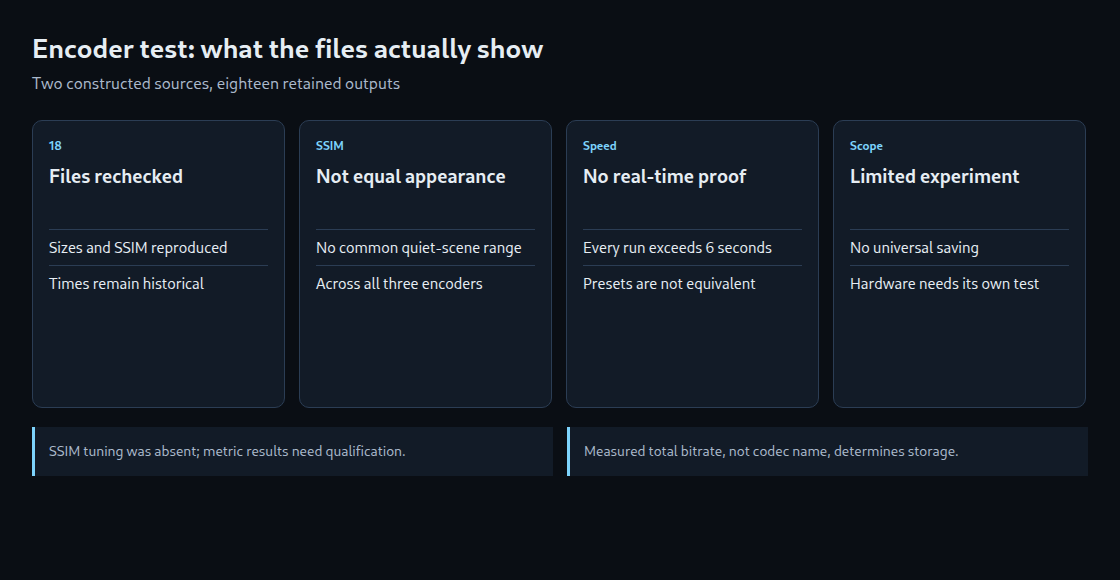
All eighteen saved file sizes match the historical log. Decoding each output against its retained reference reproduced the logged SSIM values within 0.000002. Source frames were also inspected. Encoding durations were not rerun; the times below remain historical observations from the saved log.
| Scene | Encoder / CRF | Size (kB) | SSIM | Time (s) |
|---|---|---|---|---|
| Quiet | libx264 / 26 | 173.935 | 0.969647 | 7.4 |
| Quiet | libx265 / 26 | 216.020 | 0.983188 | 48.4 |
| Quiet | libsvtav1 / 40 | 281.820 | 0.993602 | 61.2 |
| Moving | libx264 / 26 | 1273.821 | 0.990624 | 14.3 |
| Moving | libx265 / 26 | 1843.236 | 0.993767 | 93.9 |
| Moving | libsvtav1 / 40 | 1028.964 | 0.991210 | 178.1 |
The table shows selected actual outputs, not files normalized to equal quality. Decimal kB means 1,000 bytes. The sizes include MP4 container overhead; the rows should not be read as a general ranking of codec standards.
SSIM is a measurement, not identical appearance
SSIM measures structural similarity to a reference. Equal average scores do not establish identical perceived quality or equal visibility of small details. The x265 documentation warns that its default perceptual optimizations can trade metric score for appearance and recommends metric-specific tuning for SSIM benchmarking. The retained command does not include that tuning.
For the quiet source, x264 spans SSIM 0.940944–0.986467, x265 0.965353–0.992410 and AV1 0.987918–0.997030. There is no common measured interval across all three. The 179.212 kB AV1 file has a higher SSIM than the 300.607 kB x264 file, but describing those two outputs as exactly matched quality is incorrect.
The moving source has overlapping metric ranges. Interpolation estimates a value between measured points. Using the three samples, it can estimate size at a chosen score, provided the target lies inside the measured range and the interpolation method is stated. The estimate is not an actual encoded file, and linear interpolation in bytes need not match interpolation in log bitrate. A perceptual comparison requires additional evidence.
None of these runs demonstrated real-time encoding
The historical times are 7.4–17.1 seconds for x264, 41.4–149.6 for x265 and 61.2–180.7 for AV1, each for six seconds of material. Every recorded run was slower than the source duration. Calling the presets proven real-time settings contradicts those observations.
A file-encoding benchmark is also not a complete camera pipeline test. Capture, buffering, latency, audio and sustained load need separate checks. Equal preset names do not equalize compute effort, and a hardware encoder does not guarantee either a particular saving or support for every resolution and frame rate.
What the old percentages can and cannot support
The earlier 12% saving and 18% increase relied on selected comparisons and estimated metric-matched points. The retained files support a narrower conclusion: size and score change with encoder and setting, and the tested software runs did not keep up with real time. They do not prove that a speed preset alone caused the result or that AV1 generally loses less efficiency at high speed.
The proposed 13.8% motion break-even also assumes that arbitrary daily footage is a linear mixture of these two scenes. Scene changes, the grouping of frames (GOP structure), noise and rate control can invalidate that assumption. It is not a camera-planning threshold.
A useful storage decision
A practical comparison uses representative footage, explicit encoder versions and settings, repeated runtime measurements, quality assessment and the actual playback requirements. At a measured average total bitrate of 1 Mbit/s, continuous recording produces about 10.8 decimal GB per day before storage-system overhead. Codec selection alone does not supply that bitrate.
Later transcoding can reduce some archives, but requires encoding work and can discard additional image detail during the new compression. A claim that an entire archive cannot be converted depends on available processing capacity and the deadline. The historical AV1 runs suggest a substantial processing cost on that setup, not a universal prohibition.
Sources
Related articles