English
 Deutsch
 Polski
Block themes with theme.json: templates, parts and child themes

Management Summary
A block theme gives a WordPress website its appearance through page layouts, reusable sections and shared choices of colours and fonts. A child theme keeps individual changes separate from the original design. Changes saved in the website editor can take priority over the corresponding files, explaining why a file update sometimes appears to do nothing. The example makes these relationships clear so a consistent design can be adapted without losing track of which settings control the visible result.
Contents
A block theme controls the appearance of a WordPress website. Templates define whole pages. Template parts are reusable sections such as the header and footer. The theme.json file defines colours, fonts and other design options.
This example builds a small theme and then a child theme: an extension that keeps changes in a separate folder. Three questions guide the example: which template appears, where does the Site Editor save changes, and which settings does the child inherit? The described behaviour refers to WordPress 7.1. Historical tests ran on version 7.1.2 on 30 September 2026.
Required files
A standalone block theme needs style.css and templates/index.html. The first file includes at least the theme name. The second supplies the fallback when no more suitable template exists. A theme.json file is optional for theme recognition but useful for styling. This starter also adds singular.html, so individual posts and pages display their full content.
lw-base/
├── style.css
├── theme.json
├── templates/
│   ├── index.html
│   └── singular.html
├── parts/
│   ├── header.html
│   └── footer.html
├── patterns/
│   └── footer-credits.php
└── styles/
    └── night.json
The comment at the start of style.css describes the theme. Additional details matter for purposes such as submission to the WordPress theme directory. This example needs no custom CSS rules in this file because theme.json defines its appearance. Requires at least: 6.6 sets the minimum version for JSON format version 3.
/*
Theme Name: LW Base
Theme URI: https://example.com/lw-base
Author: Lukas Wojcik
Author URI: https://lukaswojcik.com
Description: Minimal block theme with templates, template parts, a pattern and a style variation.
Version: 1.0.0
Requires at least: 6.6
Tested up to: 7.1
Requires PHP: 7.4
License: GNU General Public License v2 or later
License URI: https://www.gnu.org/licenses/gpl-2.0.html
Text Domain: lw-base
*/
The folders have specific roles: templates/ contains whole-page templates, parts/ reusable page sections, patterns/ prepared groups of blocks, and styles/ alternative designs. The older folder names block-templates/ and block-template-parts/ remain supported for older themes.
Defining colours and fonts with theme.json
settings defines the colours, font sizes and tools available in the editor. styles applies specific values. This example offers three colours and uses base as the background. A slug is the short technical name of an entry, such as accent for the accent colour.
Format version 3 has been available since WordPress 6.6. defaultFontSizes is false so the theme can use the standard names small, medium and large for its own font sizes. defaultSpacingSizes serves the equivalent purpose for spacing sizes. Older JSON format versions remain supported.
$schema links to the description of allowed properties. Code editors can use this description to flag mistakes and complete entries. The WordPress 7.1 link matches the version discussed here. A link containing trunk follows ongoing development and may include newer features.
{
	"$schema": "https://schemas.wp.org/wp/7.1/theme.json",
	"version": 3,
	"settings": {
		"appearanceTools": true,
		"layout": {
			"contentSize": "720px",
			"wideSize": "1200px"
		},
		"color": {
			"defaultPalette": false,
			"palette": [
				{ "slug": "base", "color": "#ffffff", "name": "Base" },
				{ "slug": "contrast", "color": "#111827", "name": "Contrast" },
				{ "slug": "accent", "color": "#0369a1", "name": "Accent" }
			]
		},
		"typography": {
			"defaultFontSizes": false,
			"fontSizes": [
				{ "slug": "small", "size": "0.875rem", "name": "Small" },
				{ "slug": "medium", "size": "1rem", "name": "Medium" },
				{ "slug": "large", "size": "1.5rem", "name": "Large" }
			],
			"fontFamilies": [
				{
					"slug": "system",
					"name": "System",
					"fontFamily": "-apple-system, BlinkMacSystemFont, \"Segoe UI\", Roboto, sans-serif"
				}
			]
		}
	},
	"styles": {
		"color": {
			"background": "var(--wp--preset--color--base)",
			"text": "var(--wp--preset--color--contrast)"
		},
		"typography": {
			"fontFamily": "var(--wp--preset--font-family--system)",
			"fontSize": "var(--wp--preset--font-size--medium)",
			"lineHeight": "1.6"
		},
		"spacing": {
			"padding": { "top": "1.5rem", "right": "1.5rem", "bottom": "1.5rem", "left": "1.5rem" }
		},
		"elements": {
			"link": {
				"color": { "text": "var(--wp--preset--color--accent)" }
			}
		}
	},
	"templateParts": [
		{ "name": "header", "title": "Header", "area": "header" },
		{ "name": "footer", "title": "Footer", "area": "footer" }
	]
}
templateParts assigns a name and area to the header and footer. WordPress provides header, footer and uncategorized, plus navigation-overlay from 7.0. Without a specific tagName, the area also determines the surrounding HTML element.
Displaying lists and complete posts
The following templates/index.html displays titles and excerpts. The Query Loop block repeats this output for the matching posts. With "inherit":true, the block uses the selection for the current page, such as search results or posts in a category.
<!-- wp:template-part {"slug":"header","tagName":"header"} /-->

<!-- wp:group {"tagName":"main","layout":{"type":"constrained"}} -->
<main class="wp-block-group">
	<!-- wp:query {"queryId":1,"query":{"perPage":10,"pages":0,"offset":0,"postType":"post","order":"desc","orderBy":"date","inherit":true}} -->
	<div class="wp-block-query">
		<!-- wp:post-template -->
			<!-- wp:post-title {"isLink":true} /-->
			<!-- wp:post-excerpt /-->
		<!-- /wp:post-template -->

		<!-- wp:query-pagination -->
			<!-- wp:query-pagination-previous /-->
			<!-- wp:query-pagination-numbers /-->
			<!-- wp:query-pagination-next /-->
		<!-- /wp:query-pagination -->
	</div>
	<!-- /wp:query -->
</main>
<!-- /wp:group -->

<!-- wp:template-part {"slug":"footer","tagName":"footer"} /-->
For individual posts and pages, templates/singular.html adds the post-content block. This block displays the full content. Without this extra template, the fallback above would show only the title and excerpt on these pages too. Comments, a dedicated error page and further design features are outside this small starter example.
<!-- wp:template-part {"slug":"header","tagName":"header"} /-->
<!-- wp:group {"tagName":"main","layout":{"type":"constrained"}} -->
<main class="wp-block-group">
<!-- wp:post-title {"level":1} /-->
<!-- wp:post-content {"layout":{"type":"constrained"}} /-->
</main>
<!-- /wp:group -->
<!-- wp:template-part {"slug":"footer","tagName":"footer"} /-->
The parts are included using the names header and footer. The theme attribute is deliberately absent, so WordPress looks in the active theme. Hard-coding "theme":"lw-base" prevents the normal output of this part when the child is active; enabled debug output may show an error message instead.
<!-- wp:group {"layout":{"type":"flex","justifyContent":"space-between"}} -->
<div class="wp-block-group">
	<!-- wp:site-title /-->
	<!-- wp:navigation /-->
</div>
<!-- /wp:group --><!-- wp:group {"layout":{"type":"constrained"}} -->
<div class="wp-block-group">
<!-- wp:pattern {"slug":"lw-base/footer-credits"} /-->
</div>
<!-- /wp:group -->The footer loads a pattern: a prepared group of blocks. WordPress automatically registers PHP files in patterns/ when the header contains Title and Slug. Here, esc_html_e() allows the visible text to be translated through the lw-base text domain, the identifier for the theme’s translations.
/**
* Title: Footer credits
* Slug: lw-base/footer-credits
* Categories: footer
* Block Types: core/template-part/footer
* Description: Short credit line for the site footer.
*
* @package lw-base
*/
<!-- wp:paragraph {"fontSize":"small"} -->
<p class="has-small-font-size"> esc_html_e( 'Published with a block theme.', 'lw-base' ); </p>
<!-- /wp:paragraph -->styles/night.json offers a dark colour variation. After selection and saving in the Site Editor, the selected values are stored as a database customization. Updating the file later therefore does not automatically change those saved values.
{
	"$schema": "https://schemas.wp.org/wp/7.1/theme.json",
	"version": 3,
	"title": "Night",
	"settings": {
		"color": {
			"palette": [
				{ "slug": "base", "color": "#0a0e14", "name": "Base" },
				{ "slug": "contrast", "color": "#e5e7eb", "name": "Contrast" },
				{ "slug": "accent", "color": "#38bdf8", "name": "Accent" }
			]
		}
	}
}
Why a changed file may have no visible effect
The Site Editor stores customized templates in the database: whole pages as wp_template, parts as wp_template_part, and global design settings as wp_global_styles. These records are not public blog posts. An empty global-styles record can already be created when the editor opens.
Each customization belongs to the active theme. The wp_theme association contains that theme’s folder name, such as lw-child. A template identifier such as lw-child//index combines the theme and template names.
A saved customization of index takes priority over that theme’s templates/index.html. A file update can therefore remain invisible. Removing the customization restores the file version if the file exists. A template that exists only as a file cannot be deleted through this operation. These read-only WP-CLI commands list records and the theme associated with an example record; 123 represents an actual record ID.
# Which templates, template parts and global styles live in the database?
wp post list --post_type=wp_template,wp_template_part,wp_global_styles --post_status=any --fields=ID,post_type,post_name,post_modified

# Which theme (stylesheet) does a customization belong to? 123 = an ID from the list above.
wp post term list 123 wp_theme --fields=name
After a theme switch, old customizations remain stored under the previous theme. Switching back can make them apply again. The Site Editor export instead creates a ZIP containing theme files and incorporated customizations, including merged design settings.
Which template takes priority?
WordPress first looks for the most suitable template. For an ordinary individual post, the sequence can be single-post-hello-world, single-post, single, singular, index. More specific names appear first, followed by more general fallbacks.
For the same name, the saved customization comes first, then the child-theme file, then the parent-theme file. If no matching theme file exists, registered plugin templates can also apply through register_block_template(), available since WordPress 6.7. With no match, the search continues with the next name. Extension filters can change this standard search.
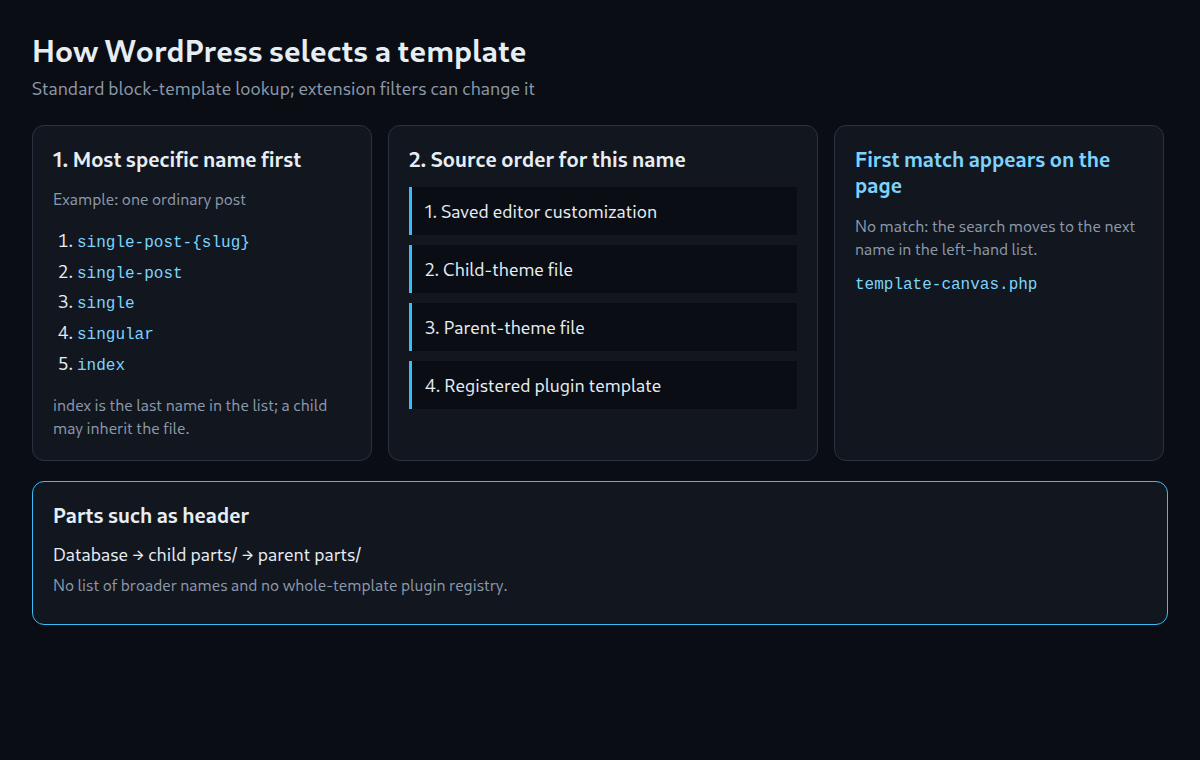
For example, a parent’s single.html takes priority over a saved customization of index. The more specific name decides first; the source decides between matches with the same name. Parts such as header do not use a list of increasingly general names. For the requested part name, the order is database, child file, parent file. The registry for whole-page plugin templates is not an extra step in this part lookup.
template-canvas.php outputs the selected blocks. Since 6.8, an empty saved template produces a notice for logged-in accounts. Without a login, WordPress uses the file version where available.
Adding a child theme
A child theme needs style.css with Theme Name and Template. The Template value must exactly match the parent folder name. A separate index.html is unnecessary because WordPress can find the parent’s file.
lw-child/
├── style.css
├── theme.json
└── parts/
└── header.html/*
Theme Name: LW Child
Template: lw-base
Description: Child theme of LW Base with its own palette and header.
Version: 1.0.0
Requires at least: 6.6
Tested up to: 7.1
Requires PHP: 7.4
License: GNU General Public License v2 or later
License URI: https://www.gnu.org/licenses/gpl-2.0.html
Text Domain: lw-child
*/Files with matching names in templates/ and parts/ replace the parent versions. Patterns are matched by the Slug in the file header, and style variations by the filename in styles/. Parent files remain available when not replaced. The following child header adds the site tagline:
<!-- wp:group {"layout":{"type":"flex","justifyContent":"space-between"}} -->
<div class="wp-block-group">
	<!-- wp:group {"layout":{"type":"flex","orientation":"vertical"}} -->
	<div class="wp-block-group">
		<!-- wp:site-title /-->
		<!-- wp:site-tagline /-->
	</div>
	<!-- /wp:group -->
	<!-- wp:navigation /-->
</div>
<!-- /wp:group -->
Editor customizations belonging to the parent do not apply after switching to the child. However, customizations previously saved for this child can immediately apply again. The new file version determines the result alone only when no such customization exists.
Which settings does the child inherit?
WordPress combines settings in this order: its own defaults, registered block settings, theme values, and finally saved customizations. A later value wins for the same property. Within the theme settings, the child adds to or replaces parent values. theme.json settings also take priority over corresponding add_theme_support() settings.
{
	"$schema": "https://schemas.wp.org/wp/7.1/theme.json",
	"version": 3,
	"settings": {
		"color": {
			"palette": [
				{ "slug": "base", "color": "#f4f6f9", "name": "Base" },
				{ "slug": "contrast", "color": "#111827", "name": "Contrast" },
				{ "slug": "accent", "color": "#c2410c", "name": "Accent" }
			]
		}
	},
	"styles": {
		"elements": {
			"heading": {
				"typography": { "fontWeight": "700" }
			}
		}
	}
}
In this example, the parent’s layout widths, font sizes and link colour remain. The child adds bold headings. Colour palettes have an important exception: the child’s palette replaces the entire parent palette. The same applies to other preset lists, such as font sizes, font families and shadows, within the same settings source.
The child therefore includes all three colours. With only accent, the variables for base and contrast would be missing here. Background and text rules could no longer apply the intended colours. This query shows the theme palette without saved user customizations:
wp eval 'echo wp_json_encode( wp_get_global_settings( array( "color", "palette", "theme" ), array( "origin" => "base" ) ), JSON_PRETTY_PRINT );'"origin" => "base" omits saved customizations. Other default, block and theme data are still processed, and extension filters may apply. The requested path color → palette → theme limits the output to the theme palette.
Test scope and practical checks
The archived 30 September 2026 tests on WordPress 7.1.2 document activation, child inheritance, editor validation, template priority and palette replacement for the original example. The added full-content template belongs to this revision. Before use on a website, a separate test installation should cover the list view, individual post, page and a saved editor customization.
Two technical limits matter: a PHP template in the child can take priority over a parent block template with the same name. The wp_theme_json_data_theme filter also runs before a separate child JSON file is merged with the parent file, so the complete inherited values are not yet available at that point.
A related article covers the page-template security update in WordPress 7.1.2.
Questions and answers
Does a child need its own index.html?
No. The parent’s fallback template is sufficient. A separate file is needed only for a different layout.
Why is a file change invisible?
A saved editor customization can override the file with the same name. After backing up and removing that customization, the file applies again. The selected template and existing caches also need checking.
Does the child palette extend the parent palette?
No. A separate child palette replaces this list. All colours still needed must therefore be included in the child palette.
Sources
- Theme Handbook: Introduction to templates (retrieved 29.09.2026)
- Theme Handbook: Template parts (retrieved 29.09.2026)
- Theme Handbook: Registering patterns (retrieved 29.09.2026)
- Theme Handbook: Style variations (retrieved 29.09.2026)
- Theme Handbook: Child themes (retrieved 29.09.2026)
- Theme Handbook: Template hierarchy (retrieved 29.09.2026)
- Theme Handbook: Main stylesheet (style.css) (retrieved 29.09.2026)
- Block Editor Handbook: Theme.json version 3 reference (retrieved 29.09.2026)
- Block Editor Handbook: Global settings and styles (theme.json) (retrieved 29.09.2026)
- Make WordPress Core: Theme.json version 3 (retrieved 29.09.2026)
- JSON schema theme.json for WordPress 7.1 (retrieved 29.09.2026)
- wordpress-develop 7.1: class-wp-theme-json-resolver.php (retrieved 29.09.2026)
- wordpress-develop 7.1: class-wp-theme-json.php (retrieved 29.09.2026)
- wordpress-develop 7.1: block-template-utils.php (retrieved 29.09.2026)
- wordpress-develop 7.1: block-template.php (retrieved 29.09.2026)
- wordpress-develop 7.1: blocks/template-part.php (retrieved 29.09.2026)
- wordpress-develop 7.1: block-patterns.php (retrieved 29.09.2026)
- wordpress-develop 7.1: class-wp-theme.php (retrieved 29.09.2026)
- wordpress-develop 7.1: class-wp-rest-templates-controller.php (retrieved 29.09.2026)
- WP-CLI: wp post list (retrieved 29.09.2026)
- WordPress.org version-check API (current release) (retrieved 29.09.2026)
Related articles