English
 Deutsch
 Polski
From Download to First Response: How Difficult Is Local LLM Setup?

Management Summary
A local language model produces AI answers on a personal computer instead of through an external service. The article explains the route from downloading software to a usable first chat. A suitable desktop application can simplify getting started on one workstation, but the device, memory and software still need to fit together. The overview makes the workload clearer: setup and troubleshooting belong alongside later maintenance. Sharing access with several people adds further requirements.
Contents
A local LLM is a language model that produces responses on the computer itself. A first chat often needs only a desktop application and a compatible model file. A service handling several simultaneous requests needs additional setup. The main hurdles are compatible drivers, sufficient memory and graphics-card detection.
This comparison explains the individual steps but does not report measured installation times. Duration depends on the computer, software and model. A long download does not automatically mean difficult setup, so the two times are recorded separately.
Starting points by operating system
| System | Compact starting path | Extra work |
|---|---|---|
| Windows | LM Studio or Ollama | Compatible driver; vLLM does not run natively on Windows |
| macOS / Apple Silicon | LM Studio or Ollama | Compatible model file and available memory |
| Linux | Ollama or a prebuilt llama.cpp program | Packages, device access and service startup |
| Multiple requests on Linux | vLLM with supported GPU | Supported model, numeric format and computing operations |
Five details before downloading
Five details are needed before downloading: operating system, graphics processor (GPU), available system or graphics memory, free disk space and intended model. The documentation must support that exact combination. A backend is the software component that performs calculations on the CPU or GPU. Multiple model versions require more disk space than a single file.
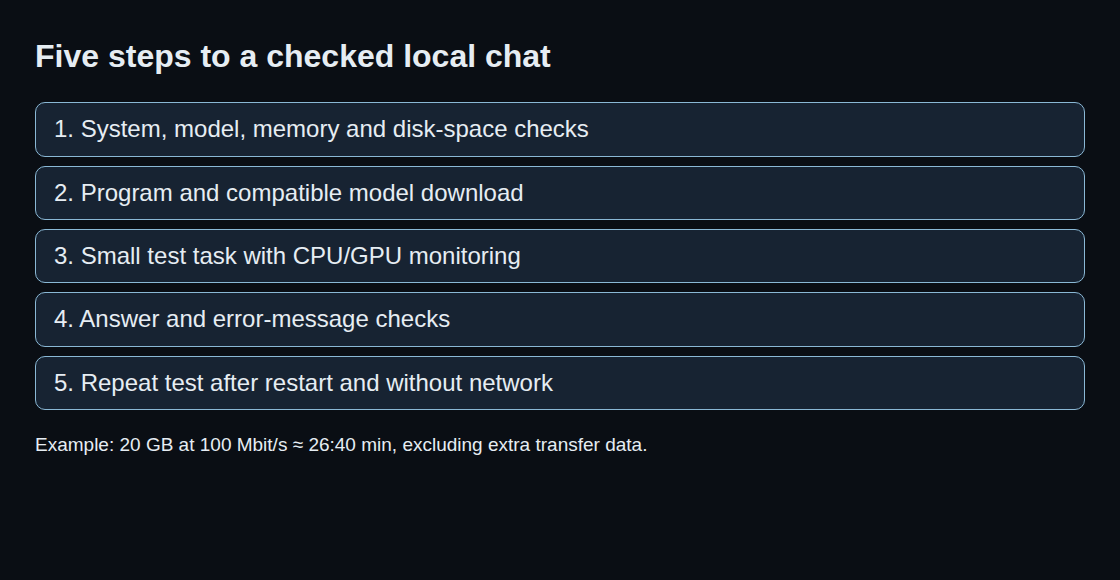
A small supported model and a short, checkable task provide a useful first test, such as extracting two bullet points from a supplied paragraph. Longer inputs and simultaneous requests follow after that test. This separates installation problems from memory limits. Context means the amount of text the model can consider during a request.
Download time is not a setup benchmark
Illustrative calculation: a 20 GB model file contains 160 gigabits because a byte contains eight bits. At a constant 100 Mbit/s, transfer takes a theoretical 1,600 seconds, or 26 minutes 40 seconds. At 1 Gbit/s it takes 160 seconds. These are decimal GB; extra transfer data, fluctuations and server limits are excluded.
A useful timing comparison records four durations separately: download, installation, first model launch and troubleshooting. A fast download can be followed by lengthy troubleshooting. Conversely, an easy-to-use application may spend a long time waiting for a large file.
Checking GPU execution
An answer does not prove GPU use. In Ollama, ollama list shows stored models; ollama ps shows currently loaded models. Its PROCESSOR column distinguishes CPU, GPU and mixed memory placement. Logs and GPU utilisation during a request provide further evidence. An empty process list after unloading is not evidence of a driver fault.
ollama list
ollama ps
Poor or slow answers can have different causes. CPU execution can be slower. An incorrect chat template can pass roles or messages to the model in the wrong format. Unsupported quantisation, a space-saving way of storing numbers, can prevent loading. Memory errors with longer inputs instead call for checks of context length and memory headroom. The specific error message determines the next step.
Initial setup and continued operation
After the first successful run, the checks include switching models, restarting the computer and repeating the same task without a network connection. Model files and required computing modules must already be installed. External tools and cloud models remain disabled. This verifies the tested configuration; later updates or other functions may need a connection again.
An API lets other programs request responses from the model. Initially, the service should be reachable only through the loopback address 127.0.0.1 on the same computer. Network access adds requirements for access control, limits on simultaneous requests and maintenance. A single desktop chat does not need such a service. The memory estimator helps with model and hardware selection; an installation log records actual setup effort.
Memory planning for model selection: LLM VRAM estimator.
Related tools
Questions and answers
Does a successful model launch prove that the GPU is active?
A model can also run on the central processor (CPU), or across CPU and GPU. Memory placement in ollama ps and utilisation during a request help verify the configuration.
Can a local LLM operate without internet access?
With all files downloaded and suitable software installed, responses can be generated without internet access. External tools and cloud models may need a connection. A disconnected test shows whether the specific local task works.
Sources
- Ollama: Hardware support
- vLLM: GPU installation
- llama.cpp: project and hardware support
- LM Studio: documentation
- Ollama: FAQ
- Ollama: command reference
- LM Studio: offline operation
- LM Studio: system requirements
Sources checked: 26 October 2026.
Related articles