English
 Deutsch
 Polski
Jellyfin on Raspberry Pi 5: Direct Play and Transcoding Limits
Part 5 of 7 in the series Homelab on the Raspberry Pi

Management Summary
Jellyfin turns a Raspberry Pi 5 into a home media library that sends stored films to televisions and other playback devices. The modest computer works best when a device can play the original file directly, without conversion. Converting video during a film demands much more processing and can exceed its capacity. Compatible playback devices or copies prepared in advance therefore matter more than the library interface alone, alongside reliable storage, networking and cooling.
Contents
Jellyfin on the Pi 5: compatible playback
A Raspberry Pi 5 can serve a local media library with Jellyfin when the playback device supports the files. The practical goal is to avoid unnecessary video conversion. Neither an SSD nor a fast network guarantees playback without buffering; storage, bitrate peaks, Wi-Fi conditions and client capabilities all matter.
The Pi 5 includes an HEVC hardware decoder but no hardware video encoder. Jellyfin has deprecated Raspberry Pi V4L2 acceleration and provides no supported Pi 5 hardware transcoding path for this setup. Hardware acceleration therefore remains None. Passing /dev/dri into the container does not create the missing support.
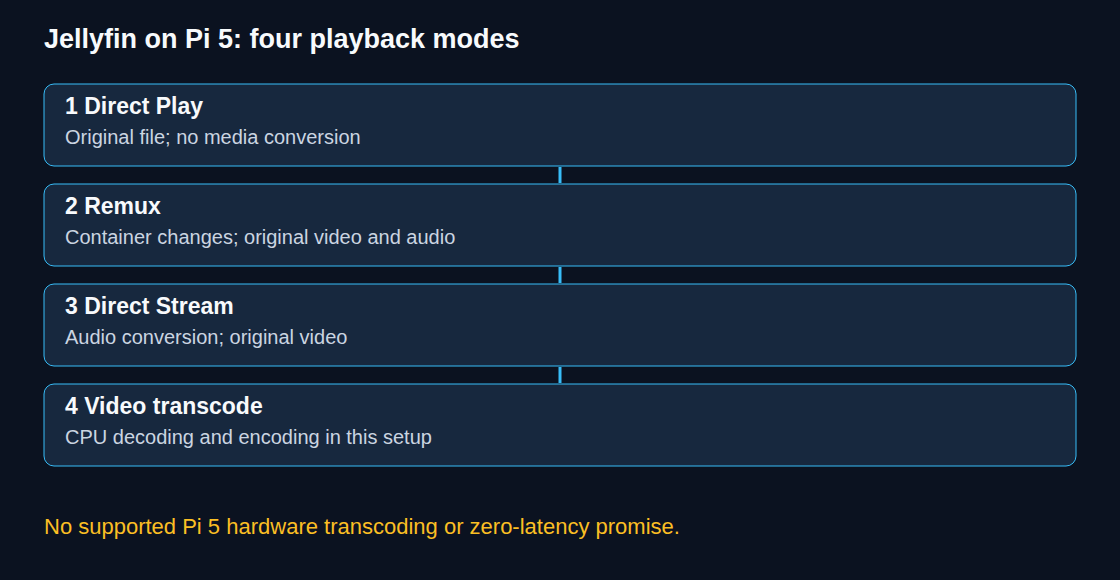
Four playback modes with different costs
| Mode | Server work |
|---|---|
| Direct Play | The original file is delivered without media conversion. |
| Remux | The container format changes; audio and video remain unchanged. |
| Direct Stream | Audio is converted; video remains unchanged. |
| Transcode | Video is decoded and encoded again. |
Remux and audio-only conversion can also be relatively light. Low CPU usage is not proof of Direct Play. Video transcoding, subtitle burn-in and HDR-to-SDR tone mapping can exceed the Pi’s processing capacity. Burn-in places subtitles directly into the video image; tone mapping adapts the brightness range of HDR video for SDR playback. Both can require video conversion. A compatible client or a previously converted media copy often avoids that work during playback.
1. Storage and permissions
The example assumes a maintained 64-bit Raspberry Pi OS installation, Docker Engine and a current Compose plugin. The selected official Jellyfin image must support ARM64. In a writable project directory, the following commands create configuration and cache directories and display the current account’s numeric IDs:
mkdir -p config cache
id -u
id -g
Those IDs are suitable only when the intended service account is the current account. A dedicated service account needs its own UID/GID and write access to config and cache. The media directory needs read permission on files and traversal permission on parent directories. A blanket chmod -R 755 would unnecessarily expose files and add executable bits; existing permissions should instead be reviewed for the selected account.
An SSD can improve database and thumbnail access. Media files can also reside on a sufficiently fast hard disk or mounted network share. Actual sustained throughput matters more than the storage label. The Pi 5’s documented external interface is PCIe 2.0 x1; PCIe 3.0 operation is outside that official specification. A stable power supply, adequate cooling and a persistently mounted media path are prerequisites.
2. A minimal container
The following file is saved as compose.yaml. A neighbouring .env defines JELLYFIN_IMAGE as a tested release reference for jellyfin/jellyfin, plus JELLYFIN_UID, JELLYFIN_GID and the existing absolute MEDIA_PATH. A recorded digest, a content hash that identifies the exact image, improves reproducibility; updates still need a deliberate version change and a backup of configuration and data.
services:
  jellyfin:
    image: ${JELLYFIN_IMAGE:?set tested official jellyfin/jellyfin image}
    restart: unless-stopped
    user: "${JELLYFIN_UID:?set service UID}:${JELLYFIN_GID:?set service GID}"
    ports:
      - "${JELLYFIN_BIND_IP:-127.0.0.1}:8096:8096/tcp"
    volumes:
      - ./config:/config
      - ./cache:/cache
      - type: bind
        source: ${MEDIA_PATH:?set existing absolute media directory}
        target: /media
        read_only: true
        bind:
          create_host_path: false
    security_opt:
      - no-new-privileges:true
The default binding is loopback, 127.0.0.1, so remote clients cannot connect. For a trusted local network, JELLYFIN_BIND_IP can be set to the Pi’s stable private LAN address. Host and router firewall rules must restrict access to the intended network; no internet forwarding is required. The media mount is read-only, so Jellyfin cannot write metadata or subtitles into the media folders.
docker compose config --quiet checks configuration syntax after substitution. docker compose up -d starts the service; docker compose logs jellyfin shows startup and permission errors. The web interface is available at http://<configured-address>:8096. Initial setup creates an administrator account and libraries pointing to container paths such as /media/movies.
No graphics devices, render groups, host networking or public discovery URL are needed for this direct-address setup. HTTP on port 8096 is unencrypted. Access beyond a trusted LAN requires an appropriate VPN or HTTPS reverse proxy configuration. The official image already includes jellyfin-ffmpeg; no host FFmpeg replacement or manual path change is required for the normal image setup.
3. Actual playback checks
The dashboard’s active session information identifies the playback mode and conversion reason. Tests should include representative files with different codecs, audio tracks, subtitle types and bitrate peaks. A client supporting HEVC can still require video conversion because of profile, resolution, bitrate limits or subtitle burn-in.
For a conversion, the FFmpeg log under the mounted configuration directory shows the selected streams and codecs. A video output codec of copy means that video is not re-encoded; audio conversion may still occur. libx264 indicates software H.264 encoding, but is not the only possible encoder. Direct Play need not create a transcoding log.
CPU load alone cannot establish hardware acceleration. The conversion rate, remaining playback buffer, storage wait, temperature and network throughput are more useful together. If converting one minute of video takes longer than one minute, conversion cannot keep up with playback indefinitely. A generic host command such as ffmpeg -hwaccel drm neither proves Jellyfin integration nor guarantees that a particular hardware decoder was used.
Questions and answers
Does an unsupported audio format always trigger video transcoding?
No. Direct Stream can convert only the audio. Remux can solve a container mismatch. Image subtitles may require burn-in when the client cannot render those subtitles; even text subtitles are not universally compatible. The session’s actual conversion reason determines the next adjustment.
Is host networking required?
Direct access through port 8096 works with bridge networking. DLNA is a separate optional plugin since Jellyfin 10.9. Its container setup requires host networking and local SSDP access on UDP 1900; client discovery on UDP 7359 is a different feature. Host mode alone neither installs DLNA nor guarantees higher throughput.
Is active cooling always mandatory?
Cooling requirements depend on sustained load, enclosure and ambient temperature. Active cooling helps maintain performance under heavy work; every transcode does not necessarily keep all four cores fully occupied for an entire film. Temperature and throttling measurements are more reliable than a blanket promise of silent or cool operation.
Does a local library mean no external connections?
Jellyfin can operate without internet access. Enabled metadata providers, artwork downloads and plugins can still contact external services. Local storage therefore does not by itself guarantee that all requests stay on the LAN. Jellyfin has no mandatory server subscription; hardware, electricity and optional services still have costs.
Sources
- Jellyfin documentation
- Jellyfin: Hardware Acceleration
- Raspberry Pi hardware documentation
- Jellyfin: hardware acceleration and Raspberry Pi limits
- Jellyfin: container installation
- Jellyfin: playback and transcoding modes
- Jellyfin: network access and metadata
- Jellyfin: DLNA plugin
- Raspberry Pi 5 specifications
- Docker Compose: service configuration
Homelab on the Raspberry Pi
- Raspberry Pi 4 and 5: Booting From an SSD by Changing the Bootloader
- Raspberry Pi UPS: five options and selection criteria
- Local CI/CD for Raspberry Pi: Automating Docker Compose Deployments
- Docker Compose Home Server: Traefik, TLS and Update Monitoring
- Jellyfin on Raspberry Pi 5: Direct Play and Transcoding Limits
- Raspberry Pi as a Hardened WireGuard VPN Gateway with Split-Tunneling
- Raspberry Pi Monitoring with Prometheus and Grafana
Related articles