English
 Deutsch
 Polski
A dynamic Gutenberg block with block.json and render.php

Management Summary
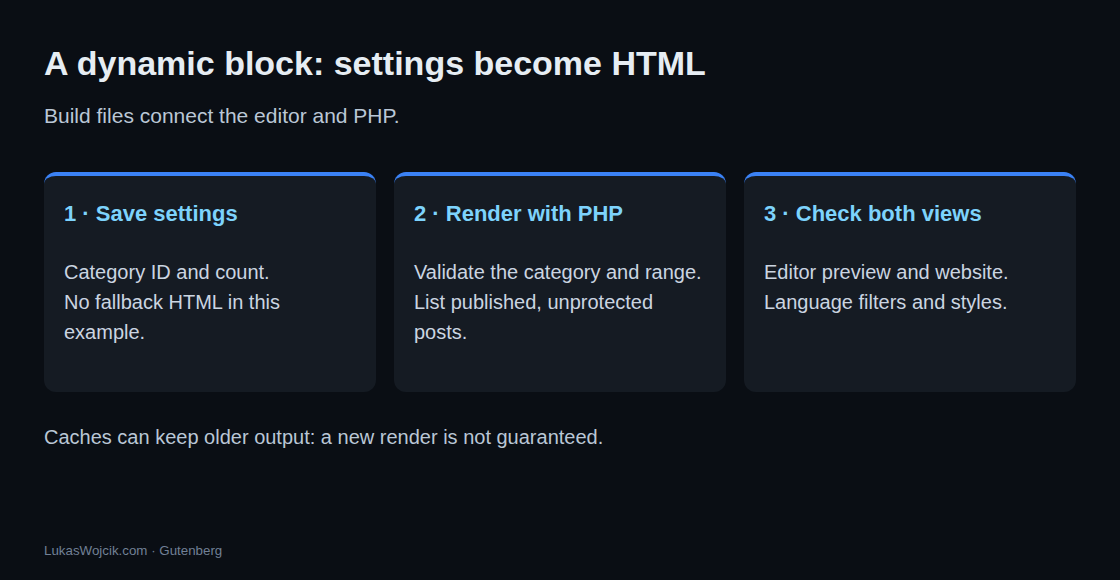
A dynamic Gutenberg block is a reusable WordPress content element whose display is generated from saved settings. In this example, selecting a category and a number creates a list of recent published posts. New articles can therefore appear without manually editing every page containing the list, reducing editorial upkeep. The example also shows an important dependency: disabling its plugin leaves no list, and saved page copies can delay visible updates. Automatic content still needs suitable display and language handling.
Contents
Why PHP builds the list
A list of recent posts can change without an edit to the post containing the list. A dynamic block produces HTML on the server. This example stores only a category and a count; PHP finds matching published posts and turns them into links. Dynamic blocks can also store fallback HTML. This example deliberately has no fallback: With the plugin inactive, the output remains empty.
1. Scaffold and build
The example uses fixed tool versions: create-block 4.99.0 and @wordpress/scripts 37.0.0. Node.js 22.23.3 is one suitable version; scripts 37 requires at least 22.22.2 within the 22.x line. node –version shows the installed version. These commands create the scaffold. After replacing the source files, npm run build runs again.
npx @wordpress/create-block@4.99.0 category-posts --variant dynamic --namespace lw --title "Category Posts"
cd category-posts
npm install --save-dev --save-exact @wordpress/scripts@37.0.0
npm run build
Source files live under src/category-posts/. The examples below replace block.json, index.js, edit.js, render.php and the main plugin file. The generated SCSS files remain. view.js is not loaded because block.json has no viewScript entry.
category-posts/                 (abridged)
├── category-posts.php          plugin header and block registration
├── package.json                build/start scripts with --blocks-manifest
├── readme.txt
├── src/
│   └── category-posts/
│       ├── block.json
│       ├── index.js
│       ├── edit.js
│       ├── render.php
│       ├── view.js             not loaded by this example
│       ├── style.scss
│       └── editor.scss
└── build/                      written by npm start / npm run build
    ├── blocks-manifest.php
    └── category-posts/
        ├── block.json
        ├── index.js
        ├── index.asset.php
        ├── index.css
        ├── style-index.css
        └── render.php
The two scripts belong in the existing scripts section of package.json; other package settings remain. –webpack-copy-php copies PHP files, while –blocks-manifest generates the shared metadata file. npm start rebuilds after edits; npm run build produces the release build.
{
	"scripts": {
		"build": "wp-scripts build --webpack-copy-php --blocks-manifest",
		"start": "wp-scripts start --webpack-copy-php --blocks-manifest"
	}
}
2. One description for editor and server
block.json describes the name, attributes and files. Attributes are saved settings: categoryId contains the category ID and count the requested number of posts. The schema checks the data type; PHP also checks meaningful numeric ranges. usesContext requests the containing post ID so the list can exclude that post.
{
	"$schema": "https://schemas.wp.org/trunk/block.json",
	"apiVersion": 3,
	"name": "lw/category-posts",
	"version": "0.1.0",
	"title": "Category Posts",
	"category": "widgets",
	"icon": "list-view",
	"description": "Lists the latest posts of one category, rendered on the server.",
	"attributes": {
		"categoryId": {
			"type": "integer",
			"default": 0
		},
		"count": {
			"type": "integer",
			"default": 5
		}
	},
	"usesContext": [ "postId" ],
	"supports": {
		"html": false,
		"align": [ "wide", "full" ],
		"color": {
			"background": true,
			"text": true,
			"link": true
		},
		"spacing": {
			"margin": true,
			"padding": true
		},
		"typography": {
			"fontSize": true
		}
	},
	"textdomain": "category-posts",
	"editorScript": "file:./index.js",
	"editorStyle": "file:./index.css",
	"style": "file:./style-index.css",
	"render": "file:./render.php"
}
apiVersion 3 identifies the block API version. editorScript and editorStyle apply to the editor; style applies to both editor and website. supports enables options such as colours and spacing. useBlockProps() and get_block_wrapper_attributes() supply the corresponding HTML attributes.
3. Block registration
The main file registers the blocks described in the build manifest. The manifest is a generated PHP metadata file, avoiding separate reads of each block.json. This example requires WordPress 6.9 or later.
/**
* Plugin Name: Category Posts
* Description: Server-rendered block that lists the latest posts of one category.
* Version: 0.1.0
* Requires at least: 6.9
* Requires PHP: 7.4
* Author: Lukas Wojcik
* License: GPL-2.0-or-later
* License URI: https://www.gnu.org/licenses/gpl-2.0.html
* Text Domain: category-posts
*
* @package Lw
*/
if ( ! defined( 'ABSPATH' ) ) {
exit; // Exit if accessed directly.
}
/**
* Registers every block listed in build/blocks-manifest.php.
*
* The manifest is generated by wp-scripts (--blocks-manifest), so WordPress
* does not have to read and decode each block.json on every request.
*/
function lw_category_posts_block_init() {
wp_register_block_types_from_metadata_collection(
__DIR__ . '/build',
__DIR__ . '/build/blocks-manifest.php'
);
}
add_action( 'init', 'lw_category_posts_block_init' );For a single block, registration through its directory is an alternative. This path also points to build: The build step is still required. The alternative replaces registration inside the init handler rather than running in addition to it.
// Single block, without a manifest: reads build/category-posts/block.json.
register_block_type( __DIR__ . '/build/category-posts' );
Changes under src take effect after the next build. That includes render.php and block.json. The target installation needs the main plugin file and the generated build directory.
4. A post list from saved settings
WordPress provides three variables in render.php: $attributes contains settings, $content contains saved inner content and $block provides block context. In this example, $content is empty. The file produces the following output:
/**
* Server-side rendering of the lw/category-posts block.
*
* Variables provided by WordPress:
*
* @var array $attributes Block attributes, defaults from block.json applied.
* @var string $content Inner content (always empty for this block).
* @var WP_Block $block Block instance: name, context, parsed block.
*
* @package Lw
*/
if ( ! defined( 'ABSPATH' ) ) {
exit; // Exit if accessed directly.
}
$lwcp_category_id = isset( $attributes['categoryId'] ) && is_int( $attributes['categoryId'] )
? $attributes['categoryId'] : 0;
$lwcp_count = isset( $attributes['count'] ) && is_int( $attributes['count'] )
? $attributes['count'] : 5;
if ( $lwcp_category_id < 1 ) {
return;
}
if ( $lwcp_count < 1 || $lwcp_count > 10 ) {
$lwcp_count = 5;
}
$lwcp_term = $lwcp_category_id ? get_term( $lwcp_category_id, 'category' ) : null;
// Render nothing until a valid category has been chosen.
if ( ! $lwcp_term instanceof WP_Term ) {
return;
}
// Do not list the post that contains the block (context from "usesContext").
$lwcp_current_id = isset( $block->context['postId'] ) ? absint( $block->context['postId'] ) : 0;
$lwcp_posts = get_posts(
array(
'category__in' => array( $lwcp_term->term_id ),
'suppress_filters' => false,
'numberposts' => $lwcp_count,
'post_status' => 'publish',
'has_password' => false,
'exclude' => $lwcp_current_id ? array( $lwcp_current_id ) : array(),
)
);
<div // Core escapes the returned attribute values.
// phpcs:ignore WordPress.Security.EscapeOutput.OutputNotEscaped -- Core-generated wrapper attributes.
echo get_block_wrapper_attributes(); >
if ( empty( $lwcp_posts ) ) :
<p> esc_html_e( 'No posts in this category yet.', 'category-posts' ); </p>
else :
<ul class="wp-block-lw-category-posts__list">
foreach ( $lwcp_posts as $lwcp_post ) :
<li>
<a href="<?php echo esc_url( get_permalink( $lwcp_post ) ); ?>"> echo esc_html( get_the_title( $lwcp_post ) ); </a>
<time datetime="<?php echo esc_attr( get_the_date( 'c', $lwcp_post ) ); ?>"> echo esc_html( get_the_date( '', $lwcp_post ) ); </time>
</li>
endforeach;
</ul>
endif;
</div>An invalid or missing category produces no output. A count outside 1 to 10 falls back to five posts. category__in restricts the query to the selected category; child categories are not automatically included. Password-protected and unpublished posts are excluded.
suppress_filters is explicitly false, allowing filters such as those supplied by language plugins to run. This alone does not guarantee the correct language: The actual multilingual plugin and its preview behaviour need separate checks.
Links, titles and dates each use the appropriate escaping function. Escaping encodes characters so content cannot act as HTML or attributes. get_block_wrapper_attributes() already returns attribute values escaped by WordPress. The justified phpcs:ignore applies only to that output.
WordPress loads render.php again for every block instance. Unconditional global function or class declarations would collide on the second load. Those helper definitions belong in the main plugin file, which loads once.
5. Editor settings and preview
index.js connects the block to edit.js. save explicitly returns null: Only a comment and attributes are saved, with no finished list HTML.
import { registerBlockType } from '@wordpress/blocks';
import './style.scss';
import Edit from './edit';
import metadata from './block.json';

// No fallback HTML: only the block comment and attributes are stored.
registerBlockType( metadata.name, {
	edit: Edit,
    save: () => null,
} );
edit.js loads category names, displays a selector and limits the slider to 1–10. A loading failure displays a message instead of an endless spinner. The query loads all categories; very large collections need a search with limited result pages.
import { __ } from '@wordpress/i18n';
import { InspectorControls, useBlockProps } from '@wordpress/block-editor';
import {
	Notice,
	PanelBody,
	Placeholder,
	RangeControl,
	SelectControl,
	Spinner,
} from '@wordpress/components';
import { useSelect } from '@wordpress/data';
import { store as coreStore } from '@wordpress/core-data';
import { decodeEntities } from '@wordpress/html-entities';
import { ServerSideRender } from '@wordpress/server-side-render';
import metadata from './block.json';
import './editor.scss';

// Same query shape as the core Latest Posts block uses for its category list.
const CATEGORIES_QUERY = { per_page: -1, _fields: 'id,name', context: 'view' };

export default function Edit( { attributes, setAttributes } ) {
	const { categoryId, count } = attributes;
	const blockProps = useBlockProps();

    const { categories, categoryError } = useSelect( ( select ) => {
        const store = select( coreStore );
        const args = [ 'taxonomy', 'category', CATEGORIES_QUERY ];
        return {
            categories: store.getEntityRecords( ...args ),
            categoryError: store.getResolutionError( 'getEntityRecords', args ),
        };
    }, [] );

	const options = [
		{ value: '0', label: __( '— Select a category —', 'category-posts' ) },
		...( categories ?? [] ).map( ( term ) => ( {
			value: String( term.id ),
			label: decodeEntities( term.name ),
		} ) ),
	];

	return (
		<>
			<InspectorControls>
				<PanelBody title={ __( 'Settings', 'category-posts' ) }>
					{ categoryError ? (
                        <Notice status="error" isDismissible={ false }>
                            { __( 'Categories could not be loaded.', 'category-posts' ) }
                        </Notice>
                    ) : categories ? (
						<SelectControl
							__next40pxDefaultSize
							__nextHasNoMarginBottom
							label={ __( 'Category', 'category-posts' ) }
							value={ String( categoryId ) }
							options={ options }
							onChange={ ( value ) =>
								setAttributes( { categoryId: Number( value ) } )
							}
						/>
					) : (
						<Spinner />
					) }
					<RangeControl
						__next40pxDefaultSize
						__nextHasNoMarginBottom
						label={ __( 'Number of posts', 'category-posts' ) }
						value={ count }
						min={ 1 }
						max={ 10 }
						onChange={ ( value ) =>
							setAttributes( { count: value ?? 5 } )
						}
					/>
				</PanelBody>
			</InspectorControls>
			<div { ...blockProps }>
				{ categoryId ? (
					<ServerSideRender
						block={ metadata.name }
						attributes={ attributes }
						skipBlockSupportAttributes
					/>
				) : (
					<Placeholder
						icon="list-view"
						label={ __( 'Category Posts', 'category-posts' ) }
						instructions={ __(
							'A category selection in the block settings enables the preview.',
							'category-posts'
						) }
					/>
				) }
			</div>
		</>
	);
}
ServerSideRender sends settings to the WordPress REST interface and displays the result of render.php. REST is the HTTP interface to WordPress data and functions. The component can group requests, so one edit does not necessarily mean exactly one request.
The official documentation describes ServerSideRender as a fallback for existing PHP code. For new complex interfaces, a JavaScript preview built from REST data is often more suitable. This teaching example deliberately uses the same PHP output for preview and website.
skipBlockSupportAttributes removes styling attributes from the preview request because the outer editor wrapper already receives them. The inner PHP wrapper remains. Colours, spacing and nested elements therefore need separate editor and website checks.
6. Storage, caching and verification
The saved block comment for category 7 and three posts looks like this:
<!-- wp:lw/category-posts {"categoryId":7,"count":3} /-->Static blocks usually save HTML. Changes to save can invalidate existing HTML when the new result no longer matches the saved structure. Not every code change causes this error. A deprecated definition can preserve support for older valid structures.
This dynamic example does not validate saved list HTML. A changed render.php takes effect after rebuilding and deployment; page caches can still serve older output. Likewise, executing PHP does not necessarily trigger a new database query: An object cache can supply query results.
The corrected source built successfully on 26 October 2026 with Node.js 22.23.3 and scripts 37.0.0. A successful build does not establish editor usability or compatibility with every theme or language plugin. An audit reported known vulnerabilities in development dependencies; production reuse requires dependency updates and renewed checks. node_modules does not belong in the deployed plugin.
Questions and answers
Why does an edit have no effect? Registration and loading use files under build. A new build copies changes from src; page caches may then need refreshing.
Can render.php contain helper functions? Unconditional global declarations are unsuitable because the file loads repeatedly. Plugin files loaded once are the appropriate location.
Why are posts from a child category missing? category__in deliberately selects the specified category here. Including child categories requires different query arguments and a matching description.
Sources
Related articles