English
Meta Conversions API Gateway vs. Self-Hosted Server-Side GTM: Cost, Control, Match Quality

Contents
Implementing the Meta Conversions API adds a server-to-server connection to the Meta Pixel; Meta describes the two as a redundant setup. This reduces the dependency on third-party cookies but does not reliably bypass tracking blockers or Safari’s Intelligent Tracking Prevention: the Gateway, for example, still receives its events from the pixel script in the browser. Meta lists several setup options, including the free “Meta-enabled Conversions API”, direct integrations and partner integrations, which include Google Tag Manager. For an implementation on dedicated infrastructure, two architectural paths are available: the official Meta Conversions API Gateway and a custom Server-Side GTM (ssGTM) container.
This article details the structural differences between these two solutions, evaluating the monthly costs, data sovereignty, Event Match Quality (EMQ), and the ability to enrich tracking events with first-party data.
The Architecture of the Conversions API Gateway
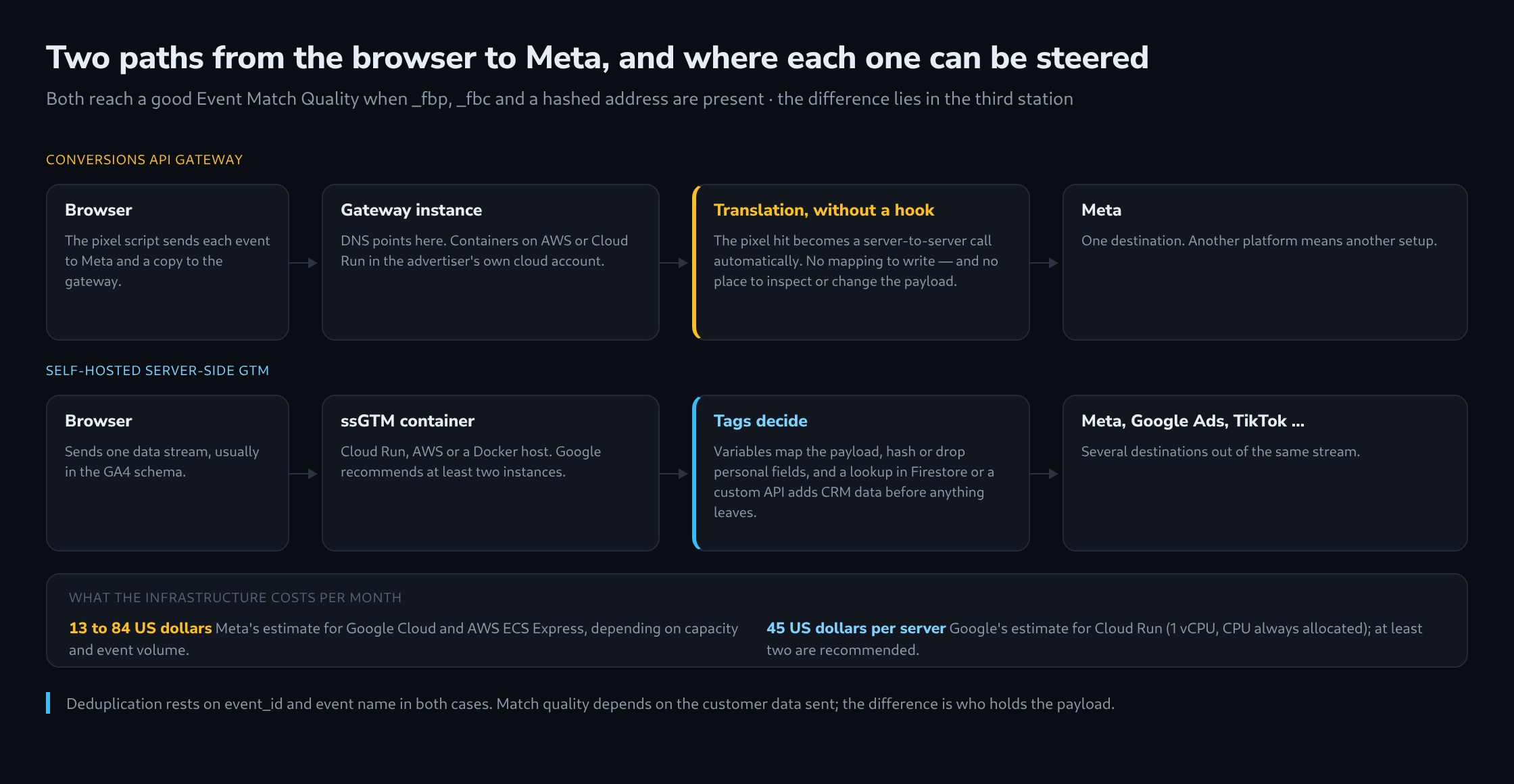
The Conversions API Gateway is a packaged solution provided by Meta. According to the Meta documentation on the Conversions API Gateway, it offers a simplified provisioning process that automatically deploys a server instance within a cloud account owned by the advertiser, on AWS EKS, AWS ECS Express or Google Cloud. Once set up, the pixel script also sends every event to the gateway endpoint, for example a dedicated subdomain; the browser’s request to Meta remains in place. The gateway translates these client-side hits into Conversions API calls. The primary advantage lies in the speed of deployment, as no manual tagging or variable mapping is required inside a tag management system.
Server-Side GTM as an Independent Infrastructure
A self-hosted Server-Side GTM container works differently. Deployed on Google Cloud Run, AWS or an independent Docker environment, it serves as a universal data hub. The browser sends a unified stream, typically in the Google Analytics 4 format, to the ssGTM endpoint. Inside the server container, a component called a client claims the request and converts it into event data. Tags read that data through variables and send it simultaneously to Meta, Google Ads, TikTok and other platforms. This separates the tracking logic from any single advertising platform and provides a scalable foundation for web analytics.
Cost Comparison: Gateway vs. Server-Side GTM on Cloud Run
The cost structures of the two approaches cannot be reduced to “fixed VMs versus serverless”. According to Meta, the Conversions API Gateway runs on AWS EKS, AWS ECS Express or Google Cloud, where it uses Cloud Run itself. Meta’s developer documentation estimates the monthly minimum cost on Google Cloud at $12.60 for up to 10 events per second (less with far fewer requests) and $54 for up to 100, excluding load balancer and data transfer. For AWS ECS Express, it lists $39.27 for 10 million and $83.53 for 250 million events per month, so costs grow with volume. For a Server-Side GTM container on Cloud Run, Google puts each server (1 vCPU, “CPU always allocated” pricing) at approximately $45 per month and recommends a minimum of two instances to reduce the risk of data loss during a server outage. Running fewer instances is possible but does not follow this recommendation.
Data Control and Enrichment Capabilities
Data sovereignty represents a critical factor. The Meta Gateway acts as a black box; the automated routing handles the data translation implicitly, leaving administrators with little granular control over the payload before it reaches Meta servers. A Server-Side GTM container allows precise manipulation of the data stream. Personally Identifiable Information (PII) can be excluded with Transformations or hashed with SHA-256 in variables before any external transmission occurs. Furthermore, ssGTM supports data enrichment: through the Firestore API (Firestore.read, Firestore.query) or a custom API call via sendHttpRequest, offline CRM data, profit margins or user lifetime values are fetched during processing and appended to the outgoing Meta event. The server container’s BigQuery API, by contrast, only writes (BigQuery.insert) and is not suited to such lookups.
Event Match Quality (EMQ) and Deduplication
Event Match Quality (EMQ) is a score from 0 to 10 that indicates how effective the customer information sent with a server event is likely to be at matching events to Meta accounts. Both the Gateway and ssGTM can reach good EMQ scores if the incoming data contains identifiers such as the _fbp cookie, the _fbc click ID, and hashed user emails; Meta gives email and click ID a high priority. For deduplication, Meta matches event_id and event_name.
| Feature | Meta Conversions API Gateway | Server-Side GTM |
|---|---|---|
| Deployment Time | Hours (Automated Cloud Setup) | Days (Requires Tagging & Mapping) |
| Base Infrastructure Cost | Per Meta approx. $13–84/month, depending on platform and volume | Per Google approx. $45/month per server, at least 2 recommended |
| Multi-Vendor Support | Meta Only | Universal (Google, Meta, TikTok, etc.) |
| Data Enrichment | Not Natively Supported | Supported via Firestore/APIs |
With the Gateway, the event_id is generated automatically and passed to both channels, so deduplication works without further configuration. ssGTM, by contrast, requires a precise configuration: the browser tag and the server tag must send the same event name and the same ID (eventID in the pixel, event_id in the Conversions API), for example an ID generated in the browser and passed to both tags via the dataLayer. Meta only deduplicates events received within 48 hours of the first event with that ID.
What this achieves
- Assessment of the infrastructure costs of both paths based on the estimates published by Meta and Google.
- Understanding the limitations of vendor-locked tracking gateways.
- Implementation of comprehensive data enrichment strategies using independent server containers.
- The option to improve Event Match Quality with additional customer information added on the server.
Questions and answers
Does the server-side route change anything about consent?
Not about the obligation. Whether an event reaches Meta through the pixel or through a server, it is the same data going to the same recipient. What changes is the point at which consent has to be enforced.
With the Gateway this is comparatively simple: it receives its events from the pixel script in the browser. If the pixel only loads after consent, the Gateway receives nothing before that either.
With Server-Side GTM, by contrast, the data stream arrives independently of the Meta Pixel, usually in the Google Analytics 4 format. Whether the Meta tag in the server container fires therefore has to be tied, in the container, to the consent state the stream carries, for example from Consent Mode. Without that condition the container forwards events from visits without consent to Meta, even though the browser itself never connected to Meta. That is the flip side of the control the article describes: the container can forward everything, so it also has to decide what not to forward.
A hashed email address remains personal data: hashing pseudonymises, but it does not anonymise.
How much does a self-hosted container cost a small site compared with the Gateway?
Going by the providers’ estimates, about seven times as much: two recommended servers at roughly $45 each come to about $90 a month, while the Gateway on Google Cloud starts at $12.60 for up to 10 events per second (excluding load balancer and data transfer for the Gateway). The gap narrows once the container serves Google Ads, TikTok or other platforms alongside Meta, because the Gateway covers Meta only.
Sources
- Conversions API Gateway
- Conversions API Gateway and Signals Gateway: GCP Architecture
- AWS ECS Express architecture – CAPI & Signals Gateway
- Compare Conversions API setup options
- Handling Duplicate Pixel and Conversions API Events
- About event match quality
- Meta Conversions API
- Server-side tagging
- Set up server-side tagging with Cloud Run
- Server-side tagging APIs
Related articles