English
 Deutsch
 Polski
Automated Enterprise Reporting: PDF Generation with Python & OpenAI API

Contents
Manual generation of weekly or monthly business reports consumes significant administrative resources and is prone to human error. Combining Python data processing capabilities with the OpenAI API produces fully automated, intelligent PDF reports. Raw data from databases or CSV files is transformed into structured Key Performance Indicators (KPIs), while a Large Language Model (LLM) formulates a precise, context-aware executive management summary. This automated pipeline ensures consistent, on-schedule reporting delivery.
1. Architectural Framework: The Automated Reporting Pipeline
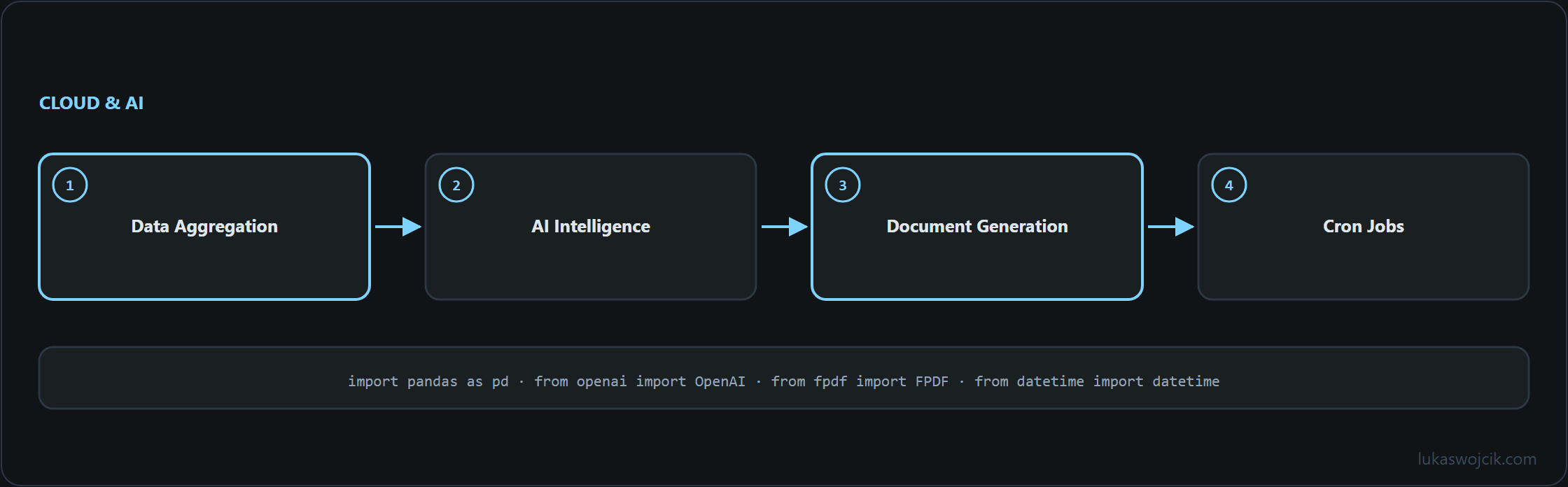
An enterprise-grade automated reporting system relies on a three-stage technical architecture:
- Data Aggregation (Pandas): Raw metrics are extracted from source systems, cleaned, and aggregated into high-level business KPIs.
- AI Intelligence (OpenAI API): The aggregated metrics are passed to an LLM (such as
gpt-4o) through a strict prompt structure to generate a readable, analytical management summary. - Document Generation (FPDF / ReportLab): The numerical data and the AI-generated text are compiled and rendered into a highly formatted, corporate-branded PDF document.
2. Step-by-Step Implementation in Python
To establish the reporting pipeline, the required libraries (pandas, openai, fpdf) must be installed. The following Python script demonstrates the complete process from data ingestion to the final PDF output:
import pandas as pd
from openai import OpenAI
from fpdf import FPDF
from datetime import datetime

# 1. Data Aggregation via Pandas
# In a production environment, data would be fetched from SQL or a Data Warehouse
data = {'Metric': ['Revenue', 'New Leads', 'Churn Rate'], 'Value': [145000, 850, '1.2%']}
df = pd.DataFrame(data)

revenue_val = df.loc[df['Metric'] == 'Revenue', 'Value'].values[0]
leads_val = df.loc[df['Metric'] == 'New Leads', 'Value'].values[0]

# 2. Generating the AI Management Summary
client = OpenAI()  # reads the key from the OPENAI_API_KEY environment variable

prompt = f"""
Act as a senior business analyst. Write a concise executive summary (max 3 sentences)
based on the following weekly KPIs. Highlight the performance neutrally.
Revenue: ${revenue_val}
New Leads: {leads_val}
Churn Rate: 1.2%
"""

response = client.chat.completions.create(
    model="gpt-4o",
    messages=[{"role": "user", "content": prompt}]
)
ai_summary = response.choices[0].message.content

# 3. PDF Document Generation
pdf = FPDF()
pdf.add_page()
pdf.set_font("Arial", 'B', 16)

# Document Header
current_date = datetime.now().strftime("%Y-%m-%d")
pdf.cell(200, 10, txt=f"Enterprise Weekly Report - {current_date}", ln=True, align='C')
pdf.ln(10)

# Injecting KPIs
pdf.set_font("Arial", 'B', 12)
pdf.cell(200, 10, txt="Key Performance Indicators:", ln=True)
pdf.set_font("Arial", '', 12)
for index, row in df.iterrows():
    pdf.cell(200, 10, txt=f"- {row['Metric']}: {row['Value']}", ln=True)
pdf.ln(10)

# Injecting AI Summary
pdf.set_font("Arial", 'B', 12)
pdf.cell(200, 10, txt="Management Summary (AI-Generated):", ln=True)
pdf.set_font("Arial", '', 12)
pdf.multi_cell(0, 10, txt=ai_summary)

# Export File
pdf.output("Automated_Weekly_Report.pdf")
3. Step-by-Step Scheduling and Automation
Once the script functions correctly, manual execution is no longer necessary. The pipeline can be fully automated using system schedulers:
- Cron Jobs (Linux/macOS): Add an entry via
crontab -eto execute the script every Monday at 08:00 AM (e.g.,0 8 * * 1 /usr/bin/python3 /path/to/report_script.py). - Cloud Execution: For enterprise environments, the script can be deployed as a Google Cloud Function or AWS Lambda function, triggered by a Cloud Scheduler job.
- Email Distribution: Extend the Python script using the
smtpliblibrary to automatically attach the generated PDF and send it to a predefined management mailing list.
4. Summary & Architectural Value
What this tutorial achieves: The successful implementation of an automated reporting pipeline that dynamically aggregates raw database metrics, enriches them with an AI-generated management summary via the OpenAI API, and outputs a formatted PDF document.
Resulting value: Hours of manual administrative spreadsheet work are permanently eliminated. Decision-makers receive highly accurate, consistently formatted insights immediately at the end of each reporting cycle. By shifting the workload from manual data compilation to automated AI evaluation, enterprise resources are freed up for critical strategic initiatives.
Questions and answers
Why does PDF generation fail as soon as the summary contains a euro sign or curly quotation marks?
Because FPDF’s built-in fonts such as Arial only know an 8-bit character set, essentially Latin-1. German umlauts are in it; the euro sign, letters such as ł, ą or ę, curly quotation marks and the en dash are not. The language model phrases its text freely and often uses exactly these characters, and depending on the library version the run then ends with an encoding error.
The fix is a TrueType font with Unicode coverage, such as DejaVu Sans, loaded with add_font() and then set in place of Arial. In the maintained library fpdf2 this is straightforward; the older fpdf package on PyPI is no longer developed. Both are imported with from fpdf import FPDF, which is why the difference does not show in the script.
How can the summary be kept from stating numbers that are not in the data?
It cannot be prevented entirely, only caught. A language model phrases; it does not calculate reliably, and a statement such as “up 12% on last week” can appear even though no comparison value was passed. Three measures reduce the risk:
- Only finished values go in. Changes compared with the previous week are calculated by pandas and written into the prompt; the model is there to describe them, not to derive them.
- Comparison values are supplied as well. The script passes the values of a single week only; without a previous period or a target, an assessment has no basis, and whatever the model writes about it is a guess.
- The answer is checked before it goes into the PDF. A short comparison extracts every number from the text and checks it against the values passed; if one does not occur there, the report goes out with a fixed text block instead of the summary, or is held back.
The third step matters most, because it is the only one that does not depend on the model following instructions.
Sources
Related articles