First-Party Cookie Enrichment via Cloudflare Workers

Contents
Modern browser privacy mechanisms, specifically Apple Safari Intelligent Tracking Prevention (ITP) and Mozilla Firefox Enhanced Tracking Protection (ETP), impose strict expiration limits on client-side state persistence. Any HTTP cookie created via JavaScript using document.cookie is automatically capped at a maximum lifespan of 7 days—or reduced to 24 hours if incoming traffic arrives from known advertising parameters or click-through domains. This limitation severely degrades multi-touch attribution, customer lifetime value (LTV) models, and return-visitor recognition in Google Analytics 4 (GA4). Deploying a First-Party Cookie Enrichment proxy via Cloudflare Workers running on the root domain edge infrastructure converts client-side identifiers into secure, server-set HTTP-only headers, extending cookie persistence up to two full years (730 days).
1. Architectural Mechanics of Safari ITP and Firefox ETP
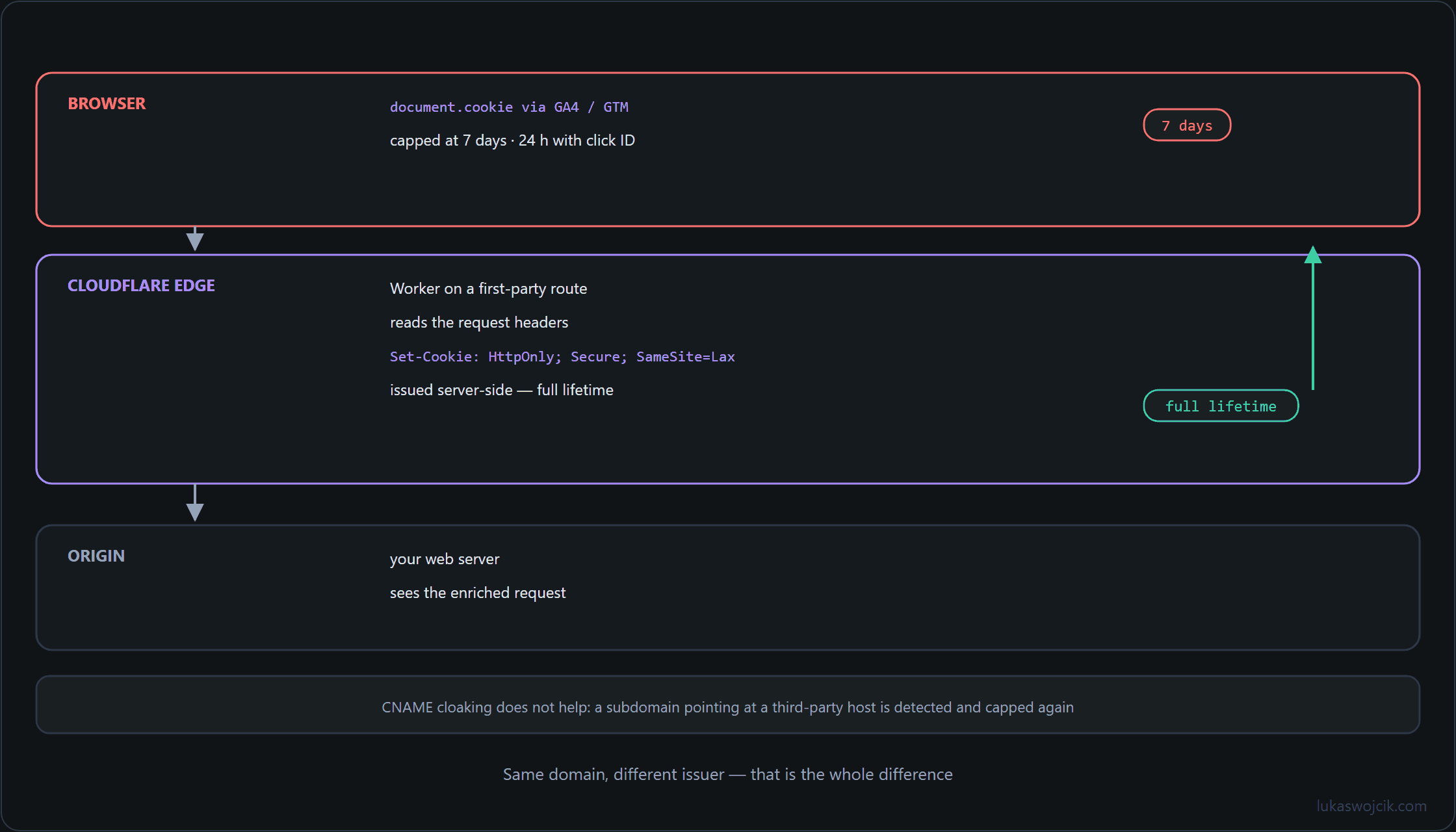
To bypass client-side expiration caps without violating first-party domain boundaries, tracking architectures must leverage HTTP response headers emitted from an authoritative first-party hostname. The restriction framework operates under three distinct rules:
- Client-Side Cap (7 Days / 24 Hours): Cookies set via browser JavaScript scripts (such as GA4
_gaand_ga_XXXXXXXXXXcookies) are truncated by WebKit storage restrictions. - CNAME Cloaking Detection: Third-party tracking endpoints mapped via simple CNAME DNS records to subdomains are flagged by browser heuristics, triggering the same 7-day expiration penalty.
- Same-Site Edge Exemption: Cookies issued via HTTP
Set-Cookieheaders from a server executing on the primary e-commerce hostname (e.g., via Cloudflare Workers routes likewww.example.com/edge-cookie) are classified as genuine server-side first-party storage and remain exempt from ITP storage restrictions.
2. Step-by-Step Configuration of the Cloudflare Worker Edge Proxy
Implementing an edge enrichment proxy requires deploying a serverless script that intercepts incoming browser requests, reads existing analytics IDs, and refreshes them via HTTP headers:
- Wrangler & Worker Project Initialization: Initialize a new Worker script using Cloudflare Wrangler CLI or navigate to the Cloudflare Workers & Pages dashboard to create an empty service.
- Custom Route Assignment: Map the Worker to execute on a first-party subdirectory route on the primary production hostname (e.g.,
https://www.example.com/fp-cookie-enrichment*). - Cookie Extraction & Header Injection: Program the Worker to inspect incoming HTTP request headers for existing
_gaand marketing identifiers, rewrite their expiration timestamps, and append aSet-Cookieheader withSecure,SameSite=Lax, and aMax-Age=63072000(two years) directive.
Production-Ready TypeScript Worker Script
export default {
  async fetch(request: Request): Promise<Response> {
    const url = new URL(request.url);

    // Only process requests directed to the designated enrichment endpoint
    if (url.pathname !== '/fp-cookie-enrichment') {
      return fetch(request);
    }

    const cookieHeader = request.headers.get('Cookie') || '';
    const gaCookieMatch = cookieHeader.match(/(?:^|;\s*)_ga=([^;]*)/);

    // Fallback or extract the current GA4 client ID
    const gaClientId = gaCookieMatch ? gaCookieMatch[1] : 'GA1.1.' + Math.floor(Math.random() * 1e9) + '.' + Math.floor(Date.now() / 1000);

    const response = new Response(JSON.stringify({ status: 'enriched', clientId: gaClientId }), {
      status: 200,
      headers: {
        'Content-Type': 'application/json',
        'Access-Control-Allow-Origin': 'https://' + url.hostname,
        'Access-Control-Allow-Credentials': 'true'
      }
    });

    // Set first-party HTTP header with 2-year persistence (730 days = 63072000 seconds)
    response.headers.append(
      'Set-Cookie',
      `_ga=${gaClientId}; Max-Age=63072000; Path=/; Domain=${url.hostname}; Secure; SameSite=Lax`
    );

    return response;
  }
};
3. Step-by-Step Integration with Google Analytics 4 & GTM
To ensure Google Tag Manager (GTM) utilizes the server-refreshed identifier without overriding it via client-side JavaScript, the web tracking container must be updated:
- Asynchronous Endpoint Calling: In frontend application code or via a GTM Custom HTML tag executing on initialization, invoke an asynchronous
fetch()call to/fp-cookie-enrichmentwith credentials enabled. - Cookie Write Suppression: In the GA4 Configuration Tag (or Google Tag), set the parameter
cookie_updatetofalse. This prevents the browser analytics script from overwriting the HTTP-only server expiration timestamp with a 7-day client-side date. - Server-Side GTM Forwarding: If using a Server-Side GTM (ssGTM) container, map the custom hostname to the same Cloudflare zone, allowing inbound event payloads to inherit the enriched two-year first-party cookie automatically.
4. Summary & Architectural Value
What this tutorial achieves: The successful deployment of a serverless Cloudflare Worker proxy running on the primary first-party hostname that intercepts, rewrites, and extends Google Analytics 4 and marketing cookies via server-side HTTP headers.
Resulting value: Analytics tracking becomes immune to the 7-day and 24-hour cookie deletion caps imposed by Safari ITP and Firefox ETP. Session continuity and visitor identification are preserved for up to two full years, dramatically improving the accuracy of long-term customer journey analytics, multi-touch attribution models, and ROAS calculations without relying on intrusive third-party fingerprinting.
Related articles