English
 Deutsch
 Polski
Secure WordPress REST API: OAuth 2.0 and Custom Authorized Endpoints

Contents
A secure WordPress REST interface needs three separate decisions: how the caller is authenticated, which action is authorized and which data is accepted. OAuth 2.0 can help, but building an OAuth system is not a prerequisite for every integration.
Application password or OAuth?
Application Passwords have been part of WordPress core since 5.6. Over HTTPS, these credentials authenticate a WordPress account. Permissions come from that account; administrative access exists only if the account has it. A dedicated integration account with deliberately assigned capabilities can therefore be appropriate. A standard application password does not have its own narrow OAuth scopes. Revocation, secure storage and permission checks remain necessary.
OAuth 2.0 adds delegated authorization through an authorization server and a suitable WordPress integration. Core does not provide a complete OAuth 2.0 server. Scopes need definition and actual enforcement at the endpoint. Short lifetimes, refresh tokens and rotation depend on the implementation; a Bearer header does not create them. User-authorized access calls for an authorization-code flow with PKCE following current security practice; service access needs a supported arrangement for that purpose. OAuth is not synonymous with JWT or encryption.
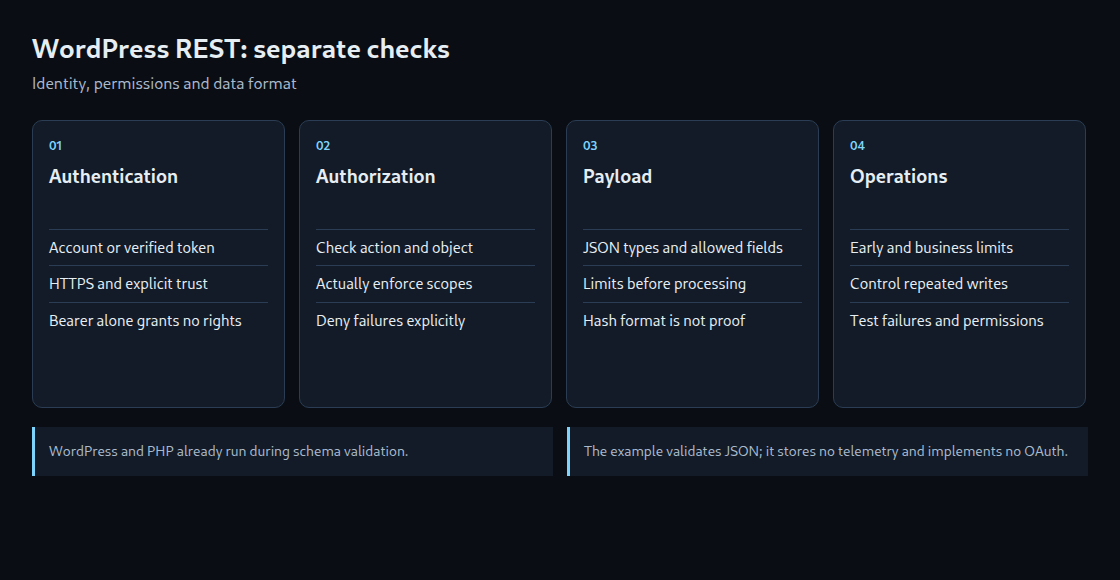
Authentication does not replace authorization
A valid token does not establish permission to modify a particular resource. Depending on the system, checks include issuer, audience, validity, revocation policy, scope and mapped account. JWT validation also requires allowed algorithms and trusted keys; decoding alone verifies no signature. A maintained authentication integration should perform these checks instead of an undefined helper function.
A route’s permission_callback checks the allowed action, for example through current_user_can(). Access to a specific post or customer object also requires object-level authorization. An explicit true grants access; WP_Error denies access with an appropriate response. Core also treats false and null as denial. Other values such as 0 or an empty string must not represent failure: core does not treat those return values as false.
A complete but deliberately limited validation example
The example registers only a JSON validation endpoint. It stores no telemetry and implements neither OAuth nor rate limiting. Prerequisites are WordPress, HTTPS and existing supported authentication. The custom lw_validate_telemetry capability must be deliberately assigned to an appropriate account or role during setup; the example grants no permissions itself. OAuth integration and scope enforcement must additionally exist beyond the account capability shown here.
<?php
// Example validation endpoint: no telemetry is stored.
add_action('rest_api_init', function () {
    register_rest_route('lw-example/v1', '/validate-telemetry', [
        'methods' => 'POST',
        'permission_callback' => function () {
            if (!current_user_can('lw_validate_telemetry')) {
                return new WP_Error('rest_forbidden', 'Not permitted', [
                    'status' => rest_authorization_required_code(),
                ]);
            }
            return true;
        },
        'callback' => function (WP_REST_Request $request) {
            if (!$request->is_json_content_type()) {
                return new WP_Error('invalid_media_type', 'JSON required', ['status' => 415]);
            }
            if (strlen($request->get_body()) > 8192) {
                return new WP_Error('body_too_large', 'Body too large', ['status' => 413]);
            }
            $body = $request->get_json_params();
            $schema = [
                'type' => 'object',
                'required' => ['payload_hash'],
                'additionalProperties' => false,
                'properties' => [
                    'payload_hash' => [
                        'type' => 'string',
                        'minLength' => 64,
                        'maxLength' => 64,
                        'pattern' => '^[a-fA-F0-9]{64}$',
                    ],
                ],
            ];
            $valid = rest_validate_value_from_schema($body, $schema, 'body');
            if (is_wp_error($valid)) {
                return new WP_Error('invalid_body', 'Invalid JSON body', ['status' => 400]);
            }
            return new WP_REST_Response(
                ['validated' => true, 'stored' => false],
                200,
                ['Cache-Control' => 'no-store']
            );
        },
    ]);
});
An accepted JSON body contains exactly payload_hash with 64 hexadecimal characters. Extra fields, wrong types and missing values are rejected. Such a hash proves neither the source nor authenticity of a payload. The example validates only the format and explicitly responds with stored: false. Real storage also requires a business schema, object permissions and a reliable idempotency rule for repeatable writes.
The code reads only the JSON body instead of merged URL, form and JSON parameters. Its 8 KiB limit applies after PHP has started. A web-server or upstream limit remains necessary when large requests should be rejected before the application. The 20 isolated tests used copied WordPress schema and request classes with authentication and hook substitutes; no actual HTTP or OAuth integration was executed.
Validation order and workload limits
WordPress and PHP are already running before the REST argument schema is checked. During normal dispatch, core checks registered arguments before permission_callback and the main callback. Further business validation can run inside the callback before processing, as in the example. A schema therefore does not prevent PHP startup. A custom validate_callback must also handle wrong types correctly; a regex alone is not a complete payload check.
A limiter before PHP can reduce early processing cost. Application-level limits can distinguish authenticated clients and expensive operations. Proxies are not inherently restricted to IP-based limits; shared addresses and untrusted forwarding headers need special handling. Atomic counters, clear windows, defined failure behavior and appropriate 429 responses belong in the implementation. No single measure guarantees protection from every overload.
Questions and answers
Does a signed request with a timestamp prevent replay?
A time window rejects old requests but does not prevent repetition within the accepted window. Depending on the protocol, protection needs unique identifiers stored atomically with expiry, bound request components and a business-level idempotency rule. Secret rotation and TLS remain important. A custom design is not automatically simpler than a well-supported standard.
Must /wp/v2/users always be disabled?
Public author information differs from protected account fields. Removing routes indiscriminately can break the editor, plugins or integrations. A targeted access policy must also consider author archives and other public sources. Different login and display names replace neither strong authentication nor authorization.
Which failure cases belong in acceptance tests?
Missing credentials, missing capabilities, expired or incorrect tokens, wrong types, oversized bodies, additional fields, repeated writes and an unavailable token or limiter store. Access or consent tokens do not belong in public logs. Even after successful authentication, access to another account’s protected object must still fail.
Sources
- WordPress: REST authentication
- WordPress: Application Passwords
- WordPress: Custom endpoints
- WordPress: REST dispatch
- WordPress: Permission callback handling
- WordPress: Schema validation
- IETF RFC 9700: OAuth 2.0 security
- IETF RFC 9421: HTTP message signatures
- IETF RFC 8725: JWT security
- OWASP: REST security
- WordPress: REST API handbook
- OWASP: Top 10
Related articles