English
 Deutsch
 Polski
Zero-Server-Side Browser Tools: Designing Secure Utilities in Vanilla JavaScript

Contents
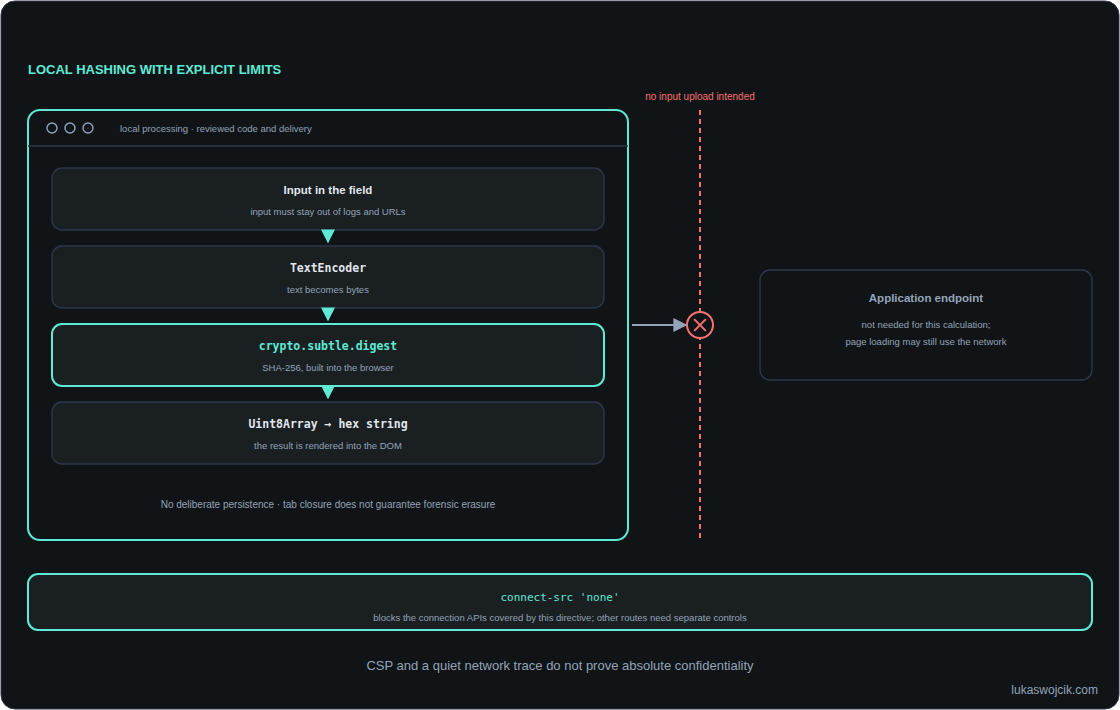
A local browser utility can hash, parse or transform input without uploading that input to an application server. The benefit is a smaller data flow: the processing endpoint does not need the sensitive content. The page itself may still be downloaded, and its hosting server may still receive request metadata. “Processed locally” therefore needs a precise scope.
Local processing has a trust boundary
The browser sandbox separates web content from parts of the operating system. Code running on the same page can still read input fields. A compromised script, unsafe HTML insertion or a browser extension with suitable permissions can undermine confidentiality. Vanilla JavaScript means code without a framework; the term is not a security guarantee.
A small utility benefits from minimal dependencies, HTTPS delivery, reviewed source code and no analytics or session replay around the input. Input must stay out of URLs, application logs and error telemetry. Output representing arbitrary text belongs in textContent or an input’s value, not in innerHTML.
Hashing the intended bytes
TextEncoder encodes JavaScript text as UTF-8 bytes. TextDecoder performs the reverse operation for a selected encoding. These operations still allocate memory and take time. crypto.subtle.digest() returns a promise, but surrounding text conversion and loops can still occupy the main thread. Hardware acceleration and zero latency are not guaranteed.
This example calculates SHA-256 over the UTF-8 representation without trimming or lowercasing. The one-million-UTF-16-code-unit limit is an illustrative application limit, not a browser guarantee or a byte limit. A calling interface must display rejected inputs and errors clearly.
async function sha256Text(text) {
  if (typeof text !== 'string') throw new TypeError('Expected text');
  if (text.length > 1_000_000) throw new RangeError('Input too large');
  if (!globalThis.isSecureContext || !globalThis.crypto?.subtle) {
    throw new Error('Web Crypto requires a supported secure context');
  }
  const bytes = new TextEncoder().encode(text);
  const digest = await crypto.subtle.digest('SHA-256', bytes);
  return Array.from(new Uint8Array(digest),
    byte => byte.toString(16).padStart(2, '0')).join('');
}
For a file checksum, the input should be the original file bytes rather than text decoded and encoded again. digest() requires the complete input in memory and does not support incremental streaming. Very large files need a different, reviewed implementation and measured resource limits. SHA-256 alone is neither encryption nor a suitable password-storage scheme; a hash of predictable personal information is not automatically anonymous.
CSP reduces specific communication paths
connect-src 'self' allows script connections to the page’s own origin. connect-src 'none' blocks the connection APIs governed by that directive, including fetch, WebSocket and beacon requests. Images, forms, frames and script loading have separate controls. A policy for a local tool needs those routes considered as well, plus tightly restricted executable code.
CSP is enforced in the browser and adds a useful layer, but is not a general network firewall or mathematical proof against exfiltration. Navigation and permitted resource requests need separate attention. Self-hosted scripts can also be compromised. An enforcing policy must be tested; Report-Only records violations without blocking the operation.
Workers improve responsiveness, not secrecy
A Web Worker can move expensive work away from the UI thread. The worker has no direct DOM access, but the page supplies the input and receives the result. Malicious page code can therefore intercept either side. Workers can also make network requests.
A separate worker file needs the appropriate CSP response header for its own execution context. The page’s worker-src controls whether the worker may be loaded; that is not the same as controlling the worker’s later connections. Blob workers inherit the creator’s policy and require a matching creation permission. A separate file can simplify review, but a checksum alone proves no absence of network behaviour.
Evidence and remaining limits
A useful check covers initial loading, input, processing, copy/download, error paths and clearing. Network inspection should include workers and any active service worker. An offline run after loading is evidence for that build and workflow, not every future release. Network-denied test environments provide a stronger additional check.
Clearing fields and dropping references reduces accidental reuse, but JavaScript cannot promise forensic erasure of every copy in browser or operating-system memory. Clipboard content, downloads and deliberately stored data can outlive a tab. Avoiding unnecessary persistence is more reliable than promising complete deletion on close.
Questions and answers
What can be shown without reading the source?
A documented network trace, an offline processing demonstration and an inspected enforcing CSP provide complementary evidence. A silent network panel during one test cannot establish a universal guarantee. Delivery integrity, dependencies and later releases still need review.
Where is Web Crypto available?
crypto.subtle requires a supported secure context. HTTPS and normal localhost development are suitable; a plain HTTP address on a private LAN normally is not. The example checks both the context and API availability.
Sources
- MDN Web Docs
- OWASP Top 10
- Web Crypto digest: secure context, Promise, no streaming
- TextEncoder: UTF-8 encoding
- TextDecoder: byte decoding
- Workers: communication and CSP
- CSP connect-src scope
- Secure contexts and localhost
- Content Security Policy Level 3
- OWASP: safe DOM output
- JavaScript memory management
- OWASP: password hashing
Related articles