English
WebP File Sizes: Comparing Light and Dark Diagrams Fairly

Management Summary
WebP is an image format that can reduce the amount of data a website needs to transfer. For diagrams with text and sharp edges, preserving every image point can sometimes produce smaller files than a high-quality version that discards detail. In the article's comparison of twelve light and dark pairs, that was true for all 24 images, while the colour theme alone made little difference. The result explains why actual graphics matter more than a blanket assumption that lighter images are larger.
Contents
A light diagram can produce a larger file than a dark version. That observation alone does not explain the cause. Image content, encoder version, lossless or lossy mode, quality, metadata and preprocessing can all affect the result. A useful comparison separates file size from the explanation for that size.
What the historical comparison can establish
The original workshop account reported 662 pairs and totals of 32.5 versus 56.2 MB. Those totals imply approximately 73% more bytes for the light set. If the measurements were recorded correctly, the byte difference was real; the unsupported step was attributing the difference to brightness alone.
The complete original measurement table, sample selection and encoder settings could not be recovered during this review. The old factors are therefore not presented as a newly verified benchmark. In particular, a wide spread does not disprove a brightness effect, and a mean above the median does not establish that only a few outliers caused the difference.
A fresh comparison with recorded settings
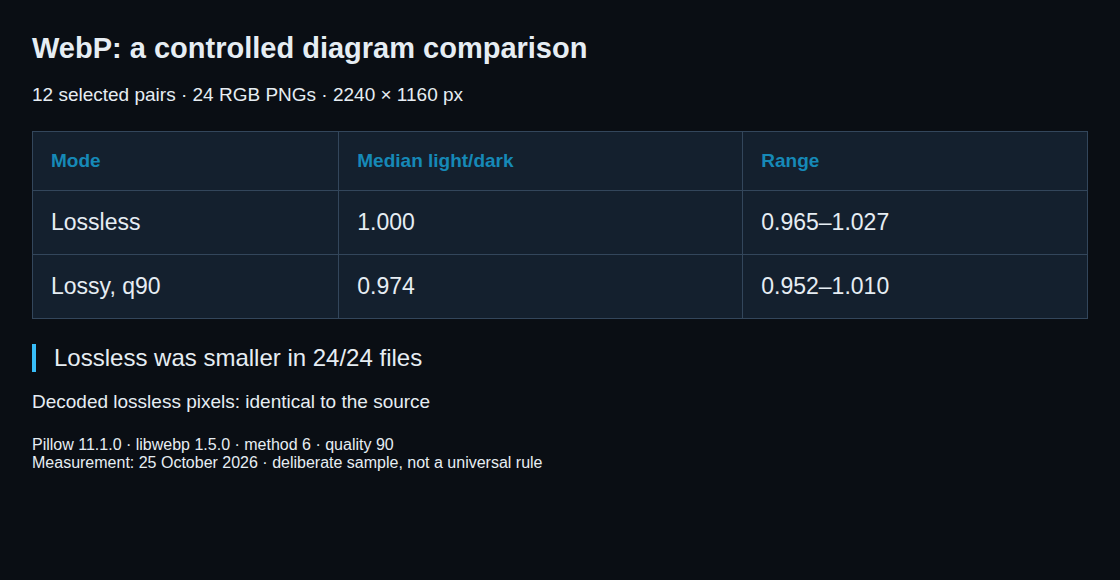
The new check used twelve existing English diagram topics, each in dark and light form: 24 RGB PNG files, all 2240 × 1160 pixels. The topics were selected deliberately, not randomly. Private copies were encoded with Pillow 11.1.0 and libwebp 1.5.0, without resizing or copying metadata.
Each file was encoded twice: lossy WebP at quality 90 and method 6, and lossless WebP at quality 90 and method 6. In lossless mode, the quality parameter controls compression effort rather than permitted image degradation. The two modes are therefore separate comparisons.
| Mode | Median light/dark ratio | Range |
|---|---|---|
| Lossless | 1.000 | 0.965–1.027 |
| Lossy, quality 90 | 0.974 | 0.952–1.010 |
Within this sample, the two themes had similar sizes. Lossless was smaller than lossy quality 90 for all 24 files. For each file, the lossy size was divided by the lossless size. The middle of the sorted ratios, called the median, was 1.577: this ratio corresponds to about 58% more bytes for lossy encoding. Decoding the lossless outputs reproduced every source pixel exactly. This supports testing lossless for these diagrams; it does not prove that lossless always wins for graphics or that light and dark images always weigh the same.
Why palette and RGB are not the whole explanation
A PNG palette describes how source colors are stored. It does not force a particular WebP compression mode. A pipeline can decode both palette and RGB sources to the same pixels before encoding. The PNG IHDR color type is useful evidence about the source, but encoder logs are needed to establish what happened next.
Lossy WebP predicts pixel blocks from neighboring pixels. It transforms the differences between prediction and source, then rounds the resulting values to save space; this rounding loses information. Flat areas can compress efficiently too. Lossless WebP uses different transforms and coding techniques, including palette-related techniques. “Quality 90 wastes bits in every flat area” is therefore not a sound explanation.
A smaller result still needs a quality check
A re-encoded source that is four times larger than an existing file is a reason to inspect the pipeline. It does not uniquely identify a changed quality setting. Codec versions, metadata, pixel conversion and compression mode can also differ. Conversely, similar byte counts do not prove identical settings.
For a fair experiment, the original PNG is the input for both modes. Re-encoding an already lossy WebP in lossy mode can discard more image details. A comparison should record input hashes, dimensions, transparency, versions, explicit options, output bytes and decoded image quality. Thin text and colored edges deserve a visual check.
Questions and answers
Does 27 larger files out of 40 mean a coin-toss result?
No: 27/40 is 67.5%. The count alone neither proves equal sizes nor measures the size difference. Related diagram templates also undermine an assumption of independent observations. Ratios and the selection method are more informative than that analogy.
How is WebP compression mode identified?
The image payload uses VP8 for lossy coding or VP8L for lossless coding. VP8X describes an extended container; metadata, alpha or animation chunks may occur before the image data. A full inspection with webpinfo is safer than reading only the first chunk.
Can the original quality setting be recovered?
WebP has no standard field storing the encoder’s original quality option. Re-encoding with known settings can provide comparisons, but cannot uniquely recover all original choices. Encoder logs are the stronger evidence.
Does the result apply to photographs?
No general result follows from this diagram sample. Lossy encoding often saves substantial space for textured images at acceptable visual quality. The choice depends on the actual image and the required quality, not only on its category.
Related articles