English
 Deutsch
 Polski
Tutorial: Building and Testing RTSP Stream URLs for IP Cameras

Contents
An RTSP address identifies a media service and the requested stream. RTSP controls the session; video is commonly carried in RTP packets. Camera support, paths, authentication and transport options depend on the model and firmware. A successful connection is only the first check, not proof of reliable recording.
1. Identify the actual server
The host can be a camera, recorder, Protect console or restreamer. The address must point to the component that serves this particular stream. A camera account is not automatically a recorder account. Port 554 is the conventional RTSP default, but the configured port is decisive.
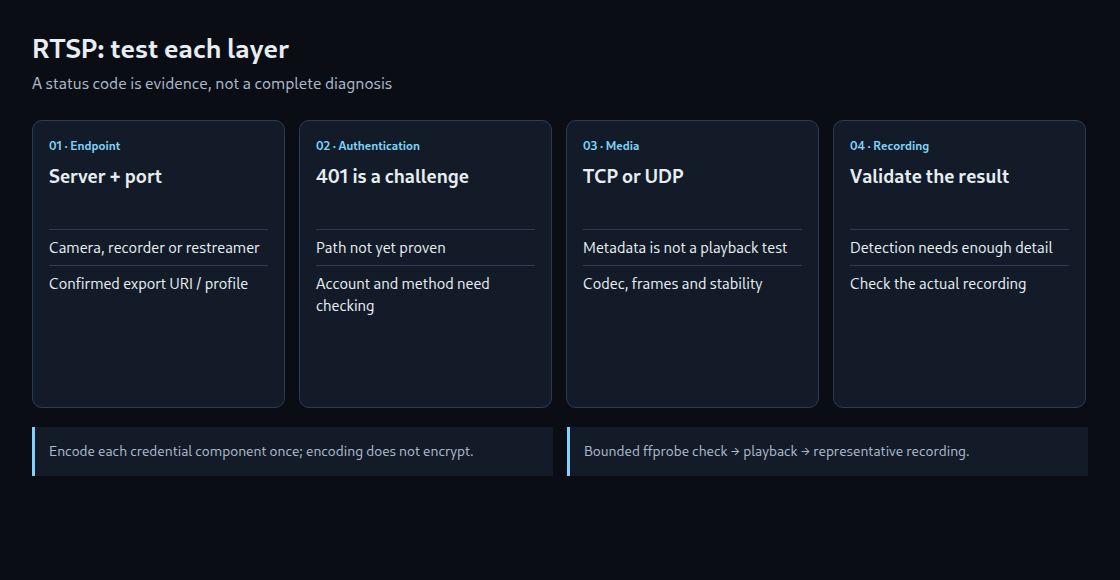
The following invented address illustrates the components. Credentials in the URL are a client convention that needs compatibility checks; separate credential fields are preferable where supported.
rtsp://viewer:Example%402026@192.0.2.10:554/Streaming/Channels/102
scheme | user:password       | host      | port | path
Neither host, credentials nor port is identical across cameras. IPv6 literals require brackets, for example rtsp://[2001:db8::10]:554/stream. A query string can select additional settings. Its exact meaning comes from the device documentation.
2. Obtain the path from the device or its documentation
| Device family | Illustrative path |
|---|---|
| Hikvision | /Streaming/channels/101 · /Streaming/channels/102 |
| Amcrest IP | /cam/realmonitor?channel=1&subtype=0 |
| Reolink | /Preview_01_main · /Preview_01_sub |
| Axis | /axis-media/media.amp?streamprofile=PROFILE |
These are examples, not universal addresses. In the Hikvision pattern, the channel precedes a two-digit stream suffix: channel 12 with stream 02 becomes 1202. A channel does not universally identify a physical lens. An Axis resolution parameter requests a supported size; it does not inherently name a fixed “substream”.
For a compatible ONVIF Media service, GetProfiles identifies available media profiles and GetStreamUri requests a URI for the selected profile and transport. Authentication, reachability and client compatibility still need testing. A returned private address is not automatically reachable through a different network.
UniFi Protect’s official port reference lists both RTSPS on 7441 and RTSP on 7447. The earlier claim that Protect always refuses plain RTSP was too broad. The configured, supported export address and console version take priority over guessed URL conversions.
3. Encode credentials without confusing encoding with encryption
Reserved characters can change how a URL is parsed. Username and password components should be encoded separately: @ → %40, / → %2F, # → %23, ? → %3F, % → %25 and space → %20. Encoding a colon as %3A avoids ambiguity, but a colon inside user information does not universally terminate that field. An already encoded value must not be encoded again.
Percent-encoding is reversible and provides no secrecy. Digest authentication does not send the password itself as plaintext, but that does not encrypt the video or guarantee that every camera uses Digest. Basic authentication without transport protection exposes recoverable credentials. RTSPS protects the control connection with TLS; media protection depends on the negotiated transport.
A dedicated viewing account limits privileges. URLs and aliases remain sensitive in process arguments, logs and configuration. Local encoding avoids sending a real password to an online encoder.
4. Run a bounded metadata check
This Bash example needs ffprobe and GNU timeout. It reads the URL without terminal echo, requests interleaved TCP transport and reports the first video stream’s metadata. The local URL input does not become a literal history command, but the expanded argument can still be visible to permitted process inspection and may appear in errors.
IFS= read -r -s -p 'RTSP URL: ' RTSP_URL
printf '\n'
timeout -k 2s 15s ffprobe -v error \
  -rtsp_transport tcp -timeout 5000000 \
  -select_streams v:0 \
  -show_entries stream=codec_name,width,height,avg_frame_rate \
  -of json "$RTSP_URL"
probe_status=$?
unset RTSP_URL
printf 'Exit status: %s\n' "$probe_status"
-timeout 5000000 limits RTSP socket I/O waits to five seconds in the tested FFmpeg 7.1.5. The outer command sets a separate 15-second wall-clock limit and a further two-second kill grace period. GNU timeout normally returns 124 on expiry. There is no promise that a valid camera responds within two seconds.
A codec and size in JSON confirm useful metadata, not sustained packet delivery or successful decoding. A missing video entry is not a successful video test. A player and a representative recording test should then check actual frames, motion, day/night changes and reconnect behavior.
| 401 Unauthorized | Authentication is requested or failed. An initial challenge can be normal; path correctness is not established. |
|---|---|
| 404 Not Found | The requested resource was not found. This alone does not prove that credentials were accepted. |
| Connection refused | The endpoint or an intermediary rejected the TCP connection. The target, configured port, service and firewall need checking. |
| Timeout | The particular connection or read did not finish in time. Investigation needs the stage, transport, route, load and logs. |
TCP interleaving can avoid separate UDP media ports. It cannot repair a wrong path, unsupported codec, missing permission or lost connectivity. UDP can also be appropriate; packet loss and buffering determine the practical latency trade-off.
5. Separate detection and recording deliberately
Frigate allows a detect input and a record input. This fragment illustrates the roles for a confirmed Hikvision-style path. The complete configuration also needs the relevant recording settings and validation for the installed Frigate version.
cameras:
  driveway:
    ffmpeg:
      inputs:
        - path: "rtsp://{FRIGATE_RTSP_USER}:{FRIGATE_RTSP_PASSWORD}@192.0.2.10:554/Streaming/Channels/102"
          input_args: preset-rtsp-generic
          roles: [detect]
        - path: "rtsp://{FRIGATE_RTSP_USER}:{FRIGATE_RTSP_PASSWORD}@192.0.2.10:554/Streaming/Channels/101"
          input_args: preset-rtsp-generic
          roles: [record]
Environment substitution is supported only in documented configuration fields. Here the password variable contains the URL-encoded value. A protected environment file reduces accidental sharing; runtime values are not a secret vault.
A smaller detection stream can reduce decoding load, but distant targets may become too small. With the same field of view, reducing width from 3840 to 640 pixels reduces linear pixel density to one sixth. If an idealized target spans 172.8 pixels initially, the scaled image contains only 28.8 pixels. Cropping, perspective and encoding can change the practical result; this is not a detection guarantee.
Questions and answers
Does go2rtc always need only one camera connection?
Several consumers can share one upstream stream. Different main and substream sources can still require separate upstream connections. Device session limits vary by model; a universal two- or four-session limit is not justified.
Does a DHCP reservation solve every later failure?
A reservation helps keep an address predictable. Address conflicts, routing, power, firmware, service settings and account changes remain possible. A router restart does not necessarily change a lease.
What causes a stream to stop after some time?
Logs should distinguish transport loss, session expiry and client or device restarts. A supported RTSP keepalive and the server’s session timeout matter; missing RTCP feedback is not the sole explanation. Automatic reconnect can restore service without identifying the original cause.
Sources
- FFmpeg: RTSP demuxer
- FFmpeg: ffprobe
- RFC 2326: RTSP 1.0
- RFC 3986: URI syntax
- Ubiquiti: Protect ports
- Reolink: RTSP paths
- Hikvision: RTSP stream
- Amcrest: RTSP products
- Axis: video streaming
- Frigate: configuration substitution
- Frigate: camera input roles
- Frigate: restream
- ONVIF Media 24.12: GetProfiles / GetStreamUri
Related articles