Secure WordPress REST API: OAuth 2.0 and Custom Authorized Endpoints
Contents
Secure WordPress REST API: OAuth 2.0 and Custom Authorized Endpoints
Integrating WordPress with external SaaS platforms, serverless data pipelines, or automated deployment agents requires exposing robust, high-performance API interfaces. Relying on default WordPress REST API endpoints or basic Application Passwords often grants excessive privileges across the entire Content Management System. Designing secure, enterprise-grade integration layers requires implementing OAuth 2.0 authorization flows alongside purpose-built custom REST endpoints with granular access restrictions.
1. Moving Beyond Application Passwords: The Power of OAuth 2.0
Standard WordPress Application Passwords authenticate requests using Basic Authentication over HTTPS. While functional for simple scripts, this model inherits the full administrative capabilities of the associated user account. In complex architectures, OAuth 2.0 provides superior cryptographic separation and security governance:
- Strict Scope Limitation: OAuth 2.0 access tokens can be restricted to specific read or write scopes (e.g., granting permission solely to update specific custom database tables without providing access to user management or plugin configurations).
- Short-Lived Tokens & Revocation: Access tokens expire automatically after a predefined lifecycle, utilizing refresh token rotation to minimize exposure if an external SaaS integration is compromised.
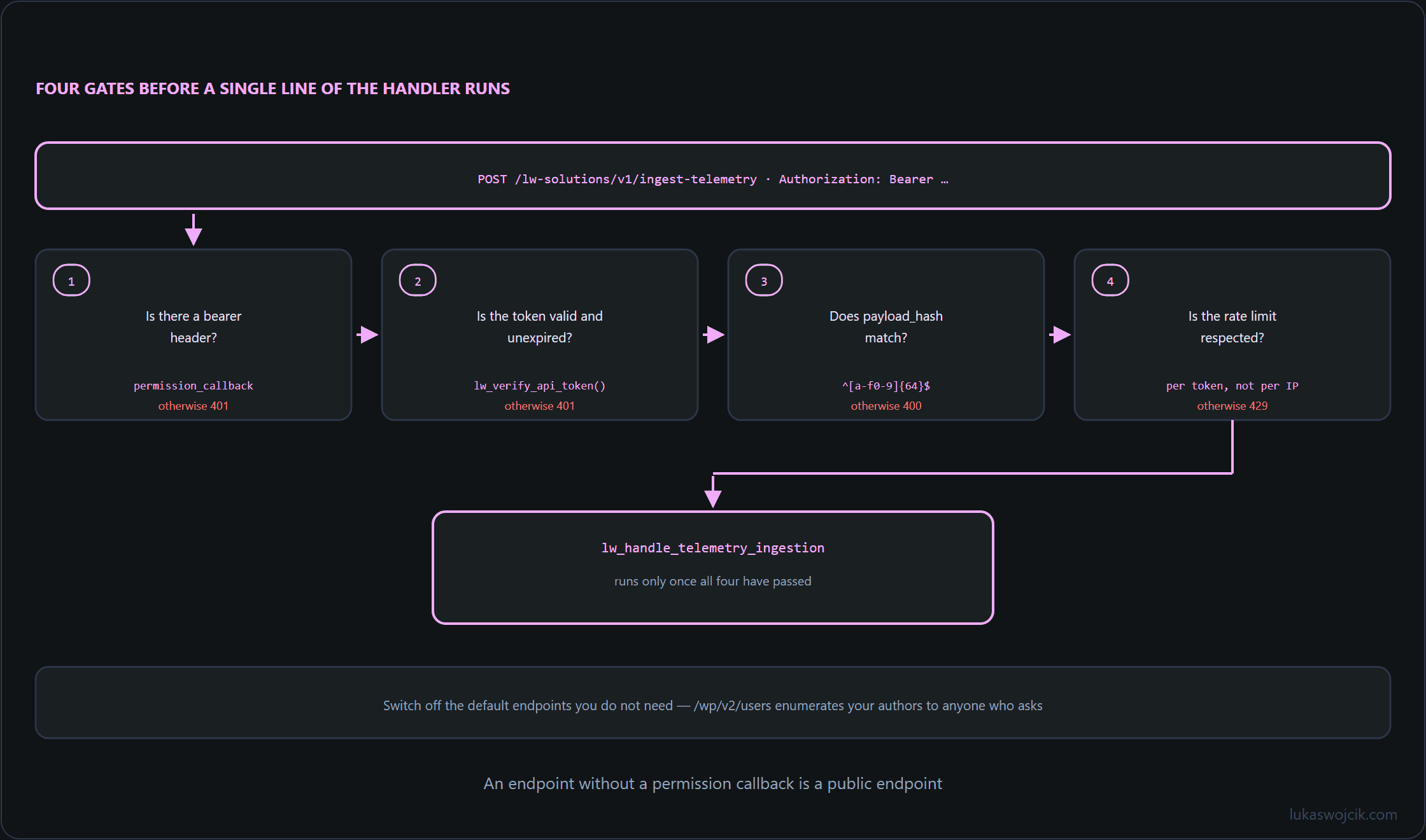
2. Architecting Custom REST API Endpoints with Minimal Attack Surface
To prevent unauthorized data exfiltration or unintended database manipulation, custom endpoints must be registered using register_rest_route() with explicit input validation, sanitization routines, and strict permission callbacks.
// Example: Secure custom REST API endpoint with strict OAuth / token validation
add_action('rest_api_init', function () {
    register_rest_route('lw-solutions/v1', '/ingest-telemetry', [
        'methods'             => 'POST',
        'callback'            => 'lw_handle_telemetry_ingestion',
        'permission_callback' => function ($request) {
            // Validate OAuth bearer token or custom JWT HMAC signature
            $auth_header = $request->get_header('authorization');
            if (!$auth_header || !str_starts_with($auth_header, 'Bearer ')) {
                return new WP_Error('rest_forbidden', 'Missing authorization token', ['status' => 401]);
            }
            $token = substr($auth_header, 7);
            return lw_verify_api_token($token); // Must return true or WP_Error
        },
        'args'                => [
            'payload_hash' => [
                'required'          => true,
                'type'              => 'string',
                'validate_callback' => function($param) {
                    return (bool) preg_match('/^[a-f0-9]{64}$/i', $param);
                }
            ]
        ]
    ]);
});
3. Hardening Best Practices for API Integrations
Exposing REST endpoints to external automation scripts necessitates several defensive engineering practices:
- Rate Limiting & Throttling: Implementing Redis-based or server-level request throttling prevents Denial-of-Service (DoS) vectors against resource-intensive endpoints.
- Payload Schema Enforcement: Relying on strict JSON schema validation within the endpoint registration rules ensures that malformed payloads are rejected at the REST server level before executing any PHP backend logic.
- Default Endpoint Disabling: Unused default routes (such as
/wp/v2/users) should be programmatically restricted or stripped from unauthenticated requests to prevent username enumeration.
Summary
Secure REST API architecture in WordPress requires abandoning over-privileged basic authentication in favor of scoped OAuth 2.0 token workflows. Combining rigorous permission_callback validations, strict regex-based argument checks, and dedicated integration routes ensures seamless automation without expanding the CMS attack surface.
Related articles