Local CI/CD for Raspberry Pi: Automating Docker Compose Deployments
Part 4 of 4 in the series Homelab on the Raspberry Pi
Contents
Managing containerized infrastructure on edge devices such as a Raspberry Pi often involves repetitive manual SSH sessions, manual image pulls, and direct execution of Docker Compose commands. Transitioning to a localized CI/CD pipeline automates the lifecycle of self-hosted services—including Home Assistant, Nextcloud, and custom Python automation scripts—by leveraging Git repositories, webhook listeners, and local deployment agents.
1. Architecture of Local GitOps for Edge Devices
Adopting a GitOps methodology shifts the source of truth for all infrastructure configurations from local filesystem modifications to a centralized Git repository. Rather than editing YAML files directly on the server, deployment definitions are maintained in version control.
- Declarative Configuration: Every service, network definition, and persistent volume is declared explicitly inside structured
docker-compose.ymlfiles stored in a Git repository. - Auditability & Rollbacks: Version control provides an immutable history of configuration changes, allowing immediate rollbacks to previous working states if an update causes service instability.
- Zero-Touch Edge Deployments: The edge server acts as a continuous consumer of repository states, eliminating the need for interactive shell access during routine updates.
2. Automated Pulls and Deployments via Webhook Listeners
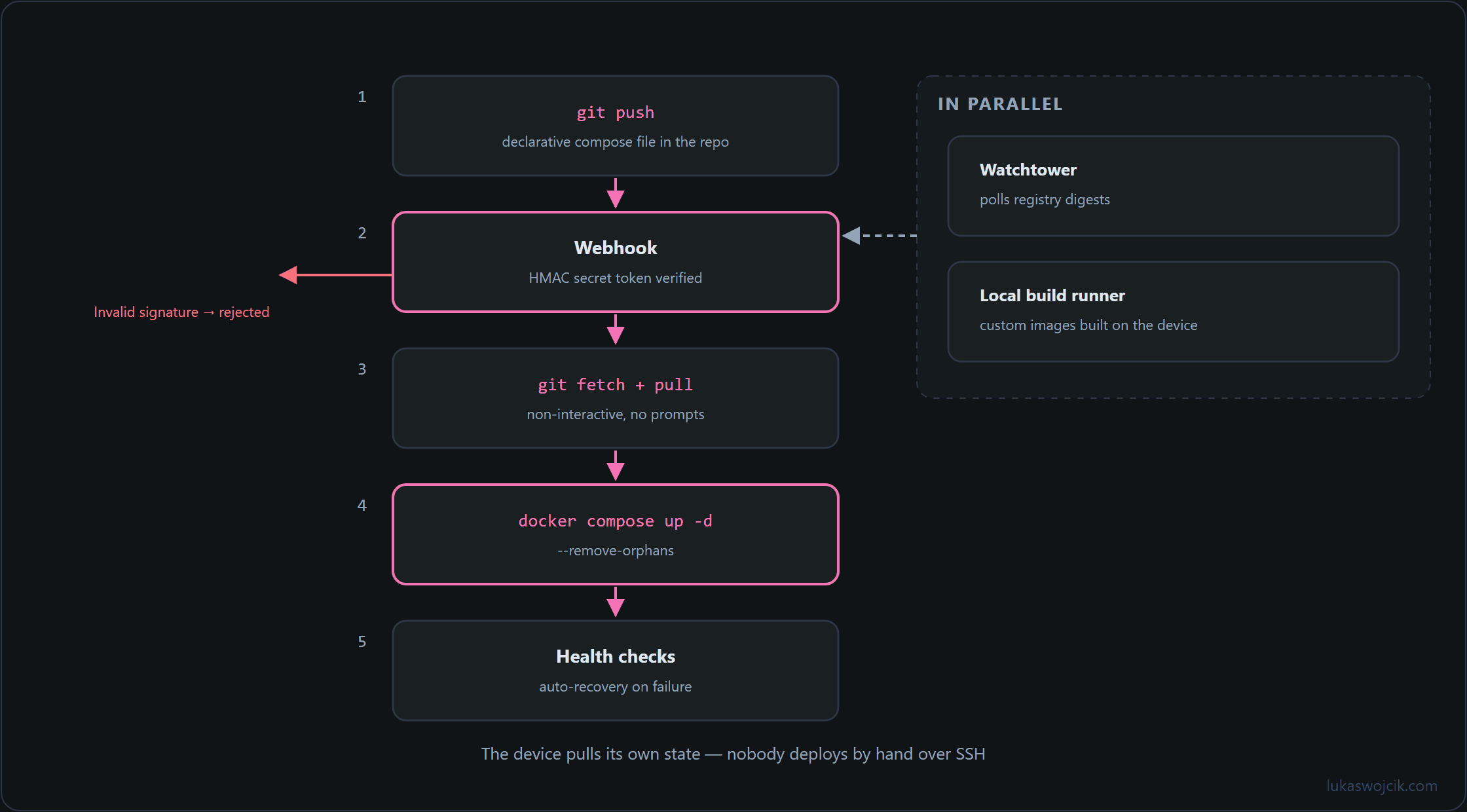
To eliminate manual SSH deployment commands, lightweight webhook servers (such as adnanh/webhook or dedicated automation daemons) can be deployed natively on the Raspberry Pi. These services listen for HTTP POST payloads triggered by code repository push events or CI/CD pipelines.
Webhook Execution Workflow
- Payload Verification: Incoming webhook requests are cryptographically validated using HMAC secret tokens to prevent unauthorized remote execution.
- Automated Git Fetch: Upon successful validation, the local daemon triggers a non-interactive pull sequence to update the local workspace from the remote branch.
- Stack Re-convergence: The orchestration daemon runs
docker compose up -d --remove-orphans, ensuring that only modified container images or updated service declarations are recreated while preserving active services.
3. Container Lifecycle Management without SSH
Continuous deployment architectures for self-hosted environments benefit from dedicated local agents that monitor container image registries and automate container recreation without external intervention.
- Automated Registry Polling: Tools of the Watchtower family periodically inspect base image digests for running containers and automatically restart services when newer builds become available. The original
containrrr/watchtowerrepository was archived in December 2025 and the older Ouroboros project is no longer developed; maintained community forks such asnickfedor/watchtowercontinue as drop-in replacements. - Local Build Automation: For custom Python scripts or microservices, local automation runners can execute Dockerfile builds directly on the ARM architecture, circumventing cross-compilation complexities.
- Health Checks & Auto-Recovery: Implementing native Docker health checks ensures that updated containers failing initial startup routines can be flagged immediately without requiring manual log inspections.
4. Security Considerations for Local CI/CD Pipelines
Exposing automated deployment endpoints within a home or enterprise network requires strict privilege separation. Webhook daemons should never run as root; instead, access to the Docker socket should be regulated through dedicated group permissions or read-only socket proxies. Furthermore, isolating deployment listeners within a restricted management VLAN ensures that build automation remains completely protected from untrusted client devices.
Sources
Homelab on the Raspberry Pi
- Supercharge the Raspberry Pi 4 & 5: How to Boot from an SSD
- Uninterruptible Power Supply (UPS) for Raspberry Pi 4 and 5: Top 5 Solutions for High-Load Setups
- Automated Docker Deployments on the Raspberry Pi: Local-First Dev Environments
- Local CI/CD for Raspberry Pi: Automating Docker Compose Deployments
Related articles