IEEE 802.1X RADIUS Authentication on UniFi Switches

Contents
Securing physical Ethernet ports is a critical requirement for enterprise network hardening. Without port-level access control, unauthorized devices connected to wall jacks or network switches can gain immediate access to internal corporate Virtual Local Area Networks (VLANs). Implementing IEEE 802.1X RADIUS authentication on Ubiquiti UniFi switches ensures that every wired endpoint must authenticate via MAC address or cryptographic certificate before network access is granted. Furthermore, RADIUS-based dynamic VLAN assignment automatically places devices into their designated network segment upon successful authentication.
1. Architectural Framework: 802.1X and Dynamic VLANs
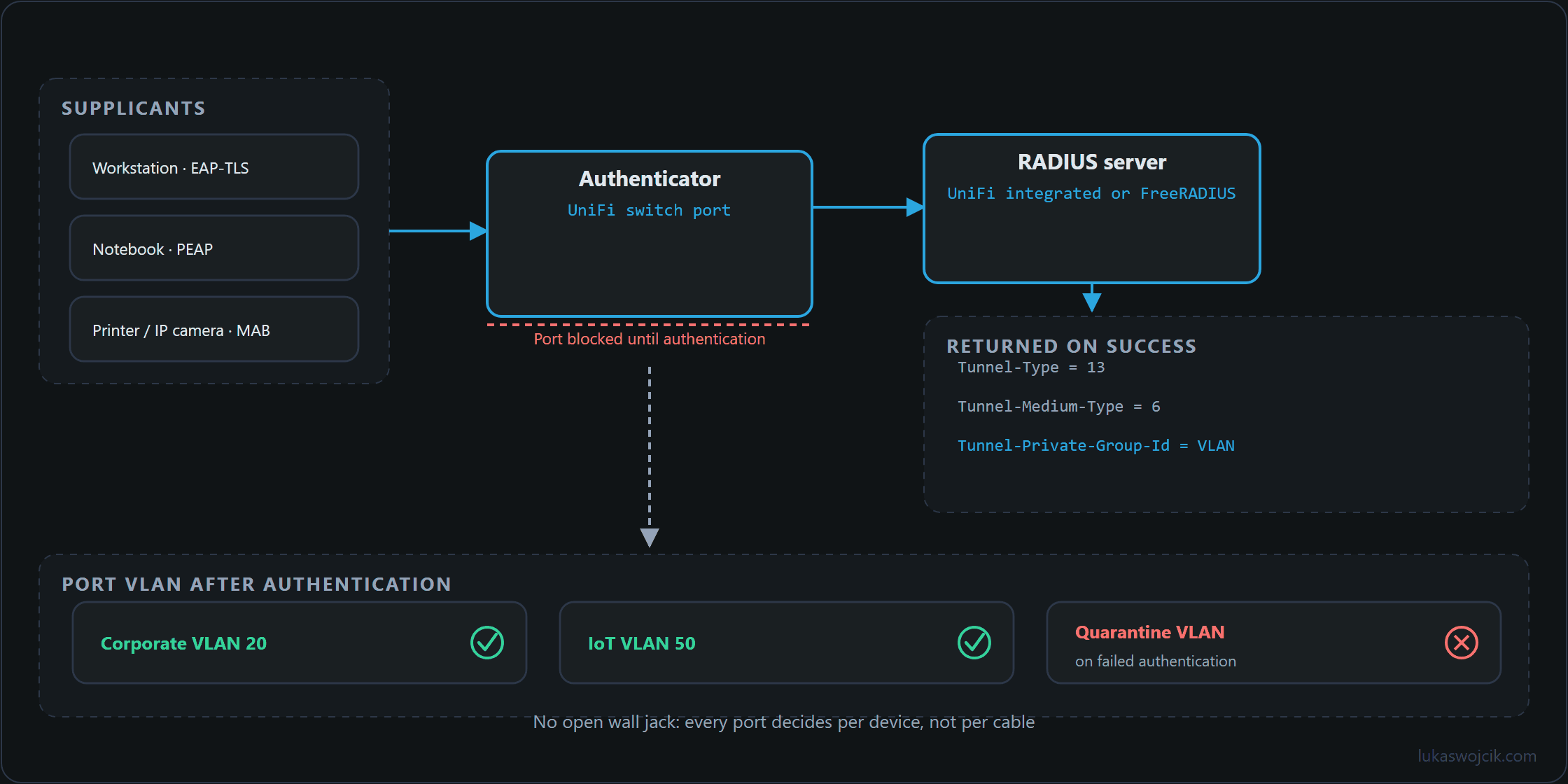
An IEEE 802.1X authentication infrastructure consists of three core entities:
- Supplicant: The client endpoint attempting to access the LAN (e.g., workstation, printer, IP camera).
- Authenticator: The UniFi network switch port that blocks traffic until identity verification is completed.
- Authentication Server: A RADIUS server (either the built-in UniFi RADIUS server on a gateway appliance or an external FreeRADIUS / Microsoft NPS instance) that validates credentials and returns specific authorization attributes.
For dynamic VLAN assignment, the RADIUS server must return three standardized IETF attributes within the Access-Accept packet:
Tunnel-Type=13(VLAN)Tunnel-Medium-Type=6(802 / Ethernet)Tunnel-Private-Group-Id=<VLAN ID>(e.g.,20for Corporate,50for IoT)
2. Step-by-Step RADIUS Server and Profile Setup in UniFi
To establish the authentication backend within the UniFi Network Application, the following configuration steps must be executed:
- RADIUS Server Activation: Navigate to
Settings > Profiles > RADIUS. If using an integrated UniFi Gateway (e.g., UDM-Pro, EFG), enable the built-in RADIUS server underSettings > Services > RADIUSand define a secure shared secret. Alternatively, input the IPv4 address, authentication port (default1812), accounting port (default1813), and shared secret of the external RADIUS server. - Enabling VLAN Assignment: In the RADIUS profile settings, check the box for
Enable RADIUS assigned VLAN for Wired Network. This allows switch ports to override their default native VLAN based on RADIUS responses. - Client Account or MAC Creation:
- For EAP-TLS / PEAP Authentication: Define user credentials or client certificates corresponding to corporate laptops.
- For MAC-Based Authentication (MAB): Register legacy devices (such as printers or CCTV cameras) by creating a RADIUS user where both the username and password equal the device MAC address in lowercase without colons or hyphens (e.g.,
001122334455), and assign the appropriate target VLAN ID.
3. Step-by-Step Switch Port Security Configuration
Once the RADIUS profile is active, switch ports must be hardened to enforce 802.1X control:
- Accessing Port Profiles: Open the UniFi Network Controller and navigate to
UniFi Devices. Select the target switch and open thePort Manager. - Selecting Target Ethernet Ports: Highlight the physical access ports connected to end-user office locations.
- Configuring 802.1X Control Mode: Scroll to the
802.1X Controlsection and select one of the following enforcement modes:Auto: Enforces standard 802.1X authentication. Supplicants must present valid EAP credentials or certificates.MAC-based: Automatically triggers MAC Authentication Bypass (MAB) for devices lacking 802.1X supplicant software.
- Fallback VLAN Configuration: Assign a restricted
Fallback VLAN(e.g., Guest or Quarantine VLAN) to isolate devices that fail authentication or do not respond to 802.1X EAPOL requests within the timeout period. - Applying Changes: Provision the switch to activate port-level enforcement immediately.
4. Summary & Architectural Value
What this tutorial achieves: The deployment of an enterprise-grade IEEE 802.1X port-based access control infrastructure on UniFi switches, incorporating both cryptographic certificate authentication and MAC Authentication Bypass (MAB) with automated VLAN segmentation.
Resulting added value: Unauthorized physical access to the local area network is completely eliminated. Unknown devices plugged into Ethernet ports are either blocked or automatically isolated in a quarantine VLAN. Concurrently, network administration is simplified: administrators no longer need to manually configure static VLANs on individual switch ports, as every verified endpoint is dynamically assigned to its correct network segment regardless of the physical port used.
Sources
Related articles