Building a RAG Knowledge Base with Google Cloud Vertex AI & BigQuery

Contents
Standard Large Language Models (LLMs) frequently suffer from hallucinations and outdated knowledge cutoffs when queried about internal corporate manuals, proprietary databases, or highly specialized technical documentation. Retrieval-Augmented Generation (RAG) overcomes these limitations by anchoring the generation process in a verified, enterprise-specific knowledge repository. Implementing a serverless RAG architecture using Google Cloud Vertex AI Embeddings and BigQuery Vector Search enables scalable semantic search across millions of document chunks without managing dedicated vector database infrastructure.
1. Architectural Framework: Serverless RAG on Google Cloud
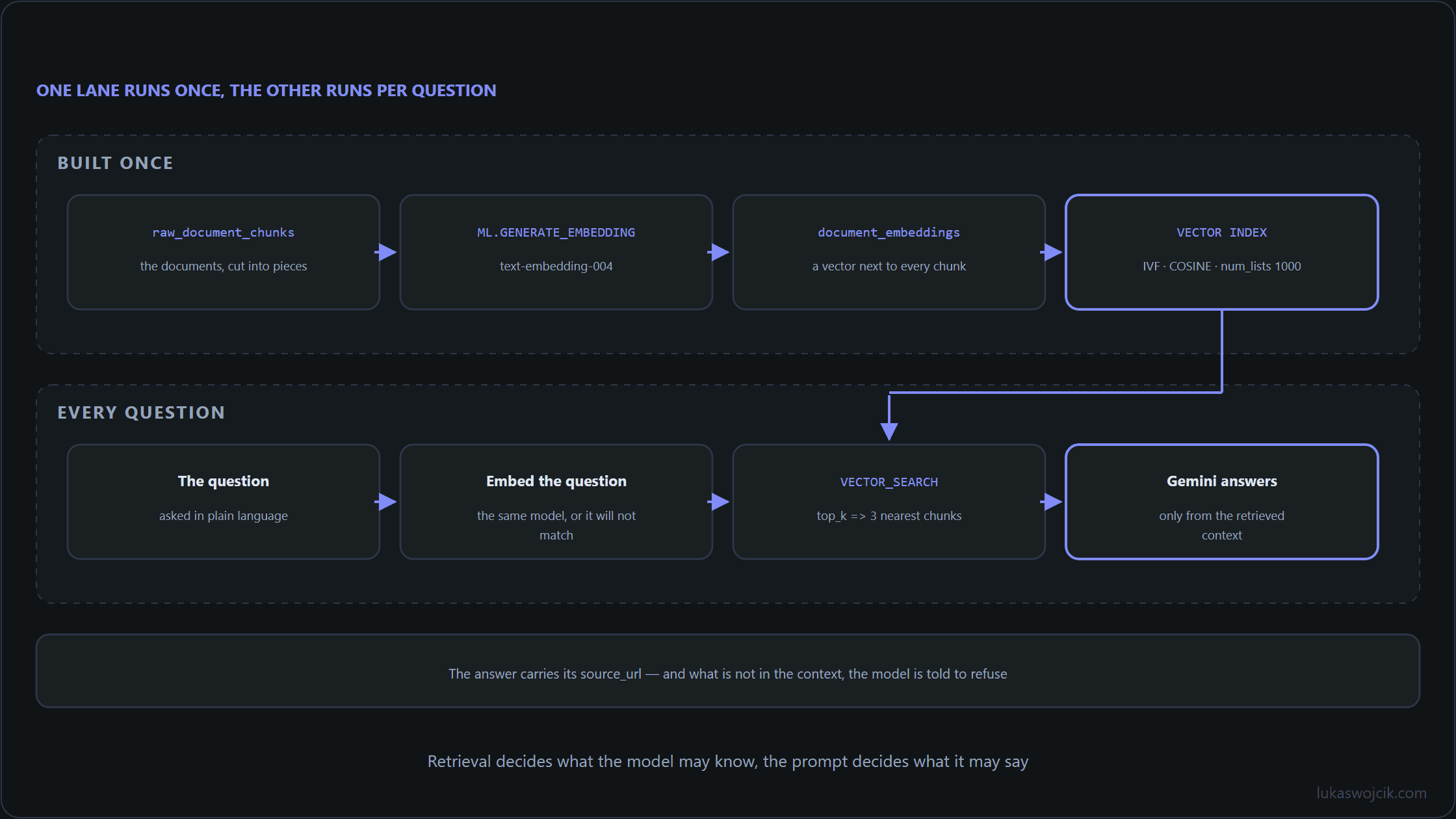
An enterprise-grade RAG pipeline on Google Cloud decouples document processing, semantic indexing, and answer generation across three managed services:
- Data Ingestion & Chunking: Raw PDF manuals, intranet wikis, and structured database tables are ingested into Google Cloud Storage (GCS) and split into semantic chunks of 500–1000 tokens with a 10% overlap.
- BigQuery ML Vector Indexing: Chunks are stored in BigQuery tables, where Vertex AI embedding models (e.g.,
text-embedding-004ortext-multilingual-embedding-002) generate high-dimensional vector representations directly via SQL. - Grounding with Vertex AI Gemini: When a query arrives, BigQuery Vector Search executes an approximate nearest neighbor (ANN) search to retrieve the top-k most relevant text chunks, which are then injected as factual context into the prompt of a Gemini model.
2. Step-by-Step Embedding Generation in BigQuery ML
To generate vector embeddings without exporting datasets to external Python scripts, a remote Vertex AI model connection must be established within BigQuery. The following SQL script connects the embedding model and transforms a table of raw document chunks into a vector-indexed knowledge repository:
-- 1. Create a remote connection to Vertex AI Embedding endpoint
CREATE OR REPLACE MODEL `enterprise_kb.vertex_embed_model`
REMOTE WITH CONNECTION `us-central1.vertex_ai_connection`
OPTIONS (
    ENDPOINT = 'text-embedding-004'
);

-- 2. Generate vector embeddings for raw corporate document chunks
CREATE OR REPLACE TABLE `enterprise_kb.document_embeddings` AS
SELECT
    doc_id,
    chunk_id,
    content_text,
    source_url,
    ml_generate_embedding_result AS content_embedding
FROM
    ML.GENERATE_EMBEDDING(
        MODEL `enterprise_kb.vertex_embed_model`,
        TABLE `enterprise_kb.raw_document_chunks`,
        STRUCT(TRUE AS flatten_json_output)
    )
WHERE
    content_text IS NOT NULL;
3. Step-by-Step Vector Indexing & Semantic Search
To ensure sub-second query performance across large document repositories, an Inverted File (IVF) vector index must be applied to the embedding column before running semantic similarity searches:
-- 1. Create an Inverted File (IVF) Approximate Nearest Neighbor index
CREATE VECTOR INDEX `kb_semantic_index`
ON `enterprise_kb.document_embeddings`(content_embedding)
OPTIONS (
    index_type = 'IVF',
    distance_type = 'COSINE',
    ivf_options = '{"num_lists": 1000}'
);

-- 2. Execute a vector similarity search to retrieve top-3 relevant chunks
SELECT
    base.doc_id,
    base.chunk_id,
    base.content_text,
    base.source_url,
    distance AS cosine_distance
FROM
    VECTOR_SEARCH(
        TABLE `enterprise_kb.document_embeddings`,
        'content_embedding',
        (
            SELECT ml_generate_embedding_result AS content_embedding
            FROM ML.GENERATE_EMBEDDING(
                MODEL `enterprise_kb.vertex_embed_model`,
                (SELECT 'What are the SLA escalation rules for critical server outages?' AS content_text),
                STRUCT(TRUE AS flatten_json_output)
            )
        ),
        top_k => 3,
        distance_type => 'COSINE'
    )
ORDER BY distance ASC;
4. Step-by-Step RAG Grounding Pipeline with Gemini
Once the relevant context chunks are retrieved via BigQuery Vector Search, a structured grounding prompt is assembled and transmitted to the Vertex AI Gemini API via Python:
from google.cloud import bigquery
import vertexai
from vertexai.generative_models import GenerativeModel

# Initialize Google Cloud clients
bq_client = bigquery.Client(project='enterprise-ai-project')
vertexai.init(project='enterprise-ai-project', location='us-central1')

def answer_query_with_rag(user_question):
    """Executes a BigQuery vector search and grounds Gemini responses."""

    # Query BigQuery Vector Search for top-3 semantic chunks
    search_query = f"""
        SELECT base.content_text, base.source_url
        FROM VECTOR_SEARCH(
            TABLE `enterprise_kb.document_embeddings`,
            'content_embedding',
            (
                SELECT ml_generate_embedding_result AS content_embedding
                FROM ML.GENERATE_EMBEDDING(
                    MODEL `enterprise_kb.vertex_embed_model`,
                    (SELECT @question AS content_text),
                    STRUCT(TRUE AS flatten_json_output)
                )
            ),
            top_k => 3,
            distance_type => 'COSINE'
        )
    """

    job_config = bigquery.QueryJobConfig(
        query_parameters=[bigquery.ScalarQueryParameter("question", "STRING", user_question)]
    )
    results = bq_client.query(search_query, job_config=job_config).result()

    # Format retrieved chunks into a factual context block
    context_block = "\n---\n".join([f"Source ({row.source_url}): {row.content_text}" for row in results])

    # Construct strict RAG prompt
    rag_prompt = f"""You are an authoritative enterprise technical assistant.
Answer the user's question ONLY using the facts provided in the Context below.
If the answer cannot be determined from the Context, state explicitly that information is unavailable.

Context:
{context_block}

Question:
{user_question}
"""

    model = GenerativeModel("gemini-1.5-pro")
    response = model.generate_content(rag_prompt)
    return response.text

if __name__ == '__main__':
    output = answer_query_with_rag("What are the SLA escalation rules for critical server outages?")
    print(output)
5. Summary & Architectural Value
What this tutorial achieves: The deployment of a serverless, highly scalable RAG knowledge base utilizing Google Cloud Vertex AI embeddings, BigQuery ML vector indexing, and Gemini generative grounding.
Resulting value: Domain-specific questions regarding internal corporate documentation, manuals, and databases are answered with high precision and verifiable source attribution. AI hallucinations are eliminated by strictly bounding answers to retrieved organizational facts. Furthermore, executing semantic indexing and vector searches directly within BigQuery removes the need for expensive, dedicated vector database clusters while maintaining enterprise-grade data security and IAM governance.
Related articles