

 English
 Deutsch
 Polski
Tutorial: Turning a Nested dataLayer Object Into Durable GTM Variables

Management Summary
The dataLayer is a shared list where a website places information for Google Tag Manager to read. In a shop, it carries details such as products, quantities and prices from the shopping process into measurement. Consistent structure helps the correct information reach reports even when baskets change. A product's position in a list is not its identity, and older entries can remain if replacement is incomplete. Clear product data prevents one basket's details from being mistaken for another's.
Contents
A data layer variable in Google Tag Manager (GTM) can return a number, a string, an object or an entire array. Dot notation selects a value inside nested data. The important distinction is between a field name and an array position: items.0 means the first item, not a particular product.
Durable variables need a documented data structure, complete event payloads and checks for missing values. An index is useful when position is the intended meaning; product identity requires an identifier.
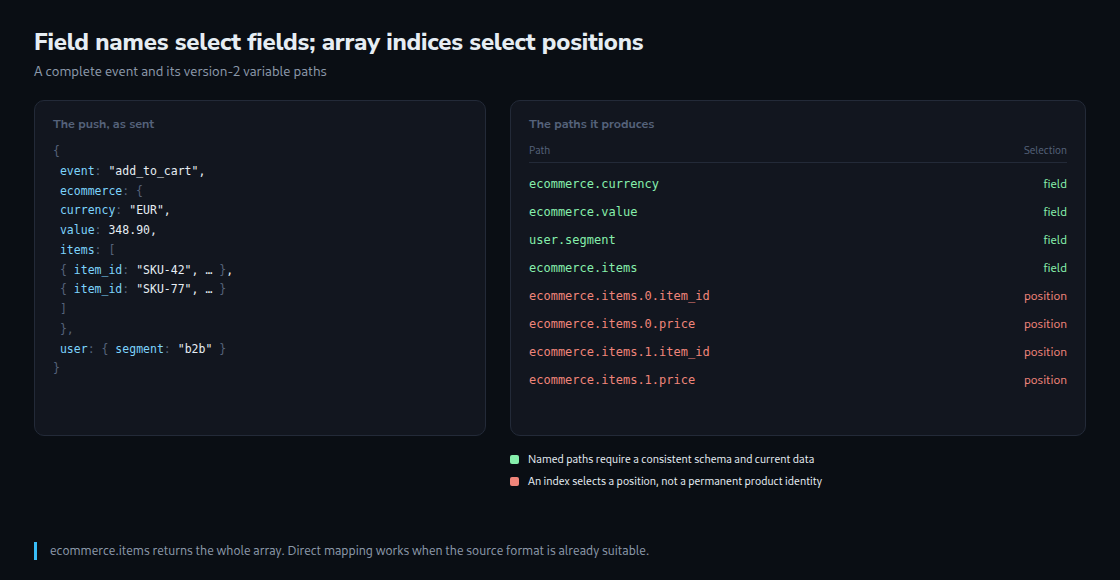
A complete add_to_cart event
The example adds two chairs and one table in a single action. The event contains those newly added items, rather than the whole existing cart. The value is 64.95 × 2 + 219.00 × 1 = 348.90, excluding shipping and tax. Currency is required when a value is supplied.
window.dataLayer = window.dataLayer || [];
dataLayer.push({ ecommerce: null });
dataLayer.push({
  event: "add_to_cart",
  ecommerce: {
    currency: "EUR",
    value: 348.90,
    items: [
      { item_id: "SKU-42", item_name: "Chair", price: 64.95, quantity: 2,
        item_category: "Furniture", index: 0 },
      { item_id: "SKU-77", item_name: "Table", price: 219.00, quantity: 1,
        item_category: "Furniture", index: 1 }
    ]
  },
  user: { logged_in: true, segment: "b2b" }
});
The initialization preserves an existing queue. Clearing ecommerce prevents old fields from leaking into this complete payload. The event name and related data belong in the same push. user.segment is an example of separate application state; a push alone does not configure a GA4 user property.
Reading nested fields with version 2
A Data Layer Variable named DLV - ecommerce.currency, with Data Layer Variable Name ecommerce.currency and version 2, returns EUR. The display name is arbitrary; the configured path determines the value. Further variables can use ecommerce.value, ecommerce.items and ecommerce. The last two return an array and an object, respectively.
Version 1 treats dots as literal characters in a key. Version 2 interprets dots as nested structure and can also expand dotted keys such as {"page.type":"pdp"}. A literal dotted key therefore does not automatically require version 1. Consistent nested objects avoid ambiguous mixtures of dotted keys and object properties.
Names are case-sensitive. A missing path without a configured default returns undefined. The resulting behavior depends on the tag and how it converts values into the outgoing request: a parameter may be omitted or converted, or custom code may fail. A missing value does not guarantee an empty parameter or a particular reporting difference.
Position is different from identity
| Path | Meaning |
|---|---|
ecommerce.currency | Event currency |
ecommerce.value | Event value |
user.segment | Application segment |
ecommerce.items | Whole item array |
ecommerce.items.0.item_id | ID of the first item |
ecommerce.items.1.price | Price of the second item; absent with only one item |
A named path remains useful only while the schema and event data remain consistent. An index path remains correct when the requirement is “the first item”; a change in order changes the product at that position. A product-specific lookup should search by item_id. The whole ecommerce.items array is normally the suitable input for GA4 ecommerce, with no custom mapping required when the source already follows the expected schema.
Message queue and merged model
window.dataLayer is an array of queued messages. GTM processes messages and maintains an internal data model. Version 2 can merge objects and arrays at every nested level: omitted fields or trailing items can survive from earlier messages. A shorter array does not reliably clear earlier entries.
Google’s GTM ecommerce examples clear the previous ecommerce object with dataLayer.push({ecommerce:null}) before sending a complete event. This pattern fits the example above. Integrations deliberately building state across several messages need a coordinated reset and payload design; blindly clearing an incomplete payload can remove required data.
Optional validation without invented defaults
The following Custom JavaScript variable, named JS - ecommerce valid, reads a version-2 Data Layer Variable named DLV - ecommerce. The function returns a boolean and leaves the source untouched.
The example contract is intentionally strict: EUR, numeric nonnegative prices and values, positive whole-number quantities, and a nonempty string in at least one of item_id or item_name. Every supplied identifier or name must be a nonempty string. GA4 also accepts an item with only a name; an ID is not universally mandatory. GA4 defaults an omitted quantity to 1, but this example requires an explicit quantity to expose missing shop data.
function () {
  var e = {{DLV - ecommerce}};
  function number(x) { return typeof x === "number" && isFinite(x); }
  function text(x) { return typeof x === "string" && x.trim() !== ""; }
  if (!e || e.currency !== "EUR" || !number(e.value) || e.value < 0 ||
      !Array.isArray(e.items) || !e.items.length) { return false; }
  var sum = 0;
  for (var i = 0; i < e.items.length; i++) {
    var a = e.items[i];
    if (!a || typeof a !== "object" || Array.isArray(a)) { return false; }
    if (!text(a.item_id) && !text(a.item_name)) { return false; }
    if (a.item_id !== undefined && !text(a.item_id)) { return false; }
    if (a.item_name !== undefined && !text(a.item_name)) { return false; }
    if (!number(a.price) || a.price < 0 ||
        !number(a.quantity) || a.quantity <= 0 ||
        Math.floor(a.quantity) !== a.quantity) { return false; }
    sum += a.price * a.quantity;
  }
  return isFinite(sum) && Math.abs(sum - e.value) < 0.005;
}
The comparison allows less than half a euro cent of floating-point difference. This is an example check for EUR, not a universal currency, discount or tax model. Free items with a genuine numeric price of 0 remain valid. Strings such as "64.95", malformed prices and zero quantities fail instead of silently becoming 0 or 1. Optional item fields remain available because the array is not rebuilt.
For the GA4 add_to_cart tag, a Custom Event trigger uses event name add_to_cart and the additional condition {{JS - ecommerce valid}} equals true. Event parameters map currency, value and items to the corresponding version-2 variables. The guard must be attached to the actual sending tag; merely returning undefined from a different variable does not stop a tag. Other triggers must not bypass the check.
Checking the selected event
In GTM preview, the same selected event provides three complementary views: the original message, the resulting data layer state and the resolved variables. Additional model fields can be intentional persistent state, not automatically a defect. Missing results can arise from timing, a clear, a wrong version, spelling or custom validation.
A useful test sequence covers two items, one item, changed order, a free item, a name-only item and malformed input. After a second shorter event, old products must not remain. The tag must fire once for valid input and remain blocked for invalid input. Tag Assistant and the outgoing GA4 request then verify the configured mapping; a unit test of the function alone cannot verify the container.
Questions and answers
What happens to a price with a decimal comma?
The validator rejects text, including "64,95". Numeric prices at the source are preferable. Any conversion of localized text requires a known locale and explicit validation; deleting dots indiscriminately would turn an English decimal price into a different amount. The expression Number(value) || 0 conceals invalid input and should not supply a financial default.
Should the custom variable push another message?
No. Variable evaluation can occur more than once. A pure function reads input and returns a result without modifying the queue or its items. A push inside a variable can create unexpected events or loops.
Related articles


