English
 Deutsch
 Polski
Plugin i18n: text domain, language packs and JavaScript

Management Summary
A translated WordPress site also needs the right language on buttons and labels added by extensions. The article explains how plugin translation works, using a reading-time display as an example. Text prepared by the server and text changed in the browser follow separate routes, so translating only one can leave mixed languages on the page. Matching translations and correct singular and plural forms make the interface understandable and consistent for German, English and Polish visitors.
Contents
- Text domain: the identifier for plugin strings
- PHP: translate strings and output text safely
- Plural forms: 1 minute, 2 minutes, 5 minutes
- Load translations when needed
- JavaScript: connect the build file and translations
- Find the correct JSON file
- Language packs from WordPress.org
- Create local translation files
- Checks and common mistakes
- Related articles and sources
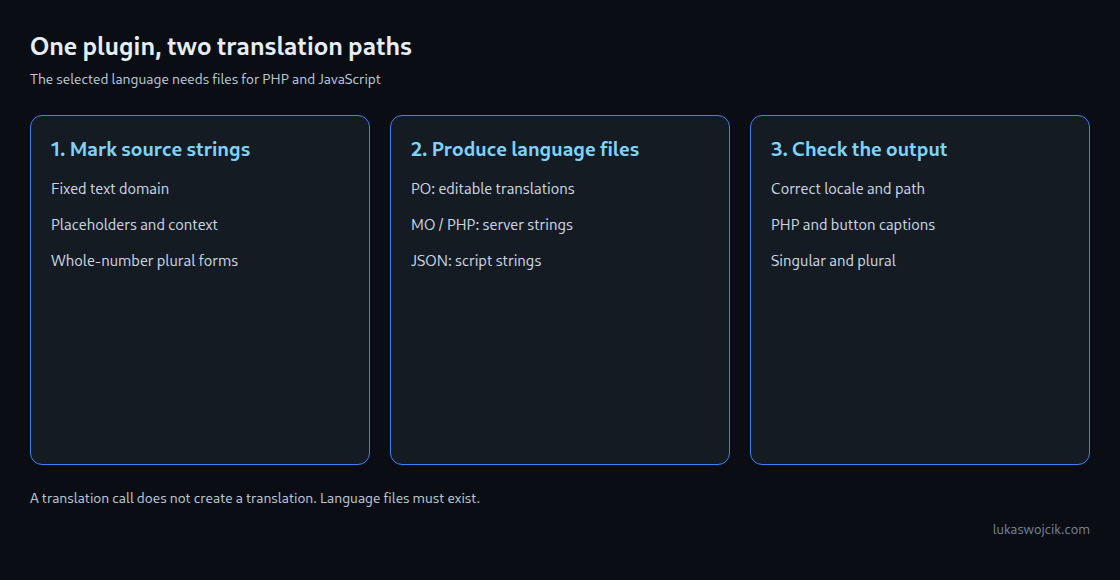
A translated WordPress interface does not automatically translate plugin text. A plugin needs marked source strings and matching translation files. PHP and JavaScript require different file formats. Both routes must work for a reading-time label and a button caption to appear in the same language.
The “LW Reading Time” example demonstrates both routes. The language follows the locale selected by WordPress or a multilingual extension. This does not automatically detect the preferred language of every visit. The example is a development template, not a verified published plugin.
Text domain: the identifier for plugin strings
A text domain assigns a string to the correct translation catalogue. For the directory name lw-reading-time, the identifier is also lw-reading-time. Translation calls contain that identifier as fixed text. A variable makes automatic extraction harder because extraction tools do not execute the PHP code.
The PHP header declares this identifier in Text Domain. Domain Path: /languages identifies the translation folder inside the plugin. The folder must exist. Text domains use lowercase letters and hyphens rather than spaces and underscores. Even common strings such as “Settings” use the plugin’s identifier; an incidental WordPress translation is not a reliable dependency.
PHP: translate strings and output text safely
The following main file adds an estimated reading time and a button to individual posts. Reading time counts whitespace-separated pieces of text, removes HTML and shortcodes, and assumes 200 words per minute. This remains an approximation. Invalid UTF-8 or a missing post leaves the output unchanged.
<?php
/**
 * Plugin Name:       LW Reading Time
 * Description:       Shows the estimated reading time above single posts.
 * Version:           1.0.0
 * Requires at least: 6.8
 * Requires PHP:      7.4
 * Author:            Lukas Wojcik
 * License:           GPL-2.0-or-later
 * License URI:       https://www.gnu.org/licenses/gpl-2.0.html
 * Text Domain:       lw-reading-time
 * Domain Path:       /languages
 *
 * @package LW_Reading_Time
 */

defined( 'ABSPATH' ) || exit;

const LW_READING_TIME_WORDS_PER_MINUTE = 200;

/**
 * Returns the estimated reading time of a post in whole minutes.
 *
 * @param WP_Post $post Post object.
 * @return int|null Minutes, at least 1; null for invalid text.
 */
function lw_reading_time_minutes( WP_Post $post ) {
	$text  = wp_strip_all_tags( strip_shortcodes( $post->post_content ) );
	$words = preg_split( '/\s+/u', trim( $text ), -1, PREG_SPLIT_NO_EMPTY );

	if ( false === $words ) {
		return null;
	}

	return max( 1, (int) ceil( count( $words ) / LW_READING_TIME_WORDS_PER_MINUTE ) );
}

/**
 * Prepends the reading time and a "mark as read" button to single posts.
 *
 * @param string $content Post content.
 * @return string
 */
function lw_reading_time_prepend( $content ) {
	if ( ! is_singular( 'post' ) || ! in_the_loop() || ! is_main_query() ) {
		return $content;
	}

	$post = get_post();
	if ( ! $post instanceof WP_Post ) {
		return $content;
	}
	$minutes = lw_reading_time_minutes( $post );
	if ( null === $minutes ) {
		return $content;
	}

	$label = sprintf(
		/* translators: %s: estimated reading time in minutes. */
		_n( 'Reading time: %s minute', 'Reading time: %s minutes', $minutes, 'lw-reading-time' ),
		number_format_i18n( $minutes )
	);

	$button = sprintf(
		'<button type="button" class="lw-reading-time__mark" data-post="%1$d">%2$s</button>',
		(int) $post->ID,
		esc_html__( 'Mark as read', 'lw-reading-time' )
	);

	return '<p class="lw-reading-time">' . esc_html( $label ) . ' ' . $button . '</p>' . $content;
}
add_filter( 'the_content', 'lw_reading_time_prepend' );

/**
 * Enqueues the front-end script and connects it to its translation files.
 */
function lw_reading_time_enqueue_script() {
	if ( ! is_singular( 'post' ) ) {
		return;
	}

	$asset_file = plugin_dir_path( __FILE__ ) . 'build/index.asset.php';
	if ( ! file_exists( $asset_file ) ) {
		return;
	}
	$asset = require $asset_file;

	wp_enqueue_script(
		'lw-reading-time',
		plugins_url( 'build/index.js', __FILE__ ),
		$asset['dependencies'],
		$asset['version'],
		array( 'in_footer' => true )
	);

	// Prefer this explicit directory for local sample JSON files; core can then fall back to language packs.
	wp_set_script_translations( 'lw-reading-time', 'lw-reading-time', plugin_dir_path( __FILE__ ) . 'languages' );
}
add_action( 'wp_enqueue_scripts', 'lw_reading_time_enqueue_script' );
__() returns translated text; _e() prints it directly. For visible HTML text, esc_html__() also protects the output: a less-than sign is treated as text rather than an HTML instruction. Corresponding esc_attr functions handle HTML attributes. The correct protection depends on the output location.
sprintf() inserts values into placeholders. The pattern stays fixed, for example Reading time: %s minute; the number is inserted afterwards. With multiple values, %1$s and %2$s allow translations to change the order. An adjacent translators: comment explains the placeholders. The example protects the complete assembled string with esc_html().
Plural forms: 1 minute, 2 minutes, 5 minutes
_n() receives two English source strings, the count and the text domain. The translation file selects the correct language form. For the whole numbers used here, English and German have two gettext forms and Polish has three. The Polish expression distinguishes 1, numbers such as 2 and 22, and numbers such as 5, 12 and 21.
| Minutes | English | German | Polish (form) |
|---|---|---|---|
| 1 | Reading time: 1 minute | Lesezeit: 1 Minute | Czas czytania: 1 minuta (0) |
| 2 | Reading time: 2 minutes | Lesezeit: 2 Minuten | Czas czytania: 2 minuty (1) |
| 5 | Reading time: 5 minutes | Lesezeit: 5 Minuten | Czas czytania: 5 minut (2) |
| 12 | Reading time: 12 minutes | Lesezeit: 12 Minuten | Czas czytania: 12 minut (2) |
| 21 | Reading time: 21 minutes | Lesezeit: 21 Minuten | Czas czytania: 21 minut (2) |
| 22 | Reading time: 22 minutes | Lesezeit: 22 Minuten | Czas czytania: 22 minuty (1) |
The singular therefore also contains a placeholder. A hard-coded “One minute” is unsuitable for languages whose first form also applies to other numbers. This rule covers whole minutes here. Fractions such as 1.5 minutes need separate grammatical handling.
Load translations when needed
For plugins hosted on WordPress.org, WordPress has loaded translations on first use since version 4.6. Since 6.8, the same applies to plugins distributed elsewhere with suitable Text Domain and Domain Path headers. With those minimum versions, an additional load_plugin_textdomain() call is unnecessary.
This does not mean translations should be requested while the main file is first read. WordPress 6.7 added a developer diagnostic for early loading. The inspected code checks whether after_setup_theme is running or has run; the diagnostic recommends init or later. Requesting a translation when the text is actually needed is usually clearer than a translated global constant.
<?php
// Too early: runs while WordPress loads the plugin file, before after_setup_theme and init.
// A known domain path can trigger this diagnostic even without a translation file.
// _load_textdomain_just_in_time() via _doing_it_wrong().
define( 'LW_READING_TIME_TITLE', __( 'Reading time', 'lw-reading-time' ) );

// Better: translate at the moment the text is needed (init or later).
function lw_reading_time_title() {
	return __( 'Reading time', 'lw-reading-time' );
}

// Plugin metadata without translating it: third parameter $translate = false.
function lw_reading_time_version() {
	if ( ! function_exists( 'get_plugin_data' ) ) {
		require_once ABSPATH . 'wp-admin/includes/plugin.php';
	}
	$data = get_plugin_data( __FILE__, false, false );

	return $data['Version'];
}
A known translation path can trigger the diagnostic before a language file is opened. An English test without translation files therefore does not rule out this problem. get_plugin_data(..., false, false) reads metadata without translation, which is suitable for a version number.
An explicit loading call can still be necessary for older supported WordPress versions or different paths. Since WordPress 6.7, that call registers the path and delegates actual loading to the on-demand mechanism. Later registration does not fix a translation request that already happened too early.
JavaScript: connect the build file and translations
The example uses a classic WordPress script. @wordpress/scripts builds the delivered build/index.js from src/index.js. The generated index.asset.php describes dependencies such as wp-i18n. The PHP code passes this list when enqueueing the script.
{
  "name": "lw-reading-time",
  "version": "1.0.0",
  "private": true,
  "license": "GPL-2.0-or-later",
  "scripts": {
    "build": "wp-scripts build",
    "start": "wp-scripts start"
  },
  "devDependencies": {
    "@wordpress/scripts": "36.0.0"
  },
  "engines": {
    "node": "^22.22.2 || ^24.15.0 || >=26.0.0"
  }
}
The package is pinned to 36.0.0 here. Its Node requirement is ^22.22.2 || ^24.15.0 || >=26.0.0: supported releases include the specified 22.x and 24.x ranges and versions from 26, not every higher major version. The lockfile created during installation also records resolved dependencies. Later builds can reuse that file with npm ci.
// src/index.js
import { _n, _x, sprintf } from '@wordpress/i18n';

const STORAGE_KEY = 'lwReadingTimeRead';

function getReadPosts() {
	try {
		const stored = JSON.parse( window.localStorage.getItem( STORAGE_KEY ) );
		return new Set( Array.isArray( stored ) ? stored.filter( ( id ) => Number.isSafeInteger( id ) && id > 0 ) : [] );
	} catch ( error ) {
		return new Set();
	}
}

const readPosts = getReadPosts();

function saveReadPosts() {
	try {
		window.localStorage.setItem( STORAGE_KEY, JSON.stringify( [ ...readPosts ] ) );
	} catch ( error ) {
		// The state remains available on this page only when storage fails.
	}
}

function showRead( button ) {
	button.disabled = true;
	button.textContent = _x(
		'Read',
		'status of a post after it was marked as read',
		'lw-reading-time'
	);
	button.title = sprintf(
		/* translators: %d: number of locally known posts marked as read. */
		_n(
			'%d post marked as read locally',
			'%d posts marked as read locally',
			readPosts.size,
			'lw-reading-time'
		),
		readPosts.size
	);
}

document.querySelectorAll( '.lw-reading-time__mark' ).forEach( ( button ) => {
	const postId = Number( button.dataset.post );
	if ( ! Number.isSafeInteger( postId ) || postId <= 0 ) {
		button.disabled = true;
		return;
	}
	if ( readPosts.has( postId ) ) {
		showRead( button );
	}
	button.addEventListener( 'click', () => {
		for ( const id of getReadPosts() ) {
			readPosts.add( id );
		}
		readPosts.add( postId );
		saveReadPosts();
		showRead( button );
	} );
} );
_x() adds context: “Read” describes a completed state here, not an instruction to start reading. The button only records a local read marker. After reloading, posts with valid saved numbers are marked as read again. Duplicate and invalid values are discarded.
If browser storage is blocked or full, the state remains available only on the current page. The example does not synchronise accounts or devices and does not fully resolve simultaneous writes from multiple tabs. The count describes locally known markers, not confirmed reading activity. Merging the latest saved snapshot on click reduces conflicts but does not guarantee conflict-free storage.
Find the correct JSON file
wp_set_script_translations() connects the registered script handle to translations. A handle is the name WordPress uses to manage the script. The call must follow registration. The example explicitly selects languages/ as the first search location for local JSON files, making the test’s lookup order clear.
For the normal plugin file build/index.js, the filename combines the text domain, locale and MD5 of the relative path. That value is dfbff627e6c248bcb3b61d7d06da9ca9. Renaming a file can therefore require a differently named translation file. Custom paths or filters can change lookup behaviour.
The inspected WordPress code first checks the explicit folder for a filename containing the handle, then for the path-hash filename. The appropriate general language folder follows. Without an explicit path, WordPress first uses the folder resolved for the text domain. PHP language files and JavaScript JSON files therefore need separate checks.
Language packs from WordPress.org
translate.wordpress.org collects strings from published plugin code. The first language pack for a locale requires at least 90 percent of the relevant code strings to be translated and approved. Readme text does not count towards that percentage. Once a language pack exists, further changes can trigger new packages even if coverage falls below 90 percent again.
A suggestion is not yet an approved translation. Responsible language or project editors review entries. A language pack supplies PHP files and the required script JSON files. WordPress stores plugin language packs in wp-content/languages/plugins/. A translation function alone guarantees neither a completed language pack nor its installation.
Create local translation files
A POT file lists translatable source strings. A PO file adds translations for one language. This editable file produces runtime MO files, optionally .l10n.php, and JSON. Since WordPress 6.5, the system can use a PHP translation file instead of MO.
# Run in a separate plugin development directory, not on the live site.
# The JSON command below follows i18n-command 3.0.1 (requires WP-CLI 3.x).
# Older command versions may modify PO input; keep a separate source backup.

# 1. Build the script: creates build/index.js and build/index.asset.php (dependency "wp-i18n").
npm install --engine-strict
npm run build

# Keep package-lock.json after installation; use npm ci for later builds.

# 2. Extract all strings from PHP and from the built JavaScript into a template.
wp i18n make-pot . languages/lw-reading-time.pot --exclude=src

# 3. Copy the template to languages/lw-reading-time-pl_PL.po (and -de_DE.po),
#    translate it in Poedit or a text editor, then compile the runtime files.
wp i18n make-mo languages
wp i18n make-php languages
wp i18n make-json languages

# Result for Polish:
# languages/lw-reading-time-pl_PL.po
# languages/lw-reading-time-pl_PL.mo
# languages/lw-reading-time-pl_PL.l10n.php
# languages/lw-reading-time-pl_PL-dfbff627e6c248bcb3b61d7d06da9ca9.json   (md5 of "build/index.js")
The JSON step follows i18n-command 3.0.1, which requires WP-CLI 3.x. This version has no --no-purge option and does not rewrite the PO file during JSON export. Older tutorials describe different behaviour. The installed version and its help must therefore match the commands; editable PO files still belong in backups or version control.
--exclude=src prevents source and build files from contributing duplicate strings with different file paths in this example. PO source references must match the delivered JavaScript file. The following Polish example shows all three plural forms; line numbers are illustrative and change during editing.
# languages/lw-reading-time-pl_PL.po (excerpt)
msgid ""
msgstr ""
"Language: pl_PL\n"
"Content-Type: text/plain; charset=UTF-8\n"
"Plural-Forms: nplurals=3; plural=(n == 1) ? 0 : ((n % 10 >= 2 && n % 10 <= 4 && (n % 100 < 12 || n % 100 > 14)) ? 1 : 2);\n"
"X-Domain: lw-reading-time\n"

#. translators: %s: estimated reading time in minutes.
#: lw-reading-time.php:50
msgid "Reading time: %s minute"
msgid_plural "Reading time: %s minutes"
msgstr[0] "Czas czytania: %s minuta"
msgstr[1] "Czas czytania: %s minuty"
msgstr[2] "Czas czytania: %s minut"

#: lw-reading-time.php:57
msgid "Mark as read"
msgstr "Oznacz jako przeczytany"

#: build/index.js:1
msgctxt "status of a post after it was marked as read"
msgid "Read"
msgstr "Przeczytany"

#. translators: %d: number of locally known posts marked as read.
#: build/index.js:2
msgid "%d post marked as read locally"
msgid_plural "%d posts marked as read locally"
msgstr[0] "%d wpis oznaczony jako przeczytany lokalnie"
msgstr[1] "%d wpisy oznaczone jako przeczytane lokalnie"
msgstr[2] "%d wpisów oznaczonych jako przeczytane lokalnie"
Checks and common mistakes
Nine isolated PHP checks cover German and Polish characters, non-breaking spaces, invalid UTF-8 and a missing post, among other cases. Eighteen JavaScript checks cover saved markers, invalid values, repeated clicks and blocked storage. WordPress functions, translations and browser objects were replaced by test doubles. These checks do not establish a complete WordPress run, npm build or language-pack import.
PHP is translated but JavaScript remains English. What needs checking?
The script handle, registration, JSON filename, locale and path must agree. A PO reference to src instead of build can produce the wrong hash. Translated entries and the delivered build file must also exist.
Must directory plugins include language files?
After translations are available and a language pack has been generated, WordPress can obtain the files. Local files remain useful before the first package or for plugins distributed outside the directory. Missing translations otherwise fall back to the source text.
Is an English test without an error enough?
No. Real German and Polish files, singular and plural forms, and both PHP and JavaScript output need testing. An error-free run does not establish that the correct translation was loaded.
Related articles and sources
- Plugin Check
- Readme and plugin header
- Script handles
- Plugin Handbook: plugin internationalization
- Plugin Handbook: Localization
- Block Editor Handbook: Internationalization
- Code Reference: __()
- _e()
- _x()
- _n()
- esc_html__()
- Code Reference: load_plugin_textdomain()
- wp_set_script_translations()
- Make WordPress Core: I18N Improvements in 4.6
- Make WordPress Core: JavaScript i18n support in WordPress 5.0
- Make WordPress Core: I18N Improvements in 6.5 (Performant Translations)
- Make WordPress Core: Internationalization improvements in 6.7
- Make WordPress Core: Internationalization improvements in 6.8
- Meta Handbook: Translations
- Polyglots Handbook: Plugin/Theme Authors Guide
- WP-CLI: wp i18n make-pot
- make-json
- make-php
- make-mo
- wordpress-develop, branch 7.1: wp-includes/l10n.php
- script-modules.php
- GlotPress: locales.php (plural rules)
- translate.wordpress.org: Akismet project, Polish export
- Plugin Check 2.1.0
- @wordpress/scripts
- @wordpress/i18n
- WordPress Coding Standards: EscapeOutputSniff
- WordPress Releases
- i18n-command 3.0.1: MakeJsonCommand
- @wordpress/scripts 36.0.0: package.json
Related articles