English
 Deutsch
 Polski
Web Infrastructure Hardening: Controlling Third-Party Scripts via Content Security Policy (CSP)

Management Summary
Content Security Policy, or CSP, is a set of website rules telling the browser which sources and programs it may load. It is used to limit unwanted code and some attacks that insert malicious content into a page. This is especially relevant when a website includes services from several outside providers. The rules must allow essential features while restricting unnecessary access. CSP is an additional protective layer: an allowed program can still misuse data, so approval of a source is not proof of trustworthiness.
Jump to the interactive example ↓
Contents
What CSP protects and where protection ends
A Content Security Policy (CSP) defines which resources a browser may load and which scripts may execute for a document. Cross-site scripting means that injected code runs in a website’s page. A CSP makes some of these attacks harder. Allowed JavaScript still has access to the document, however. A compromised library on an allowed origin is not identified merely because a CSP exists.
Escaping converts special characters so that text is not interpreted as code. Input validation checks whether submitted values meet expected rules. CSP supplements these measures and checks of the external libraries used by the site. A host allowlist names permitted source servers. It does not verify that each downloaded file is unchanged and trustworthy, or provide consent. Malicious scripts may still copy form entries (form skimming) or send data to allowed destinations. Page CSP is also not a reliable barrier against privileged browser extensions: Chrome separates isolated content scripts from the main world, where the page policy applies.
1. Inventory of actual dependencies
The inventory covers scripts, styles, images, fonts, frames and connections after interaction. Relevant variations include page type, language, login, consent and form flows. A tag manager can load additional destinations, so its host alone is not a complete dependency list. Matomo Cloud requires the actual instance URLs rather than a generic matomo.cloud permission.
‘self’ means the same origin, including scheme, host and port, not every subdomain or the same physical server. default-src provides a fallback for certain fetch directives, but not base-uri, form-action or frame-ancestors. connect-src governs browser connections such as fetch, XHR, sendBeacon and WebSocket. Browser CSP does not control onward requests from a server-side GTM container to advertising platforms.
2. An explicitly non-blocking starting policy
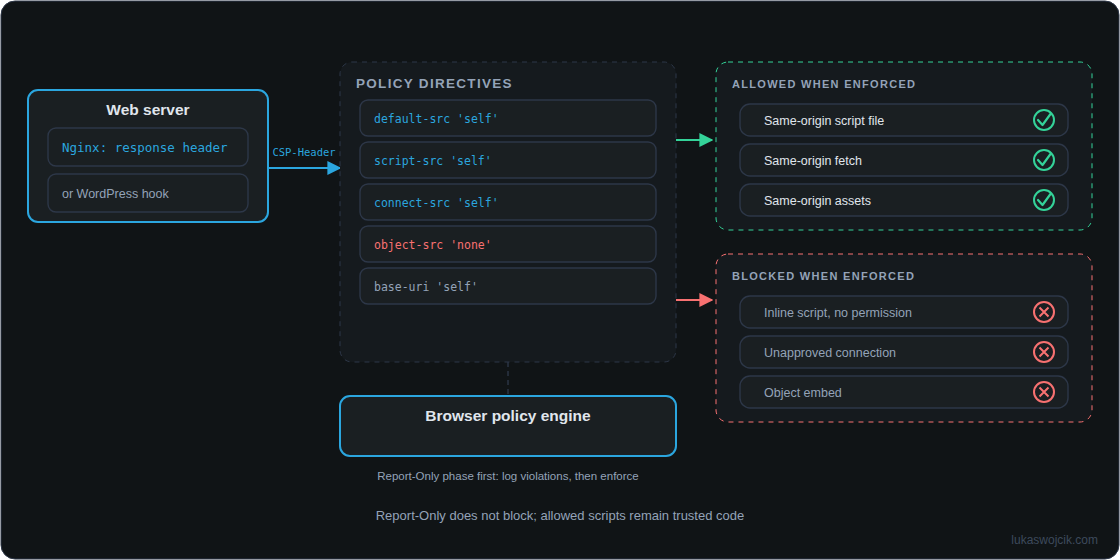
Each directive is a rule for a particular resource or action. For example, script-src controls scripts, form-action controls form submission destinations, and frame-ancestors controls which sites may embed the page. The following inventory policy is a Report-Only starting point for a test environment. Inline scripts and styles are written directly in the HTML instead of loaded as separate files. These and third-party resources have not yet been permitted. A typical WordPress site will therefore generate violations. This is not a production-ready policy without adaptation.
default-src 'self';
script-src 'self';
style-src 'self';
img-src 'self' data:;
font-src 'self';
connect-src 'self';
frame-src 'none';
object-src 'none';
base-uri 'self';
form-action 'self';
frame-ancestors 'self';
Delivered as Content-Security-Policy-Report-Only, the policy reports detected violations without blocking because of that policy. Any existing enforcing CSP still applies. Once required resources and flows have been checked, the agreed policy can be activated as Content-Security-Policy. ‘unsafe-inline’ broadly permits inline scripts again and does not replace deliberate authorization of individual scripts.
3. Responsibility for header delivery
An HTTP response header carries instructions or information alongside the page content. Nginx can deliver a static policy in such a header. The following fragment belongs in the appropriate existing server or location context; TLS, proxying, PHP and other security headers remain part of the complete configuration. The header accompanies the response and is then evaluated by the browser. This neither prevents PHP execution nor detects attacks before PHP runs.
add_header Content-Security-Policy-Report-Only "default-src 'self'; script-src 'self'; style-src 'self'; img-src 'self' data:; font-src 'self'; connect-src 'self'; frame-src 'none'; object-src 'none'; base-uri 'self'; form-action 'self'; frame-ancestors 'self';" always;
Before a planned reload, nginx -t checks the complete configuration. A failed check must prevent the reload. The fragment passed syntax validation in a separate minimal configuration; that does not validate an existing production server configuration.
sudo nginx -t && sudo systemctl reload nginxUnder default add_header inheritance, a child context with its own add_header lines stops inheriting the parent directives. always changes the covered response statuses, not inheritance. A shared include can keep relevant contexts consistent. Nginx 1.29.3 also introduced add_header_inherit merge; using that option requires a supporting version and checks for unintended duplicate headers.
Where Nginx configuration is unavailable, a small site-specific WordPress plugin can add the Report-Only header to regular frontend responses. This is an alternative delivery path, not an automatic Nginx fallback. The example is not tied to WordPress 7.0.2 and does not automatically cover administration, login, REST or cache files served directly.
<?php
/** Plugin Name: Example CSP Report-Only */
add_action('send_headers', static function () {
    if (is_admin() || headers_sent()) {
        return;
    }
    $policy = "default-src 'self'; script-src 'self'; style-src 'self'; img-src 'self' data:; font-src 'self'; connect-src 'self'; frame-src 'none'; object-src 'none'; base-uri 'self'; form-action 'self'; frame-ancestors 'self';";
    header('Content-Security-Policy-Report-Only: ' . $policy);
});
The send_headers hook can add outgoing headers. Prior output and upstream caches require attention. Multiple enforcing CSP headers apply together; permission in one does not override a restriction in another. Actual headers must therefore be checked across CDN, reverse proxy, web server and application.
4. Authorizing inline scripts with a nonce or hash
A nonce is a cryptographically random, unpredictable value for each new HTML response. The header and explicitly trusted script elements receive the same value. A WordPress action nonce is unsuitable for this purpose. A blanket HTML filter that marks every script could also authorize injected code. Caching and HTML generation must coordinate nonce handling.
The following standalone PHP document demonstrates the relationship; it is not a complete WordPress patch. no-store prevents deliberate reuse of a cached response in this example. A real application must pass the nonce to every required trusted script deliberately.
<?php
$nonce = base64_encode(random_bytes(16));
header("Content-Security-Policy: default-src 'none'; script-src 'nonce-$nonce'; base-uri 'none'; form-action 'none'; frame-ancestors 'none'");
header('Cache-Control: no-store');
header('Content-Type: text/html; charset=utf-8');
?>
<!doctype html><html lang="en"><meta charset="utf-8">
<title>Nonce example</title><p id="result">Pending</p>
<script nonce="<?= htmlspecialchars($nonce, ENT_QUOTES, 'UTF-8') ?>">
document.getElementById('result').textContent = 'Allowed script ran';
</script></html>
A hash is a calculated fingerprint of the script text. Hashes suit precisely known script contents: changes to content or whitespace can change the hash. A nonce on a script element does not authorize inline event attributes such as onclick. ‘strict-dynamic’ can delegate trust to dynamically loaded scripts and reduces the role of host lists in supporting browsers; this delegation requires explicit review. Google’s GTM guidance documents nonce-aware embedding and additional directives for particular tag features.
5. Separate checks of reports and functionality
The browser console is the message view in developer tools. Without a reporting destination, it is a local diagnostic source. Reporting-Endpoints and report-to can target a previously configured HTTPS collector, with report-uri as an older compatibility path where needed. Modern reporting and report-uri use different JSON formats. Delivery is not guaranteed: browser support, blockers and network failures limit coverage. URL data and possible script samples in reports require careful processing and bounded retention.
Reporting-Endpoints: csp="https://reports.example.com/csp"
Content-Security-Policy-Report-Only: default-src 'self'; report-to csp; report-uri https://reports.example.com/csp-legacy
These addresses are placeholders requiring actual collectors. A reported source should not automatically be allowed. Acceptance checks cover document response headers, redirects, error pages, cache hits, forms, media, consent changes and tracking requests. HTTP 200 alone proves neither correct event collection nor correct processing by the destination.
Questions and answers
Does connect-src prevent every data leak?
No. The directive controls particular connection types, not every output route or permitted destination. Other directives cover images and forms, for example. Already authorized code, compromised first-party endpoints and faulty application logic remain separate risks.
Can Report-Only be enabled through a meta element?
No. Report-Only uses an HTTP response header. Even enforcing CSP in a meta element does not support every header feature, including frame-ancestors. The actual document response header is the basis for a consistent deployment.
Sources
Learn by trying
Which scripts does this CSP allow?
Build a small script-src rule. The example page shows what would be allowed for four fictional scripts.
Learning model of one script-src directive. It does not load or run the fictional scripts. Excludes strict-dynamic, hashes, fallbacks and multiple policies. A real nonce must be unpredictable and fresh per response; demo is only a placeholder. Allowed third-party scripts still require trust.
This module runs in your browser and does not send or store your input.
Learn by trying
One minute: can you spot the mistake?
script-src 'self' 'nonce-demo' 'unsafe-inline': may an inline script without a matching nonce run in this model?
In this CSP3 rule, unsafe-inline is ignored because of the nonce source. An inline script needs the matching nonce. self alone does not permit inline scripts.
Terms you can try
Explore
Terms you can try
A short explanation and a small experiment make each term easier to understand.
Nonce
In CSP, a random value renewed for each response can permit a particular script. The script’s nonce must match the header value.
These exercises calculate in your browser. The learning module does not send your answers.
Related articles