English
 Deutsch
 Polski
Tutorial: Sizing a PoE Budget Before the Switch Is Ordered

Management Summary
Power over Ethernet, or PoE, carries electricity and data through one network cable, making cameras and phones easier to install without separate power leads. A network switch must supply enough power both to each connection and across all devices together. The article explains why average consumption alone is an unreliable buying guide: devices may reserve more power or need more at night, during heating or startup. Planning capacity before purchase avoids equipment that connects everything but cannot power it reliably.
Jump to the interactive example ↓
Contents
Power over Ethernet (PoE) carries electrical power and network data over the same cable. A PoE budget describes the power available to connected devices at the switch ports. A useful plan checks three limits: the power supported by each port, the total budget in the intended power-supply configuration, and the switch’s allocation policy. A low measured load alone does not establish that another device will receive power.
Power at the switch and power at the device
The switch or injector is the power sourcing equipment (PSE); a camera, phone or access point is the powered device (PD). Cable losses explain why the power available at the PD is lower than the corresponding PSE allowance. The following values describe the maximum power levels of the types, not a promise that every port supports the highest class.
| Standard / type | PSE maximum level | Available at PD |
|---|---|---|
| 802.3af / 1 | 15.4 W | 12.95 W |
| 802.3at / 2 | 30 W | 25.5 W |
| 802.3bt / 3 | 60 W | 51 W |
| 802.3bt / 4 | 90 W | 71.3 W |
The switch budget is calculated on the PSE side. A camera specification measured at the PD cannot be added to a switch-port measurement without accounting for cable losses. Passive 24 V PoE is a separate arrangement: voltage, polarity and pin assignment require explicit device compatibility. A passive adapter does not provide the same detection procedure as IEEE PoE.
Detection, classification and allocation are different steps
For detection, the powered device presents an electrical resistance of approximately 25 kΩ. This signature identifies a compatible PD. The power class is signalled separately through classification; the detection resistance does not encode the class. Common PSE class allowances are 15.4 W for classes 0 and 3, 4 W for class 1, 7 W for class 2, 30 W for class 4, and 45, 60, 75 and 90 W for classes 5–8. Class 0 is a default classification, not evidence of a cheap device.
Allocation depends on the switch and configuration. With fixed class-based reservation, a class-4 camera can occupy 30 W of budget while drawing only 9 W. HPE Aruba documentation also describes usage-based allocation and manually assigned values. Cisco Catalyst documentation distinguishes allocated power from actual consumption. The applicable model manual and configuration determine which value limits further ports.
LLDP is a protocol through which directly connected network devices exchange information. It permits more detailed power negotiation when both ends support the relevant functions. Negotiation can change the allocation in either direction; LLDP is not a universal switch that reduces reservation to current consumption. Optional Autoclass in 802.3bt can use a reference measurement at the PD’s maximum load to account for actual cable losses and optimise allocation. Support and operation require verification on both ends.
A worked example with an explicit assumption
The following fifteen-device installation is hypothetical. The reservation column assumes fixed allocation by class. The second column contains illustrative power readings at the switch ports, not measurements from a documented installation.
| Device | Count | Class | Class reservation | Illustrative PSE draw |
|---|---|---|---|---|
| Outdoor camera | 8 | 4 | 240 W | 100 W |
| Access point | 4 | 4 | 120 W | 52 W |
| IP telephone | 2 | 2 | 14 W | 8 W |
| Door station | 1 | 3 | 15.4 W | 8 W |
| Total | 15 | — | 389.4 W | 168 W |
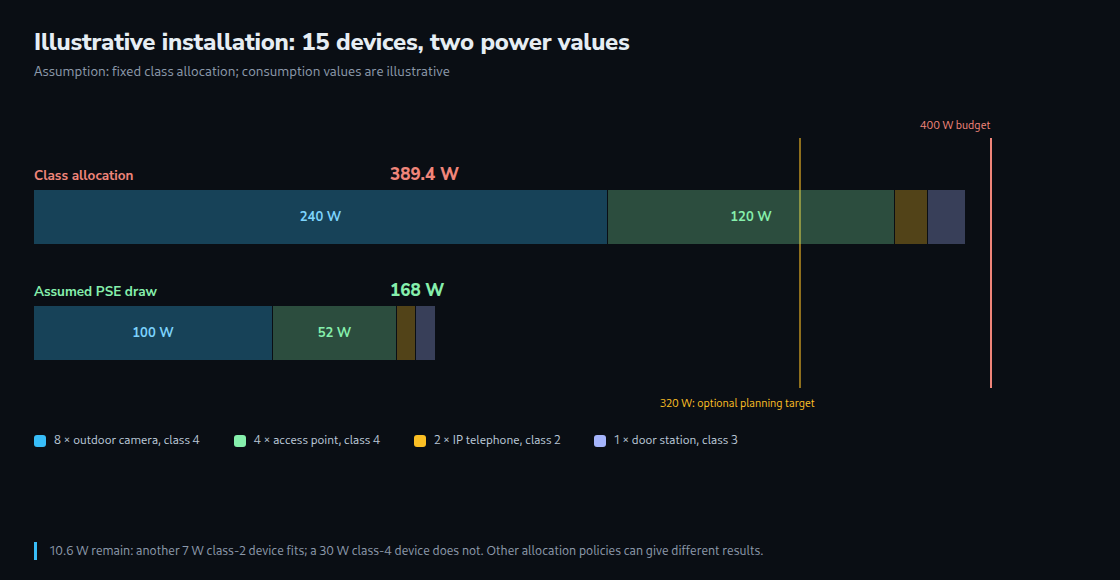
With a 400 W budget, 389.4 W reserved means 97.35% allocated; the illustrative 168 W draw is 42%. The remaining reservation capacity is 10.6 W. A further class-2 device requiring 7 W fits within that total, whereas a class-4 device requiring 30 W does not. Port capability and other configured limits still apply. Under another allocation policy, the admission calculation may differ.
A planning allowance for expansion is useful, but 80% is not an IEEE limit. If the design deliberately leaves 20% of the budget unused, a 400 W switch provides a planning allowance of 320 W. A 389.4 W reservation then requires at least 389.4 / 0.8 = 486.75 W of usable PoE budget. Additional or redundant power supplies can change the available budget; the intended redundancy mode belongs in the calculation.
Maximum load, cold weather and restart
Camera data sheets distinguish typical and maximum consumption. Axis describes maximum figures that account for conditions such as infrared illumination, heating, accessories and temperature where applicable. These loads are not universally missing from specifications, and no fixed IR or heater increment applies to all cameras. The required operating mode and the manufacturer’s maximum figure are the starting point.
A restart deserves a planned acceptance test because classification, allocation and device startup recur. Port sequencing and startup behaviour vary by model; neither simultaneous startup of every port nor a universal first-minute peak follows from PoE. A controlled maintenance-window test can cover cold start and the required camera modes without an unplanned production interruption.
Priority and measurements after installation
An exhausted budget may prevent another port from receiving power, trigger prioritisation, or permit only a reduced device mode. The exact behaviour comes from the equipment documentation. Priority levels and tie-breaking rules are model-specific. Critical services should receive priorities justified by the installation’s requirements; an ordinary data uplink consumes no PoE output unless a powered device is connected.
Where available, the acceptance record includes the allocated and measured power per port, total remaining budget, negotiated class, LLDP state and power-denial logs. A gap between consumption and allocation alone does not prove that LLDP is disabled. Useful observations cover the required daytime, night-time and cold-weather modes, plus the controlled restart.
Questions and answers
Does a shorter cable free budget?
With fixed class-based reservation, the class allowance remains unchanged. Lower cable losses reduce actual PSE consumption for the same PD load. Allocation mechanisms that account for actual consumption or an Autoclass reference measurement can also benefit; the policy determines the result.
Can a heated camera use class 4?
The complete device specification decides. Class 4 provides up to 25.5 W at the PD. Class 5 provides 40 W and class 6 provides 51 W: a hypothetical 44 W PD requirement exceeds class 5. A separate heater supply does not automatically establish the remaining camera’s class; the manufacturer’s specification remains necessary.
If the eight cameras in the example require class 5 instead of class 4, their reservation becomes 360 W and the installation total becomes 509.4 W. With class 6 the corresponding figures are 480 W and 629.4 W. Both exceed a 400 W budget even without an expansion allowance.
Which power value matters for a UPS?
The UPS supplies the actual AC input of the whole switch, including electronics and power-supply losses. A nominal 400 W PoE budget does not by itself establish a 450 W wall draw. Sizing requires the manufacturer’s input figures or suitable measurements for the worst required operating conditions, the UPS’s watt and VA limits, and the desired runtime. A single 168 W PoE reading is insufficient.
A compatible, adequately sized UPS can avoid a restart during an outage within the supported runtime. That outcome also depends on transfer behaviour and load compatibility; a battery alone does not guarantee uninterrupted service.
Sources
- Ethernet Alliance: Overview of 802.3bt Power over Ethernet (April 2018, draft overview)
- IEEE: IEEE 802.3-2022 Standard for Ethernet — standard information
- HPE Aruba 2920: Controlling PoE allocation
- Cisco: Configure and Troubleshoot AP Power
- Microchip: How Power over Ethernet Detection Works
- Axis: Typical and maximum power consumption in Axis cameras
- HPE Networking Instant On: Stack Details — Ports
- HPE Aruba: Power over Ethernet redundancy
- Ubiquiti: PoE Availability and Modes
- Eaton: UPS sizing guide
Learn by trying
Measured draw and reservation: two different budgets
Increase the device count. Watch the reserved budget run out while measured consumption still fits.
- Measured output
- Reserved
Hypothetical example: measured 8 W per device at the switch; selectable reservation. Models a switch using class-based reservation. Check compatibility, port limits, LLDP/power negotiation, cable losses and startup peaks separately. Total budget is not per-port power.
This module runs in your browser and does not send or store your input.
Learn by trying
One minute: can you spot the mistake?
60 W budget, four devices drawing 8 W each with 15.4 W reserved each. Does the reservation fit?
With the modelled class-based reservation, 4 × 15.4 = 61.6 W counts. The measured 32 W does not replace it. Check the switch documentation for negotiation or dynamic allocation behaviour.
Related articles