English
 Deutsch
Classic Scripts and the DOM: Finding Elements at the Right Time

Management Summary
Scripts are small programs that add features to websites, such as switching between light and dark designs. A browser builds a page step by step. If a program starts too early, it cannot yet include images further down the page. Those images can then remain out of step with the selected design. The article explains this sequence and why the starting time matters: text, images and controls should work together from the first time the page opens.
Contents
The HTML parser reads the page source and builds its element tree. A classic script processed by the HTML parser, without async or effective defer, pauses further HTML parsing during execution. Elements appearing later in the source are normally not yet in the document tree (DOM). Modules, asynchronous scripts and dynamically inserted scripts follow different rules.
This explains a common theme-switching failure: the header toggle works, but the first page load does not find images in the article below. All image files may be available; the query simply runs too early.
Source position is not a runtime measurement
A byte position describes order in the delivered HTML. Counting opening tags does not automatically count existing DOM elements: comments, script text, implicitly created elements and later changes can affect the result. Earlier scripts can also have inserted additional elements.
A useful test therefore records document.readyState and the actual matches at execution time. The earlier page-size and file-count figures are not presented here as reproduced measurements. A small isolated browser example demonstrates the mechanism instead.
What the browser test demonstrates
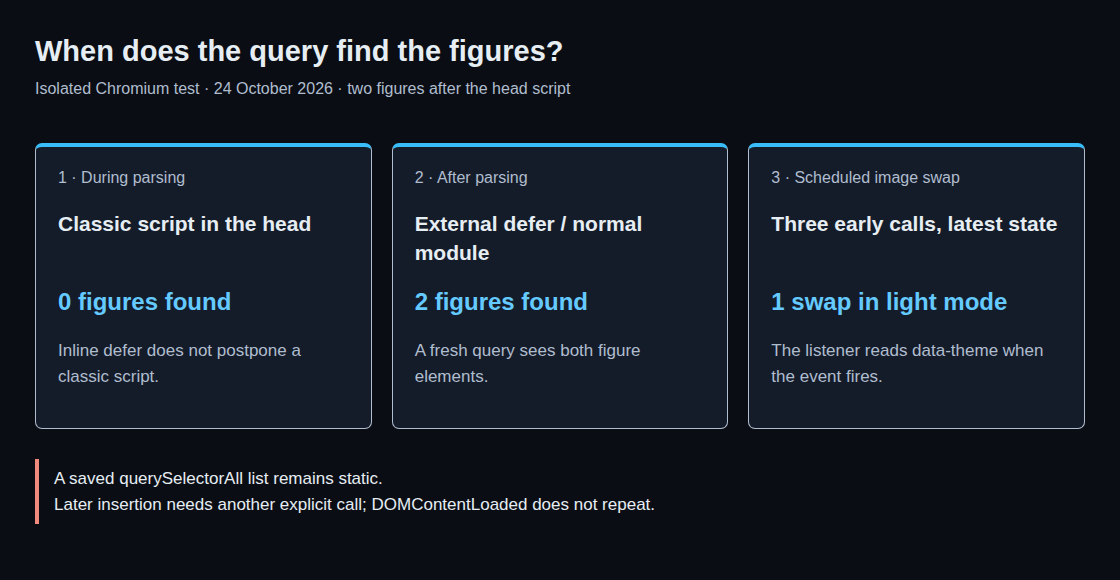
In the test dated 24 October 2026, two figure elements follow a classic script in the head. The early query finds zero figures. An external classic script with defer and an ordinary module later find both figures. Adding defer to the inline classic script does not postpone execution.
querySelectorAll() also returns a static list. The empty list captured early remains empty even after both figures exist. A fresh query is therefore needed after parsing. This was an isolated Chromium test, not a cross-browser matrix or a historical network capture of the website.
Why a later click is not enough
A click after parsing tests a state change with the elements already present. That does not establish correct behaviour during the initial load. A click can also occur while loading continues, once the control is visible and an event handler is attached.
A saved light preference, a reload in dark mode and a switch during loading are consequently separate test cases. The current theme state matters for each image swap. Existing header elements do not establish that the article figures below have already been created.
An image swap scheduled after parsing
The following integration example requires an existing bilderJetztTauschen(hell) function. That function must query the current images again on every call and set the appropriate addresses. The snippet only controls when execution happens.
const wurzel = document.documentElement;
let bildtauschGeplant = false;

function bilderTauschen(hell) {
    if (document.readyState === 'loading') {
        if (bildtauschGeplant) return;
        bildtauschGeplant = true;
        document.addEventListener('DOMContentLoaded', function () {
            bildtauschGeplant = false;
            bilderJetztTauschen(wurzel.getAttribute('data-theme') === 'light');
        }, { once: true });
        return;
    }
    bilderJetztTauschen(hell);
}
While readyState is loading, at most one listener is registered. When the event fires, the current preference is read from data-theme. After parsing, the function calls the image swap immediately with the supplied value. The root element must reflect the selection before this function is called.
In the isolated test, three early calls produced exactly one later swap using the latest light preference. A subsequent call with the dark preference ran immediately. This is an improved example; the production theme was not changed as part of this article review.
Questions and answers
When do defer and modules help?
For external classic scripts, defer schedules execution after HTML parsing and preserves document order. Ordinary modules also execute after parsing. async does not provide that guarantee; execution depends on script availability. For modules, async can matter even without a src on the module itself. Both defer and async have no effect on inline classic scripts.
Why DOMContentLoaded instead of load?
DOMContentLoaded follows HTML parsing and the associated deferred scripts. The event does not wait for all images or asynchronous scripts; stylesheets can delay execution indirectly through waiting scripts. load waits for additional page resources but excludes lazily loaded images. For required web fonts, document.fonts.ready is the targeted check. Finding the figures only requires the parsed document tree.
Does swapping prevent duplicate image transfers?
No. Preload scanning or image loading may already have requested the original address. Caching, loading distance, connection and browser behaviour determine the actual cost; loading="lazy" does not guarantee that a request is avoided. Network logs provide better evidence than script position.
<picture> with prefers-color-scheme can follow the system preference. A selection held only in localStorage is neither readable by CSS media queries nor automatically known to the server. Server-side selection requires separately transmitting that state.
What about articles inserted later?
DOMContentLoaded does not fire again for the same document. A content change without full navigation needs a separate call after insertion. In the test, inserting a third figure later did not automatically trigger another swap.
Related articles