English
 Deutsch
 Polski
Zero-Trust DNS Infrastructure: Unbound & Pi-hole with DoH and DNSSEC

Contents
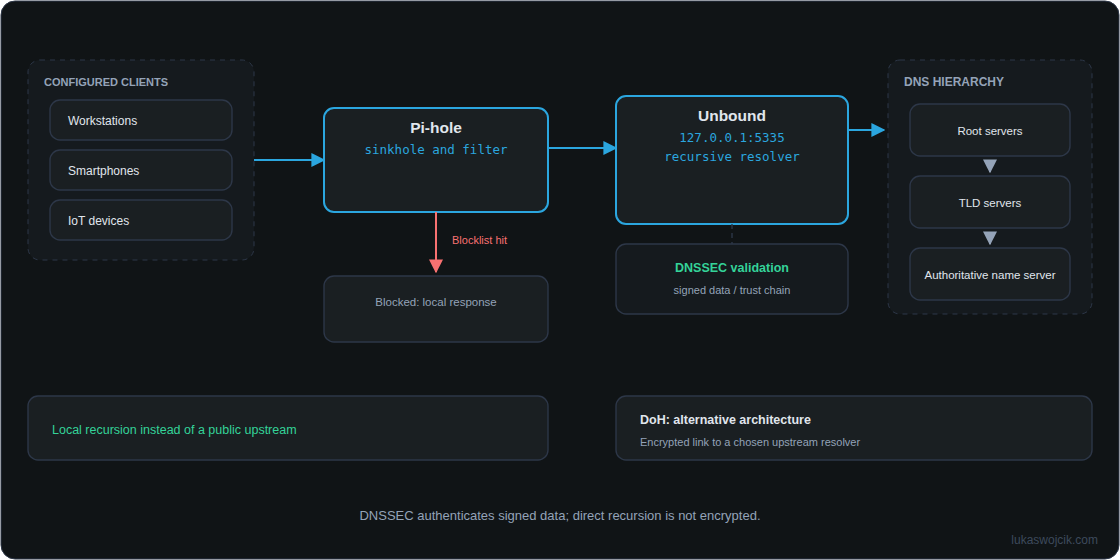
Pi-hole and Unbound perform different jobs: Pi-hole filters DNS names against rules, while Unbound resolves allowed queries and validates DNSSEC. A central public resolver is no longer the upstream collection point. Root, TLD and authoritative DNS infrastructure remains necessary. This combination alone does not establish a complete zero-trust architecture.
1. Filtering, recursion and DNSSEC
DNS maps names such as example.com to addresses. A public resolver can record received names, but ordinary DNS requests do not include complete URL paths, page contents or every piece of network metadata.
- Pi-hole: handles requests from devices actually configured to use Pi-hole. Domain blocklists are not comprehensive advertising or malware detection. Browsers using a separate DoH service can bypass the local filter.
- Unbound: resolves allowed requests that cannot be answered from cache. Referrals lead from root to TLD to authoritative servers; cached records can shorten this process.
- DNSSEC: validates signed DNS data through a chain of trust. Invalid signatures cause rejection. Zones securely identified as unsigned remain usable, without cryptographic authentication of their answers. DNSSEC does not encrypt requests.
2. Example for Debian or Raspberry Pi OS
This example assumes Pi-hole and Unbound share a host and network namespace, without separate container networks. Changes to an active DNS service can interrupt name resolution, so the existing configuration and an accessible administration route need to be preserved. Recursion requires outbound UDP and TCP port 53.
Installation from maintained distribution packages:
sudo apt update
sudo apt install unbound dnsutils
The existing package configuration under /etc/unbound/ needs checking before adding settings. Debian packages normally configure root hints and the DNSSEC trust anchor. An existing auto-trust-anchor-file declaration must not be duplicated for the same file. The Unbound service needs write access to the automatically maintained anchor. If this setup is absent, the distribution package instructions take precedence.
The following fragment for /etc/unbound/unbound.conf.d/pi-hole.conf supplements that package configuration:
server:
    interface: 127.0.0.1
    port: 5335
    verbosity: 0
    do-ip4: yes
    do-ip6: no
    do-udp: yes
    do-tcp: yes
    harden-glue: yes
    harden-dnssec-stripped: yes
    use-caps-for-id: no
    edns-buffer-size: 1232
    prefetch: yes
    qname-minimisation: yes
    hide-identity: yes
    hide-version: yes
    private-address: 10.0.0.0/8
    private-address: 172.16.0.0/12
    private-address: 192.168.0.0/16
    private-address: 169.254.0.0/16
    private-address: fc00::/7
    private-address: fe80::/10
do-ip6: no selects IPv4 transport here; AAAA records remain available. Working native IPv6 connectivity can justify yes. This fragment deliberately omits a second trust-anchor declaration and is not a complete standalone configuration.
A successful configuration check must precede a restart. These commands are separate steps; a failed first check means the restart must not proceed:
sudo unbound-checkconf
sudo systemctl restart unbound
systemctl is-enabled unbound
dig @127.0.0.1 -p 5335 fail01.dnssec.works
dig @127.0.0.1 -p 5335 dnssec.works +ad
The first DNS test should return SERVFAIL; the second should return NOERROR with ad among the flags. A single SERVFAIL does not prove validation works: connectivity failures can cause the same result. Accurate system time is required for DNSSEC. restart does not enable startup at boot; is-enabled checks the existing setting.
3. Connecting Pi-hole and checking the actual path
In Settings > DNS, the custom upstream becomes 127.0.0.1#5335. Other upstreams are removed for exclusively local recursion. After saving, a test request to Pi-hole should show Unbound as the forwarding destination in the query log. With separate containers, 127.0.0.1 refers to each container itself and is unsuitable for this connection.
Use DNSSEC enables additional validation inside Pi-hole; this is not merely status-flag forwarding. Unbound validates independently. If the extra validation is enabled, both DNSSEC tests need repeating through Pi-hole. Existing openresolv or unbound-resolvconf integration also needs checking: a resolver entry using port 53 must not create a loop back to the local service.
4. DoH is a different operating mode
Ordinary direct recursion sends unencrypted DNS requests outside the network. QNAME minimisation reduces the name components disclosed to individual servers, but an observer on the internet connection can still read requests.
A deliberately configured DoH upstream encrypts the connection to a selected resolver. That resolver receives the forwarded names. This is an alternative architecture, not an automatic fallback. Adding another Pi-hole upstream does not establish a guaranteed failover order. Certificate verification, bootstrap resolution and outage behaviour require their own configuration.
cloudflared proxy-dns was removed starting with version 2026.2.0 and is no longer a current installation option. Unbound’s documented DoH support for incoming client requests must also be distinguished from outgoing DoH forwarding.
Questions and answers
Does this prevent observation by the internet provider?
Direct recursion alone does not. DoH protects the contents of the corresponding DNS connection; destination IP addresses of later connections generally remain visible. DNSSEC protects signed data against undetected modification, but prevents neither blocking nor attacks on unsigned DNS data. Encrypted client connections to a private recursive resolver are possible; this does not automatically encrypt the resolver-to-authoritative-server path.
Why do answers containing private IP addresses disappear?
private-address prevents public DNS answers from introducing the listed private addresses. A deliberately internal name may need a narrow exception such as private-domain: "internal.example.com". An exception for an entire domain also covers subdomains and weakens rebinding protection within that scope. Local records answered directly by Pi-hole do not pass through Unbound.
What happens if …?
Simplified learning model
What happens if …?
Take a component offline in a sample network. Which services keep working?
Camera feed on the local network
A local camera is accessed by IP. The switch and Wi-Fi connect it to your device. This model does not need internet, DNS or the Pi for that.
Home Assistant by local IP
The interface runs on the Pi. Your device reaches it over the local network; no DNS name is needed here.
Zigbee automation on the Pi
A Zigbee coordinator connected directly to the Pi controls a local device. This fixed rule needs neither Wi-Fi nor internet in this example.
Cloud access to Home Assistant
Access uses a cloud hostname and a tunnel from the Pi. It needs all four components in this example.
Open a new external website
A new, uncached hostname needs DNS and a route to the internet. The local Pi does not host this external site.
Existing internet connection by IP
An established connection does not need a fresh name lookup. It survives the DNS outage while the network and internet remain available.
Simplified learning model
A sample network, not a live view of my setup. Devices stay powered. Pi = Home Assistant with USB Zigbee; DNS is an external resolver, with no cache or fallback. “Switch / Wi-Fi” represents all local access. Results describe the outage itself, not automatic recovery.
DNS · RFC 1034 ↗These examples run only in your browser. No real systems are disrupted.
PNG with settings, result and article link. Created locally only when you click.
Related articles