GA4 E-Commerce Enhanced Tracking in SPAs without DataLayer Race Conditions

Contents
Tracking e-commerce events in Single-Page Applications (SPAs) built with React, Vue, or Next.js presents unique architectural challenges. Because standard browser page loads do not occur during route transitions, traditional DOM-ready or window-loaded tracking triggers fail. Furthermore, asynchronous component rendering frequently introduces DataLayer race conditions: Google Tag Manager (GTM) tags may execute before e-commerce payload objects are fully populated, or stale transaction data from previous routes may persist and pollute subsequent events. Implementing a deterministic, race-condition-free GA4 e-commerce tracking architecture ensures data precision across the entire checkout funnel.
1. Architectural Root Causes of SPA Tracking Failures
Race conditions in SPAs typically originate from three structural antipatterns:
- Missing Ecommerce Payload Resets: GA4 e-commerce tags merge new dataLayer pushes with existing objects. If an old
ecommerceobject is not explicitly cleared, items from previous views duplicate across subsequent events. - History Change Trigger Dependency: Relying on GTM History Change triggers for virtual pageviews often fires tags before asynchronous API endpoints have returned product pricing or cart state.
- Unordered Event Dispatching: Pushing state changes and tracking events in separate, uncoordinated JavaScript execution blocks creates non-deterministic tag firing orders.
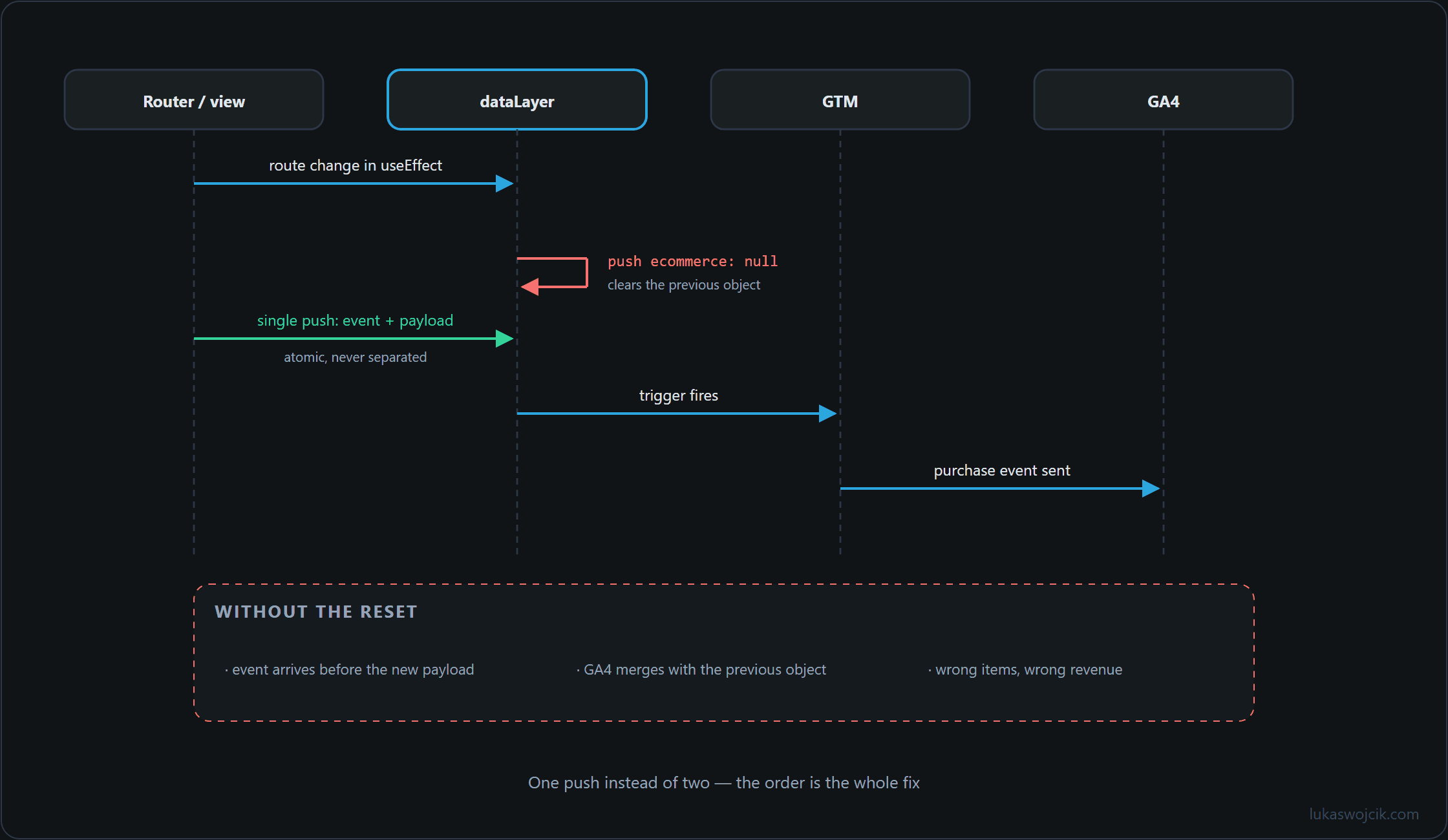
2. Step-by-Step Implementation of Deterministic DataLayer Pushes
To guarantee thread-safe dataLayer communication in frontend frameworks, e-commerce pushes must follow a strict three-step execution pattern:
- Explicit Object Clearing: Every e-commerce push must be immediately preceded by a reset command setting
ecommerce: null. This flushes GTM internal data models. - Atomic Event and Payload Bundling: Never push the data payload and the trigger event separately. Always bundle the custom event name and the full
ecommerceobject within a single atomic push. - Framework State Synchronization: In React or Next.js, encapsulate tracking calls inside side-effect hooks (such as
useEffect) with explicit dependency arrays, ensuring tags fire only after DOM hydration and state resolution are complete.
Production-Ready TypeScript / Vanilla JS Pattern
/**
 * Safely dispatches a GA4 e-commerce event without race conditions.
 * @param {string} eventName - GA4 event name (e.g., 'add_to_cart', 'purchase').
 * @param {Object} ecommercePayload - The standardized GA4 ecommerce object.
 */
function dispatchGa4EcommerceEvent(eventName, ecommercePayload) {
  window.dataLayer = window.dataLayer || [];

  // Step 1: Flush stale e-commerce data to prevent merge collisions
  window.dataLayer.push({ ecommerce: null });

  // Step 2: Atomic push of event and payload
  window.dataLayer.push({
    event: eventName,
    ecommerce: ecommercePayload
  });
}

// Example usage within a React checkout component:
// dispatchGa4EcommerceEvent('add_to_cart', {
//   currency: 'EUR',
//   value: 129.99,
//   items: [{ item_id: 'SKU_441', item_name: 'Enterprise Router', price: 129.99, quantity: 1 }]
// });
3. Step-by-Step Google Tag Manager (GTM) Configuration
Frontend code reliability must be mirrored by a defensive GTM container configuration:
- Custom Event Triggers Only: Avoid
All PagesorHistory Changetriggers for e-commerce. Create custom event triggers explicitly matching GA4 event names (e.g.,add_to_cart,begin_checkout,purchase). - Data Layer Variable Setup: Define a Data Layer Variable named
dlv - ecommercepointing to the keyecommerce. Ensure the default value is undefined. - GA4 Event Tag Mapping: Configure the GA4 Event Tag to use the Custom Event trigger. Under More Settings > E-commerce, check
Send Ecommerce dataand selectData Layeras the data source. - Tag Sequencing Enforcement: For critical conversion events like
purchase, utilize GTM Tag Sequencing to ensure consent management platform (CMP) updates or user-id attribution tags complete firing before the transaction tag executes.
4. Summary & Architectural Value
What this tutorial achieves: The deployment of a deterministic, race-condition-free Google Analytics 4 e-commerce tracking architecture tailored for Single-Page Applications (React, Vue, Next.js), utilizing atomic payload resetting and Custom Event bundling.
Resulting value: E-commerce analytics datasets become strictly accurate and reproducible. Revenue inflation caused by stale dataLayer merges is permanently eliminated, and missing cart or checkout funnel steps due to asynchronous component rendering are prevented. Consequently, performance marketing attribution and algorithmic bidding strategies receive clean, verified conversion signals.
Related articles