

The New Google Tag Manager Interface: The Era of the Unified Google Tag

The web analytics landscape is constantly evolving, and Google Tag Manager (GTM) has just undergone one of the most significant structural changes in its history. The new interface and tag architecture are a direct response to the growing need for simplified deployments. The most crucial update is the complete centralization of the Google Tag, which fundamentally changes how we configure analytics and advertising campaigns.
What Exactly Changed?
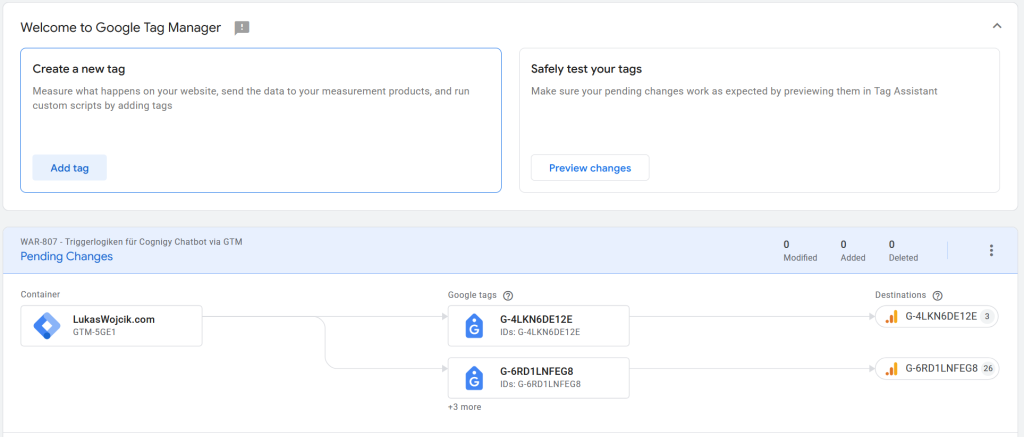
For analysts and marketers, the most noticeable shift was the deprecation of the familiar GA4 Configuration Tag. It has been entirely replaced by a single, universal Google Tag.
The new UI no longer requires separate initialization tags for every Google product. Instead, a single “Google Tag” serves as the foundation for the entire data stream.
Centralization of the Google Tag: One Tag to Rule Them All
Previously, setting up Google Analytics 4 and Google Ads conversion tracking required building parallel tag structures. The new interface introduces full centralization:
- Unified ID: The new Google Tag takes a single ID (e.g.,
G-XXXXXXXfor GA4 orAW-XXXXXXXfor Google Ads). The system intelligently routes the data to the correct destination. - Multiple Destinations: A single tag on the website can now send the same signals directly to multiple Google services simultaneously, eliminating the need to duplicate tags or code.
How Does This Impact Google Tracking?
This UI update is not just cosmetic; it introduces a brand-new Data Governance model that brings immense benefits:
- Configuration Settings Variable: Instead of manually typing parameters (like
server_container_urlorcookie_prefix) into every individual tag, a single variable now applies these settings globally across the container. - Event Settings Variable: This feature groups e-commerce parameters or user data and applies them to multiple event tags with a single click.
- Improved Page Performance: Reducing the number of initialization tags in the GTM container results in a cleaner setup and faster page load times, lowering the overall burden on the user’s browser.
The transition to the new interface and the unified Google Tag is a major leap towards a more organized, logical, and performant tracking architecture.
Sources
Related articles




One comment
The Configuration Settings variable is the change that actually pays for itself in a container with several destinations — one place for the server container URL instead of the same string typed into six tags.
Worth adding for anyone migrating: the old GA4 Configuration tags are not removed by the new interface, they simply keep working. In two containers here they sat alongside the new Google Tag for weeks which meant two initialisations and two page views per load. Nothing in the interface flags it, and in the reports it looks like a traffic increase rather than a duplicate