

 English
 Deutsch
 Polski
GA4 Alerts on Small Numbers: Threshold, Interval and Statistical Noise

Management Summary
GA4 alerts can draw attention to falling shopping activity before a serious business problem becomes obvious. With small counts, however, a large percentage drop may simply reflect normal chance variation. Choosing the alert threshold and observation period balances early detection against unnecessary alarms. Longer periods collect more evidence but react more slowly. This matters especially for smaller shops: a warning is a prompt to investigate alongside real orders and recent changes, not proof that checkout has failed.
Contents
A fall in add-to-cart events can indicate a broken checkout. Small event counts also fluctuate substantially without a technical fault. An alert therefore needs a suitable baseline, an explicit threshold and sufficiently current data.
Three quantities need separate treatment: the observed deviation, the false-alarm probability and the probability of detecting a real fault. Crossing a threshold proves neither a technical failure nor the absence of chance. An alert that remains silent does not rule out a failure either.
A reproducible example for small counts
A Poisson count provides a simple model: events arrive independently at a constant rate. For an expected mean μ, the standard deviation is √μ. With 25 expected events this is 5; with 2,500 it is 50. Relative variation falls from 20% to 2%.
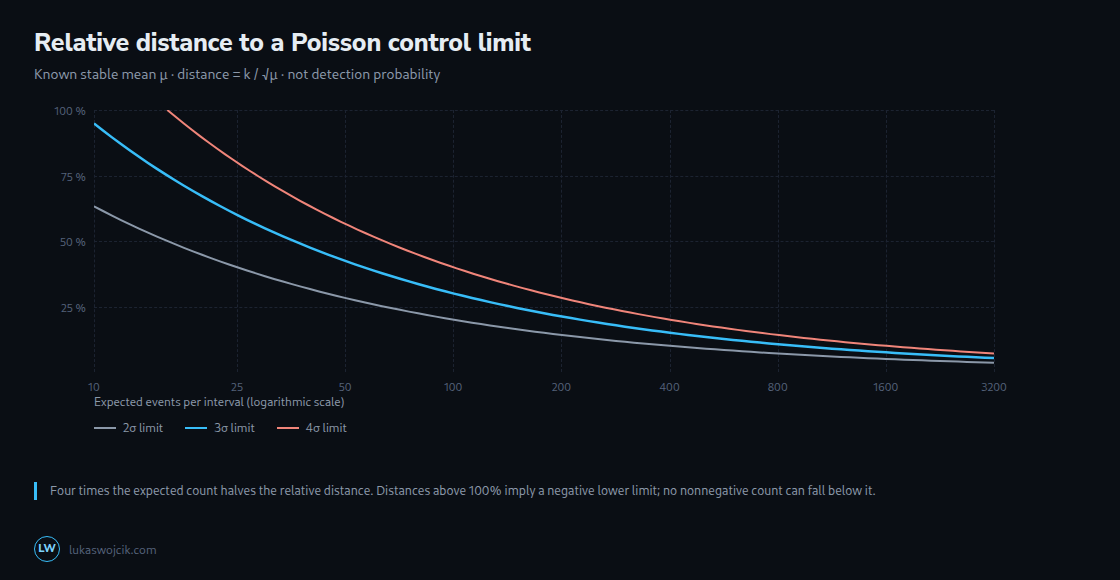
A simple lower control limit is L = μ − 3√μ. An alert fires when the observed count falls below L. The relative distance from the mean to this limit is 3/√μ. The table assumes a known, stable expected value; estimating the baseline introduces additional uncertainty.
| Expected events per interval | Distance to the 3σ limit |
|---|---|
| 50 | 42.4 % |
| 200 | 21.2 % |
| 800 | 10.6 % |
| 3200 | 5.3 % |
These percentages describe the distance to the control limit, not the smallest fault that can reliably be detected. With μ = 50, the limit is approximately 28.8; integer counts of 28 or fewer trigger the alert. A real decline of one third reduces the new expected count to about 33.3. Some intervals can still fall below 28.8, while others remain above. A required detection probability needs a separate calculation.
For μ ≤ 9, this 3σ limit is zero or negative. No nonnegative count can fall below a limit of zero. This does not make outages inherently undetectable: an appropriately calibrated Poisson rule or a separate zero-event alert may be more suitable.
A lower threshold changes both types of error
A limit at 2 rather than 3 standard deviations lies closer to the mean and responds to smaller deviations. The false-alarm probability also rises. For a known normal distribution, the one-sided probabilities below −2σ and −3σ are approximately 2.28% and 0.135%: a factor of almost 17.
These normal-distribution values are not universal GA4 false-alarm rates. Small Poisson counts can only be whole numbers, such as 0, 1 or 2; overlapping windows and multiple metrics add dependencies and further opportunities for alerts. Settings therefore need evaluation against historical data that are as free from faults as possible. Frequent false alarms can reduce attention to genuine failures.
Longer intervals: more data, later response
In the Poisson example, four times the expected count halves the relative distance to the same 3σ limit. A longer window collects more events but costs time. A short fault can also be diluted by unaffected periods within the same window.
| Window | Expected events | Distance to the 3σ limit |
|---|---|---|
| 5 min | 16.7 | 73.5 % |
| 15 min | 50.0 | 42.4 % |
| 1 h | 200.0 | 21.2 % |
| 4 h | 800.0 | 10.6 % |
The table assumes a constant 4,800 events per day. The first row represents 16.67 expected events before rounding. Even the five-minute window can signal a substantial outage; a universal boundary of 100% would be incorrect.
Window length and alert delay are different quantities. The onset and duration of the fault, evaluation schedule, window boundaries and data availability also matter. A four-hour window may be too slow for a checkout but appropriate for a daily data delivery.
A suitable baseline reduces avoidable variation
Shop traffic follows daily and weekly patterns. Campaigns, holidays, customer groups and consent also affect counts. Real data can therefore vary more than the Poisson model predicts. The tables deliberately include no unsupported universal adjustment for “real traffic”.
Comparison with the same hour and weekday can account for recurring patterns. Trends, special campaigns and a small number of reference weeks remain potential sources of error. This adjustment is neither guaranteed to equal a fourfold traffic increase nor sufficient to remove all uncertainty.
Ratios need a suitable definition
An add-to-cart rate can partly compensate for changes in traffic volume. For a simple binomial model, each session counts at most once: sessions with at least one add-to-cart event divided by all sessions under consideration. All add-to-cart events per session form a different metric; repeated events can produce values above one.
For independent sessions with a constant probability p, the rate has an approximate standard deviation of √(p(1−p)/n), where n is the number of sessions. With 50 qualifying sessions out of 1,000, the rate is 5% and the estimated standard deviation is about 0.69 percentage points. Small samples still fluctuate. With zero sessions, the rate is undefined.
Rates can also vary by channel, time of day and customer group. A fault need not change the rate visibly straight away. A control limit for event counts therefore cannot be applied unchanged to every ratio.
Questions and answers
Why does four times the count halve the relative distance?
In the Poisson model, the standard deviation grows with √μ. The relative distance of a kσ limit is k/√μ. Multiplying μ by four doubles the denominator and halves the distance. This describes the limit, not an automatically doubled detection probability.
Is a complete outage easier to detect?
Often, yes. Under a stable Poisson model, the probability of zero events is e−μ. For μ = 17 this is approximately 4.14 in 100 million intervals; for μ = 2 it is already about 13.5%. A zero-event alert therefore needs a time-appropriate expectation. Missing or delayed measurement data can also produce zero; an alert does not prove that the shop has failed.
Does an hourly GA4 alert arrive after one hour?
Only with suitably available data and evaluation. Regular GA4 reports can receive additions hours later; Google gives 24 to 48 hours for general processing. The daily BigQuery export has no guaranteed fixed completion time. An apparent decline may therefore be an incomplete delivery.
The Realtime API covers the last 30 minutes for standard properties and up to 60 minutes for Analytics 360. A single hourly query with a 30-minute window does not cover a complete hour. More frequent evaluations with clear boundaries and storage that avoids double counting require a dedicated implementation. BigQuery streaming is faster but is a best-effort service with possible gaps. For completed purchases, the shop’s order table may be a more suitable control source.
The data source affects coverage, definition and completeness as well as latency. Timestamps, consent, filters and late arrivals therefore belong in alert validation alongside the statistical threshold. Sources checked on 24 October 2026.
Sources
Practical check: a weekday baseline without the inspected day
The GA4 Anomaly Detector now compares a selected reporting day with the same weekday from each of the eight previous weeks. A Thursday is compared with eight Thursdays. The inspected day is excluded from the reference mean and sample standard deviation, so a sharp drop cannot pull its own baseline down.
The tool reads sessions, total users, page/screen views, key events, event count, total revenue and engagement rate through the read-only Data API. The default date is four days ago to leave time for processing, but that delay does not certify that the report is complete. The property’s reporting timezone and the returned metadata remain relevant.
- The comparison uses a completed day and the eight reference dates shown in the result.
- If a required date is absent from the response, the comparison is withheld. Missing rows are not silently replaced with zeros; a reported zero remains zero.
- The descriptive z-score expresses the distance from the reference mean in units of the reference standard deviation. It is assessed against the chosen threshold. With a constant baseline, the tool reports either no change or a change from that constant value, without dividing by zero.
- The nine comparison dates are available as CSV for comparison with releases, campaigns, holidays and other evidence.
Eight observations are a small reference set. These flags are not calibrated significance tests, and seven concurrent metric checks can generate chance findings. Weekday matching does not remove trends, special events, consent changes or processing delays. No flag proves complete tracking, and a flag does not establish the cause. This is a manual investigation tool, not a scheduled alert service.
Sources: Google runReport reference, metric definitions and NIST guidance on outlier detection and its assumptions.
Related articles


