English
 Deutsch
 Polski
GA4 Measurement Protocol: Server-Side CRM Offline Conversion Integration
Part 4 of 5 in the series From pixel to server: tracking that holds

Contents
The GA4 Measurement Protocol supplements web measurement with server-side events, such as a purchase confirmed later in a CRM. A sale can therefore be recorded even when no browser event occurs at completion. This does not automatically or flawlessly attribute the revenue to the original campaign.
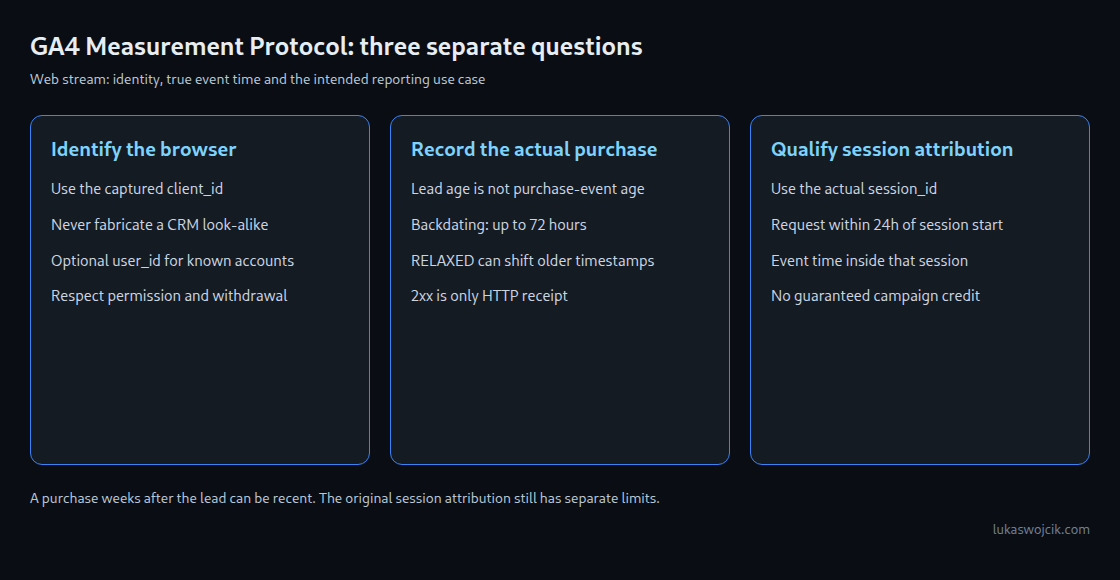
A dependable integration answers three separate questions: which browser instance or known account belongs to the event, when the purchase actually happened, and which analysis the event should support. Event processing, session attribution and advertising export have different requirements.
1. Preserve identifiers without inventing a connection
- client_id: For a web stream, this identifies the browser instance. Connecting to existing web events requires the actual captured value. A similarly formatted identifier invented from a CRM number does not create that connection. The identifier is pseudonymous, not automatically anonymous.
- session_id: This positive numeric event parameter identifies a particular session. The Google tag exposes it through
gtag('get', 'G-XXXXXXXXXX', 'session_id', callback), and the browser identifier through the same call usingclient_id. Parsing internal cookie field positions is unnecessary. The capture process must handle values that are missing or not yet available. - user_id: An optional, consistent account identifier can link known authenticated activity. An arbitrary lead number is not automatically a cross-device person identifier. Email addresses, telephone numbers and other directly identifying content do not belong in these ordinary identifier or event fields.
Identifiers are captured only in a permitted measurement context and retained for the defined purpose. A missing value is a data gap, not a reason to fabricate an identity. App streams use different fields, notably firebase_app_id and app_instance_id; this example concerns a web stream only.
2. Separate purchase time from the session window
| Goal | Relevant requirement | Consequence |
|---|---|---|
| Record a past purchase at the correct time | Event age up to 72 hours; numeric timestamp_micros in microseconds | The actual purchase time matters, not the lead’s age. |
| Inherit an existing session’s attributes | session_id; request within 24 hours of session start; overridden event time inside the session | An old session ID alone does not preserve campaign attribution. |
| Advertising export | Separate additional requirements, including request no later than 63 days after the last session day | Neither the 72-hour window nor session_id alone guarantees advertising attribution. |
For example, a lead is created on Monday and the purchase occurs on Friday. Prompt Friday reporting is not a purchase sent four days late. The purchase must not be backdated to Monday merely to fit the old session. A valid purchase event can fall outside the original session-attribution window.
Google also distinguishes validation behavior. With RELAXED or no setting, the documented handling of events older than 72 hours is to move the timestamp to 72 hours before receipt. With ENFORCE_RECOMMENDATIONS, those events are rejected. A debug test at an exact second boundary therefore proves neither universal production rejection nor guaranteed tolerance. A delivery queue should allow a comfortable margin and handle expired records explicitly instead of changing the purchase time.
The general sending guide additionally mentions 48 hours for events intended to be processed together with client-side events. The more specific 24-hour requirement applies to session attributes. These use cases must not be combined into one universal attribution window.
3. A purchase payload without a fabricated session
The following HTTPS request represents a purchase sent immediately when it actually occurs. It omits timestamp_micros, so GA4 uses request time. Delayed delivery must include the actual event time as a numeric Unix timestamp in microseconds. Static dates copied from an example are unsuitable. The sample identifier, transaction number and credentials must be replaced with real, legitimately usable values.
POST /mp/collect?measurement_id=G-XXXXXXXXXX&api_secret=SERVER_SIDE_SECRET
Host: www.google-analytics.com
Content-Type: application/json
{
"client_id": "1234567890.1700000000",
"consent": {
"ad_user_data": "DENIED",
"ad_personalization": "DENIED"
},
"events": [
{
"name": "purchase",
"params": {
"transaction_id": "CRM_INV_EXAMPLE_001",
"value": 1499.0,
"currency": "EUR",
"items": [
{
"item_id": "SKU_ENTERPRISE_PLAN",
"item_name": "Enterprise Service License",
"price": 1499.0,
"quantity": 1
}
]
}
}
]
}An old session_id and invented engagement duration are deliberately absent. Appropriate session and Realtime analysis depends on the correct session and genuinely measured engagement_time_msec; an arbitrary 100 milliseconds would fabricate a measurement. This example therefore does not guarantee complete Realtime or session-metric coverage.
transaction_id must be unique per order, non-empty and free of directly identifying customer information. Retries of the same order retain the same ID. GA4 can use this to reduce duplicate purchases in web streams; a delivery journal and protection against concurrent duplicate sends remain necessary. Value and currency must match the business definition of the purchase. Here, value equals one EUR 1,499 item without added shipping or tax.
The api_secret stays on the server and must not appear in browser code or full request-URL logs. The alternative host region1.google-analytics.com supports EU data collection; the hostname alone does not establish where every subsequent processing activity occurs.
4. Check permission and withdrawal before delivery
Server-side delivery does not replace a legal basis or bypass a consent decision. Evidence of the original collection state matters. Where processing relies on consent, a later withdrawal must also be respected before delivery; an earlier positive field is not permanent authorization. Purpose, retention and missing evidence need clear rules.
The sample consent fields set advertising data use and personalized advertising to DENIED. This does not replace checking whether the Analytics transfer itself is permitted. non_personalized_ads is deprecated; the current interface uses consent.ad_personalization. Without explicit consent fields, GA4 can use settings from corresponding online interactions. A controlled CRM pipeline needs a defined policy for this behavior.
5. Distinguish validation from actual processing
/debug/mp/collect checks the payload and returns validationMessages; events sent there do not appear in reports. Google recommends ENFORCE_RECOMMENDATIONS during development. An empty error list proves neither correct credentials nor successful processing in the intended property. A production 2xx response acknowledges HTTP receipt, not recorded revenue or campaign attribution.
A useful verification process includes synthetic payload tests, a controlled test in a separate property, and later reconciliation of transaction counts and amounts. The delivery journal distinguishes at least prepared, transported and reconciled. Connection failures, uncertain delivery and expired events need separate treatment; endless blind retries are not evidence of success.
Questions and answers
Is a sales cycle longer than 72 hours inherently unsuitable?
No. The purchase event’s age differs from the original lead’s age. Additional limits for session attribution, advertising export and other uses still need checking.
Does a BigQuery join provide complete attribution?
No. Joining CRM data to exported web events supports a separate historical analysis where suitable identifiers, time ranges and legitimately retained data exist. Missing measurements, multiple devices, duplicates and the chosen attribution model remain relevant. A warehouse result does not rewrite a historical GA4 session.
Which time should a delivery queue send?
The actual event time. Sender clocks must be synchronized. Future timestamps or moving old purchases to the present changes the measurement. Expired records can remain available for separate warehouse analysis instead of uncontrolled backfilling into GA4.
Sources
- GA4 Measurement Protocol
- Measurement Protocol reference
- Sending events and timestamp validation
- Use cases and attribution windows
- Validation and its limits
- Implementation verification
- Google tag get API
- Purchase deduplication
- User-ID requirements
- Ecommerce purchase values
- GDPR Article 7: withdrawal of consent
From pixel to server: tracking that holds
- The Evolution of Web Tracking: From Log Files to the Server-Side Future
- GA4 & Server-Side GTM: The “Migrate from JavaScript Managed Client ID” Feature Explained
- Server-Side GTM on GCP Cloud Run: Architecture, Auto-Scaling, and Cost Optimization
- GA4 Measurement Protocol: Server-Side CRM Offline Conversion Integration
- Meta Conversions API: Maximizing Event Match Quality (EMQ) and Deduplication
Related articles