

 English
 Deutsch
 Polski
Google Ads API Passkey Requirement: What It Applies To and How to Find Forgotten Authorizations

Contents
Google announced a passkey requirement for the Google Ads API on 27 July 2026, with rollout starting on 5 August. The precise trigger matters: affected accounts must use a passkey when the user authentication workflow generates a new OAuth refresh token. The announcement does not require replacement of the OAuth client.
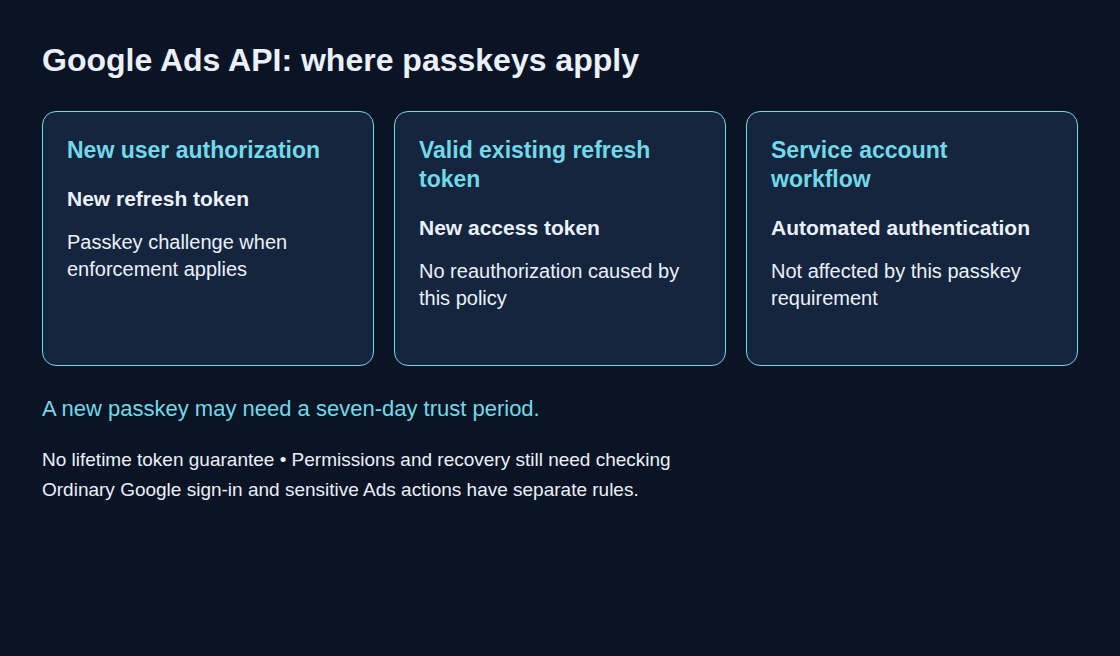
Existing refresh tokens are not invalidated by this policy. Routine exchange of a valid refresh token for an access token does not require a new passkey challenge. This is not a lifetime guarantee: revocation, token limits, inactivity or other access policies can still interrupt an integration. The current security guide describes enforcement as a rollout, so an account-specific enforcement date cannot be inferred from the launch date alone.
1. Three different authentication situations
- New user authorization: passkey authentication is required when enforced for the account. Password-only, SMS or TOTP authentication does not replace that challenge.
- Existing refresh token: the policy does not force reauthorization merely to obtain another access token.
- Service account workflow: unaffected by this particular requirement. Google recommends this flow for suitable automated or offline workloads. Account permissions and credential protection still apply.
A newly created passkey may face a seven-day trust delay. This is neither a universal account lockout nor the separate seven-day refresh-token lifetime associated with an external OAuth app in Testing status. Recovery planning must account for the actual authentication method and account policy.
2. Keep an inventory of access, not copies of secrets
A small team can use a controlled document; SQLite is useful when recurring queries are needed. The following example records identities, responsibilities and references. Token values, private keys and recovery codes do not belong in this table or a repository. A service-account row should identify the actual service-account email rather than leaving the principal empty.
CREATE TABLE ads_authorization (
  integration TEXT PRIMARY KEY NOT NULL,
  auth_type TEXT NOT NULL CHECK (auth_type IN
    ('user_account', 'service_account', 'unknown')),
  principal TEXT,
  config_path TEXT,
  token_store_reference TEXT,
  owner TEXT NOT NULL,
  deputy TEXT,
  recovery_plan_reference TEXT,
  customer_ids TEXT,
  last_verified TEXT
);

-- Illustrative metadata only; never insert tokens or private keys.
INSERT INTO ads_authorization VALUES
 ('nightly-cost-load', 'user_account', 'analyst@example.com',
  '/srv/adops/config/ads.yaml', 'vault:kv/ads/refresh',
  'analytics-team', 'platform-team', 'runbook:ads-reauthorization',
  '1234567890', NULL);
owner names the operational responsibility. deputy names a second responsible person or team, not permission to share a personal Google identity. recovery_plan_reference points to a tested procedure: for example, reauthorization by a separately authorized user with appropriate Ads access, followed by a controlled credential change. The inventory also needs the relevant OAuth client, manager-account relationship and credential environment when several integrations share infrastructure.
3. Find configuration hints without printing credentials
A bounded file search can reveal missing inventory entries. The following GNU grep command prints filenames only and handles common quoted JSON keys, camelCase names and environment-variable names. The directory is an example and must be replaced with the explicitly approved configuration scope.
# Only an explicitly approved configuration directory; filenames only.
grep -rIlEi \
  --include='*.yaml' --include='*.yml' --include='*.json' \
  --include='*.env' --include='*.ini' --include='*.properties' \
  -- 'refresh[_-]?token|service_account|private_key_id|json_key_file_path|jsonKeyFilePath|serviceAccountSecretsPath' \
  /srv/adops/config
Exit 0 means matches, 1 means no matches, and 2 indicates an error. Permission errors must remain visible. A match does not establish an active Google Ads authorization: comments, examples, other APIs and obsolete files can contain the same terms. No match proves completeness either. Secret-manager references, runtime environment variables, containers, CI jobs and managed connectors may leave no matching local file.
Each finding needs comparison with deployment configuration and the access inventory. Revoking an unknown credential immediately can break a production dependency. Ownership, actual use and a replacement or retirement plan should be established first; suspected compromise requires the applicable incident process.
4. Plan recovery with separate identities
- Grant each human administrator an individual account with the required Ads access. Google’s Ads guidance discourages shared identities; a deputy should not borrow another account’s passkey.
- For user-authorized integrations, document the authorizing account and a permitted reauthorization path. A replacement user’s token has that user’s permissions and must be tested against the required customer IDs.
- Protect refresh tokens and service credentials in the approved secret store. A server rebuild does not itself revoke a token, but loss of the credential can require reauthorization.
- Evaluate service accounts for unattended jobs. The service account needs explicit Ads access and the integration’s required API configuration; changing the identity is not just replacing a filename. Access through a manager account may require
login-customer-id. - Check the recovery procedure after changes in staffing, permissions, credentials or infrastructure, as well as on a regular review schedule.
The following SQLite query lists incomplete or outdated inventory records for both user and service accounts. The 90-day interval is an example operational policy, not a Google deadline. Dates are expected as validated YYYY-MM-DD values; unknown dates must remain visible.
SELECT integration, auth_type, principal, owner, customer_ids
FROM ads_authorization
WHERE auth_type = 'unknown'
   OR NULLIF(TRIM(principal), '') IS NULL
   OR NULLIF(TRIM(deputy), '') IS NULL
   OR NULLIF(TRIM(recovery_plan_reference), '') IS NULL
   OR date(last_verified) IS NULL
   OR date(last_verified, '+0 days') <> last_verified
   OR date(last_verified) > date('now')
   OR date(last_verified) < date('now', '-90 days')
ORDER BY owner, integration;
An empty result only means these stored checks passed. It does not prove that the inventory is complete, the passkey works, or Ads permissions remain sufficient. A controlled read-only access test and a documented recovery check provide separate evidence.
Questions and answers
Does the change require a passkey for every Google Ads interface login?
No. The API requirement concerns generation of new refresh tokens in the affected user flow. Google Ads can separately require passkeys for sensitive actions, while ordinary sign-in can still support password and two-step verification according to the account’s policies.
How can the authorizing account be identified?
Account app connections and, where available with the required privileges, Workspace OAuth logs help connect users to OAuth applications. Ads change events can show the user and client type for supported changes, but are not a complete authorization inventory. API change-event queries cover the past 30 days and require a limit of at most 10,000 rows; read-only reporting jobs leave no change event. These sources must be correlated with the actual deployment.
Related articles




One comment
Update: Since 10 September 2026 the access level of the Google Ads API is tied to the Google Cloud project used to generate the OAuth credentials. This changes nothing about the passkey requirement. The inventory described in the article should now also record the Cloud project of each integration, though, because that project decides which access level the integration works with. Sources: Google Ads Developer Blog, 10 September 2026, Access levels.