English
 Deutsch
 Polski
Amazon Ads Refresh Tokens: The 365-Day Limit and Reliable Expiry Monitoring

Contents
Amazon Ads Refresh Tokens: The 365-Day Limit and Reliable Expiry Monitoring
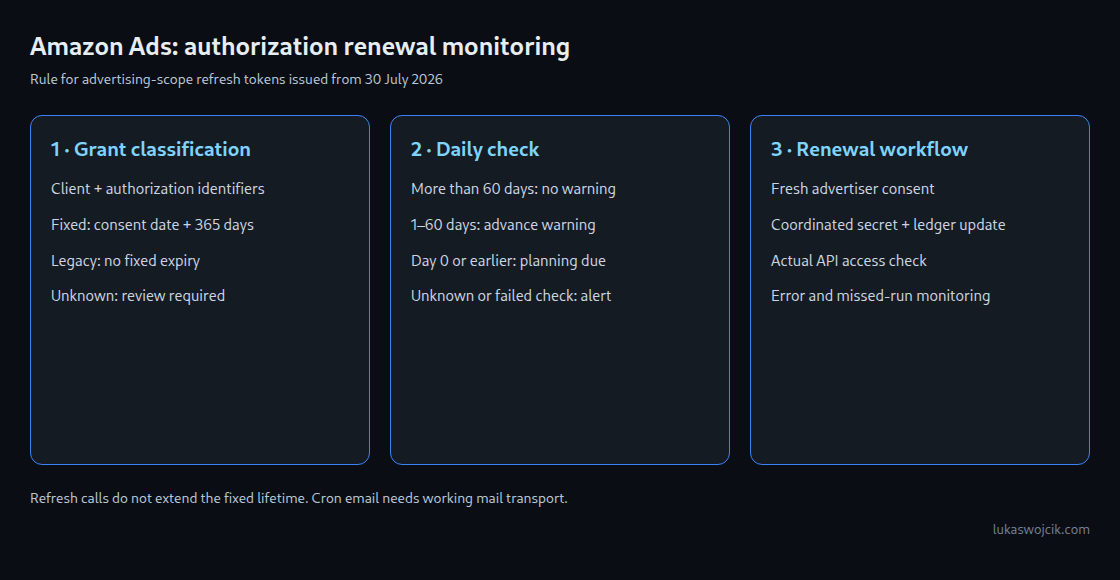
Since 30 July 2026, newly issued refresh tokens for Amazon Ads advertising scopes have a fixed lifetime: 365 days from advertiser consent. Using a refresh token to obtain new access tokens does not restart that period. A local ledger can provide advance warnings, while error monitoring detects revoked or otherwise invalid credentials before the planned deadline.
An access token authenticates API requests and is normally valid for 60 minutes. A refresh token obtains new access tokens without repeating the consent dialog on every exchange.
1. The scope of the 365-day rule
Amazon applies the rule to tokens issued on or after 30 July 2026 for advertising::campaign_management and advertising::audiences. Earlier tokens have no fixed expiry under this change, but remain revocable and can become invalid for other reasons. The distinction depends on token issuance, not merely the date an advertiser account entered an integration.
The fixed period starts at consent. An exchange of a refresh token returns a new access token and the same refresh token; a new consent is a different operation. OAuth providers have different policies, so a sliding lifetime is not a general property of refresh tokens. Amazon Ads rules also should not be confused with Selling Partner API authorization rules.
The current Amazon Ads guide recommends proactive age monitoring and reauthorization. A blanket claim that Amazon never sends any email, console warning or other reminder is not established by that guide. Operational monitoring should work independently of an assumed provider notification.
2. A ledger for authorizations, not raw tokens
The PostgreSQL example stores one row per independently managed authorization. authorization_id is an internal stable identifier, and client_id identifies the application. Several applications or grants for the same advertiser need separate rows. An account name alone is not a unique authorization identifier. Actual refresh tokens and client secrets belong in protected secret storage, outside this table and alert output.
The policy field separates fixed_365, legacy and unknown. Legacy rows have no calculated expiry. Missing evidence belongs under unknown and triggers a warning, rather than becoming an invented consent date. For fixed_365, consent_date is the UTC calendar date of recorded consent and token_issued_at is the actual issuance timestamp. A trusted authorization log is needed to classify records around the cutoff.
CREATE TABLE amazon_ads_token_ledger (
    authorization_id text PRIMARY KEY,
    client_id        text NOT NULL,
    account_name     text NOT NULL,
    policy           text NOT NULL
                     CHECK (policy IN ('fixed_365', 'legacy', 'unknown')),
    consent_date     date,
    token_issued_at  timestamptz,
    expires_on       date GENERATED ALWAYS AS (
        CASE WHEN policy = 'fixed_365' THEN consent_date + 365 END
    ) STORED,
    last_refresh_ok  timestamptz,
    owner_email      text NOT NULL,
    status           text NOT NULL DEFAULT 'active'
                     CHECK (status IN ('active', 'revoked')),
    CHECK (policy <> 'fixed_365' OR
           (consent_date IS NOT NULL AND token_issued_at IS NOT NULL)),
    CHECK (policy <> 'fixed_365' OR
           (token_issued_at AT TIME ZONE 'UTC')::date >= DATE '2026-07-30'),
    CHECK (policy <> 'legacy' OR
           (token_issued_at IS NOT NULL AND
            (token_issued_at AT TIME ZONE 'UTC')::date < DATE '2026-07-30'))
);

CREATE INDEX ON amazon_ads_token_ledger (expires_on)
WHERE status = 'active';
expires_on is a conservative planning date: consent date plus 365 days. A date-only record cannot establish the exact server-side expiration instant. The checker treats the beginning of that UTC date as a critical planning boundary, so renewal belongs before that date. A generated column keeps arithmetic consistent with stored input; incorrect source dates still produce incorrect deadlines.
3. A checker with explicit failure states
This Python 3 example requires Psycopg 3. The database role only needs SELECT on the ledger. Connection details come from ADS_LEDGER_DSN; credentials can use PostgreSQL’s protected password file or a suitable service configuration. The example limits connection and query time and prints no DSN or token values on failure.
#!/usr/bin/env python3
import os
import sys
import psycopg

WARN_DAYS = 60
QUERY = """
SELECT authorization_id, account_name, policy, expires_on,
       expires_on - CURRENT_DATE AS days_left, owner_email
FROM amazon_ads_token_ledger
WHERE status = 'active'
  AND (policy = 'unknown' OR expires_on <= CURRENT_DATE + %s)
ORDER BY expires_on NULLS FIRST, authorization_id
"""

def render(rows):
    result = 0
    for aid, name, policy, expires, days, owner in rows:
        if policy == 'unknown':
            state = 'UNKNOWN: authorization metadata needs review'
            result = 2
        elif days <= 0:
            state = 'DUE: planning deadline reached; check authorization'
            result = max(result, 1)
        else:
            state = f'WARNING: {days} days to planning deadline'
        print(f'{aid} | {name} | {state} | deadline={expires} | owner={owner}')
    return result

def main():
    dsn = os.environ.get('ADS_LEDGER_DSN')
    if not dsn:
        print('CHECK FAILED: ADS_LEDGER_DSN is missing', file=sys.stderr)
        return 2
    try:
        with psycopg.connect(dsn, connect_timeout=5,
                options='-c timezone=UTC -c statement_timeout=5000') as conn:
            rows = conn.execute(QUERY, (WARN_DAYS,)).fetchall()
    except psycopg.Error as exc:
        # No DSN, credentials or token contents in diagnostic output.
        print(f'CHECK FAILED: {type(exc).__name__}', file=sys.stderr)
        return 2
    return render(rows)

if __name__ == '__main__':
    sys.exit(main())
Exit 0 means no critical condition was found; advance warnings still produce output. Exit 1 means a planning deadline has been reached. Exit 2 means unknown authorization metadata or a failed check. A monitoring wrapper must actually consume these codes. The 60-day threshold is a configurable organizational buffer, not an Amazon requirement or a measured universal approval duration.
4. Scheduling and delivery
# Service-user crontab; working local mail transport required.
MAILTO=ads-ops@example.com
ADS_LEDGER_DSN="dbname=ops user=ads_ledger_reader"
17 6 * * * /opt/ads/venv/bin/python /opt/ads/token_ledger_check.py
The paths and database role are deployment examples. The private Python environment must contain Psycopg, and local authentication must permit the read-only role. Cron runs at 06:17 in the scheduler’s configured time zone; the SQL date calculation is explicitly UTC. MAILTO requires working local mail transport and a tested recipient. The script itself does not send email, and owner_email only labels responsibility; it is not an automatic delivery address.
Output can produce a daily reminder while a condition persists. Escalation, acknowledgment and rate control belong in the surrounding monitoring. An independent heartbeat or missed-run check is necessary because a stopped scheduler cannot report its own failure. A last_refresh_ok field is useful only when the refresh worker updates it and a separate freshness check evaluates it.
5. Renewal and error recovery
An invalid refresh token produces HTTP 400 with invalid_grant according to Amazon. A reporting job must report that failure instead of replacing valid reports with empty data. Network failures may warrant bounded retries; repeated retries do not repair an invalid grant. Recovery requires a new authorization grant through the consent workflow. Successful renewal updates the secret and ledger coherently, followed by a real access-token exchange and a minimal authorized API check.
Questions and answers
What if the original consent date is unavailable?
An opaque refresh-token string is not a reliable consent-date record. Available authorization logs and onboarding evidence can establish the date; otherwise the row remains unknown. Planned reauthorization can establish a new recorded consent, but a speculative date should never silently turn an unknown authorization into a healthy one.
Do legacy tokens need annual renewal under this rule?
No fixed annual expiry applies to tokens issued before 30 July 2026 under the cited Ads rule. Revocation and other invalidation still need monitoring. A newly issued replacement token must be classified using the current issuance and consent evidence; ordinary access-token refresh is not replacement consent.
Related articles