English
 Deutsch
 Polski
PHP2Shell: What Provides Protection and Why Unpatched Websites Will Remain

Management Summary
PHP2Shell describes critical flaws in PHP, the software that runs many websites. Protection depends on corrected software actually serving each website, not merely on an installed update or a working login. Forgotten installations and unclear maintenance responsibilities can leave exposure behind. The article connects inventory, verified updates and investigation of possible earlier attacks. Updating closes the flaws but does not remove an existing intrusion; global numbers of unpatched websites remain uncertain.
Contents
- Updated situation: attempts before public disclosure
- What PHP2Shell means
- Which updates provide protection?
- From updated packages to protected services
- The consequences of a missing update
- Will administrators actually install the updates?
- How many websites will remain at risk?
- Linux operations: identifying the PHP actually in use
- Updating PHP 8.4 with APT
- Updating PHP 8.5 with APT
- Updated packages do not prove updated running processes
- PHP 7.4: a security backport instead of unchanged 7.4.33
- Investigation: connecting events from several records
- Recognizing PHP2Shell in logs: suspicion is not proof
- Initial Linux log queries
- Improving logging without collecting form bodies
- Protection while an update is pending
- Concrete intrusion indicators: separate patching from incident response
- Questions and answers
- Sources
As of 25 October 2026. PHP runs website code on the server, including WordPress code. Two critical PHP flaws can allow an attacker to run commands without signing in under certain conditions. The name for these flaws is PHP2Shell. Updates for both have been available since 21 October. The key check is whether the website actually uses corrected PHP. A separate session issue announced on 23 October is explained below. [1] [6]
Updated situation: attempts before public disclosure
AWS observed a PHP2Shell attack attempt on 17 October 2026, before public disclosure. The observation came from MadPot: deliberately exposed decoy systems that record attacks. For further attempts, success against a real target remained uncertain. This does not provide a worldwide victim count. An investigation of an affected installation therefore needs to cover time before the disclosure date. AWS: first-hand observations and limitations
What PHP2Shell means
The identifiers are CVE-2026-109618 and CVE-2026-109619. CVE numbers identify individual security flaws. With the first flaw, PHP can treat partly prepared data as valid after running out of memory. With the second, references to released memory remain and can be used by a later request. Both flaws are in PHP itself. [3] [4]
Old PHP branches also need checking. cPanel lists affected versions from PHP 5 onwards and identifies corrected releases of its packages. Moving from PHP 7 to an arbitrary PHP 8 release is therefore insufficient evidence. The specific package must include confirmed fixes for both flaws. [7]
With Apache and mod_php, PHP runs inside the web server. A confirmed attack can occur there before website code runs. PHP-FPM instead handles requests in separate PHP processes, called workers, grouped into pools. The PHP Foundation also reports confirmed code execution through FPM, depending on the application. A WordPress login therefore does not reliably protect against these PHP flaws. [2]
Which updates provide protection?
The official updates for the two flaws are 8.2.35, 8.3.36, 8.4.27 and 8.5.12. Each branch needs that version or a newer corrected release. PHP 8.1 and older branches no longer receive regular PHP releases. Small source fixes have exceptionally been provided for 7.4, 8.0 and 8.1. Vendors can incorporate a fix into an older package; this is called a backport. It does not restore general support for an old PHP branch. [1]
A backport can retain the original PHP version number. An additional package revision then identifies the changed vendor release. The evidence is the full package version and vendor confirmation for both CVEs. Neither an old base version nor the label “PHP 8” is enough on its own. [7]
Additional notice of 23 October: session configuration
PHP describes another unusual case under CVE-2026-115560: the session.serialize_handler setting uses php_binary or php_serialize, application code switches to php with ini_set() before session_start(), and upload progress remains enabled. These names identify different storage formats for session data. PHP recommends session.upload_progress.enabled=0 until the next regular bugfix release. According to PHP, applications without that runtime format change can keep the feature enabled. This additional notice applies alongside the two updates of 21 October; a full advisory is announced for the next release. PHP: session advisory of 23 October 2026
From updated packages to protected services
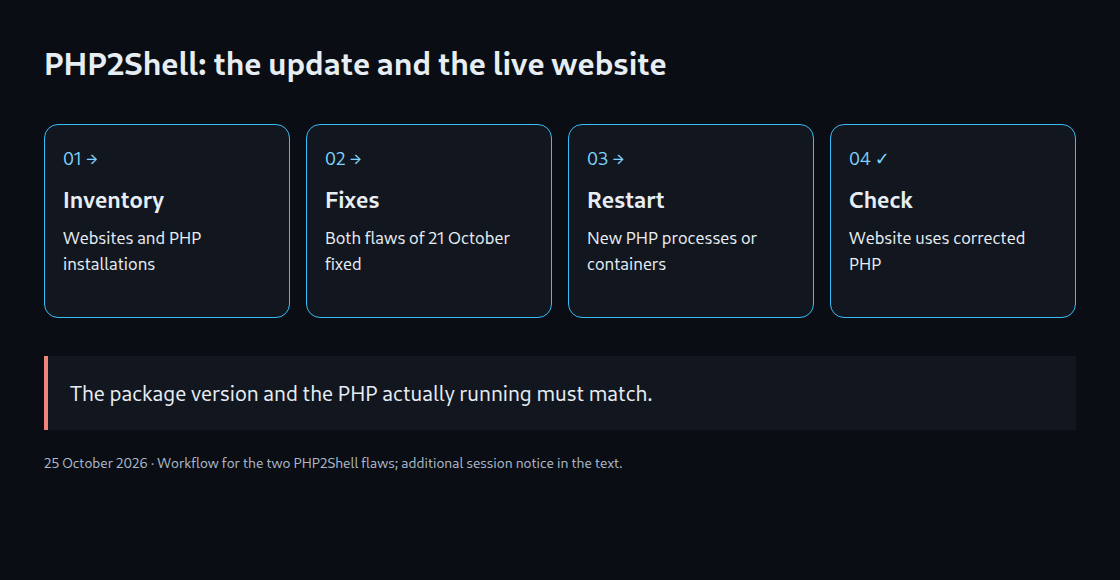
- Inventory: Domains, PHP pools, containers, forgotten test installations and embedded administration tools all belong in scope.
- Evidence: Each runtime needs a recorded package source, revision and confirmation that both CVEs are addressed.
- Running instances: PHP workers must load the corrected build. A container starts from a prepared package of programs and runtime, called an image. Custom containers need a new image with corrected PHP, followed by new containers started from that image. Updating the surrounding server does not change an existing image. [8]
- Web verification: The command line may use a different PHP installation from the website. Mapping each domain to the active runtime, followed by functional checks, completes the operational verification.
Where immediate patching remains impossible, ENISA recommends considering isolation of exposed applications. A static maintenance page served before PHP can stop requests reaching the vulnerable runtime. A maintenance plugin running inside that same PHP application does not reliably provide that separation. [5]
Temporary settings close only particular attack paths. session.upload_progress.enabled=0 disables storage of upload progress in session data. This blocks certain session paths but does not replace the two updates. memory_limit=-1 is also incomplete and can increase the risk of outages from high memory use. PHP advises against using operating-system RLIMIT_AS or RLIMIT_DATA limits for this purpose: failed memory allocation can still reach the vulnerable code. Linux cgroups limit resource use by groups of processes; these limits are not a complete repair either. [3] [4]
The consequences of a missing update
The starting point is code execution with the web worker account’s permissions, not automatic full administrator access (root). Depending on permissions and accessible secrets, consequences can include stolen database credentials, exposed customer records, altered content, planted malware and abused API keys. Reachable internal services may become further targets where network access and credentials permit. [3]
For an online shop, a modified payment page can be more damaging than an obvious outage. Investigation, recovery, downtime and loss of trust add further costs. A later patch does not remove an existing backdoor. Concrete intrusion indicators call for isolation, evidence preservation, credential review and recovery from a trusted state.
Will administrators actually install the updates?
Assessment: A rapid initial reduction in exposed installations is plausible; complete coverage within days is not. Centrally operated platforms can update large numbers of websites together. Individual servers depend on ownership, package availability, compatibility and controlled restarts. Google Cloud explicitly distinguishes automatically updated runtimes from services that must be started again from a corrected image. [8]
The remaining population is likely to be persistent: abandoned projects, old agency deployments, containers without maintenance processes and applications tied to unsupported branches. Delays do not automatically indicate administrator negligence. Missing budgets, unclear responsibilities and untested legacy dependencies can obstruct a technically straightforward patch. A specific global update rate would currently be speculation.
How many websites will remain at risk?
On 25 October 2026, W3Techs reports PHP on 69.2 percent of websites with a known server-side programming language. Within detected PHP websites, PHP 7 accounts for 26.8 percent and PHP 5 for 7.7 percent, totalling 34.5 percent. These figures describe detected use. They do not show which websites have already received the security fixes. [9]
No reliable absolute remainder follows from those figures. Vendor backports, configuration differences, hidden version information and multiple websites sharing a server prevent direct conversion. Individual web pages, domains and servers also represent different counting units.
A purely illustrative calculation: in a population of one million genuinely affected installations, a successful 95% update rate would leave 50,000 unpatched. This is neither a measurement nor a forecast. The arithmetic simply explains why even a high completion rate can leave a substantial remainder at internet scale. Verified patch status matters more for a particular website than a global percentage.
Linux operations: identifying the PHP actually in use
The following package examples apply to Debian/Ubuntu systems using APT with existing trusted repositories. The relevant PHP branch must already be installed. RPM systems, hosting panels and custom containers require the corresponding vendor workflow. Adding an arbitrary third-party repository is not a reliable repair strategy.
Before changes, the preparation includes a recoverable backup, a mapping from each domain to its PHP pool, and a short test plan. Package installation can restart services before the command finishes. The maintenance window therefore starts before installation. The following inventory includes command-line PHP (CLI) and services. A separate check must identify the PHP installation used by the web server for each website.
cat /etc/os-release
command -v php
php -v
php --ini
dpkg-query -W -f='${binary:Package}\t${Version}\n' 'php*' 'libapache2-mod-php*' 2>/dev/null
systemctl list-units --type=service --all | grep -E 'php.*fpm|apache2|nginx'
ps -eo pid,lstart,comm | grep -E 'php|apache2'
A domain can use PHP 8.4 through FPM while the shell command php points to 8.5. Additional copies can exist in containers, hosting directories and forgotten test services. Evidence for each installation needs the package source, complete revision, service or container and associated websites.
Updating PHP 8.4 with APT
This sequence selects installed 8.4 packages, including existing extensions and the Apache module. It first reads the full package list; a failed query stops the sequence. Selection for 8.4 follows. The APT simulation changes no packages. A “candidate” is the version APT would install. It must be PHP 8.4.27 or newer, or a backport confirmed to fix both flaws. Debian 13 documents 8.4.27-1~deb13u1 as corrected. APT documentation Debian: CVE-2026-109618 Debian: CVE-2026-109619
set -euo pipefail
branch=8.4
sudo apt-get update
package_rows=$(dpkg-query -W -f='${db:Status-Abbrev} ${binary:Package}\n')
selected_rows=$(awk -v branch="$branch" '
  $1 == "ii" && ($2 == "php" branch ||
    index($2, "php" branch ":") == 1 ||
    index($2, "php" branch "-") == 1 ||
    $2 == "libapache2-mod-php" branch ||
    index($2, "libapache2-mod-php" branch ":") == 1) { print $2 }
' <<< "$package_rows")
test -n "$selected_rows"
mapfile -t php_packages <<< "$selected_rows"

apt-cache policy "${php_packages[@]}"
sudo apt-get -s install --only-upgrade "${php_packages[@]}"
Installation follows review of the plan. Unexpected removals, branch changes or vulnerable candidates are reasons to stop. The next block belongs in the same Bash session and assumes an existing FPM service:
sudo apt-get install --only-upgrade "${php_packages[@]}"
sudo /usr/sbin/php-fpm8.4 -t
sudo systemctl restart php8.4-fpm
systemctl is-active php8.4-fpm
/usr/bin/php8.4 -v
/usr/sbin/php-fpm8.4 -v
Updating PHP 8.5 with APT
An existing 8.5 deployment uses the same workflow with a corrected candidate starting at 8.5.12 or a confirmed vendor backport. Debian 13’s standard repository does not provide PHP 8.5 simply because a newer PHP branch exists. Without a suitable candidate from the already approved source, this workflow stops before installation.
set -euo pipefail
branch=8.5
sudo apt-get update
package_rows=$(dpkg-query -W -f='${db:Status-Abbrev} ${binary:Package}\n')
selected_rows=$(awk -v branch="$branch" '
  $1 == "ii" && ($2 == "php" branch ||
    index($2, "php" branch ":") == 1 ||
    index($2, "php" branch "-") == 1 ||
    $2 == "libapache2-mod-php" branch ||
    index($2, "libapache2-mod-php" branch ":") == 1) { print $2 }
' <<< "$package_rows")
test -n "$selected_rows"
mapfile -t php_packages <<< "$selected_rows"

apt-cache policy "${php_packages[@]}"
sudo apt-get -s install --only-upgrade "${php_packages[@]}"
Continuation again requires a reviewed plan, the same Bash session and an existing FPM service.
sudo apt-get install --only-upgrade "${php_packages[@]}"
sudo /usr/sbin/php-fpm8.5 -t
sudo systemctl restart php8.5-fpm
systemctl is-active php8.5-fpm
/usr/bin/php8.5 -v
/usr/sbin/php-fpm8.5 -v
Apache with mod_php instead requires an updated Apache module and an orderly Apache restart after a successful configuration check. On Debian the check is sudo apache2ctl configtest. A PHP package update in a pure FPM setup does not require a blanket nginx restart. Separate FPM masters, persistent CLI services and containers need individual treatment. Restarts can interrupt active requests; redundant deployments should be rolled out sequentially.
Updated packages do not prove updated running processes
Linux can keep a process running from an old executable after replacement. A fresh php -v then reports the corrected release while an existing worker continues with the old build. This read-only check identifies PHP processes retaining a deleted executable:
sudo bash <<'BASH'
for link in /proc/[0-9]*/exe; do
  target=$(readlink "$link" 2>/dev/null) || continue
  case "$target" in
    *php*"(deleted)"*)
      pid=${link#/proc/}
      pid=${pid%/exe}
      printf 'PID %s: %s\n' "$pid" "$target"
      ;;
  esac
done
BASH
A match calls for checking the service and version; it does not prove an intrusion. An empty result does not prove complete protection either: loaded Apache modules, libraries and other PHP installations are outside this search. Application checks then cover login, uploads, forms, background jobs and scheduled tasks. A public phpinfo() page would expose unnecessary server details. Suitable checks use protected internal diagnostics and match the running process to the verified installation.
PHP 7.4: a security backport instead of unchanged 7.4.33
PHP 7.4 remains end-of-life. Migration to a supported branch or a verified fix from the existing supplier’s extended support service (LTS) is preferable. For an unavoidable transition period, the PHP project published a minimal source backport covering both PHP2Shell identifiers. This does not restore general support or promise fixes for unrelated vulnerabilities.
The source revision (commit) verified on 25 October is 712e60f9edfd03f0960fc4fc3c2c375f42b90aa2. The workflow pins that exact source revision. Rebuilding the unchanged 7.4.33 release does not include this correction. PHP: specific security commit
This example turns PHP source code into programs for the command line and FPM. It requires a separate, compatible Debian/Ubuntu build environment with Git and CA certificates. The blocks belong to the same Bash session. This is not a fully validated production installation. Old PHP source cannot be built with every current system library combination.
set -euo pipefail
workdir=$(mktemp -d "$HOME/php74-php2shell.XXXXXX")
cd "$workdir"
git init php-src
cd php-src
git remote add origin https://github.com/php/php-src.git
commit=712e60f9edfd03f0960fc4fc3c2c375f42b90aa2
git fetch --depth=1 origin "$commit"
git checkout --detach FETCH_HEAD
test "$(git rev-parse HEAD)" = "$commit"
git show -s --format='%H%n%s%n%b' HEAD
The required tools and separate installation directory follow below. --disable-all keeps the example small; the result does not automatically include every extension required by WordPress or another application. The configured user and group www-data must exist in the target environment. PHP: Unix installation · PHP: FPM build options
sudo apt-get update
sudo apt-get install --no-install-recommends \
  build-essential autoconf bison re2c pkg-config \
  libxml2-dev libsqlite3-dev

./buildconf --force
prefix=/opt/php74-php2shell-712e60f9
test ! -e "$prefix"
./configure \
  --prefix="$prefix" \
  --with-config-file-path="$prefix/etc" \
  --with-config-file-scan-dir="$prefix/etc/conf.d" \
  --disable-all --enable-cli --enable-fpm --enable-session \
  --with-fpm-user=www-data --with-fpm-group=www-data \
  --without-pear
make -j2
NO_INTERACTION=1 REPORT_EXIT_STATUS=1 make test
Failed or unexpectedly skipped relevant tests need investigation. Only an accepted test run is followed by installation into the new target directory, named prefix in the script. This does not replace /usr/bin/php or existing distribution packages:
sudo make install
sudo install -d -m 0755 "$prefix/etc/conf.d"
sudo install -m 0644 php.ini-production "$prefix/etc/php.ini"
"$prefix/bin/php" -n -v
"$prefix/bin/php" --ini
"$prefix/sbin/php-fpm" -v
git rev-parse HEAD
The result may still report a 7.4 version number. The evidence therefore consists of the verified source revision, build log and program actually used. Website requirements may still need extensions such as database drivers, mbstring, XML, cURL or ZIP. Extensions must match the binary interface of this PHP build (ABI). The build tools phpize and php-config must also belong to this exact installation.
FPM configuration, the service account and file permissions require separate tests. A separate socket, meaning a connection endpoint, and a separate service keep the new installation apart from the old one. After a successful php-fpm -t -y /path/to/php-fpm.conf test, the web server can point specifically to the new pool. A successful command-line invocation alone changes no website. If the switch fails, the application remains isolated; returning the vulnerable installation to public access is not a safe fallback.
Investigation: connecting events from several records
Datadog reproduced the flaws in its laboratory. Successful code execution need not crash a worker or produce a suspicious HTTP status. HTTP 200 therefore provides no assurance. Suspicious form submissions, memory errors and unexpected child processes become meaningful when the timing links these events. A single memory-exhaustion error alone does not prove an attack. Datadog Security Labs: original analysis
An investigation combines web-server records, PHP errors, process starts and unexpected file changes. Existing evidence needs preserving before cleanup. Full form contents can contain passwords and should not be routinely recorded. A web application firewall (WAF) filters web requests but does not repair PHP. Two results need separate records: corrected PHP is running, and possible earlier access has been investigated.
Recognizing PHP2Shell in logs: suspicion is not proof
No universal log entry says “PHP2Shell detected”. An unusual request, a software error and confirmed attacker commands are different findings. A connected sequence is stronger evidence: an unusual request, an error in the responsible PHP process and an unexplained action afterwards. Missing entries can result from disabled logging, deleted old log files or short retention.
| Observation | Interpretation | Next check |
|---|---|---|
| Many POST requests or large uploads | Also normal for imports and legitimate uploads | Target route, time and deviation from the usual workload |
| Memory exhaustion, process termination or invalid memory access (segfault) | A lead, not a unique PHP2Shell signature | Related requests, pool, process identifier (PID) and known software defects |
| Unexpected command interpreter or download tool started by PHP | Higher priority; some applications legitimately launch such programs | Parent process, actual purpose and timing |
| Unauthorized code change or proven foreign command | Concrete evidence suggesting compromise | Isolation, evidence preservation and scope assessment |
Initial Linux log queries
The following commands read existing data. Service names, paths and time range must match the installation. The timestamp uses the local system timezone; comparison across systems requires matching timezones and synchronized clocks. PHP errors appear in the journal only when the service actually sends those messages there. systemd: journalctl
sudo journalctl --since '2026-10-17 00:00:00' \
  -u php8.4-fpm -u php8.5-fpm -u apache2 -u nginx \
  --no-pager -o short-iso |
grep -Ei 'Allowed memory size.*exhausted|Out of memory|segfault|SIGSEGV|child .*exited on signal'
No output means only “no match in these sources with this pattern.” Separate FPM error files, container logs and virtual-host-specific logs require additional queries. Rotated files also belong in the investigation window.
For common Apache/nginx access logs recording the HTTP request, this query returns the last hundred matching POST lines from the files read. This is initial triage, not a complete scanner; file ordering does not guarantee chronological sorting:
sudo zgrep -hE '"POST [^"]+ HTTP/[0-9.]+"' \
  /var/log/nginx/access.log* /var/log/apache2/access.log* |
tail -n 100
Missing paths or different log formats require adjusted file selection. Standard access logs normally omit the complete request body. A commonly recorded byte count usually describes the response, not the upload. Searching ordinary access logs for PHP_SESSION_UPLOAD_PROGRESS may therefore find nothing even when that form field was sent. Missing body data cannot be reconstructed retrospectively. Apache: log meanings and configuration
A snapshot of process relationships can provide additional context:
ps -eo pid,ppid,lstart,user,comm --forestThe list contains only processes running now. Finished commands can be traced only if suitable monitoring was already enabled. Examples include operating-system audit records and security software that records process starts (EDR). Recording switched on today cannot supply yesterday’s history.
Improving logging without collecting form bodies
An additional nginx log can record each request’s identifier, time, method, path and result, plus data volume and duration. The definition belongs inside the http { ... } block in nginx configuration. The new format helps with future requests only. nginx: log_format and access_log
log_format php2shell escape=json
  '{"time":"$time_iso8601","request_id":"$request_id",'
  '"client":"$remote_addr","method":"$request_method","uri":"$uri",'
  '"status":"$status","request_bytes":"$request_length",'
  '"response_bytes":"$body_bytes_sent","duration":"$request_time",'
  '"upstream_status":"$upstream_status"}';
The next line enables the format inside the appropriate server { ... } block. Existing access_log entries and settings inherited from an outer block need checking: a setting at this level can replace logging previously inherited from above.
access_log /var/log/nginx/php2shell-access.log php2shell;The configuration must pass nginx -t before a reload. request_bytes covers the whole request, including headers, rather than just an uploaded file. It does not measure PHP memory use. $uri is nginx’s processed path and can change during internal redirects. URL parameters, cookies, authorization headers and form contents are not directly recorded. IP addresses and paths can nevertheless contain personal information. Access permissions, retention and regular log-file rotation therefore need configuring. Behind an intermediary server, the client address is reliable only with correct trust settings. OWASP: secure logging
Protection while an update is pending
The priority is a corrected PHP installation. If an immediate update is impossible, public requests need stopping before PHP, for example with a static maintenance page or restricted access. The same restriction must cover direct access to the origin server. Protection through a CDN, which distributes or forwards content, is insufficient while the direct route remains open.
- Request limits: Size, upload and rate limits at the intermediary server (reverse proxy) should match actual needs. Legitimate imports and large files require tested rules. A small request can consume more memory internally, so size limits are not complete protection.
- WAF as another layer: Appropriate vendor rules require activation and enforcement checks. Observation-only rules block nothing; an HTTP 403 only establishes rejection of that particular request.
- Restricted privileges: Separate pool accounts, minimal file permissions, restricted database accounts and limited network access reduce potential damage. A compromised application can still abuse every secret legitimately available to that application.
- Official interim measures: Disabling session upload progress early blocks particular paths, not both flaws completely. Blanket removal of PHP memory limits without suitable external boundaries can create further availability failures.
Concrete intrusion indicators: separate patching from incident response
Deleting a suspicious file and updating PHP is insufficient for a conclusion that the incident has been resolved. The affected instance first needs isolation against further access. Relevant logs, timestamps and available process evidence should be preserved while further access is blocked. Unconsidered cleanup can destroy useful evidence.
Subsequent steps include assessing accessible data and adjacent systems, replacing potentially exposed credentials from a trusted environment and rebuilding from verified sources where appropriate. A backup must predate possible compromise both chronologically and in content. Returning to public service requires a corrected active runtime, checked application and continued monitoring. “Patch installed” and “incident investigated” remain separate findings.
Questions and answers
Is a WordPress update sufficient?
No. Updating WordPress does not replace a corrected PHP runtime. Application updates and server packages require separate verification.
Does a working website establish safety?
No. Ordinary requests can succeed on a vulnerable runtime. The absence of visible changes also cannot exclude an earlier intrusion.
Useful evidence combines the package revision, vendor confirmation covering both CVEs and verification of active web processes. Signs of compromise require a separate investigation.
Sources
- PHP: Security advisory, 21 October 2026
- PHP Foundation: security release and background
- PHP: CVE-2026-109618
- PHP: CVE-2026-109619
- ENISA: joint statement
- NHS England: PHP2Shell
- cPanel: corrected package revisions
- Google Cloud: runtime updates and redeployment
- W3Techs: PHP use on 25 October 2026
Additional primary sources and documentation
- PHP: pinned PHP 7.4 security backport
- PHP: Unix installation
- PHP: FPM compilation options
- APT: apt-get options and simulation
- Debian: CVE-2026-109618
- Debian: CVE-2026-109619
- AWS: MadPot observations before disclosure
- Datadog Security Labs: reproduction, detection and remediation
Further analysis and reporting
Log investigation documentation
Related articles