

 English
What the Server Receives When a Page Is Requested

Management Summary
Opening a webpage sends a request to a server before the page's banner or programs begin running. Connection details and existing cookies may already accompany that request. These describe the connection rather than proving a person's identity, and extra lookups can add information not supplied directly by the browser. This matters for understanding website privacy: disabling page programs does not hide the connection. The article's Connection Mirror illustrates a later request, not an exact replay of the initial visit.
Contents
- The first request is not the whole page load
- Three headers are a curl default, not an HTTP minimum
- Headers describe context, not a verified person
- Client hints depend on support and policy
- Connection data and additional lookups
- What the Connection Mirror actually measures
- Privacy signals and existing cookies
- Questions and answers
- Sources
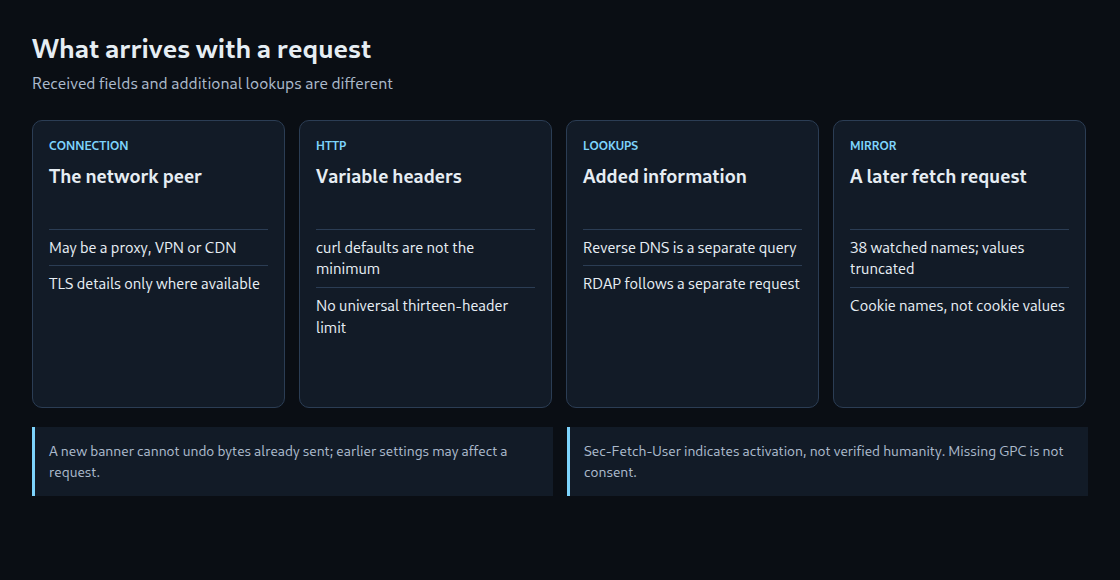
A network request can deliver connection details, headers and stored cookies before the requested page executes its own JavaScript. A consent banner cannot undo a request already sent. That does not make every header compulsory or every later use of the data unavoidable.
The first request is not the whole page load
The relevant boundary is the request for the document and the code subsequently executed by that document. A previous page, an extension or a service worker may already have run code. A later fetch call is another request, not a reconstruction of the original navigation.
There is no universal sequence of banner, tag manager and analytics. Scripts can execute during loading, and a server can process requests without JavaScript. Prior settings can influence what is sent; a newly displayed banner cannot retrospectively change received bytes.
Three headers are a curl default, not an HTTP minimum
The earlier article records three headers for curl, eleven for a navigation and thirteen for fetch in September 2026. These are historical example counts, not browser limits. The original browser captures were not available for independent verification in this review.
A local HTTP/1.1 test reproduced curl’s Host, User-Agent and Accept defaults. Removing User-Agent and Accept still produced a successful request with Host alone. HTTP/1.1 requires Host; the other two are not required for every valid request. HTTP/2 and HTTP/3 use their own framing and pseudo-header rules.
Headers describe context, not a verified person
Accept describes acceptable response formats; Accept-Language carries language preferences. A language list alone does not establish a person’s identity or provide a quantified fingerprinting risk. Browser settings, privacy features, request type and proxies affect the fields.
Sec-Fetch-Site, Sec-Fetch-Mode and Sec-Fetch-Dest describe context. Sec-Fetch-User: ?1 indicates user activation for a navigation in supporting browsers. It is not proof of a human rather than automation: non-browser clients can fabricate headers, and script can participate in an activated navigation.
Client hints depend on support and policy
Supporting Chromium browsers normally send the low-entropy UA hints for brand/version, mobile status and platform over secure connections. This is not a promise for every browser or embedded environment.
Additional HTTP hints generally require an Accept-CH request and remain subject to browser policy. That is not the only access path: navigator.userAgentData.getHighEntropyValues() is a separate JavaScript interface. An absent Accept-CH header therefore does not establish that no script can obtain additional information.
Connection data and additional lookups
The receiving endpoint knows its network peer. That address may belong to a proxy, VPN or CDN rather than the visitor’s device. Reverse DNS looks for a hostname associated with an IP address. RDAP queries registration information, such as the organization responsible for an address range. These are additional lookups; their results are not fields sent by the browser. A network holder is not reliable proof of a residential connection or a particular person.
HTTPS provides negotiated TLS details where the server exposes them. Ordinary HTTP has no TLS. Existing connections can be reused, and TLS 1.3 early data is an exception to the claim that every request follows a newly completed handshake. A CDN that terminates TLS has a separate origin connection, possibly with different parameters or no TLS.
What the Connection Mirror actually measures
The linked tool calls its API through fetch and displays that API request. It watches 38 named headers, truncates displayed values to 500 characters and excludes raw Cookie and Authorization values. Cookie names are shown separately; the total header count can exceed the displayed subset.
The endpoint performs reverse DNS for eligible public addresses and RDAP only after the separate network lookup is requested. It also records an address-based request counter. The tool is therefore not merely a passive rendering of the initial page request. Proxy headers require a trusted proxy configuration before their contents can be treated as a client address.
Privacy signals and existing cookies
Sec-GPC: 1 expresses a preference against specified sale, sharing and cross-context advertising uses; it is not a universal ban on every form of collection. The older DNT specification defines both 1 and 0, so DNT does not always mean no. An absent signal does not establish consent.
Previously stored cookies may accompany an eligible request before page code runs, subject to scope and browser restrictions. A first visit to one URL can still carry cookies set elsewhere within the applicable scope. localStorage is not automatically an HTTP header; a script can later transmit a value read from it.
Questions and answers
Does disabling JavaScript hide the connection?
No. A network request still reaches a receiving endpoint. Disabling JavaScript can reduce script-driven activity, but does not remove the metadata needed for that request.
Does the curl command show what the server received?
Verbose curl output shows the client’s outgoing view, including the request line. An echo server is unnecessary for that display. Intermediaries may modify the request before the origin receives it, so client output and server capture are different observations.
curl -q --http1.1 -sv https://example.com/ -o /dev/null 2>&1 | grep '^>'Related articles


