GTM Integrations for Claude Code: Three MCP Servers, Their Tool Count and Their Context Cost

Contents
A Google Tag Manager container is a JSON document that decides which scripts a website loads and when. Changing it from a prompt means handing a language model write access to that document. The interesting question is not whether that works — it does — but what exactly the model is allowed to touch, and what the connection costs before a single tag is written.
Three integrations were measured for this article on 9 September 2026: three MCP servers, each started over stdio with npx on a Raspberry Pi 5 with Node 20.19.2 and asked for its tool list, plus the Tag Manager API v2 that all of them sit on. The numbers below come from those runs and from the API’s own discovery document, not from the READMEs.
Three ways a container reaches the model
Claude Code knows nothing about Tag Manager on its own. Everything it can do with a container arrives through one of three routes, and only two of them add a capability.
An MCP server is a process that Claude Code starts and talks to over stdio or HTTP. It publishes a list of tools, and each tool appears in the session under the name mcp__<server>__<tool>. That name is what permission rules and hooks match on later, which is the reason it is worth knowing.
The API through the shell needs no server at all. An access token and curl are enough, and the model writes the request itself. Nothing is added to the context up front, and nothing is hidden behind a wrapper either — the trade is convenience against transparency.
A skill or slash command adds no capability whatsoever. It carries a recipe: a naming convention, a review checklist, the order in which a trigger has to exist before a tag can reference it. It changes what the model does with the other two routes, never what it may do. Confusing the two is the most common misreading of the word “integration” here.
What sits underneath: 106 methods, seven scopes, one workspace
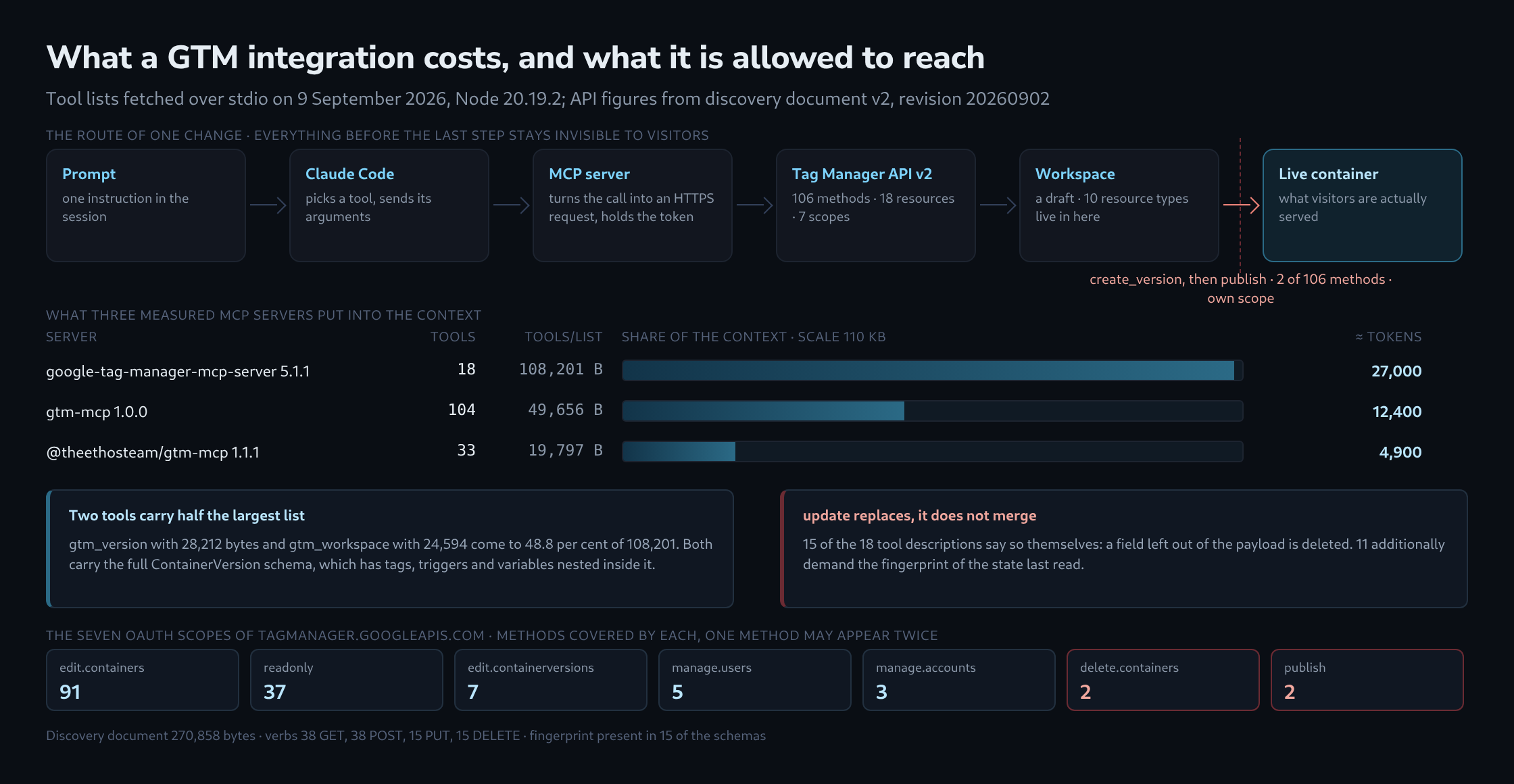
Every route ends at the same place. The Tag Manager API v2 discovery document, revision 20260902 and 270,858 bytes long, describes 106 methods across 18 resources: 38 GET, 38 POST, 15 PUT and 15 DELETE.
Ten of those resources live inside a workspace — tags, triggers, variables, built-in variables, folders, templates, clients, transformations, zones and the gtag configuration. A workspace is a draft. Nothing written into it reaches a single visitor, no matter how wrong it is.
Two further steps stand between the draft and the live site. workspaces.create_version freezes a workspace into a container version, and versions.publish makes that version live. The scope tagmanager.publish covers exactly two of the 106 methods: the publish call and environments.reauthorize. Every other thing an integration can do is, by construction, invisible to visitors until a separate call says otherwise.
# Reading tags: the path carries account, container and workspace.
# A workspace id is mandatory - there is no route to the live tags.
ACC=6012345678; CONT=123456789; WS=42
curl -s -H "Authorization: Bearer $TOKEN" \
  "https://tagmanager.googleapis.com/tagmanager/v2/accounts/$ACC/containers/$CONT/workspaces/$WS/tags"

# Without a token every method answers the same way:
# {"error":{"code":401,"status":"UNAUTHENTICATED",
#   "details":[{"reason":"CREDENTIALS_MISSING"}]}}
Fifteen of the API’s schemas carry a fingerprint, a value that changes whenever the entity changes. An update that sends a stale fingerprint is refused rather than allowed to overwrite an edit somebody made in the browser meanwhile.
Three MCP servers, three cuts through the same API
| Server | Tools | tools/list | ≈ tokens | Shape |
|---|---|---|---|---|
google-tag-manager-mcp-server 5.1.1 |
18 | 108,201 B | 27,000 | one tool per entity, action as a parameter |
gtm-mcp 1.0.0 |
104 | 49,656 B | 12,400 | roughly one tool per API method |
@theethosteam/gtm-mcp 1.1.1 |
33 | 19,797 B | 4,900 | task-shaped, five recipes and a raw call |
The first packs the whole API behind 18 tools. Seventeen of them take an action parameter carrying 101 actions in total, of which 38 only read; gtm_tag alone covers create, get, list, update, remove and revert. The eighteenth, gtag_destination, only lists.
The second is close to a one-to-one mapping of the API: 104 tools against 106 methods, 37 of them named get_… or list_….
The third does not follow the API shape at all. Beside the ordinary calls it carries five recipes — gtm_recipe_ga4_config, gtm_recipe_ga4_event, gtm_recipe_meta_pixel and two trigger recipes — and a 215-byte escape hatch named gtm_raw for everything the other 32 tools do not reach.
A fourth candidate never started. @yoryoboy/gtm-mcp 4.1.0 stopped with Missing required configuration: DATABASE_URL, DB_ENCRYPTION_KEY, because it is built as a hosted multi-tenant service with a PostgreSQL store behind it, not as a local process. Publication on npm with “MCP server” in the description is no promise that a package runs on a workstation.
The context price is not in the tool count
The three tool lists differ in size by a factor of 5.5, and the order does not follow the number of tools. The 18-tool server sends 108,201 bytes of definitions, the 33-tool server 19,797.
Two tools account for nearly half of the largest list: gtm_version at 28,212 bytes and gtm_workspace at 24,594, together 48.8 per cent of 108,201. The cause is the ContainerVersion resource. It embeds tags, triggers, variables, clients, folders, zones, templates, transformations and the gtag configuration, so a fully typed schema of it is necessarily large — and it is sent whether or not a version is ever touched.
This is not a one-off cost at connection time. Tool definitions belong to the request, so they travel with every turn of the session. Two consequences follow. Connecting several servers of this shape at once fills a sizeable part of a context window before any work begins. And a server with looser schemas is not automatically the weaker choice: a wrong field type is caught by the API within a second, while a precise schema is paid for on every single turn.
What an integration may change is decided by the token
All three servers authenticate against Google in the same way, and the real guard rail is the OAuth scope. The largest server’s default asks for all seven, publishing and container deletion included — visible in its src/constants/scopes.ts as a flat list.
The set can be narrowed. The server reads GTM_SCOPES from its environment and splits it on spaces or commas. That narrowing works in one of the three authentication modes only. In the source, createAuthFromEnv hands the parsed scopes to the service-account branch alone; the refresh-token branch receives client id, secret and refresh token, and the access-token branch receives the token. A refresh token already carries the scopes it was minted with, so GTM_SCOPES standing next to it changes nothing and reports nothing.
{
  "mcpServers": {
    "gtm": {
      "command": "npx",
      "args": ["-y", "google-tag-manager-mcp-server"],
      "env": {
        "GOOGLE_SERVICE_ACCOUNT_KEY": "{...}",
        "GTM_SCOPES": "https://www.googleapis.com/auth/tagmanager.readonly"
      }
    }
  }
}
A second gate sits inside Tag Manager itself. A service account only reaches a container after its address has been added there as a user, and that permission is graded per container: read, edit, approve, publish. An account with edit rights and a publish scope still cannot publish.
The third gate is on the Claude Code side and matches on the tool name. A deny rule on mcp__gtm__gtm_version takes the publishing tool out of reach even where the token would allow the call, and a PreToolUse hook on the same name can demand a confirmation instead. Three independent gates, and the useful arrangement is to close the outermost one — the token — because it is the only one that also holds when the container is reached from somewhere other than this session.
Where it goes wrong
Update replaces, it does not merge. Fifteen of the 18 tool descriptions state it themselves: any field left out of the payload is deleted. A model that sends only the field it wants to change strips the rest of the tag. Eleven of the tools additionally require the fingerprint of the state they last read, which forces a read before every write and turns a careless edit into an error message instead of a loss.
A tag is not a flat object. Its settings live in a parameter array of key, type and value, with eight types in the enumeration — template, integer, boolean, list, map, triggerReference, tagReference and the unspecified one — where list and map nest further parameters inside themselves. This structure, not the tag name, is where generated payloads go wrong.
{
  "name": "GA4 - purchase",
  "type": "gaawe",
  "parameter": [
    { "type": "template", "key": "eventName", "value": "purchase" },
    { "type": "tagReference", "key": "measurementId",
      "value": "GA4 Configuration" },
    { "type": "list", "key": "eventParameters", "list": [
      { "type": "map", "map": [
        { "type": "template", "key": "name",  "value": "value" },
        { "type": "template", "key": "value", "value": "{{DLV - value}}" }
      ]}
    ]}
  ],
  "firingTriggerId": ["17"]
}
“GTM” is ambiguous on the package registry. A search for gtm-mcp returns servers for go-to-market frameworks alongside the Tag Manager ones; @shashwatgtmalpha/craft-gtm-mcp lists go-to-market among its keywords, and growth-mcp describes itself as an “open-source GTM MCP server” without meaning Tag Manager at all. The keyword list separates the two faster than the description does.
What this does not solve
None of these integrations can tell whether a tag actually fires. quick_preview compiles a workspace into a preview version; it does not load a page, and it says nothing about a data layer that arrives too late. The judgement about correctness stays with a preview session in a browser, exactly as before.
Neither does the API record why something changed. A container version carries a name and a description, and both stay empty unless they are filled in the same call — which makes the version description the cheapest place to record which prompt caused which change, and the first thing to go missing when a tag is created in a hurry.
And the file route has not become obsolete. An exported container is a single JSON file, and reviewing it against a diff needs no token, no scope and no server. For a change that is written by a model and read by a human, the export remains the shorter path — the API’s advantage begins where the change has to be applied, not where it has to be understood.
Related articles