English
 Deutsch
 Polski
Safari 27 and Measurability in 2027: What Is Technically Blocked and Which Tracking Architecture Holds Up

Management Summary
Safari is Apple’s web browser. Its privacy protections can limit the information websites receive about visits and their origins. The article explains what this means for businesses measuring marketing results: gaps in reports can arise even when a page works normally. Collecting data through an owned website address does not restore information already removed by the browser. Understanding these limits helps judge reports realistically without treating unconfirmed claims about future blocks as established facts.
Contents
Safari can block measurement requests or remove information from a request. An event sent successfully therefore does not automatically contain useful source information. Planning for 2027 requires checking the actual data path: what reaches the server, what a script can read and what subsequently appears in the report.
This source review, dated 25 October 2026, separates documented features from open questions. Apple’s Safari 27 release notes do not establish a complete new list of blocked advertising networks or URL parameters. Public WebKit code exposes possible filters and permissions, but not a reliable inventory of all currently shipped rules. Specific additions such as xmt, si or particular vendors are therefore not presented here as confirmed Safari 27 blocks. No Safari device test was conducted for this article. [1, 4, 5]
Which protections are documented
The mechanisms serve different purposes. A network filter prevents a connection. Link Tracking Protection removes certain identifiers from an address. Fingerprinting protection makes recognition through device characteristics harder. A cookie limit instead reduces how long an identifier remains stored. Each case needs a separate test.
| Mechanism | Documented background | Practical effect |
|---|---|---|
| Network filtering | WebKit already described blocking known trackers in private browsing for Safari 17. | A script may load even though the subsequent measurement request fails. |
| Fingerprinting protection | For known fingerprinting scripts, Safari 26 restricts device queries, long-lived script-written storage and access to URL parameters and the referrer, among other capabilities. | A request may arrive without the previous page or campaign information. |
| Cookie and storage rules | WebKit distinguishes third-party cookies, script-writable storage and server access identified as third-party cloaking. | An owned subdomain does not establish a permanently available identifier. |
This table summarizes existing mechanisms rather than assigning a wholly new protection layer to every Safari version. Settings, private browsing, content blockers and the particular request can change the result. National browser shares cannot replace an analysis of the site’s actual traffic. [2, 3, 6]
Missing information despite a successful request
Missing source information can be investigated: the network log shows the fields actually transmitted. A successful HTTP response initially confirms only the transfer. Comparing the input, transmitted data and report identifies where information disappears. A larger “Direct” share alone does not prove a Safari filter is responsible.
Fingerprinting protection also does not mean that every call returns fresh random values. WebKit describes modified outputs and standardized device properties; certain audio values remain consistent within a buffer. This does not establish that every possible fingerprint is impossible. [7]
The public WebKit code examined here classifies scripts using hostnames and domains, among other inputs. The interfaces contain separate permissions for cookies, local storage, URL parameters and network requests. This development code does not establish the complete rules of an installed Safari 27 version. Nor does this evidence establish blanket inheritance of every restriction from a tag container to each subsequently loaded script. [4, 5]
What an owned domain changes
| Setup | Data path | Limit |
|---|---|---|
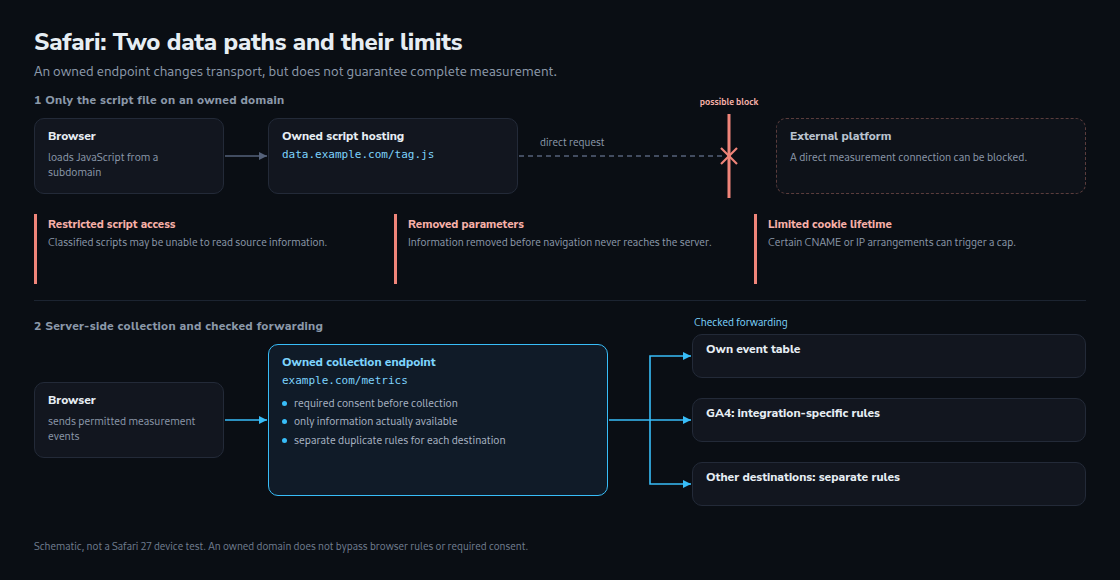
| Hosting only the script | The site serves JavaScript; the browser then sends data directly to the analytics platform. | The external measurement connection remains and can be blocked. |
| Owned collection endpoint | The browser sends to example.com/metrics, for example. The server validates the data and forwards permitted events. | Fewer direct platform connections, but no guarantee against browser rules, content blockers or missing input data. |
A collection endpoint receives measurement events. A reverse proxy can pass requests under an owned path to an internal service. The browser then sees the owned path. This does not replace checks on stored data or any required consent.
Checking URL parameters and cookies separately
Link Tracking Protection can remove identifiers before the destination page loads. Removed information then never reaches the server. Campaign parameters and a script’s reading permissions are separate issues: a parameter may reach the server while a restricted script cannot access the value. Private browsing and the additional all-browsing setting therefore belong in the test matrix. [3, 7]
UTM parameters such as utm_source name a campaign source. A click ID instead identifies a particular advertising click. UTM-based campaign classification is useful, but neither reconstructs a removed click ID nor proves the effect of an individual advertisement.
CNAME and IP checks can apply to server cookies under an owned subdomain. A CNAME is a DNS reference to another name. WebKit describes restrictions for certain cases where an owned subdomain conceals a third party. This does not imply identical treatment of every cookie from a server with a different IP address. [6]
A concrete test compares the transmitted Set-Cookie header, the expiry stored in the browser and later availability. A seven-day expiry may also originate from the server itself. A path on the main domain can avoid certain differences in the data path, but cannot guarantee longer storage. HttpOnly prevents JavaScript access; this does not create an exemption from Safari’s storage rules.
A setup that can be checked in 2027
- Collection limits. Required consent and permitted purposes must govern collection and storage from the start, not just forwarding. An owned database does not automatically make collection permissible.
- Available source information. The server receives the URL actually requested. The
Refererheader may be absent or contain only the referring origin; a URL fragment after#is not included. This cannot recover parameters already removed. [8] - Destination-specific forwarding checks. GA4 Measurement Protocol supplements regular collection; switching entirely to this protocol can produce incomplete reports. A generic
event_iddoes not automatically eliminate every GA4 duplicate. For purchases in web data streams, Google documents deduplication usingtransaction_id. [9, 10] - An auditable event record. A permitted, purpose-limited table can compare incoming and forwarded events. The table contains only received events and is not a complete inventory of all visits.
Less JavaScript can reduce work on the page. Improvements in loading speed or response to interaction nevertheless need measurement on the actual setup.
Investigating gaps with a defined counting base
The comparison starts with the same page request on both sides: a unique request ID links a delivered HTML request to the corresponding pageview event. A request with two repeated events still counts once. Browser cache, internal navigation without a new HTML request, bots and prefetching require separate handling.
The test matrix covers normal and private Safari, advanced protection for all browsing, links from Mail or Messages and a comparison browser. Each case records the URL at the server, transmitted event fields, blocked requests and cookie behavior. Browser version, settings, consent state and enabled content blockers belong in the results.
The following BigQuery example uses two project-specific tables, not a ready-made GA4 export. measurement_allowed can be true only when collecting this request for measurement is permitted and any required consent is present. is_prefetch, is_bot and is_document_request are preprocessed log fields. The window ends one day before analysis to give delayed events time to arrive; one day does not guarantee that all delayed data has arrived.
WITH bounds AS (
  SELECT TIMESTAMP_SUB(CURRENT_TIMESTAMP(), INTERVAL 29 DAY) AS start_ts,
         TIMESTAMP_SUB(CURRENT_TIMESTAMP(), INTERVAL 1 DAY) AS end_ts,
         CURRENT_TIMESTAMP() AS checked_at
), raw_logs AS (
  SELECT l.*, COUNT(*) OVER (PARTITION BY request_id) AS id_rows
  FROM server_access_logs AS l CROSS JOIN bounds AS b
  WHERE l.ts >= b.start_ts AND l.ts < b.end_ts
), logs AS (
  SELECT browser_family, request_id,
    REGEXP_CONTAINS(
      SPLIT(COALESCE(url, ''), '#')[OFFSET(0)],
      r'[?&](gclid|msclkid|fbclid|twclid)=[^&#]+'
    ) AS has_click_id
  FROM raw_logs
  WHERE is_document_request AND NOT is_bot AND NOT is_prefetch
    AND measurement_allowed
    AND request_id IS NOT NULL AND TRIM(request_id) != ''
    AND id_rows = 1
), hits AS (
  SELECT DISTINCT request_id
  FROM analytics_events AS e CROSS JOIN bounds AS b
  WHERE event_name = 'page_view'
    AND e.ts >= b.start_ts AND e.ts < b.checked_at
    AND request_id IS NOT NULL AND TRIM(request_id) != ''
)
SELECT l.browser_family,
       COUNT(*) AS document_requests,
       ROUND(SAFE_DIVIDE(COUNTIF(h.request_id IS NOT NULL), COUNT(*)), 3)
         AS capture_rate,
       ROUND(SAFE_DIVIDE(COUNTIF(l.has_click_id), COUNT(*)), 3)
         AS click_id_share
FROM logs AS l LEFT JOIN hits AS h USING (request_id)
GROUP BY l.browser_family
ORDER BY document_requests DESC;
capture_rate is the share of uniquely identified document requests with at least one pageview. click_id_share covers all included document requests, not only paid landings. The query excludes missing, empty and repeated request IDs within the window. The number and causes of these exclusions require a separate check. Matching requires IDs that are unique across all requests.
A lower Safari rate is a reason to investigate, not an isolated browser effect. Different consent rates, content blockers, classification errors and data losses can also contribute. A click-ID rate for paid landings additionally requires a denominator of reliably identified campaign landings. More “Direct” traffic or fewer returning visits provide further clues, but do not uniquely identify a particular Safari rule.
Questions and answers
Does a CNAME guarantee permanently available cookies?
No. The visible name alone does not determine Safari’s treatment. The destination, IP relationship, specific cookie rule and browsing mode require checks. Claiming that every CNAME automatically triggers the same seven-day cap would also be incorrect.
How does a CDN cache affect the comparison?
Pages served by the CDN are absent from the origin server’s log. The counting base must then come from the CDN. A request ID stored in cached HTML can be served repeatedly. Matching requires a new ID for each actual delivery, for example through a function at the CDN. Multiple events with the same ID can also result from retries or duplicate tags and alone do not prove a cache error.
Can a daily dashboard detect every new block?
A dashboard can show unusual changes. Small samples, delayed data and simultaneous campaign changes make detection harder. Establishing a cause also requires specific test requests; detecting every rule change within one day cannot be promised.
Sources
- Apple: Safari 27 release notes
- WebKit: features in Safari 17
- WebKit: features in Safari 26
- WebKit: public privacy interfaces (development branch)
- WebKit: assigning script privacy rules (development branch)
- WebKit: tracking prevention and cookie rules
- WebKit: Private Browsing 2.0
- MDN: Referer HTTP header
- Google: GA4 Measurement Protocol and limitations
- Google: deduplicate purchases with transaction IDs
Related articles