English
 Deutsch
 Polski
Gapless Playback: Encoder Delay and Padding in MP3, AAC, Opus and FLAC, Measured

Management Summary
Gapless playback keeps concerts and DJ mixes continuous when one track changes to the next. Audio compression can add material before or after the intended recording; information stored in the file tells the player what to skip. Correct track cuts, preserved timing information and a suitable player must work together. File length alone cannot establish whether a pause will be heard, and a particular audio format does not guarantee a seamless transition on every device.
Contents
Gapless playback means that the next track starts without an extra pause. A continuous concert recording or DJ mix should keep its timing across track boundaries. Correct cutting, encoder metadata and the playback program all matter. A file can have the right length while a player still pauses to open the next track.
Lossy encoders often process blocks of samples and need audio before or after the intended interval. Delay describes the leading portion to skip; padding describes the extra end portion. These samples are not necessarily all digital silence. The file must identify the intended audio interval, and the decoder and player must use that information correctly.
What a length check can prove
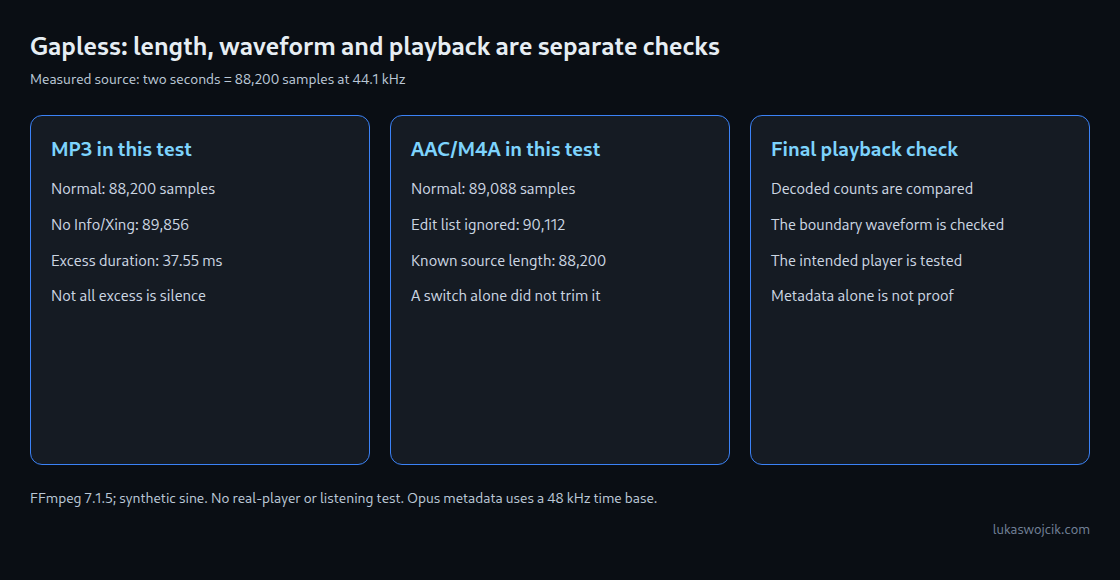
Two seconds at 44.1 kHz contain 88,200 samples per channel. If decoding a two-second source produces 89,088 samples, 888 extra samples remain. That equals 20.14 ms. It does not prove that every one of those samples is silent, or that a particular player produces an audible 20.14 ms pause.
A low-level threshold answers a different question: how long does the waveform stay below a chosen amplitude? A sine naturally crosses zero, and music contains quiet passages. A short run below the threshold is therefore not automatically an inserted gap.
The measurement
The test used FFmpeg 7.1.5, a mono 441 Hz sine at 44.1 kHz and two halves of two seconds. The source was 16-bit PCM with a peak of 16,000/32,768. Each half contains exactly 882 cycles. Both halves were encoded independently; the resulting decoded samples matched between the two runs for each format.
FLAC provided a lossless control. Other encoders were libmp3lame at 320 kbit/s, FFmpeg’s AAC encoder at 256 kbit/s in M4A, libopus at 128 kbit/s and libvorbis at 192 kbit/s. All decoded results were converted to 44.1 kHz for the length comparison; this includes resampling the Opus output.
| File and decode mode | Samples per half at 44.1 kHz | Extra samples |
|---|---|---|
| FLAC, normal | 88,200 | 0 |
| MP3, normal | 88,200 | 0 |
| MP3, Info/Xing frame removed | 89,856 | 1,656 |
| AAC/M4A, normal | 89,088 | 888 |
| AAC/M4A, edit list ignored | 90,112 | 1,912 |
| Opus, normal | 88,200 | 0 |
| Ogg Vorbis, normal | 88,200 | 0 |
FLAC reproduced the source samples exactly. Equal length for a lossy format does not mean identical samples or a perfectly unchanged boundary. Separate encoding can alter the waveform near the beginning and end.
MP3: the decoder adjustment also affects the end
The tested MP3 declared 576 samples of encoder delay and 1,080 samples of padding. FFmpeg 7.1.5 adds 529 samples to the leading skip and subtracts the same adjustment from the trailing discard: 1,105 at the start and 551 at the end. Together that removes 1,656 samples and returns the original length.
The 529 value is explicit in this FFmpeg version’s MP3 reader. It is not an unexplained extra sample or a universal value for every decoder. Adding 529 at the start while leaving the original padding unchanged double-counts that adjustment when calculating total excess duration.
Rewriting the MP3 without its Info/Xing frame left 89,856 decoded samples in this test. The total excess was 37.55 ms. That is a length difference, not a guaranteed interval of complete silence.
AAC: a declared duration is not the decoded sample count
The M4A edit list declared a start offset of 1,024 audio samples and a duration of two seconds. An edit list maps the stored media onto the intended playback timeline. Normal decoding removed the leading offset but still produced 89,088 samples. Ignoring the edit list produced 90,112.
FFmpeg’s advanced_editlist option defaults to enabled. Disabling it while retaining edit-list processing produced the same 89,088 samples in this test. The documentation describes changes to the stream timeline; it does not promise that every PCM export will end at the exact source sample count.
Explicitly retaining the first 88,200 samples after the normal leading trim restored the known source length. This was a separate trim based on the original file, not a result obtained merely by enabling a switch. An unknown recording must not be cut to a guessed length: an audible ending could be lost.
Opus, Vorbis and FLAC
Ogg Opus stores pre-skip and page positions on a fixed 48 kHz time base. Here pre-skip was 312 units, or 6.5 ms. The decoder can nevertheless output at 8, 12, 16, 24 or 48 kHz. The time base of a metadata field and the sample rate of an output file are different things.
Ogg Vorbis page positions help define the audio endpoint. FLAC preserves the original PCM samples without lossy encoder padding. Its STREAMINFO total-sample field may legally be zero, meaning unknown. A missing total there does not make a valid FLAC file incapable of decoding to its correct end.
These formats still need a player that schedules consecutive tracks without interruption. Sample-rate changes, buffering or playback settings can affect the transition. A format name alone is not a playback test.
Why the silence threshold matters
With an amplitude threshold of 0.00001, about −100 dBFS, the longest low-level run in a 100 ms window around the join was one sample for FLAC and normal MP3. The untagged MP3 measured 12.31 ms, and normally decoded AAC 15.99 ms. These values differ from the excess durations in the table because low-level ringing is not the same as exact zero.
Changing the signal, threshold or encoder can change these readings. The test used a synthetic sine rather than music, and no phone or music-player application was tested. Length, waveform and actual playback therefore need separate checks.
A practical release check
- The continuous source is retained as PCM WAV or FLAC, with documented track boundaries.
- Separate delivery tracks are normally cut from that source before lossy encoding. Lossless editing of compressed files needs format-aware handling and renewed checks.
- The final files are decoded, their lengths compared with the source and their joins inspected for unwanted silence or waveform jumps.
- The intended player is tested with the intended track order, crossfade setting and playback mode. The delivered version also needs checking if the platform converts the upload.
The linked gapless checker displays selected header fields. Its calculated gap is not a measured playback pause and can depend on simplifying assumptions. It is useful as a starting point for metadata inspection; decoded sample counts and a real playback test remain necessary.
Questions and answers
Is AAC padding always about 20 ms?
No. The result above belongs to this encoder, source length and container. Other AAC profiles, encoders and lengths can differ. A fixed 20 ms correction is not a general repair.
Does one continuous file avoid every playback problem?
It avoids switching between separate files at the marked track boundaries. It does not prevent buffering interruptions, dropouts or problems already present in the recording.
Can correct metadata be lost later?
Yes. Rewriting or splitting a file can remove fields or leave stale counts. The relevant check is on the final delivered file. A platform’s own conversion can require another playback check.
Related articles and tool
Related articles