

 English
 Deutsch
 Polski
Local Voice Control in Home Assistant with Whisper & Piper
Part 4 of 6 in the series Home Assistant without the cloud

Management Summary
Local voice control lets Home Assistant process spoken household commands within the home network. Whisper recognises speech and Piper turns the reply into spoken words, reducing reliance on external voice services. This can make smart-home control more independent, but microphones, computing power and the controlled devices still affect reliability and response time. The benefit depends on the whole setup: local speech processing alone does not make every connected device work without internet access.
Contents
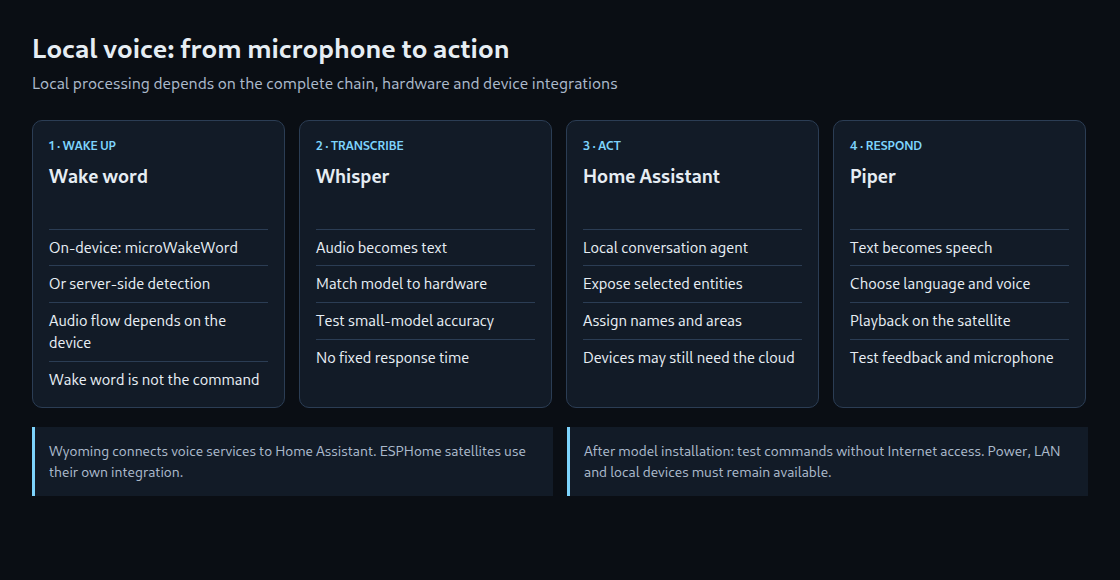
Local voice control combines four tasks: detecting a wake word, turning speech into text, carrying out a matching command and speaking a response. Home Assistant, Whisper and Piper can keep this processing within the local network. The complete chain matters: a local voice assistant does not make a cloud-connected socket work offline.
1. What each component does
Whisper transcribes the recording. The local Home Assistant conversation agent maps supported sentences to actions. Piper generates spoken output. A voice satellite is a separate device with a microphone and speaker, such as a unit placed in a room. Each component has a separate responsibility and can fail independently.
Wake-word detection can run on the satellite with microWakeWord or on a server with a service such as openWakeWord. Server-side detection requires audio to enter the local network before the wake word has been recognized; depending on the device implementation, voice activity detection limits that stream by checking whether speech is present. “Audio is only transmitted after the wake word” is therefore not universally true. An English wake word does not determine the language of the following commands.
2. Hardware selection based on measurements
A model name does not guarantee a response time. Microphone quality, background noise, language, sentence length and concurrent workloads affect the result. Smaller Whisper models require less processing power but can misrecognize names more often. An initial comparison can use the same ten short commands with two model sizes, recording both transcription errors and waiting time.
The usual faster-whisper implementation runs on a CPU or supported NVIDIA GPUs through CUDA. A Google Coral Edge TPU is not an interchangeable accelerator for this stack. If transcription is too slow, a more powerful local computer is an option. Speech-to-Phrase is another option for a limited set of home-control commands, with stronger restrictions on open-ended content. Whisper remains useful when open transcription is required.
3. Local services and assistant configuration
- Installation type: Home Assistant OS provides managed apps, formerly called add-ons. Home Assistant Container requires separately operated voice services. The older Supervised installation has been unsupported since Home Assistant 2025.12.
- Voice services: On Home Assistant OS, setup consists of installing and starting Whisper and Piper, then adding the discovered Wyoming integrations. External services can be connected using their actual address and configured port. Wyoming connects these services to Home Assistant; the ESPHome integration connects an ESPHome satellite.
- Assistant settings: Under Settings → Voice assistants, the configuration uses the required language, Home Assistant as conversation agent, Whisper for speech recognition and Piper for speech output. The model and voice must match the language and must first be downloaded.
- One device made available for a test: For example, a locally connected light with an unambiguous name and an assigned area. An entity represents an individual function or state in Home Assistant, such as a light’s on/off state. Its presence does not automatically allow Assist to control it.
- Text test before audio: A simple typed command separates naming and exposure problems from microphone and transcription issues. The same command is then tested through the satellite.
Voice services belong on a trusted network with restricted reachability. A port number in an example is not an instruction to expose it to the Internet. An optional cloud conversation agent or cloud device integration changes the data path and needs separate consideration when the intended chain is entirely local.
4. ESP32-S3-BOX-3: device-specific firmware
A BOX-3 is not an arbitrarily wired ESP32 development board. Its microphones, audio codecs, speaker, memory and buttons require configuration for the exact device variant. A generic YAML file with arbitrary I²S pins is not a complete BOX-3 setup.
The official Home Assistant device guide provides installation paths for BOX, BOX-3 and BOX-Lite and links their ESPHome configurations. After device-specific setup, Wi-Fi connectivity, the ESPHome integration, selected assistant and wake word must match. Existing device configuration needs a backup before a firmware change.
A custom build also needs networking, a valid encrypted API connection, audio input and output, and logic to start and resume listening. use_wake_word: true alone does not create a complete continuous listening loop or automatically enable on-device microWakeWord. Configuration validation cannot replace microphone and speaker tests on the actual hardware.
5. Diagnosis by processing stage
- No activation: The checks cover microphone mute, detection location, selected wake word and satellite connectivity.
- Incorrect text: The comparison covers recording quality, distance, language and Whisper model. Gain changes need small steps: excessive amplification clips the recording and reduces recognition quality.
- Correct text but no action: The checks cover permission for Assist to control the entity, names, alternative names (aliases), area and supported wording. The built-in agent uses sentence patterns, which can be extended with custom sentences.
- Action without an audible reply: Piper output and the audio path to the satellite need separate tests. A working microphone path does not prove a working speaker path.
The assistant’s debug view helps distinguish these stages. A trace of a specific failed request provides better evidence than replacing every component at once.
Questions and answers
Does control work without the Internet?
After the required models are installed, the local voice chain can operate without Internet access. Power, the local network, voice services and controlled devices must remain available. A test with the Internet temporarily disconnected and several known commands checks that assumption in practice. Downloads, updates and cloud devices may still require Internet access.
Does local processing mean no recordings exist?
No. Local primarily describes the processing location. Debug data, recordings, backups and additional integrations need separate assessment. A physical microphone mute switch and a traceable data path complement the software configuration. Whisper and Piper alone guarantee neither complete availability nor the absence of stored data.
Sources
- www.home-assistant.io/voice_control/voice_remote_local_assistant/
- www.home-assistant.io/integrations/wyoming/
- www.home-assistant.io/voice_control/about_wake_word/
- contributors.home-assistant.io/os/installation-types/
- github.com/SYSTRAN/faster-whisper
- www.home-assistant.io/voice_control/s3_box_voice_assistant/
- esphome.io/components/voice_assistant/
- www.home-assistant.io/voice_control/troubleshooting/
- contributors.home-assistant.io/architecture/platform/voice/
Home Assistant without the cloud
- Zigbee2MQTT and ZHA: Planning a Reliable Zigbee Network
- ESPHome and ESP32 in Practice: Building Cloud-Free Environmental Sensors
- Presence Detection 2.0: mmWave Radars (LD2410/LD2450) in Lighting Automation
- Local Voice Control in Home Assistant with Whisper & Piper
- WireGuard & Tailscale DMZ: Secure External Access to Home Assistant and Self-Hosted Servers
- Local Energy Management: Integrating PV Inverters and Battery Storage via Modbus TCP
Related articles


