English
 Deutsch
 Polski
Mac Studio M5 as a Local AI Workstation: M5 Max, M5 Ultra and Mac mini M6 Compared

Management Summary
Mac Studio and Mac mini can serve as personal workstations for language models, AI systems that process text and produce answers. The article considers their suitability for this work. Their shared memory also supports other applications and is not entirely available to AI. The relevant question is therefore which tasks a particular configuration can handle usefully. More memory can broaden what fits on the machine, but speed, electricity use and noise remain part of the purchasing decision.
Contents
A Mac Studio can run large language models directly on a local computer. Enough memory and software that supports Apple hardware are the key requirements. Replaceable graphics cards, as found in many tower PCs, are not part of this design.
On 25 October 2026, Apple lists Mac Studio with M5 Max or M5 Ultra and Mac mini with M6 or M5 Pro. The table covers three selected variants, not the entire Mac range. Figures come from specifications; no original response-speed measurements are available.
Three Apple profiles
| Device | Unified memory | Documented bandwidth |
|---|---|---|
| Mac mini M6 | 16–32 GB | 153 or 170 GB/s |
| Mac Studio M5 Max | 36–128 GB | 460 or 614 GB/s |
| Mac Studio M5 Ultra | 96–512 GB | 1.2 TB/s |
Capacity depends on the configuration ordered. Apple lists 128 GB for M5 Max with the 40-core GPU variant; 512 GB on M5 Ultra requires the 80-core GPU variant. Despite the higher generation number, Mac mini M6 is limited to less memory. Bandwidth describes potential data transfer per second, not the speed of completed answers.
Unified memory is a shared budget
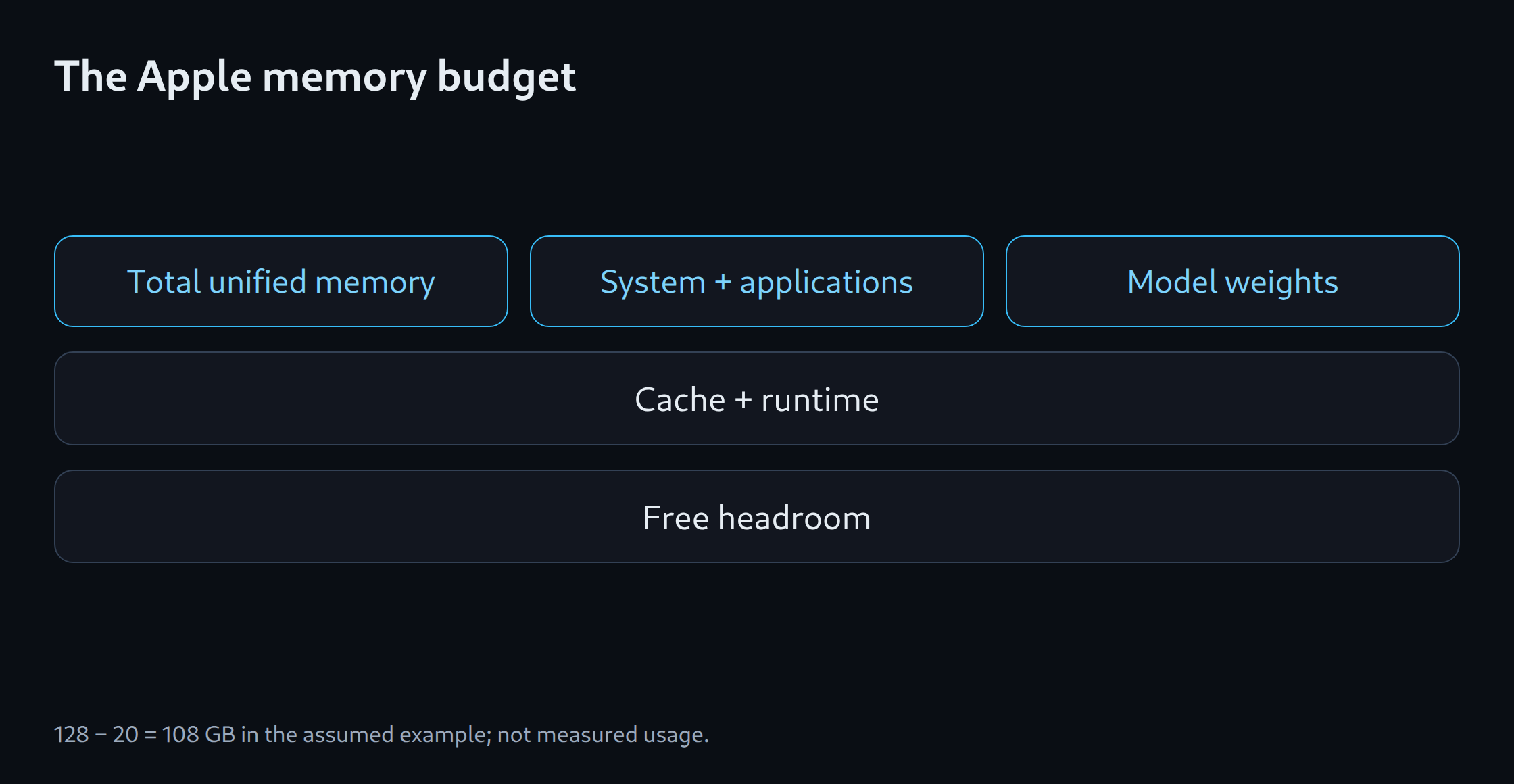
Unified memory means shared working memory. The main processor and graphics processor use it, while the operating system and other applications also occupy space. Model weights, the stored numerical values of the model, are only part of the requirement. Intermediate results and temporary working space need memory too. A 512 GB total therefore does not provide 512 GB of freely usable model space.
An assumed example reserves 20 GB out of 128 GB for the system and other applications, leaving 108 GB for the model and execution software. The 20 GB is an invented planning allowance, not an Apple minimum. The remaining 108 GB is not a guaranteed GPU allocation either: macOS and the application can impose further limits. A continuously running service needs measurement with typical inputs and other applications running.
MLX, llama.cpp and Ollama
MLX LM generates text using models for Apple silicon. llama.cpp can use the GPU through Apple’s Metal interface; Ollama also documents Metal support. The linked Ollama MLX article describes a specific preview with a particular model and requires more than 32 GB of memory. That preview is not a promise for every Ollama model or later version.
An MLX model file and a GGUF file for llama.cpp are not simply interchangeable. A fair comparison starts with the same original model revision. Quantisation stores model values with lower precision to reduce space; that setting also needs recording. The chat template determines how system instructions and messages are assembled for the model. Differences can change answers even on identical hardware.
Neural Engine and GPU acceleration
Apple distinguishes Neural Accelerators inside the GPU from the separate Neural Engine. An application uses such computing units only when its software path supports them. Neural Engine core count alone therefore says nothing about how quickly an arbitrary language model answers.
A chat test measures the delay from submission to the first response fragment separately from subsequent text generation. Long inputs need additional processing before output begins. A service for several people also requires testing with simultaneous requests. A model can fit in memory and still be too slow for the intended use.
Mac, tower PC and DGX Spark compared
A tower PC can allow replacement of the graphics card and other components, depending on its design. A compatible NVIDIA card enables CUDA-based software. DGX Spark also uses NVIDIA GPU technology but has an Arm processor; programs and containers must support that platform. A Mac instead needs a supported model format and a suitable version of the execution software.
Selection therefore starts with a specific task and its memory requirements. A smaller model on a mini may suffice; a larger model or longer inputs may need more memory. Noise, power at the wall and response times require measurements on the intended device. The linked calculator supports an initial estimate. Without testing the actual tasks, that estimate does not establish suitability for purchase.
Memory planning for model selection: LLM VRAM estimator.
Related tools
Questions and answers
Does the current comparison include a Mac Studio M6?
Apple currently documents Mac Studio with M5 Max or M5 Ultra and Mac mini with M6. This plan follows those product assignments. Any later Studio model requires its own confirmed specifications.
Are all 512 GB of unified memory available to the LLM?
No. The operating system, other applications and the model share memory. Intermediate results need space in addition to the stored model values. The memory actually available to the model depends on running applications and limits imposed by macOS.
Sources
- Apple: Mac Studio M5 Max / M5 Ultra – technical specifications
- Apple: Mac mini M6 and Mac Studio M5 available
- MLX LM: project
- llama.cpp: project and backends
- Ollama: Hardware support
- NVIDIA: DGX Spark Hardware Overview
- Apple: Mac mini – technical specifications
- Ollama: MLX on Apple Silicon
Sources checked: 25 October 2026.
Related articles