Building a Robust Zigbee & Thread Mesh Network in Apartment Buildings

Contents
Deploying reliable wireless sensor networks in multi-dwelling units (MDUs) and apartment buildings presents severe radio frequency (RF) engineering challenges. Dense 2.4 GHz Wi-Fi congestion from neighboring apartments, combined with reinforced concrete walls and underfloor heating grids, frequently causes packet loss, high latency, and dead zones for low-power IEEE 802.15.4 protocols like Zigbee and Thread. Building a zero-dropout smart home mesh network requires strict RF spectrum separation, strategic placement of mains-powered routing nodes, and hardware-level isolation of central coordinators.
1. RF Spectrum Management & Channel Allocation
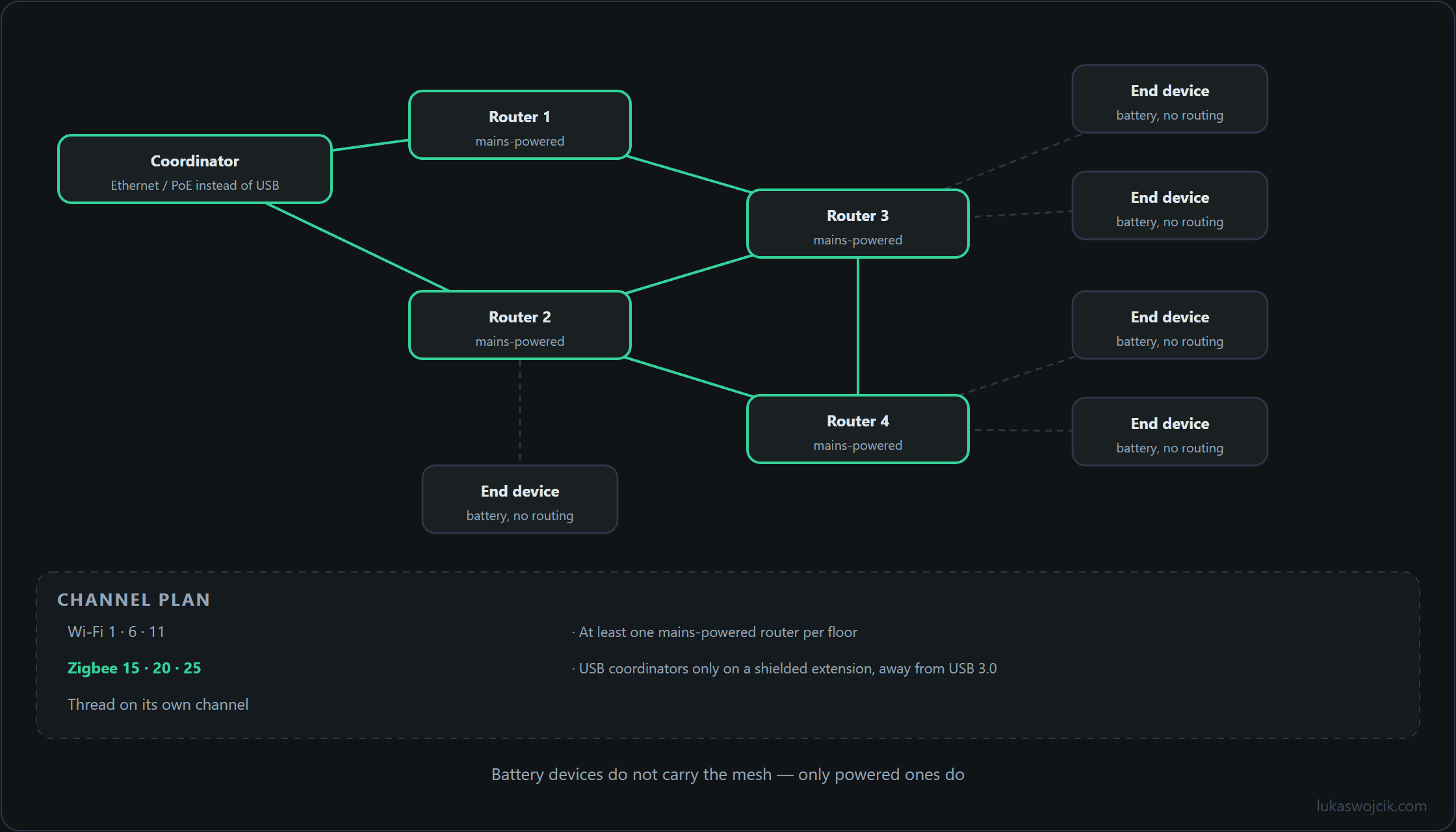
Zigbee, Thread, and 2.4 GHz Wi-Fi operate within the same ISM frequency band. Interference occurs when Wi-Fi access points overlap with low-power 802.15.4 channels. Proper channel isolation is mandatory:
- Wi-Fi Channel Mapping: Standard Wi-Fi networks should be locked strictly to non-overlapping Channels 1, 6, or 11 with a 20 MHz channel bandwidth.
- Zigbee Channel Selection: To reside in the sidebands between standard Wi-Fi frequencies, Zigbee networks must be configured to use Channel 25 (2475 MHz) or Channel 26 (2480 MHz). Channel 26 sits entirely above Wi-Fi Channel 11.
- Thread Network Separation: If Thread (Matter over Thread) operates alongside Zigbee, Thread Border Routers must be assigned an independent frequency, such as Channel 15 or Channel 20, to prevent co-channel collision.
2. Hardware Isolation: Eliminating USB 3.0 Interference
USB 3.0 ports and external solid-state drives (SSDs) emit broadband electromagnetic noise in the 2.4 GHz spectrum, which severely degrades the receive sensitivity of Zigbee coordinators and Thread Border Routers plugged directly into server hardware.
- Ethernet / PoE Coordinators: The most resilient architectural choice is replacing local USB dongles with network-attached coordinators (e.g., SLZB-06 or TubesZB) powered via Power over Ethernet (PoE). These devices can be positioned centrally in hallways or corridors away from server racks.
- Shielded Extension Wiring: If USB coordinators must be used, they require connection via a shielded USB 2.0 extension cable (minimum 1.5 meters length) to physically distance the antenna from the host server’s motherboards and power supplies.
3. Step-by-Step Mesh Backbone Architecture
A stable mesh topology requires a structured ratio between mains-powered routing nodes and battery-powered end devices:
- Core Routing Grid: In apartment buildings with concrete shear walls, at least one mains-powered router (such as an in-wall neutral-wired relay module or smart socket) must be permanently installed in every room.
- LQI Threshold Verification: Link Quality Indication (LQI) between core routers must remain above 100. Values falling below 80 indicate high packet retransmission rates and require intermediate routing nodes.
- In-Situ Device Pairing: Battery-powered sensors (motion, door/window, temperature) must always be paired in their final physical mounting location rather than adjacent to the coordinator, ensuring they attach to the nearest optimal routing parent.
- Direct Zigbee Binding: For mission-critical lighting, direct IEEE 802.15.4 binding must be configured between wall switches and light fixtures. This allows lighting control to function autonomously even if the central server or coordinator goes offline.
Production-Ready Zigbee2MQTT Configuration (Channel & Power Tuning)
# configuration.yaml for Zigbee2MQTT
homeassistant: true
permit_join: false
mqtt:
  base_topic: zigbee2mqtt
  server: 'mqtt://192.168.10.10:1883'
serial:
  # Using a network-attached PoE Zigbee Coordinator
  port: 'tcp://192.168.10.50:6638'
advanced:
  # Selecting Channel 25 to avoid Wi-Fi 1, 6, and 11 overlap
  channel: 25
  # Increasing transmit power for concrete wall penetration (up to 20 dBm on CC2652P)
  transmit_power: 10
  network_key: GENERATE
availability:
  active:
    timeout: 10
  passive:
    timeout: 1500
4. Summary & Architectural Value
What this tutorial achieves: The deployment of a zero-dropout, high-density Zigbee and Thread wireless mesh network in multi-dwelling apartment buildings by applying RF spectrum isolation, PoE-based remote coordinators, and a permanent mains-powered routing backbone.
Resulting value: Wireless dead zones, sensor dropouts, and high-latency command delays are permanently eliminated. Even in environments saturated by dozens of overlapping Wi-Fi networks and dense reinforced concrete walls, smart home telemetry and automation triggers operate with sub-50-millisecond reliability. Furthermore, direct binding protocols guarantee local lighting functionality during central server maintenance.
Related articles