English
 Deutsch
 Polski
Plugin Check locally and in CI: findings before the review

Management Summary
Plugin Check is a tool for finding common problems in WordPress extensions before publication. It can check a development copy or run automatically after changes. Its purpose is to catch issues such as missing licence information or unsafe handling of displayed data early, reducing avoidable review work. The article explains how to use its findings meaningfully. The tool supports developers, but an empty report is neither a guarantee of security nor a promise of acceptance into the plugin directory.
Contents
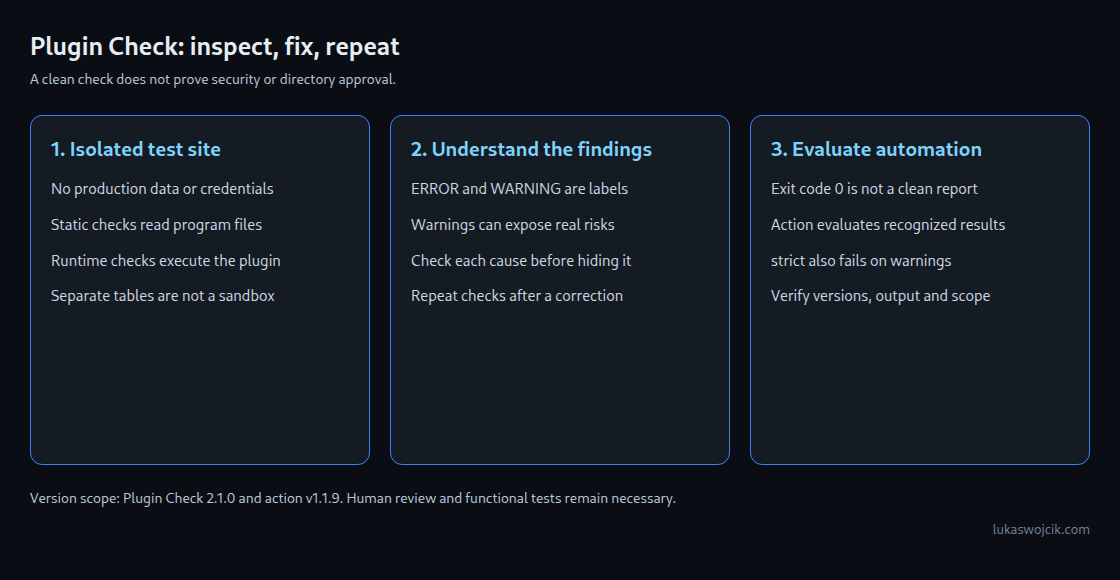
Plugin Check finds common problems before a WordPress.org submission: missing licence information, unsafe output or incorrectly assigned translations. The tool is also called PCP. A finding identifies something to investigate; a clean run proves neither security nor acceptance into the directory.
This article covers the WordPress administration screen, the command line and GitHub Actions. CI means that GitHub automatically starts checks after a code change. Technical details refer to Plugin Check 2.1.0 and action v1.1.9. A deliberately faulty example and an improved version illustrate the differences.
What Plugin Check examines
Plugin Check 2.1.0 requires at least WordPress 6.3 and PHP 7.4. The earlier WordPress 7.1.2 example environment is a historical test setup, not a current update recommendation. New test environments need a current supported WordPress version. “Tested up to” records a test version, not complete compatibility.
Version 2.1.0 registers 34 checks. Each has a short technical name such as late_escaping. Static checks read program files without executing the examined plugin code. Many use PHP_CodeSniffer, or PHPCS; individual rules are called sniffs. Escaping protects output for its destination, such as HTML text or an HTML attribute, so characters in a value do not become unwanted code.
Runtime checks observe an activated plugin while it runs. Plugin Check uses separate test tables, but these are not a complete security boundary: plugin code can still access files or external services. Checks therefore belong in a disposable local installation without real customer data or production credentials. The five runtime checks in 2.1.0 concern size, scope and loading behavior of scripts and stylesheets.
| Category (slug) | Examples of checks in 2.1.0 |
|---|---|
General (general) | i18n_usage, php_error_reporting, ai_provider |
Plugin Repo (plugin_repo) | plugin_readme, plugin_header_fields, file_type, offloading_files, setting_sanitization, prefixing, plugin_review_phpcs, trademarks |
Security (security) | late_escaping, direct_file_access, safe_redirect, direct_db_queries, direct_db |
Performance (performance) | enqueued_scripts_in_footer, performant_wp_query_params, enqueued_scripts_scope, non_blocking_scripts |
Accessibility (accessibility) | none: the category is defined, but no built-in check of 2.1.0 is assigned to it |
Every Security check in 2.1.0 also belongs to plugin_repo. That category already includes output and direct-file-access checks. The FAQ says that directory submissions typically need to pass every Plugin Repo check. Other categories add further checks. Approval still requires review by the team.
ERROR and WARNING are result types, with a numerical severity value. This classification does not reliably rank actual security risk. A warning about missing form checks can identify a real vulnerability. A URL value used only for display does not require a nonce merely because it comes from a URL. Processing, output and possible data changes determine the risk. A nonce helps resist cross-site requests; a permission check determines which account may perform an action.
Running it locally: admin screen and WP-CLI
After installation and activation, Tools → Plugin Check provides selectors for plugins, categories and result types. Access requires permission to manage plugins. Results identify file, line, column, type, code and explanation. Version 1.8.0 added CSV, JSON and Markdown export. Every command below refers to the local test installation.
WP-CLI controls WordPress from the command line. wp plugin check accepts a plugin name, path or ZIP URL. Only static checks run by default. Runtime checks require --require to load cli.php before WordPress starts, and the examined plugin must be active. Without these prerequisites, some checks are absent. The absence of runtime findings then provides no evidence of correct operation.
# Local disposable test installation; version used for this article.
wp plugin install plugin-check --version=2.1.0 --activate

# All static checks for wp-content/plugins/lw-hello-banner.
wp plugin check lw-hello-banner

# Include runtime checks (plugin must be active): load cli.php before WordPress boots.
wp plugin check lw-hello-banner --require=./wp-content/plugins/plugin-check/cli.php

# Limit the run to categories or to single checks.
wp plugin check lw-hello-banner --categories=plugin_repo,security
wp plugin check lw-hello-banner --checks=late_escaping,i18n_usage

# Findings as one JSON array; no findings produces a success line.
wp plugin check lw-hello-banner --ignore-warnings --format=strict-json --fields=file,line,column,type,code,message

# Show result codes, then ignore one specific code.
wp plugin check lw-hello-banner --format=csv --fields=code,message
wp plugin check lw-hello-banner --ignore-codes=textdomain_mismatch

# Checks for an update of an existing directory plugin.
wp plugin check lw-hello-banner --mode=update

# What is available in the installed version.
wp plugin list-checks --format=csv
wp plugin list-check-categories
The main wp plugin check options in version 2.1.0:
| Flag | Effect |
|---|---|
--checks=, --exclude-checks= | run only the listed check slugs, or skip them |
--categories= | limit the run to categories, comma-separated |
--ignore-codes= | hide individual result codes such as textdomain_mismatch |
--ignore-warnings, --ignore-errors | hide one of the two result types |
--format= | table (default), csv, json, ctrf and the variants strict-table, strict-csv, strict-json, strict-ctrf |
--fields= | choose columns, for example code,message |
--exclude-directories=, --exclude-files= | skip paths in file-based scans; .git, vendor, vendor_prefixed, vendor-prefixed and node_modules are excluded by default |
--severity=, --error-severity=, --warning-severity= | show only results at or above a severity |
--mode= | new (default) or update; in update mode an outdated “Tested up to” is reported as a warning instead of an error |
--slug= | override the slug used for text domain and readme comparisons |
A check name selects a test; a result code identifies a finding. For example, --checks=i18n_usage selects translation checks. --ignore-codes=WordPress.WP.I18n.TextDomainMismatch hides matching findings instead. --format=csv --fields=code,message lists codes and explanations.
The CLI code in 2.1.0 does not automatically return a failure status when it finds problems. Exit code 0 therefore does not mean “no findings”. An automated approval step must evaluate the results and must not treat missing or unreadable output as success. The GitHub Action includes its own result processing.
With --format=json, each file has a FILE: … line followed by a JSON array. The whole output is not one JSON document. With findings, --format=strict-json produces one combined array. Default columns omit filenames; --fields=file,line,column,type,code,message adds them. Without findings, a success line still appears instead of an empty array. Scripts must distinguish both cases explicitly.
A sample plugin with built-in mistakes
The deliberately faulty plugin belongs in wp-content/plugins/lw-hello-banner/. Here, the folder name is the slug. The text domain assigns translations to the plugin and should also be lw-hello-banner. The example prints a greeting, reads a name from the URL and provides a note field. Deliberate problems include raw output, missing licence information and an externally loaded script. A CDN is an external file-delivery service. This faulty version is only for reading and checking in a disposable environment.
/**
* Plugin Name: LW Hello Banner
* Description: Shows a greeting banner at the top of the front page.
* Version: 0.1.0
* Author: Lukas Wojcik
* Text Domain: hello-banner
*/
// Intentionally faulty example for Plugin Check. Do not use on a live site.
error_reporting( E_ALL );
function lw_hello_banner_register_setting() {
register_setting( 'general', 'lw_hello_banner_note' );
add_settings_field(
'lw_hello_banner_note',
__( 'Banner note', 'hello-banner' ),
'lw_hello_banner_field',
'general'
);
}
add_action( 'admin_init', 'lw_hello_banner_register_setting' );
function lw_hello_banner_field() {
echo '<input type="text" name="lw_hello_banner_note" value="' . get_option( 'lw_hello_banner_note' ) . '">';
}
function lw_hello_banner_assets() {
wp_enqueue_script( 'lw-hello-banner', 'https://cdn.jsdelivr.net/npm/canvas-confetti@1.9.3/dist/confetti.browser.min.js' );
}
add_action( 'wp_enqueue_scripts', 'lw_hello_banner_assets' );
function lw_hello_banner_render() {
$name = isset( $_GET['lw_name'] ) ? $_GET['lw_name'] : 'Guest';
$note = get_option( 'lw_hello_banner_note', '' );
echo '<div class="lw-hello-banner"><p>' . sprintf( __( 'Hello, %s!', 'hello-banner' ), $name ) . ' ' . $note . '</p></div>';
}
add_action( 'wp_body_open', 'lw_hello_banner_render' );What Plugin Check reports for it
The table connects typical findings from the Plugin Check 2.1.0 rules to the example problems. Counts and exact output depend on the environment, version and selected checks. This is not a guaranteed current measurement.
| Result code | Check (category) | Type | Cause in the sample |
|---|---|---|---|
no_plugin_readme | plugin_readme (plugin_repo) | ERROR | no readme.txt |
plugin_header_no_license | plugin_header_fields (plugin_repo) | ERROR | no License header |
textdomain_mismatch | plugin_header_fields (plugin_repo) | WARNING | header says hello-banner, slug is lw-hello-banner |
missing_direct_file_access_protection | direct_file_access (security, plugin_repo) | ERROR | functions and hooks without an ABSPATH guard |
WordPress.WP.I18n.TextDomainMismatch | i18n_usage (general, plugin_repo) | ERROR | __() calls with the wrong text domain |
WordPress.WP.I18n.MissingTranslatorsComment | i18n_usage (general, plugin_repo) | ERROR | %s without a translators: comment |
PluginCheck.CodeAnalysis.PHPErrorReporting.DirectErrorReportingCall | php_error_reporting (general) | WARNING | error_reporting( E_ALL ) |
WordPress.PHP.DevelopmentFunctions.prevent_path_disclosure_error_reporting | plugin_review_phpcs (plugin_repo) | WARNING | error_reporting( E_ALL ) |
PluginCheck.CodeAnalysis.SettingSanitization.register_settingMissing | setting_sanitization (plugin_repo) | ERROR | register_setting() without a third argument |
WordPress.Security.EscapeOutput.OutputNotEscaped | late_escaping (security, plugin_repo) | ERROR | get_option(), __(), $name and $note in echo |
PluginCheck.CodeAnalysis.EnqueuedResourceOffloading.OffloadedContent | offloading_files (plugin_repo) | ERROR | script URL on cdn.jsdelivr.net |
WordPress.WP.EnqueuedResourceParameters.MissingVersion, .NotInFooter | enqueued_scripts_in_footer (performance) | WARNING | no version, no fifth argument |
WordPress.Security.NonceVerification.Recommended | plugin_review_phpcs (plugin_repo) | WARNING | $_GET['lw_name'] without a Nonce check |
WordPress.Security.ValidatedSanitizedInput.MissingUnslash, .InputNotSanitized | plugin_review_phpcs (plugin_repo) | WARNING | $_GET['lw_name'] used raw |
Several checks can report one underlying cause. The header check compares the text domain in the file header with the slug; the i18n check examines translation calls. error_reporting() can also trigger multiple rules. Nonce and input rules come from plugin_review_phpcs, so selecting only security misses some security-related findings.
Static and runtime checks examine different properties. An external script can be flagged simply for its remote URL. For a local script, the pages loading it also matter. A homepage-only banner does not need its script on every other page. No finding is a substitute for checking that behavior.
The corrected version
The improved version contains a main file, readme.txt and local JavaScript in assets/. The header states the licence and minimum versions. The ABSPATH guard prevents direct execution outside WordPress. The note setting gets a sanitization function; HTML output is escaped immediately before printing. The script loads only on the front page. defer postpones execution until the HTML document has been parsed. This loading-argument form has existed since WordPress 6.3.
/**
* Plugin Name: LW Hello Banner
* Description: Shows a greeting banner at the top of the front page.
* Version: 0.2.0
* Requires at least: 6.3
* Requires PHP: 7.4
* Author: Lukas Wojcik
* License: GPLv2 or later
* License URI: https://www.gnu.org/licenses/gpl-2.0.html
* Text Domain: lw-hello-banner
*/
if ( ! defined( 'ABSPATH' ) ) {
exit;
}
define( 'LW_HELLO_BANNER_VERSION', '0.2.0' );
/**
* Registers the banner note setting and its field on Settings > General.
*/
function lw_hello_banner_register_setting() {
register_setting(
'general',
'lw_hello_banner_note',
array(
'type' => 'string',
'sanitize_callback' => 'sanitize_text_field',
'default' => '',
)
);
add_settings_field(
'lw_hello_banner_note',
__( 'Banner note', 'lw-hello-banner' ),
'lw_hello_banner_field',
'general',
'default',
array( 'label_for' => 'lw_hello_banner_note' )
);
}
add_action( 'admin_init', 'lw_hello_banner_register_setting' );
/**
* Prints the input field for the banner note.
*/
function lw_hello_banner_field() {
printf(
'<input type="text" class="regular-text" id="lw_hello_banner_note" name="lw_hello_banner_note" value="%s">',
esc_attr( get_option( 'lw_hello_banner_note', '' ) )
);
}
/**
* Loads the bundled script on the front page only.
*/
function lw_hello_banner_assets() {
if ( ! is_front_page() ) {
return;
}
wp_enqueue_script(
'lw-hello-banner',
plugins_url( 'assets/lw-hello-banner.js', __FILE__ ),
array(),
LW_HELLO_BANNER_VERSION,
array(
'in_footer' => true,
'strategy' => 'defer',
)
);
}
add_action( 'wp_enqueue_scripts', 'lw_hello_banner_assets' );
/**
* Prints the banner on the front page.
*/
function lw_hello_banner_render() {
if ( ! is_front_page() ) {
return;
}
// phpcs:ignore WordPress.Security.NonceVerification.Recommended -- Read-only display value, nothing is stored.
$name = isset( $_GET['lw_name'] ) ? sanitize_text_field( wp_unslash( $_GET['lw_name'] ) ) : '';
if ( '' === $name ) {
$name = __( 'Guest', 'lw-hello-banner' );
}
$greeting = sprintf(
/* translators: %s: visitor name */
__( 'Hello, %s!', 'lw-hello-banner' ),
$name
);
$note = get_option( 'lw_hello_banner_note', '' );
echo '<div class="lw-hello-banner"><p>' . esc_html( $greeting );
if ( '' !== $note ) {
echo ' ' . esc_html( $note );
}
echo '</p><button type="button">' . esc_html__( 'Dismiss', 'lw-hello-banner' ) . '</button></div>';
}
add_action( 'wp_body_open', 'lw_hello_banner_render' );The custom URL parameter is lw_name. WordPress already uses the generic name parameter to select a post, so that parameter can change the requested page or produce a 404 response. The example value is cleaned and displayed only as escaped text. The narrowly scoped phpcs:ignore comment therefore suppresses the nonce warning on that line. That reasoning would be wrong for a save operation, which also needs form and permission checks. The article on WordPress security functions explains the distinction.
=== LW Hello Banner ===
Contributors: lukaswojcik
Tags: banner, greeting
Requires at least: 6.3
Tested up to: 7.1
Requires PHP: 7.4
Stable tag: 0.2.0
License: GPLv2 or later
License URI: https://www.gnu.org/licenses/gpl-2.0.html

Shows a short, dismissible greeting banner at the top of the front page.

== Description ==

LW Hello Banner prints a greeting on the front page. An optional note can be set under Settings > General.

== Changelog ==

= 0.2.0 =
* Add output escaping, setting sanitization and a local script.

= 0.1.0 =
* Initial version.
Tested up to states the WordPress major version actually tested, such as 7.1. Changing the number solely to silence a finding is not a test. The rules can report an outdated value as an error for new plugins and a warning in update mode. A patch value such as 7.1.2 can also be flagged. Licence declarations in the readme and main file must agree. The readme and plugin-header article covers the fields.
// assets/lw-hello-banner.js
( function () {
	const banner = document.querySelector( '.lw-hello-banner' );
	if ( ! banner ) {
		return;
	}

	const button = banner.querySelector( 'button' );
	if ( button ) {
		button.addEventListener( 'click', function () {
			banner.hidden = true;
		} );
	}
} )();
Plugin Check in GitHub Actions
The official action comes from WordPress/plugin-check-action. This workflow was traced through the v1.1.9 source. The action sets up Node 24 and the local WordPress test environment wp-env, installs Plugin Check and dependencies, and activates the examined plugin. Its command uses --require for runtime checks. The usual wp-env setup needs Docker; the workflow uses a GitHub-hosted Ubuntu test machine.
The action reads the result file and adds findings beside the affected files. A processed ERROR sets exit code 1; a warning alone does not. With strict: true, processed warnings also fail the job. This only covers result entries actually recognized by the parser. Incomplete output or disabled checks cannot establish general security. Pull requests can receive a summary comment, and the raw result file is saved as a downloadable artifact.
Inputs in v1.1.9: build-dir (default ./), checks, exclude-checks, categories, exclude-files, exclude-directories, ignore-codes, ignore-warnings, ignore-errors, include-experimental, wp-version (latest or trunk), severity, error-severity, warning-severity, include-low-severity-errors, include-low-severity-warnings, slug, strict and repo-token. List inputs take one entry per line.
build-dir selects the examined folder. Its last path component normally becomes the slug; the slug input can override it. A different name can produce incorrect translation findings. Development material such as .github also does not belong in the shipped plugin. The workflow therefore builds a separate output folder using git archive. Entries marked export-ignore in .gitattributes stay out. Only files already in the Git commit enter this archive.
# .github/workflows/plugin-check.yml
name: Plugin Check
on:
pull_request:
push:
branches:
- main
permissions:
contents: read
pull-requests: write # only for the summary comment on pull requests
jobs:
plugin-check:
runs-on: ubuntu-latest
steps:
- name: Checkout
uses: actions/checkout@v7
# Build the folder that would be shipped, without .github and other
# development files (see export-ignore in .gitattributes).
- name: Build distributable plugin folder
run:
mkdir -p build
git archive --format=tar --prefix=lw-hello-banner/ HEAD | tar -x -C build
- name: Run Plugin Check
uses: wordpress/plugin-check-action@v1.1.9
with:
# The folder name becomes the slug (text domain check, readme check).
build-dir: ./build/lw-hello-banner
wp-version: latest
# Optional filters, one entry per line:
# categories: |
# plugin_repo
# security
# exclude-checks: |
# enqueued_scripts_scope
# ignore-codes: |
# textdomain_mismatch
# Fail on warnings as well:
# strict: true# .gitattributes: files that git archive leaves out of the build
/.gitattributes export-ignore
/.github export-ignore
/.gitignore export-ignore
/build export-ignorepull-requests: write permits the optional summary comment. Pull requests from external forks may have restricted permissions. The action logs a comment failure as an error annotation but does not additionally set the exit code there. The workflow references v1.1.9 instead of the moving v1 tag. A fully reviewed commit hash fixes code identity more strongly; version tags can also be moved.
Limits and open points
- Plugin Check does not replace manual review. A clean result provides no approval guarantee.
- The PHP examples passed syntax checks. Isolated tests checked the archive layout, banner button and official result parser. No complete WordPress run or GitHub-hosted workflow was performed for these examples here.
- Some checks infer likely naming patterns from the code. A consistent function prefix such as
lw_hello_banner_reduces collisions, but an inferred rule still needs interpretation. - Action v1.1.9 has no input that fixes the Plugin Check version. On a fresh environment, it installs the directory version. Fixing the action tag alone therefore does not fix every dependency.
- There is no PHP-version input. In v1.1.9 only
trunkselects a different WordPress source; otherwp-versionvalues use the current release. Older-version tests need a separate setup, discussed in a separate article in this series. - Script findings depend on the pages and loading conditions examined. The article on selective script removal explains selective removal of plugin scripts.
Questions and answers
Does a run without findings guarantee that the plugin is accepted into the directory?
No. A clean run helps prepare a submission but does not guarantee approval. Manual review addresses further questions such as service purpose, presentation and licensing.
Why does the GitHub Action report more than a local wp plugin check run?
Three differences deserve an initial check:
- The action loads
cli.phpand activates the examined plugin. A local run may omit runtime checks. - The Plugin Check versions or selected checks may differ.
- The build folder may include development files that are absent from the release.
When is it acceptable to suppress a warning?
Only a demonstrably false finding should be suppressed. A harmless text display may justify a phpcs:ignore comment on that exact line, with a reason. This is not a general exception for URL input. ignore-codes hides the same code throughout the plugin and can conceal real errors.
Why is the same text domain reported twice?
The header check examines the file header; the i18n check examines individual translation calls. Both must refer to the same plugin. An incorrect slug can therefore create many findings. The action input slug or CLI flag --slug explicitly sets the comparison value.
Sources
- Plugin Check (PCP) on WordPress.org
- WordPress/plugin-check, README
- Plugin Check release 2.1.0
- Plugin Check: WP-CLI documentation (docs/CLI.md)
- Plugin Check: available checks (docs/checks.md)
- Default_Check_Repository.php (tag 2.1.0)
- Check_Categories.php (tag 2.1.0)
- Plugin_Check_Command.php (tag 2.1.0)
- plugin-check.ruleset.xml (tag 2.1.0)
- Check sources (tag 2.1.0)
- Unit tests of the checks (tag 2.1.0)
- WordPress/plugin-check-action, README
- plugin-check-action: action.yml (v1.1.9)
- plugin-check-action: src/main.ts (v1.1.9)
- plugin-check-action release v1.1.9
- wp_enqueue_script() – Developer Resources
- @wordpress/env – Block Editor Handbook
- WordPress.org version API
- actions/checkout releases (v7.0.1)
- GitHub Docs: variables reference (GITHUB_WORKSPACE)
- GitHub Docs: permissions required for GitHub Apps
Related articles