English
 Deutsch
 Polski
Tutorial: page_location, URL Fragments and Server Requests

Management Summary
Website analytics identifies viewed pages using an address sent by the website, which need not contain everything shown in the browser’s address bar. The part after # often identifies a section or application view and is omitted from the normal page request, although website code can send it separately. This matters for clear page reports and avoiding unwanted personal information in analytics. Sites that switch views without reloading also need consistent counting so each completed change is represented once.
Contents
A browser address, an HTTP page request and a GA4 event are different representations. The fragment after # is omitted from the request for the page. JavaScript can still read that fragment and send the value in a separate request.
GA4 does not include the fragment by default. Google’s pageview documentation explicitly states this exception to location.href. A custom page_location override can change the submitted value; the address bar alone does not establish what reached Analytics.
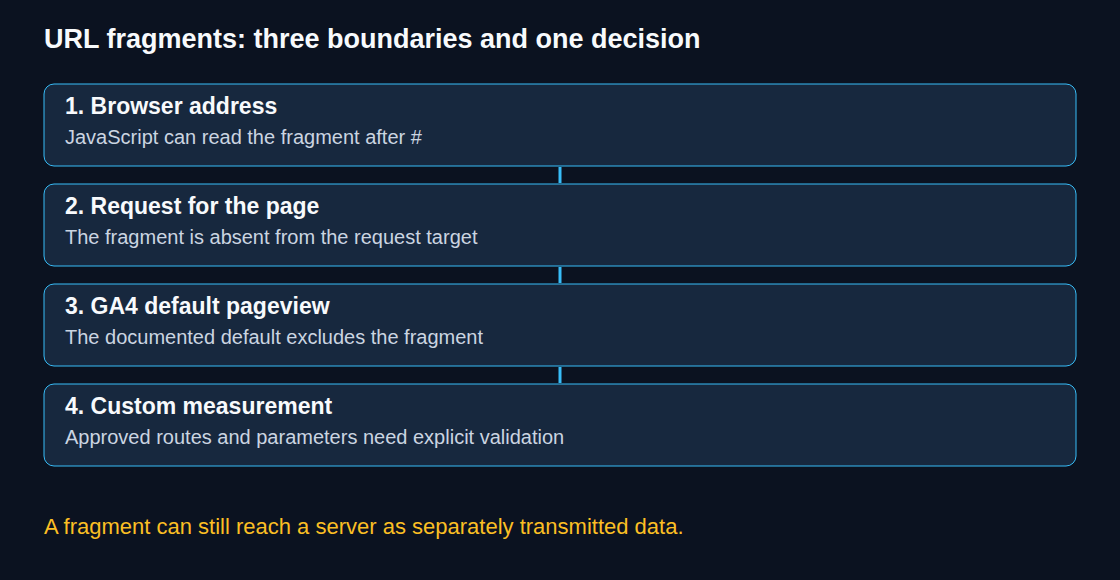
From the address bar to the request
For https://shop.example/checkout?page=2#payment, the scheme is https, the host is shop.example, the path is /checkout, the query is page=2 and the fragment is payment. More general URLs can also contain a port or user information.
The page request targets /checkout?page=2. HTTP/1.1 normally carries the host name and, when required, port in Host and the target in the request line; HTTP/2 and HTTP/3 use corresponding pseudo-headers. A request for /#/catalog therefore does not tell the page server which hash route was selected. Changes between hash routes need not request another document at all. Access logs cannot count those transitions from document requests alone.
What the GA4 dimensions describe
The following example assumes the documented default, a valid URL and no custom rewrite or redaction. The dimensions are views of collected event data, not four independent collection systems.
| Dimension | Default example |
|---|---|
| Hostname | shop.example |
| Page location | https://shop.example/checkout?page=2 |
| Page path + query string | /checkout?page=2 |
| Page path | /checkout |
A custom override containing a fragment requires its own check of the outgoing event and the report or export used. The default table does not guarantee how every reporting surface handles arbitrary supplied fragments. A stable, non-personal route name or an approved virtual path is often clearer for hash routing.
Query values can split otherwise identical pages into separate rows. The actual result also depends on redaction, rewriting and reporting. A path-based dimension can group pages without deleting campaign information from collection. A custom route_name needs an event-scoped custom dimension when used in ordinary GA4 reports.
Length and privacy before transmission
Google specifies a maximum of 1,000 characters for page_location. A longer value is outside that limit; silent, reliable truncation is not a supported design assumption. Short, valid, meaningful URLs are preferable to cutting an arbitrary string, which can destroy route or parameter semantics.
Dropping query parameters by name is not a complete privacy filter: paths, allowed parameter values, fragments and titles may also contain personal data. Google data redaction is an additional control, not a guarantee that every personal value is detected. A local length check can record only the length; printing the first 120 URL characters may itself expose sensitive information.
Removing UTM parameters or click identifiers before campaign processing can affect acquisition reporting. An initial tag receiving the raw address is not a general solution when that address contains personal data. Approved campaign handling and privacy-safe page identifiers need a coordinated design and tests; explicit campaign fields are not a universal substitute for auto-tagged click identifiers.
Single-page applications (SPAs): measurement after a completed transition
Single-page applications replace the visible content without loading a whole new document for every screen. Automatic history-based measurement already exists. A custom History API wrapper is therefore neither always necessary nor proof that the new page title is ready. pushState() does not fire hashchange; a URL change also does not establish that an asynchronous route finished rendering.
A useful rule for the application is one route_ready notification after a real screen transition has completed. The example below belongs in application code, with one call after the new screen and its title are ready. The two approved route keys and English display titles are illustrative and need adaptation to the actual route catalogue. Unknown routes and a missing or false permission value are rejected.
function reportRouteReady(routeKey, measurementAllowed) {
  var routes = {
    catalog: { path: "/catalog", title: "Catalog" },
    checkout: { path: "/checkout", title: "Checkout" }
  };
  if (measurementAllowed !== true ||
      !Object.prototype.hasOwnProperty.call(routes, routeKey)) {
    return false;
  }
  var route = routes[routeKey];
  window.dataLayer = window.dataLayer || [];
  window.dataLayer.push({
    event: "route_ready",
    route_name: routeKey,
    page_location: new URL(route.path, location.origin).href,
    page_title: route.title
  });
  return true;
}
This helper sends no request by itself. The integration must supply the current measurement permission and stop calls on withdrawal; the boolean does not replace consent handling for other tags. In GTM, a Custom Event trigger for route_ready can drive a GA4 page_view tag, using Data Layer Variables for the three supplied fields. Values must also stay coherent on subsequent events. The helper intentionally does not read raw URLs or titles. The mapped URLs contain no query or fragment; the example is not a complete acquisition implementation.
The router must provide exactly one call per counted transition, including the agreed initial-screen policy. A table-of-contents jump is not automatically a screen view. Identical routes can still represent a deliberate revisit, so URL equality alone is not a universal deduplication rule. The previous approved virtual URL also needs consideration as page_referrer for navigation analysis.
For fully manual pageviews, the initial automatic pageview and enhanced measurement’s history pageviews need separate disabling. send_page_view: false alone does not disable history-based pageviews. Acceptance checks include initial load, forward/back navigation, anchors, repeated routes, consent changes and one intended event per transition. Tag Preview, outgoing requests and DebugView answer different questions.
Questions and answers
Can a server-side container remove a fragment?
Yes, if a client explicitly included the fragment as event data. The container can change or exclude that value before forwarding. This cannot undo receipt at the endpoint or logging before transformation. Values that must stay on the device require removal before the outbound request.
Can a server redirect translate a hash route into a path?
Not from the page request alone. A redirect from / to /app/ without its own fragment normally preserves the original fragment under HTTP semantics. Client-side route mapping can translate approved old routes to new paths. A History API replacement also requires the server to serve the resulting path on reload; a location replacement performs navigation. Measurement should start after the intended mapping, with an explicit reporting comparison across the migration.
Does a fragment make personal data safe?
No. Scripts can read and transmit fragments. The lack of a fragment in the document request is a narrow protocol property, not a privacy guarantee.
Sources
- RFC 3986: URI Generic Syntax, section 3.5
- RFC 9110: HTTP Semantics, Location
- Google Analytics: Measure pageviews
- Google Analytics: Measure single-page applications
- Google Analytics Data API: Dimensions and metrics
- Google Analytics: Automatically collected events
- Google Analytics: Event collection limits
- Google Analytics: Data redaction
- Google Analytics: Avoid sending personally identifiable information
- MDN: History.pushState()
- Google Tag Manager: Server-side transformations
- Google Analytics: Set custom campaign data
- Google tag: Set up consent mode on websites
- Google Analytics: Create event-scoped custom dimensions
Related articles