English
 Deutsch
 Polski
Comparing Two GTM Container Exports: Normalising Before the Diff and What a Line Diff Cannot Show

Management Summary
A Google Tag Manager export is a saved description of website measurement settings. Comparing two exports can reveal what changed between versions, which is useful before release or when investigating unexpected reports. Consistent formatting makes genuine differences easier to see, while removing fields or rearranging meaningful lists can conceal them. The comparison explains changes in settings, not automatically their effect on the website. Version history and observed behaviour supply that wider context.
Contents
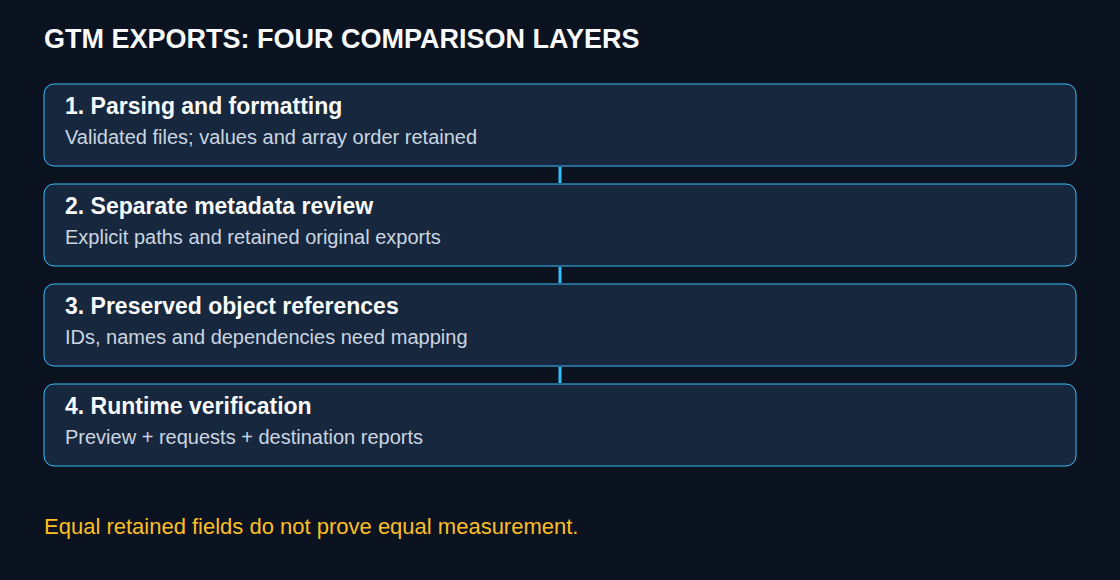
A diff is a list of differences between two files. Normalising the exports means formatting both in the same way so that layout differences do not obscure changed settings. A GTM export comparison answers several different questions: whether the files differ, whether the parsed configuration differs, and whether measurement behaves differently. These questions require different evidence. Formatting can obscure a change, but deleting fields too aggressively can hide one.
Update — 19.10.2026: The comparison’s limits now include changes to Google’s delivered runtime and the optional container optimization. The October changes to Google tag and GTM.
The comparison scope
Both exports need a recorded account, container, version or workspace, export time and selection scope. A partial export is not equivalent to a full export. Google documents that continuing a partial export without required dependencies can remove references to missing tags and triggers while preserving variable references.
GTM object IDs identify entities; no general rule regenerates all IDs at each export. A fingerprint is recomputed when an entity is modified, according to the API documentation. It is not a documented timestamp or proof of a specific editor, edit time or runtime effect. These fields remain useful evidence even when a secondary view omits selected metadata.
Formatting without deleting values
jq -S sorts object keys and formats JSON. It leaves array order and string contents intact; spaces inside a string remain data. The following Bash script requires jq and diff, accepts two file paths and rejects empty files, multiple documents and inputs without a containerVersion object. That shape check is not full GTM schema validation.
#!/usr/bin/env bash
set -euo pipefail
if (( $# != 2 )); then
  printf 'Usage: bash compare-gtm.sh old.json new.json\n' >&2
  exit 2
fi
work_dir=$(mktemp -d)
trap 'rm -rf -- "$work_dir"' EXIT
normalise() {
  jq -e -S -s '
    if length != 1 then error("Expected one JSON document")
    elif (.[0] | type) != "object" then error("Expected an object")
    elif (.[0].containerVersion | type) != "object"
      then error("Expected a GTM container export")
    else .[0] end
  ' "$1"
}
normalise "$1" > "$work_dir/old.json"
normalise "$2" > "$work_dir/new.json"
if diff -u -- "$work_dir/old.json" "$work_dir/new.json"; then
  printf 'No differences in this parsed, formatted view.\n'
else
  diff_status=$?
  exit "$diff_status"
fi
Saved as compare-gtm.sh, the invocation is bash compare-gtm.sh old.json new.json. Status 0 means no difference in this view; 1 means diff found differences. A parsing or command failure is an error, not equality. The sequential temporary files ensure that normalisation succeeds before diff runs. Process substitution such as diff <(norm old.json) <(norm new.json) does not by itself propagate every producer failure into diff’s exit status.
This view still includes timestamps, fingerprints and version context. That is deliberate. A secondary reduced view needs an explicit list of allowed field paths, a documented purpose and the untouched export alongside it. Recursive deletion by names such as accountId or fingerprint can remove unrelated nested data. If the reduced files are equal, only the fields still present have been compared. The removed fields may still differ.
JSON parser behaviour also matters: duplicate object keys and very large numeric values need explicit handling. jq’s number behaviour depends on version and build. The example is not a byte-preserving archival format or a universal semantic-equivalence test.
Changed values as well as added keys
A key-set difference reports additions and removals, but misses a changed value under an existing key. This separate overview reports all three at the top level:
jq -n --slurpfile a old.json --slurpfile b new.json '
  if ($a|length) != 1 or ($b|length) != 1 then
    error("Expected one JSON document per file")
  elif ($a[0]|type) != "object" or ($b[0]|type) != "object" then
    error("Expected objects")
  else
    $a[0] as $old | $b[0] as $new
    | ($old|keys) as $ka | ($new|keys) as $kb
    | {removed: ($ka - $kb), added: ($kb - $ka),
       changed: [$ka[] as $key
         | select($new|has($key))
         | select($old[$key] != $new[$key]) | $key]}
  end'
A change deep inside a tag can appear only as containerVersion in this overview. The formatted diff or a schema-aware comparison supplies the detail. String "1" and number 1 are distinct values; neither display similarity nor a small character difference makes that change harmless.
Object identity and array order need a policy
Within a container, entity IDs provide useful correspondence across versions, but deletion and recreation or import can create a different entity. Across containers, IDs and context cannot simply be erased. Matching by name requires an unambiguous mapping and explicit handling of renames, duplicates and unresolved references.
The mapping must preserve firing and blocking trigger references, folder references, tag sequencing, templates and other relevant relationships. Setup and teardown references use tag names in the documented API. Variable references often use {{name}}; that does not make a global textual substitution or a trigger-only mapping complete. Built-in trigger identifiers require explicit supported handling, not blind lookup in the exported trigger list.
jq -S does not sort arrays. Sorting entity lists can improve a separate review view when identity is established. Sorting arbitrary nested arrays can alter meaning, including ordered table rows. Keeping all arrays untouched in the first view avoids silently making that choice.
Text differences do not establish runtime effects
Line, word and character views offer different levels of detail. A line diff can establish text equality and show type-changing punctuation. Some tools also detect moves. The diff shows what changed, but usually cannot explain why it changed or how the change affects measurement.
Identical JSON does not establish identical measurement. Google’s release notes of 8 October 2026 describe container-load initialization and visible gtag.config events that may match broad Custom Event triggers. The optional optimization announced on 12 October also involves centralized settings and destination tags. Preview checks execution, network inspection checks requests, and destination-side reports check processing; a browser request alone proves neither correct attribution nor final reporting. Permissions are not versioned and need a separate record.
Questions and answers
Does a normalized file replace the original export?
No. Untouched exports provide the restoration and audit basis. A reduced comparison file is not automatically importable or complete. Exports may contain configuration values, code and sensitive identifiers, so repository access and redaction require appropriate handling.
Does Windows always change every line ending?
No. Editor settings and Git attributes determine that behaviour. *.json text eol=lf selects LF for matching text files in Git’s working tree. Existing tracked content may need a reviewed renormalization; the setting does not remove whitespace inside JSON strings.
Can a diff identify who made the change?
The exported values alone do not establish authorship. Version history, workspace records and retained audit evidence provide the necessary context. A fingerprint does not replace those records.
Sources
- Google Tag Manager: Container export and import
- Google Tag Manager API: Tags and references
- Google Tag Manager API: Container versions
- jq: Manual
- Git: Attributes and line endings
- Google Tag Manager: Release notes
- Google: Updates to Google tag and Tag Manager
- Google: Optimize a Tag Manager container
- Tag Manager for web
- Docker documentation
- Google tag: supported installation methods
- Google tag in Tag Manager: setup and initialization
Related articles