English
 Deutsch
 Polski
How the Stats4U WordPress plugin works: counter code, placement, consent and requests

Management Summary
Stats4U is a visitor counter and statistics service for websites. Its WordPress extension makes it easier to choose a counter design, place it on a page and connect it to a consent tool. The browser sends visit information to the external service, where statistics are created. The article explains that division of work and the limits of the integration. A counter without its own cookies still transfers data; removing the extension does not automatically delete the statistics held by the service.
Contents
Stats4U by LW IT Solutions displays a visitor counter as a small image. The browser sends requests to stats4u.net; the service counts and builds the statistics. Depending on the integration and settings, these can include referrers, visible time on the page, scroll depth and an online indicator. A counter number is sufficient for embedding. The WordPress plugin is available in the plugin directory; this article covers version 1.6.0. The source is on GitHub.
This article explains four plugin tasks: reading counter code, placing an image in the theme, connecting a consent tool and loading the counter script. The original tests were performed on 2 October 2026 with WordPress 7.1.2, PHP 8.4 and Twenty Twenty-Five. Retained parser, HTML and placement logs were compared with the code. The old network test was deliberately restricted and cannot establish the behavior of all server responses or every theme.
From counter code to embedding
Under “Settings → Stats4U”, a wizard offers five steps: counter, appearance, placement, consent and completion. Custom configuration shows all settings on one page instead. The first field accepts existing counter code. Other options open the creator or request a new number. These requests go from the administrator’s browser to the service, not from the plugin’s PHP code.
The stats4u_code_lesen() parser recognizes several image-counter code formats. The retained test covers twelve inputs; the table groups a plain number and a number with a hash sign into one row. Globe and map scripts are not supported image counters. These examples therefore do not establish support for arbitrary creator output:
| Pasted | Result |
|---|---|
| HTML, image with link | number, design, dark mode and size 150% |
| BBCode | number, design, dark mode |
| Markdown | number, design, language German |
script code with s4u.js | number, design, dark mode, counting “unique visitors”, language Polish |
| image address alone | number and design |
old long form ?action=pic&s4uid=… | number and design |
the number only, also with # | number, design unchanged |
address of the statistics page /live/<number> | number |
| statistics page with a custom name | note: paste the code or the number |
globe widget globe.js | note: the plugin shows image counters |
| any other text | note: code not recognised |
Since version 1.5.0, the plugin inserts the official s4u.js rather than only an image. The script reads the current page URL and document.referrer and sends those values with the image request. Browser settings or Referrer-Policy can remove or shorten the referrer. A plain image request also follows that policy. Under the usual default, another origin receives only the origin, such as https://example.com/; this is not a universal domain-only restriction. The following PHP excerpt selects an immediate script or a waiting placeholder:
// stats4u.php (excerpt)
function stats4u_zaehler_teile($e) {
    $daten = stats4u_skript_daten($e);
    if (stats4u_cmp($e) === null) {
        return array('skript' => array('src' => STATS4U_SKRIPT, 'async' => true) + $daten);
    }
    stats4u_wartet(true);
    return array('platzhalter' => $daten);
}

function stats4u_html() {
    $e = stats4u_einstellungen();
    if ($e['id'] === '') { return ''; }
    $t = stats4u_zaehler_teile($e);
    if (isset($t['skript'])) {
        return '<span class="stats4u-zaehler">' . trim(wp_get_script_tag($t['skript'])) . '</span>';
    }
    return '<span class="stats4u-zaehler" data-stats4u="' . esc_attr(wp_json_encode($t['platzhalter'])) . '"></span>';
}
Without a selected consent tool, wp_get_script_tag() creates an immediately loadable script with escaped attribute values. With a recognized integration, an empty placeholder is created first. data-stats4u holds the counter settings in the JSON data format. Producing this HTML alone does not prove that blocking works in the browser.
Placement in the theme
The default position is below the theme footer. WordPress has no universal hook immediately after the visible footer area. wp_footer is an output point called by the theme, usually near the end of the page. For the “below” and “inside” positions, the plugin first collects HTML in an output buffer and searches for a recognizable footer. The following excerpt recognizes particular roles, classes and IDs; arbitrary layouts do not necessarily match:
// stats4u.php (excerpt)
function stats4u_ist_seitenfuss($name, $tag) {
    if (preg_match('/(?<![\w-])role\s*=\s*["\']?contentinfo\b/i', $tag)) { return true; }
    if (preg_match('/(?<![\w-])itemtype\s*=\s*["\']?[^"\'>]*WPFooter/i', $tag)) { return true; }
    $namen = array('colophon', 'footer', 'site-footer', 'main-footer', 'page-footer', 'global-footer',
                   'elementor-location-footer');
    if ($name === 'footer') { $namen[] = 'wp-block-template-part'; }
    foreach (array('id', 'class') as $attr) {
        if (preg_match('/(?<![\w-])' . $attr . '\s*=\s*(?:"([^"]*)"|\'([^\']*)\'|([^\s>]+))/i', $tag, $m)) {
            $wert = strtolower(($m[1] ?? '') . ($m[2] ?? '') . ($m[3] ?? ''));
            if (array_intersect(preg_split('/\s+/', trim($wert)), $namen)) { return true; }
        }
    }
    return false;
}
Among recognized areas, the last outermost area wins. For example, when div.site-footer contains another footer area, the outer section is used. A plain <footer> after get_footer() can serve as a fallback. Missing markers or interference from other output buffers can move the counter to the general page-end position. Version 1.6.0 inserts the counter through the buffer callback. CSS with :has(img) hides supported containers without an image element; this does not check whether the image file loaded successfully.
The retained placement log confirms positions in the tested theme. “Below the content” applies once to the main content of a singular post or page. A static front page can also qualify; the blog front page in the old test did not receive a counter there. Other choices include a fixed lower corner and “nowhere automatically”. The “Stats4U counter” block and shortcode provide custom placement. do_shortcode('') returns HTML that the template still needs to output. Two embeddings can trigger two image requests; a single count is not automatically guaranteed.
Consent: requirements and limitations
Version 1.6.0 contains 27 selectable entries: 25 tools, the additional legacy CookieYes mode and the WP Consent API. The plugin outputs blocking attributes or an API check for each selection. Waiting for agreement requires a correctly configured tool, category or service identifier and execution order. The table shows retained HTML output; this does not replace complete acceptance and rejection tests for every integration.
| Tool | Release script in the HTML |
|---|---|
| Complianz | <script type="text/plain" data-category="statistics"> |
| Cookiebot | <script type="text/plain" data-cookieconsent="statistics"> |
| consented.eu | <script type="text/plain" data-consented="stats4u"> |
| CookieYes | <script data-cookieyes="cookieyes-analytics" src="…/freigabe.js"> |
| WP Consent API | inline script that asks wp_has_consent() and listens for changes |
The logged cases initially contained no directly loadable s4u.js tag. Some integrations use the external freigabe.js file. For the WP Consent API, the plugin requires a defined consent type and a positive wp_has_consent() result. In opt-out mode, that result can be positive before any explicit agreement. The API configuration must therefore match the intended behavior. Custom integrations allow only type, class and data-* attribute names:
// stats4u.php (excerpt)
function stats4u_eigene_attribute($roh) {
    $aus = array('type' => 'text/plain');
    if (preg_match_all('/([a-zA-Z][a-zA-Z0-9_.:-]*)\s*=\s*(?:"([^"]*)"|\'([^\']*)\'|([^\s"\'>]+))/', (string) $roh, $m, PREG_SET_ORDER)) {
        foreach ($m as $a) {
            $name = strtolower($a[1]);
            if (!preg_match('/^(data-[a-z0-9_.:-]+|class|type)$/', $name)) { continue; }
            $wert = $a[2] !== '' ? $a[2] : ((isset($a[3]) && $a[3] !== '') ? $a[3] : ($a[4] ?? ''));
            $aus[$name] = substr(preg_replace('/[^A-Za-z0-9 _.:\/,#-]/', '', $wert), 0, 80);
        }
    }
    return $aus;
}
The test containing onload="alert(1)" confirms removal of that event handler. Allowed attribute names do not prevent every configuration error: type="text/javascript" is accepted and can make the release script execute immediately. Version 1.6.0 also does not itself stop running counter scripts when consent is withdrawn. Once available, window.stats4uAn() does not check agreement again before later calls. Rejection, withdrawal and subsequent page transitions therefore need testing in the actual integration.
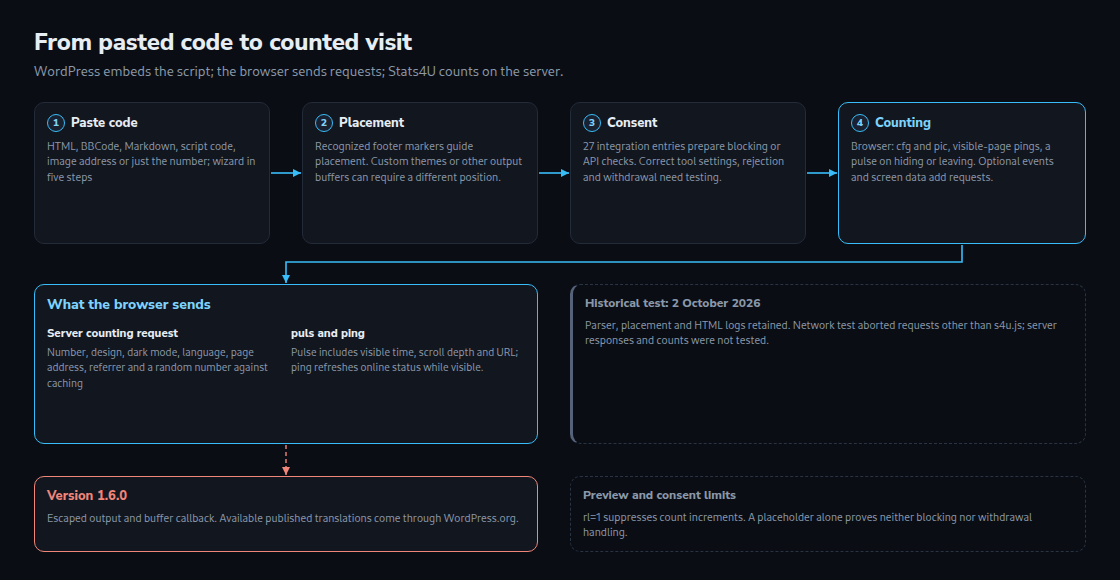
Historical network test
The old report describes Chrome with a fresh profile and intercepted requests. Only s4u.js could load from the service; other requests were recorded and aborted. This exposed attempted requests, not their server responses or actual counter results. The 70-second test is not a complete list of possible requests. The table describes that historical test; file size, compression and cache duration can change later.
| When | Request | Content |
|---|---|---|
| on load | s4u.js | 13,237 bytes transferred, Brotli, cached for an hour, no Set-Cookie |
| on load | action=cfg, GET | the counter number only: the counter’s settings |
| on load | action=pic, image | counter number, design, dark mode, language, page address, referrer and a random number against caching; intended for counting; aborted in the described test |
| after 60 s | action=ping, POST | the counter number only, for “online now” |
| on leaving | action=puls, beacon | counter number, page address, visible seconds, scroll depth and load time |
The current embedding script does not set its own cookies or write to localStorage. The blocked historical test alone could not establish the behavior of every service endpoint. The image request includes the full current URL and available referrer, so page URLs should not contain confidential values. action=puls can be sent on the first switch to the background, not only on final departure. Optional features can add screen and window dimensions, events and performance data. action=ping is attempted at minute intervals while visible, for up to ten counters and at most 120 sends. A successful sendBeacon() return value means only that data entered the sending queue. Statistics are produced on the Stats4U server. This plugin’s PHP code contains no outbound HTTP call to that service; this says nothing about other parts of a WordPress installation.
Languages and page transitions
With “the language of each page”, the plugin uses the locale reported by WordPress. The retained Polylang test shows en, de and pl for the respective pages. Navigation without a full reload needs extra steps: s4u:seiteweg closes the old time measurement, then the new page must be embedded again. On this website, inc/footer-tracker.php separately checks Consented.hasConsent('stats4u') before reinserting scripts or activating placeholders. That extra check belongs to the website, not the public plugin function stats4uAn(). This source inspection is not a test of every withdrawal scenario.
Publication and uninstall behavior
The development report dates a WordPress.org review request to 26 September and approval to 29 September 2026. The published changelog confirms output escaping and buffer-callback changes in version 1.6.0. Escaping means preparing each value safely for its particular place in HTML. Review does not guarantee freedom from defects. Earlier bundled translations were moved out of this package. Language packs through translate.wordpress.org become available only after the respective translations are published; 18 old templates do not automatically mean 18 released language packs.
The uninstall routine removes stats4u_einstellungen and the saved settings view stats4u_ansicht. In Multisite, options are removed for the individual sites. This runs when the plugin is deleted, not merely deactivated. A page cache can still contain old counter HTML. Deleting the plugin does not delete the external counter or statistics.
All links
- Stats4U in the WordPress.org plugin directory
- Source code on GitHub, with README and the translation templates
- Translation on translate.wordpress.org
- stats4u.net, with the creator for new counters
- Paragraph for a site’s own privacy policy, per counter number and in 19 languages
- Terms of use and privacy policy of Stats4U
Questions and answers
Does Stats4U set a cookie?
The inspected s4u.js sets no cookies and writes nothing to localStorage for the embedding itself. This does not make the entire website or every consent tool cookie-free. Some plugin adapters read existing consent cookies. The creator or a login on stats4u.net is also distinct from the embedding. The historical test blocked most server responses and therefore was not a complete cookie test. Requests still transmit information including an IP address and browser identification. The linked privacy-policy template must match the actual configuration.
What happens if stats4u.net is unreachable?
An outage can prevent the counter image or individual statistics features from working. async lets the browser continue parsing HTML during the script download, but loading and execution still consume time and resources. The CSS rule hides an empty container only while no img exists. If an image element has already been inserted but its request fails, a broken image can remain visible. An entirely unchanged layout is therefore not guaranteed.
Do visits in the preview or the editor count?
The settings page and block editor use rl=1 for image previews. In the inspected service code, this parameter suppresses counter increments. The image request still reaches the server with ordinary connection information. This applies to those two built-in previews; a normal front-end post preview is not automatically the same mode.
Does deleting the plugin also delete the counter?
Deleting the plugin removes its own WordPress settings and view preferences. No external counter-deletion request is made. Old page caches and separately embedded counter code need separate attention. Managing or deleting the statistics on stats4u.net is a separate operation.
Sources
- Stats4U 1.6.0 in the plugin directory, retrieved 02.10.2026
- Stats4U-Wordpress, source code on GitHub, retrieved 02.10.2026
- WordPress.org: Detailed Plugin Guidelines, retrieved 02.10.2026
- WP Consent API, retrieved 02.10.2026
- wp_get_script_tag(), retrieved 02.10.2026
- wp_print_inline_script_tag(), retrieved 02.10.2026
- PHP: ob_start(), retrieved 02.10.2026
- MDN: Navigator.sendBeacon(), retrieved 02.10.2026
- MDN: :has(), retrieved 02.10.2026
- Stats4U: paragraph for the privacy policy, retrieved 02.10.2026
- MDN: Referrer-Policy, Additional check on 25 October 2026
- WP Consent API: wp_has_consent(), Additional check on 25 October 2026
Related articles