English
 Deutsch
 Polski
Autoload in WordPress: Values, Queries and Memory Usage

Management Summary
Autoload is WordPress's way of loading selected settings together when the site starts processing a request. It avoids repeatedly fetching settings one by one, but unnecessary large values can add work. This matters when investigating a slow website or high memory use. Reducing unnecessary settings can lighten the site's workload, but size alone does not show actual memory consumption. Useful optimisation distinguishes settings genuinely needed by the site from information that can be handled differently.
Contents
WordPress loads frequently needed options together into a set called alloptions. The autoload column determines which entries belong to that set by default. Since WordPress 6.6, checking only for yes is insufficient: additional values can also mean autoload.
What actually happens during loading
A site’s options normally reside in its options table. When building alloptions, WordPress first checks the object cache. The database is queried only without a suitable cache hit. An upstream full-page cache can even serve a page without a complete WordPress startup. Static files and unrelated PHP scripts do not automatically load WordPress options.
Autoload saves individual option queries but also includes values not needed for the current request. Non-autoloaded options remain available through get_option() and may also be cached. Not being autoloaded means neither deleted nor necessarily slow.
Which values count
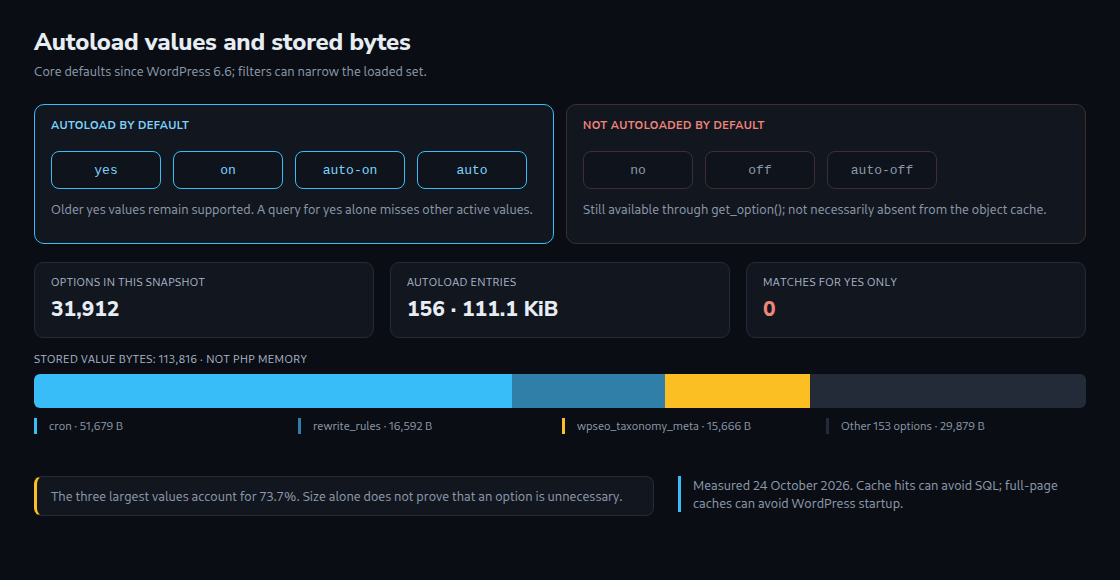
yesandno: older markers that remain supported.onandoff: explicitly enabled or disabled autoload.auto-onandauto-off: results of an automatic decision.auto: no definite automatic decision; also loaded by default.
wp_autoload_values_to_autoload() returns yes, on, auto-on and auto by default. A filter with the same name can remove values. The actual runtime list can therefore be shorter. An upgrade does not universally remove existing yes markers.
A read-only SQL check
The following query reports counts and stored value bytes for the default list. wp_options must be replaced with the actual table name, particularly with a different prefix or Multisite:
SELECT COUNT(*) AS option_count,
       COALESCE(SUM(OCTET_LENGTH(option_value)), 0) AS value_bytes
FROM wp_options
WHERE autoload IN ('yes', 'on', 'auto-on', 'auto');
With a modified autoload filter, the value list needs adjustment. A second query identifies large entries:
SELECT option_name, autoload,
       OCTET_LENGTH(option_value) AS value_bytes
FROM wp_options
WHERE autoload IN ('yes', 'on', 'auto-on', 'auto')
ORDER BY value_bytes DESC
LIMIT 20;
These queries do not change options. OCTET_LENGTH counts bytes in the stored value, not characters or PHP memory. Names, array structures, unserialization and cache formats create additional or differently distributed costs. The core fallback also matters: if the autoload query returns no rows, wp_load_alloptions() can subsequently retrieve every option. An empty result therefore does not prove that no data is loaded.
What the 150,000-byte threshold means
Without an explicit autoload setting, WordPress evaluates a new or updated value through filters. The default size rule produces auto-off above 150,000 stored bytes. Exactly 150,000 bytes does not exceed the threshold. An explicit true, however, produces on even for a larger value.
The wp_max_autoloaded_option_size filter can change the threshold; other filters can affect the decision. This is neither a global memory limit nor a continuous cleanup of every existing option. A 102,403-byte value marked off, for example, would not demonstrate that this threshold was exceeded.

A current snapshot of this blog
A read-only measurement on 24 October 2026 found 31,912 options. Of these, 156 entries matched the effective autoload list at that time: 113,816 stored value bytes in total, approximately 111.1 KiB. Checking only yes still returns zero results here; the existing markers are on, auto and off.
The largest autoloaded values are cron at 51,679 bytes, rewrite_rules at 16,592 bytes and wpseo_taxonomy_meta at 15,666 bytes. Together, these three values account for approximately 73.7 percent of measured value bytes. This is a dated inventory, not a runtime measurement or proof of unnecessary data.
Questions and answers
What changes with a persistent object cache?
A cache hit can avoid the database query for alloptions. Transfer and processing costs depend on the cache and its serialization or compression. The sum of database values is neither the exact cache item size nor the exact PHP memory requirement. A persistent object cache keeps values available across separate requests. A reliable assessment compares requests that find values already cached (warm cache) with requests that must load them first (cold cache).
Can the cron option be reduced?
The option contains scheduled tasks, including publication events named publish_future_post. Required events must not be removed merely because of size. Unused tasks need checking by hook, arguments and responsible plugin. Dividing total bytes by event count says little about the size of an additional event. A system cron job changes the trigger, not automatically the event list’s storage.
What happens to deactivated plugins?
WordPress does not automatically switch every related option to off. A plugin can nevertheless run cleanup or autoload routines during deactivation. wp_set_option_autoload_values() supports targeted changes; direct SQL changes bypass the corresponding cache maintenance. Ownership, use and reactivation behaviour require checking before changes.
Sources
- WordPress Options API
- WordPress developer resources
- wp_load_alloptions()
- wp_autoload_values_to_autoload()
- wp_determine_option_autoload_value()
- wp_filter_default_autoload_value_via_option_size()
- wp_set_option_autoload_values()
- WordPress 6.6: Autoload changes
- Plugin activation and deactivation
- WP-Cron scheduling
Related articles