English
 Deutsch
 Polski
WordPress: Clean Up Expired Transients with WP-CLI

Management Summary
WordPress stores temporary values to avoid repeating some work on every page request. These values, called transients, can remain in the database after their usefulness expires. Targeted cleanup removes expired entries while preserving articles, previous revisions and language links. The article explains this maintenance task using WordPress’s command-line tool. It can reduce unnecessary stored data, but a smaller database does not automatically mean a faster website.
Contents
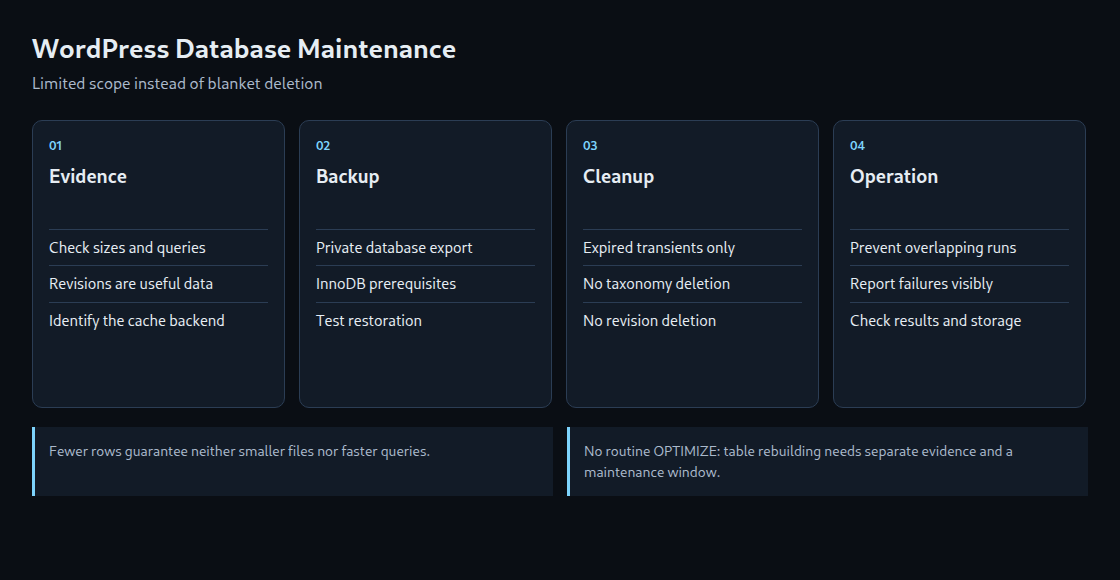
A large WordPress database is not automatically a poorly maintained database. Revisions preserve recoverable text versions; transients hold cached data. Maintenance starts with evidence: which data is no longer needed, how much storage is actually allocated, and which query is slow?
This guide automates only the removal of expired database transients. Revisions, post metadata and language relationships remain intact. It requires Linux with Bash and flock, a verified WP-CLI installation and a single WordPress site without an external object cache. Multisite and Redis/Memcached setups need a separate procedure.
1. Size and content
wp db size --tables --all-tables-with-prefix --human-readable --orderby=size --order=desc lists matching-prefix tables by descending size. The explicit sorting options establish that order. The output proves neither fragmentation nor a specific performance loss.
WordPress does not necessarily create a revision for every unchanged save. Normal permanent deletion through the WordPress API also removes related metadata and relationships. Orphaned rows are records whose related object no longer exists. They can result from direct SQL changes or faulty extensions; the cause needs investigation before a cleanup routine.
Expired transients are handled on access, and WordPress also has scheduled cleanup. A backlog can therefore indicate missed cron events. With an external object cache, transients may reside outside the database. Counting database timeout rows does not then describe the whole cache.
2. A Deliberately Limited Maintenance Script
The script receives the WordPress directory through WP_PATH, an existing private working directory through STATE_DIR, and optionally an absolute WP_BIN path. The working directory must be outside every publicly served directory and accessible only to the maintenance account. The script’s path check catches a WordPress subdirectory; additional web-server aliases still require inspection.
The default audit mode reports table sizes, revision count and transient count. The transient count includes unexpired entries and is not a deletion preview. apply first exports the database, then deletes only expired regular and site transients. Here, site transients are the specially named values of a single-site installation.
#!/usr/bin/env bash
set -Eeuo pipefail
umask 077
export PATH=/usr/local/bin:/usr/bin:/bin
: "${WP_PATH:?Set the WordPress directory}"
: "${STATE_DIR:?Set a private existing directory outside every webroot}"
WP_BIN="${WP_BIN:-/usr/local/bin/wp}"
MODE="${1:-audit}"
[[ "$MODE" == audit || "$MODE" == apply ]] || { echo "Use audit or apply" >&2; exit 2; }
[[ -x "$WP_BIN" && -d "$WP_PATH" && -d "$STATE_DIR" ]] || { echo "Invalid paths" >&2; exit 2; }
WP_PATH=$(realpath "$WP_PATH")
STATE_DIR=$(realpath "$STATE_DIR")
case "$STATE_DIR/" in "$WP_PATH/"*) echo "State directory is inside WordPress" >&2; exit 2;; esac
exec 9>"$STATE_DIR/maintenance.lock"
flock -n 9 || { echo "Another maintenance run holds the lock" >&2; exit 75; }
trap 'status=$?; echo "FAILED (exit $status); inspect the last completed step" >&2; exit "$status"' ERR
wp_run() { "$WP_BIN" --path="$WP_PATH" "$@"; }
wp_run core is-installed
wp_run eval 'if (is_multisite() || wp_using_ext_object_cache()) { WP_CLI::error("Example requires single-site without external object cache"); }'
wp_run db size --tables --all-tables-with-prefix --human-readable --orderby=size --order=desc
printf '%s\n' "Revision count (not scheduled for deletion):"
wp_run post list --post_type=revision --post_status=inherit --format=count
printf '%s\n' "Database transient count (includes unexpired entries):"
wp_run transient list --format=count
if [[ "$MODE" == audit ]]; then
    printf '%s\n' "Audit finished; no cleanup commands executed."
    exit 0
fi
wp_run eval 'global $wpdb; $rows=$wpdb->get_results("SHOW TABLE STATUS"); if ($wpdb->last_error || !$rows) { WP_CLI::error("Table engine check failed"); } foreach ($rows as $row) { if ($row->Engine !== null && $row->Engine !== "InnoDB") { WP_CLI::error("Backup example requires InnoDB tables"); } }'
partial=$(mktemp "$STATE_DIR/backup-$(date -u +%Y%m%dT%H%M%SZ)-XXXXXX.sql.partial")
wp_run db export "$partial" --single-transaction --skip-lock-tables
[[ -s "$partial" ]] || { echo "Empty backup; cleanup blocked" >&2; exit 1; }
backup="${partial%.partial}"
mv -- "$partial" "$backup"
printf 'Backup created: %s\n' "$backup"
wp_run transient delete --expired
wp_run transient delete --expired --network
printf '%s\n' "Expired-transient cleanup completed."
The lock prevents overlapping runs of this script using the same working directory. It does not lock other maintenance tools or website traffic. An error stops execution without automatically undoing completed steps. If the second transient operation fails, the first may already have succeeded.
The export uses a consistent transaction for InnoDB tables. Changes to table structure, such as adding or removing columns, must not run concurrently. The engine check rejects other table engines. A successful export and nonempty file do not replace a restoration test. Dumps can contain personal data and secrets; access, retention, free space and an independent backup require decisions before scheduled use. Failed partial files remain available for investigation.
3. Initial tests on a separate copy
The script belongs in an administratively managed file that the execution account can read and execute but cannot change. Its private working directory needs write access for that account. WP-CLI needs access to WordPress configuration and the database; routine execution as root is unnecessary.
The first run uses actual paths and audit. Even this mode loads WordPress and extensions, so plugin initialization is not guaranteed to be entirely free of writes. Before apply, export and restoration should be tested on a separate instance. Failure tests include an invalid path, export failure and a concurrent second run.
Verification covers more than file size: the homepage, editing, language switching, categories and selected features need checks. Removing transients can cause cache rebuilding and temporary load. WP-CLI still uses PHP and the database; zero resource overhead is not a valid promise.
4. Cron scheduling with observable results
After successful tests, the maintenance account’s crontab can define fixed WP_PATH, STATE_DIR and WP_BIN values. One example schedule is 0 3 * * 0 /bin/bash /opt/scripts/wp-transients.sh apply. This expression schedules a run on Sundays at 03:00 in the cron service’s timezone. The path and time require adjustment; /opt/scripts/wp-transients.sh is the chosen installation location for the shown script.
Output must remain observable rather than disappearing into /dev/null. Cron mail needs a functioning mail transport. An alternative needs a restricted, rotated log and a tested failure notification. A missing successful run also needs detection. A powered-off host or stopped cron daemon cannot execute the job.
The installed cron implementation determines scheduling timezone and daylight-saving behavior. A fixed expression guarantees neither a second-precise start nor successful completion. The WP-CLI path and reduced cron environment require testing under the actual account.
5. Separate decisions about revision retention and rebuilds
A revision limit such as define( 'WP_POST_REVISIONS', 3 ); retains a bounded history. An existing definition should be changed rather than duplicated. The limit is applied when new revisions are created; setting the constant does not immediately clean the entire archive. Autosaves and extension filters need separate consideration.
wp db optimize is not a necessary weekly addition. For MySQL InnoDB, OPTIMIZE can rebuild a table; even online DDL, changes to table structure while the database remains in use, needs locks during certain phases. Storage requirements, table features, engine and version determine behavior. MariaDB has its own variants. File shrinkage or a particular speed improvement is not guaranteed. Measured problems and a planned maintenance window provide the basis.
Questions and Answers
Why omit blanket taxonomy-relationship deletion?
term_relationships.object_id does not always identify a post. Polylang uses the table for language and translation relationships of categories and tags. Joining only against posts can delete valid relationships; coincidentally matching IDs can hide part of the damage. Such repairs require a specifically verified selection.
Will the database become 40 to 60 percent smaller?
No general percentage is supported. Deleted rows, internally reusable space and storage returned to the operating system are different quantities. Query performance also needs separate measurement.
Is a backup in the same directory sufficient?
A local export helps before a change but does not protect against failure of that storage device. An independent backup and a tested recovery procedure remain necessary. Restoring over a database used since the backup can overwrite newer changes and requires planning.
Sources
Related articles