English
 Deutsch
 Polski
GTM Integrations for Claude Code: Three MCP Servers, Their Tool Count and Their Context Cost

Management Summary
AI assistants can help prepare website measurement in Google Tag Manager, such as recording completed purchases. MCP integrations provide the connection between Claude Code and those settings. The three compared packages organise their tools differently, but tool count alone says little about usefulness or running costs. More important are appropriate access rights, a clear separation of drafts from publication and reliable changes. Actual usage determines costs more accurately than the size of a tool list.
Contents
- Tools, direct API calls and skills
- What the historical sizes mean
- Drafts and publication
- Reading workspace tags and the published version
- Three checks on access
- GTM_SCOPES does not affect every authentication mode
- Changes without accidental data loss
- Browser checks and change descriptions
- Questions and answers
- Sources
An AI assistant can prepare a Google Tag Manager tag for completed purchases. The integration needs access to the correct container. A container groups tags, triggers and variables; a JSON export describes those settings as text. Access rights matter more than the number of available tools.
This comparison covers three MCP packages. MCP is a protocol through which an assistant can call tools. The original measurement dated 9 September 2026 reports tool counts and response sizes for specific package versions. The original raw logs are unavailable for this review. Those figures remain labelled as historical reports; current API rules and package source code were checked separately.
Tools, direct API calls and skills
An MCP server might offer a tool for reading a tag. Claude Code sends the arguments, the server calls the Tag Manager API, and the result comes back. A local server can communicate through its process input and output, called stdio; a remote server can use HTTP.
A direct curl request needs no MCP server. The API address, access token and data format still need to be correct. Instructions and results consume context through this route too. An access token is a time-limited credential; its OAuth scopes specify the requested kinds of access.
A skill can include instructions, checks and helper scripts. Claude Code skill settings can also pre-approve tool calls. A skill does not create missing Google permissions. The actual tools, credentials and account permissions still determine the available access.
What the historical sizes mean
| Package version | Reported tools | Reported tools/list bytes |
|---|---|---|
google-tag-manager-mcp-server 5.1.1 |
18 | 108201 |
gtm-mcp 1.0.0 |
104 | 49656 |
@theethosteam/gtm-mcp 1.1.1 |
33 | 19797 |
The byte figures describe the originally reported tools/list response: the descriptions of all offered tools. A definition includes its name, description and input fields. A few tools can therefore require more text than many small tools.
The original comparison describes the first server as a collection of tools by entity type: gtm_tag, for example, combines reading and editing through an action parameter. The second separates substantially more API calls into individual tools. The checked third package source confirms task recipes and gtm_raw for direct API methods.
The earlier figures of roughly 27,000, 12,400 and 4,900 tokens are only rough estimates from byte size, not measurements with a particular model’s tokenizer. Tokens are the text units processed by a model. JSON formatting, character encoding and the tokenizer affect the result.
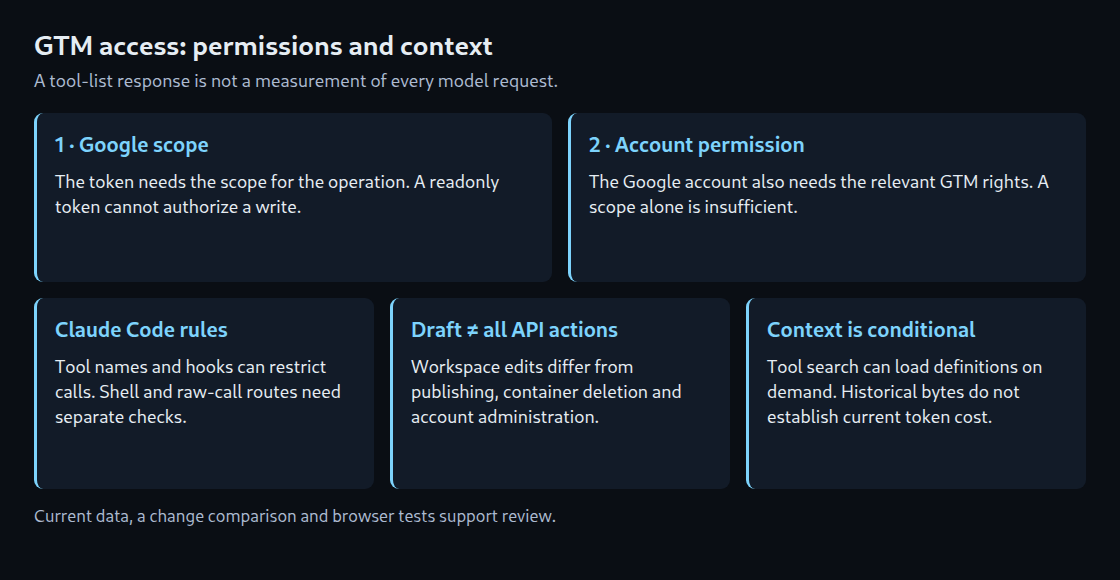
Claude Code can now use tool search to load MCP definitions when needed. Not every complete definition therefore enters every model request automatically. Settings, client version and platform determine the actual behavior. A 108,201-byte tool list establishes neither a fixed context footprint nor a fixed price per turn.
Prompt caching can reduce the price of repeated inputs that have already been loaded. A cache hit does not reduce the number of context tokens processed. Hits, cache-writing costs and savings depend on the model, request and cache configuration. Actual usage figures are more useful for cost comparisons than byte estimates.
Drafts and publication
The public API description retrieved on 25 October 2026 has revision 20261021. The document contains 270,858 bytes and 106 methods: 38 GET, 38 POST, 15 PUT and 15 DELETE. This counts API methods, not an MCP server’s tools.
A workspace is a draft inside a container. Editing its tag configuration does not automatically replace the published default version. Typically, workspaces.create_version first creates a version, and versions.publish publishes one. Preview and custom environments require separate consideration.
This workflow does not make other API permissions harmless. Deleting containers, changing user permissions and editing environments are not merely tag drafts. Exactly two methods use the tagmanager.publish scope in the checked discovery document. This does not mean every other method lacks consequences for a running system.
Reading workspace tags and the published version
Listing a workspace’s tags requires its ID. The published version can instead be read through versions:live; that response also contains the version’s tags. The following example only reads data. IDs and token stand for values from an authorized setup.
# Example IDs; TOKEN must contain an authorized access token.
ACC=6012345678
CONT=123456789
WS=42
: "${TOKEN:?Access token required}"

# Draft tags in one workspace
curl --silent --show-error --fail-with-body \
  --connect-timeout 10 --max-time 30 \
  -H "Authorization: Bearer $TOKEN" \
  "https://tagmanager.googleapis.com/tagmanager/v2/accounts/$ACC/containers/$CONT/workspaces/$WS/tags"

# Published version, including its tags; no workspace ID
curl --silent --show-error --fail-with-body \
  --connect-timeout 10 --max-time 30 \
  -H "Authorization: Bearer $TOKEN" \
  "https://tagmanager.googleapis.com/tagmanager/v2/accounts/$ACC/containers/$CONT/versions:live"
A missing or expired token and insufficient permissions can produce different errors. One error message is not a guarantee for every API method. --fail-with-body exposes HTTP errors through the exit code while retaining the response body; it requires a suitable curl version.
Three checks on access
First, the access token needs the required OAuth scope. Second, the associated Google account needs the appropriate Tag Manager permissions. A publishing scope alone does not grant publishing access to an account without that permission. Both checks apply outside Claude Code too.
Third, Claude Code can block particular tool calls or request approval. A rule for mcp__gtm__gtm_version applies to that tool. A PreToolUse hook can also inspect input fields such as action. A hook is a script that returns a decision before the call.
A tool-name rule does not control a separate curl call. If the same credentials are accessible through the shell, Google scopes and account permissions still apply there, but that MCP name rule does not. An unrestricted raw-call tool can also substitute for blocked specialized tools. All reachable routes need to be considered together.
GTM_SCOPES does not affect every authentication mode
The checked CLI version google-tag-manager-mcp-server@5.1.1 uses a version range for its core package starting at 2.1.1. In the specifically inspected core 2.1.1, GTM_SCOPES reaches token generation only for service-account authentication. Without an explicit selection, seven Tag Manager scopes are requested.
In the refresh-token or access-token branch, the same environment variable does not change existing permissions. Restriction requires a Google credential with the intended scope. The configuration below illustrates only the service-account variant. The key is a placeholder; real keys do not belong in a public repository.
In this configuration, Claude Code expands ${GTM_SERVICE_ACCOUNT_KEY} from its environment. The value must be the complete service-account key JSON, not a path to a file. The account also needs the appropriate Tag Manager access.
{
  "mcpServers": {
    "gtm": {
      "command": "npx",
      "args": [
        "-y",
        "google-tag-manager-mcp-server@5.1.1"
      ],
      "env": {
        "GOOGLE_SERVICE_ACCOUNT_KEY": "${GTM_SERVICE_ACCOUNT_KEY}",
        "GTM_SCOPES": "https://www.googleapis.com/auth/tagmanager.readonly"
      }
    }
  }
}
A fixed CLI version makes the comparison easier to reproduce, but does not automatically fix every dependency version. Exact reproduction also requires a recorded dependency resolution. The different MCP packages additionally use different credential names and authentication procedures.
Changes without accidental data loss
An update starts by reading the current object. The intended field is then changed and the complete object required by that method is sent. A PUT request is not automatically a partial addition. The particular method and server determine which fields may be omitted.
A fingerprint identifies the object state that was read. The API makes this check optional for tags.update. If the previous fingerprint is supplied after the stored value has changed, the values no longer match. Without supplying it, that protection is absent. A matching fingerprint still does not prove that a tag configuration is logically correct.
Tag parameters can contain lists and nested objects. A measurement ID, variable reference and tag reference are different values. A current export of the correct tag type is therefore a better starting point than an arbitrary GA4 JSON example. Referenced variables and triggers must also exist in the target container.
Browser checks and change descriptions
quick_preview creates a preview version. The call does not open a website or prove that a purchase event arrives at the right time. Browser checks need to cover triggers, data-layer values and consent states. An additional browser integration can help, but an API call alone does not perform those checks.
A version name and description can record the reason for a change. Those details do not arise automatically from a prompt and can also be changed later through version management. Exports before and after the change additionally show the actual difference. Comparing them needs no further Google credentials once both files are available.
Questions and answers
Is a smaller tool list always better?
No. Short definitions can provide less guidance about valid inputs. Detailed definitions can prevent mistakes. The task, description quality and actually loaded context matter. No fixed API response time follows from the size.
Can one tool both read and publish?
Yes. When actions are bundled, a name-only rule may block both. Checking the action parameter is more precise, but must match the installed server version. A separate publishing tool is easier to block individually.
Why use a separate workspace?
A separate draft groups related changes and makes review or disposal easier. Changes from other workspaces can still require synchronization and conflict resolution. workspaces.sync supports that synchronization. The number of simultaneous workspaces available depends on the Tag Manager offering.
What does a failed package start prove?
A startup error about missing database or key configuration initially establishes only that the attempted start lacked prerequisites. It does not establish that the package can never run locally. Package documentation and required services determine the deployment options.
Sources
- https://code.claude.com/docs/en/mcp
- https://code.claude.com/docs/en/skills
- https://code.claude.com/docs/en/hooks
- https://developers.google.com/tag-platform/tag-manager/api/v2/authorization
- https://developers.google.com/tag-platform/tag-manager/api/reference/rest/v2/accounts.containers.versions/live
- https://developers.google.com/tag-platform/tag-manager/api/reference/rest/v2/accounts.containers.workspaces.tags/update
- https://developers.google.com/tag-platform/tag-manager/api/reference/rest/v2/accounts.containers/delete
- https://developers.google.com/tag-platform/tag-manager/api/reference/rest/v2/accounts.containers.environments/update
- https://developers.google.com/tag-platform/tag-manager/api/reference/rest/v2/accounts.containers.versions/update
- https://tagmanager.googleapis.com/$discovery/rest?version=v2
- https://registry.npmjs.org/google-tag-manager-mcp-core/2.1.1
- https://registry.npmjs.org/google-tag-manager-mcp-server/5.1.1
- https://registry.npmjs.org/gtm-mcp/1.0.0
- https://registry.npmjs.org/@theethosteam/gtm-mcp/1.1.1
- https://curl.se/docs/manpage.html#–fail-with-body
- https://platform.claude.com/docs/en/build-with-claude/prompt-caching
- https://developers.google.com/tag-platform/tag-manager/api/v2
- https://docs.claude.com/en/docs/claude-code/mcp
Related articles