English
 Deutsch
 Polski
B2B Lead Attribution: Passing UTM Parameters to the CRM

Management Summary
In business sales, an enquiry may arrive well after the advertising contact that introduced a company. Campaign labels in web links help carry that context into the CRM, the system used to manage customer contacts and sales opportunities. Recording the first and latest observed campaign, with valid consent, makes later enquiries easier to place in context. The information supports marketing and sales decisions, but captures only part of the customer journey and does not prove that an advert caused a sale.
Contents
B2B means business-to-business sales. A lead is a potential customer contact. Such a contact may arrive through an advert and submit a form several visits later. The landing-page campaign parameters may then be absent from the current URL. Separate storage can pass those values to a form and then to the CRM, the system that manages customer contacts and sales opportunities. This supplements the form integration; GA4 does not automatically lose an already collected campaign source on the next internal page.
1. What first and last touch mean here
This example retains the earliest and latest observed visits containing valid UTM parameters or supported click IDs. Visits without those parameters leave the records unchanged. First touch therefore means the earliest campaign contact still available in this browser, and last touch means the most recently captured campaign contact. Attribution assigns contacts or sales to marketing channels. These two records do not reconstruct a complete customer journey or cross-channel attribution.
UTM parameters are campaign labels added to a URL, such as utm_source=newsletter. The five UTM fields describe source, medium, campaign, term and content. gclid and li_fat_id are also stored separately with capture timestamps. A subsequent email campaign can therefore update last touch without erasing the Google click ID. Other identifiers, including wbraid and gbraid, require a separately verified integration.
2. Consent and expiry before persistence
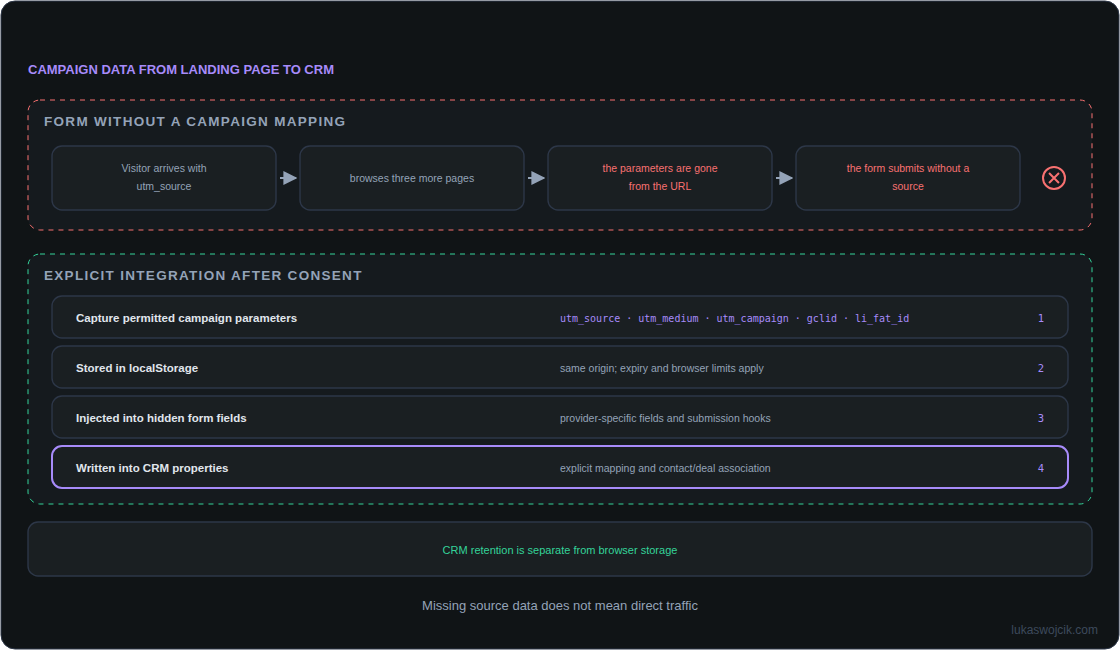
localStorage is browser storage that a website can read and write with JavaScript. A consent management platform (CMP) records consent choices. In Germany, marketing attribution in localStorage generally requires consent under section 25 TDDDG. localStorage is not exempt from device-storage protection. Access remains blocked until consent has been confirmed. On withdrawal, the CMP integration must stop further use, delete the stored record and clear attribution fields already populated in forms.
The ES module uses localStorage only. Its illustrative 30-day lifetime applies separately from capture to each touch or click ID; it is not a general retention recommendation. Expired values are excluded from output, with physical cleanup on the next capture call. Browser deletion, tracking prevention and storage errors can shorten availability. An origin combines the protocol, hostname and port of a web address. Storage is restricted to the same origin: other subdomains and browsers do not share it.
export function attributionStore({ consent, storage, now = Date.now }) {
  const key = 'b2b_attribution_v2';
  const ttl = 30 * 86400000;
  const utm = ['utm_source', 'utm_medium', 'utm_campaign', 'utm_term', 'utm_content'];
  const ids = ['gclid', 'li_fat_id'];
  const valid = value => typeof value === 'string' && value.trim().length > 0
    && value.length <= 500 && !/[\u0000-\u001f\u007f]/.test(value);
  function permitted() { try { return consent() === true; } catch { return false; } }
  function fresh(record, time) {
    return record && Number.isFinite(record.at) && record.at <= time
      && time - record.at < ttl && record.values && typeof record.values === 'object';
  }
  function read(time) {
    const data = JSON.parse(storage().getItem(key) || '{}');
    const result = { first: null, last: null, ids: {} };
    for (const name of ['first', 'last']) {
      if (fresh(data?.[name], time)) {
        const values = Object.fromEntries([...utm, ...ids]
          .filter(k => valid(data[name].values[k]))
          .map(k => [k, data[name].values[k]]));
        if (Object.keys(values).length) result[name] = { at: data[name].at, values };
      }
    }
    for (const name of ids) {
      const item = data?.ids?.[name];
      if (fresh(item, time) && valid(item.values[name])) result.ids[name] = item;
    }
    return result;
  }
  return {
    capture(search) {
      if (!permitted()) return false;
      try {
        const time = now();
        let data;
        try { data = read(time); } catch { data = { first: null, last: null, ids: {} }; }
        const params = new URLSearchParams(search);
        const values = Object.fromEntries([...utm, ...ids]
          .filter(k => params.getAll(k).length === 1 && valid(params.get(k)))
          .map(k => [k, params.get(k).trim()]));
        if (Object.keys(values).length) {
          const touch = { at: time, values };
          data.first ||= touch;
          data.last = touch;
          for (const name of ids) if (values[name]) {
            data.ids[name] = { at: time, values: { [name]: values[name] } };
          }
        }
        storage().setItem(key, JSON.stringify(data));
        return true;
      } catch { return false; }
    },
    fields() {
      if (!permitted()) return {};
      try {
        const data = read(now());
        const fields = {};
        for (const side of ['first', 'last']) {
          for (const name of utm) fields[side + '_' + name] = data[side]?.values[name] || '';
          fields[side + '_captured_at'] = data[side] ? new Date(data[side].at).toISOString() : '';
        }
        for (const name of ids) {
          fields[name] = data.ids[name]?.values[name] || '';
          fields[name + '_captured_at'] = data.ids[name] ? new Date(data.ids[name].at).toISOString() : '';
        }
        return fields;
      } catch { return {}; }
    },
    clear() { try { storage().removeItem(key); } catch {} }
  };
}
The module can be served as /assets/utm-store.mjs. An unchanged Custom HTML tag cannot run export/import as classic JavaScript. The CMP adapter must return the actual current consent state. The safe starting configuration below deliberately permits no storage.
import { attributionStore } from '/assets/utm-store.mjs';
const attribution = attributionStore({
  consent: () => false, // Replace with the verified CMP adapter.
  storage: () => window.localStorage
});
// After consent is confirmed, and on relevant SPA navigation:
attribution.capture(window.location.search);
// In the CMP withdrawal handler:
// attribution.clear();
capture must run again after consent, while campaign parameters remain available. A single pre-consent call does not capture the visit retroactively. Single-page applications update the displayed page without loading a whole new document. They need capture when navigation changes the relevant URL. Reading URL parameters needs no DOMContentLoaded event. Duplicate, empty, excessive-length and control-character values are rejected. Repeating capture on the same tagged URL records another observation; capture timestamps are not verified advertising-click timestamps.
3. Explicit mapping of form fields
fields() returns named fields without nested objects, such as first_utm_source, last_utm_campaign, gclid and gclid_captured_at. Missing values stay empty. An empty field is not evidence of direct traffic. A gclid alone does not automatically populate UTM fields either. Any inferred channel classification requires a documented rule, separate from the raw values.
A hidden field is submitted with the form but is not displayed as an input box. A custom HTML form can mark each prepared hidden field with data-attribution-key. The function updates only marked fields and clears old values when consent is no longer available. The submit handler must call this function before constructing the form payload; asynchronous libraries need their documented integration hook.
function fillAttribution(form) {
  const values = attribution.fields();
  for (const field of form.querySelectorAll('input[type=hidden][data-attribution-key]')) {
    field.value = values[field.dataset.attributionKey] || '';
  }
}
// Example field in a custom form:
// <input type="hidden" name="campaign_source" data-attribution-key="first_utm_source">
Gravity Forms provides the native gform/post_render event from version 2.9. The older gform_post_render is a jQuery event; using that name in document.addEventListener does not provide an equivalent listener. Events and field mappings must match the installed version. A CRM property name is not automatically a Gravity Forms HTML input name. Current HubSpot forms provide form instances and setFieldValue. An iframe embeds another page inside the current page. A general search in the main page’s HTML tree cannot access an iframe from another origin. Contact Form 7 likewise needs configured fields and an appropriate submission mapping.
4. CRM integration and offline conversions
The backend validates incoming values again: hidden inputs and URL parameters can be modified. Names, email addresses and other personal content do not belong in UTM parameters. CRM properties, form fields and API fields need explicit mappings; matching display labels do not connect systems.
Existing contacts need rules for preserving the earliest known contact, recording later campaigns and merging records. Contact-to-deal associations must be established explicitly. A channel group such as Paid Social (paid social-media advertising) describes acquisition. Lead, Opportunity and Closed-Won describe sales stages: a potential contact, a concrete sales opportunity and a completed sale. These are separate dimensions.
An offline conversion is a relevant result recorded outside the website, such as a sale confirmed in the CRM. Deduplication prevents the same result being counted twice. Offline conversions require a separate integration with a conversion action, actual conversion time, suitable identifier, required consent and deduplication. Merely storing an ID does not trigger an upload. Google documents a maximum of 90 days after the associated click for traditional offline uploads and 63 days for enhanced conversions for leads; the configured conversion window also applies. This window specifies how long after an advertising interaction a conversion can be attributed to it. Browser retention is independent. Earlier qualified sales stages can be separate conversion actions when definitions and values suit the bidding objective.
For LinkedIn, li_fat_id in landing URLs depends on Enhanced conversion tracking being enabled for the Insight Tag in Campaign Manager. The Conversions API accepts this identifier as LINKEDIN_FIRST_PARTY_ADS_TRACKING_UUID. That match identifier is not itself proof that a conversion falls within an attribution window.
5. Checks before deployment
A test journey starts with a Google campaign, continues through an untagged page and a later email campaign, then submits the form. First touch remains Google, last touch becomes email, and an unexpired gclid remains separately available. Additional checks cover denied and withdrawn consent, expired and corrupt data, blocked storage, AJAX forms and actual CRM fields. Ten isolated JavaScript tests cover the storage logic; these do not test a production CMP, form or CRM integration.
Questions and answers
Will Safari preserve the record for 30 days?
That lifetime is not guaranteed. WebKit can delete script-writable storage after seven days of browser use without interaction with the website. Server-set cookies are not a universal workaround: restrictions can also apply to CNAME- or IP-based tracking arrangements. A lawfully submitted CRM copy no longer depends on browser storage, but still needs its own retention and deletion rules.
Do first and last touch provide multi-touch attribution?
Two touchpoints are not a complete event sequence. This example also retains only the latest observed supported click ID per platform. Multiple clicks, device changes and contact merges need a more extensive data model with appropriate privacy controls. The output records observed campaign signals, not a proven causal contribution to revenue.
Sources
Related articles