English
 Deutsch
 Polski
Google Ads OCI: Conversion values from BigQuery

Management Summary
A sale with high revenue is not always the most profitable sale. Google Ads can receive a value based on contribution margin, the revenue remaining after defined variable costs, to guide advertising bids. BigQuery, a service for analysing stored data, can calculate these values from orders before they are imported into the advertising account. This connects campaign decisions more closely to business economics, provided that costs, order matching and later refunds are handled consistently.
Contents
Google Ads can optimize bids using conversion values supplied by a business. BigQuery can prepare those values from order data, for example a contribution margin after defined variable costs. For example, 100 euros of revenue excluding tax minus 60 euros of goods, shipping and payment costs leaves 40 euros of contribution margin. Fixed costs are not yet deducted. This is not automatically net profit, cash flow or customer lifetime value. A useful pipeline needs a documented value definition, permitted data use, reliable identifiers and a separate upload process.
OCI means Offline Conversion Import: a recorded business outcome is sent to Google Ads after the event.
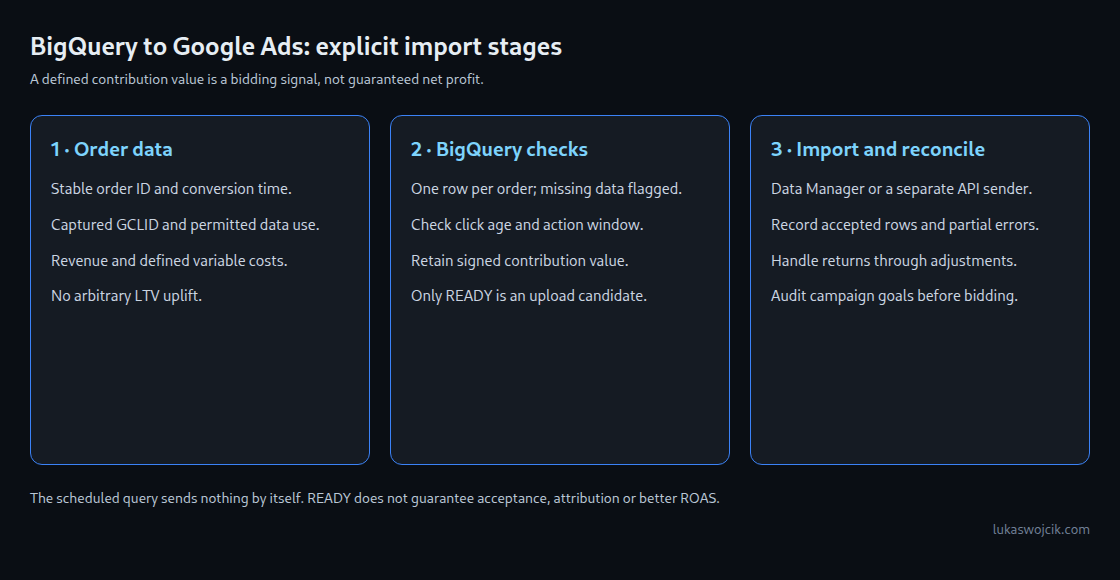
What the pipeline does
The example below prepares classic GCLID-based offline conversions. It links an order to a captured ad click; it does not calculate a multi-touch attribution model. GA4 is optional for this design. The standard GA4 export includes ecommerce.transaction_id and event-level collected_traffic_source.gclid, but a purchase event is not guaranteed to contain a custom gclid parameter.
Click-ID capture and advertising uploads require the applicable consent and policy checks. A first-party cookie or an ERP record does not bypass those requirements. The example uses a previously validated marketing_upload_allowed flag. That flag is an internal gate, not a replacement for consent evidence or the upload API’s consent fields.
Required fields and their meaning
orders_for_adscontains one current row perorder_id. The ID is stable and non-empty; duplicate rows are flagged rather than silently selected.gclidis the original captured identifier.click_timeandconversion_timeare TIMESTAMP fields; the conversion time is the actual, immutable business event, not the time of a retry.net_revenue_ex_tax,cogs_amount,shipping_costandpayment_feeare NUMERIC amounts in the same currency. Revenue reflects discounts and known refunds. Costs must use consistent signs and refund treatment.currency_codeis a validated ISO 4217 currency. The query only checks the three-letter format, not membership in the ISO list.marketing_upload_allowedis BOOL.order_statusfollows the shop’s documented lifecycle.ads_upload_logrecords accepted imports with order ID, action and BOOLaccepted; rejected requests do not count as accepted.
The example assumes one Google Ads conversion customer and one action mapping. Multiple accounts require that account identity in the import ledger key. Financial values must be finite NUMERIC amounts. Parallel upload workers also need coordination or an idempotent sender that repeats requests without duplicate effects; checking the ledger is not a lock.
Preparing and checking orders before upload
The following GoogleSQL example retains pending historical orders, so shipment on day eight does not lose an order from a seven-day purchase window. For production use, tables need suitable partitions, for example by date, so each run does not read the entire history. Incremental reconciliation processes new or changed orders while also keeping track of older pending orders. The 30-day action window is an example setting that must match the conversion action.
-- GoogleSQL teaching example: replace project/dataset identifiers.
-- orders_for_ads: one current row per order; timestamps remain immutable.
-- ads_upload_log: accepted imports only, keyed by action + order_id.
DECLARE run_time TIMESTAMP DEFAULT CURRENT_TIMESTAMP();
DECLARE action_name STRING DEFAULT 'Contribution_Purchase';
-- Example only: match the configured conversion action's click window.
DECLARE click_window_days INT64 DEFAULT 30;

WITH prepared AS (
  SELECT o.*,
    COUNT(*) OVER (PARTITION BY order_id) AS rows_per_order,
    ROUND(net_revenue_ex_tax - cogs_amount - shipping_cost - payment_fee, 2)
      AS contribution_value,
    EXISTS (
      SELECT 1 FROM `project_id.erp_data.ads_upload_log` AS l
      WHERE l.order_id = o.order_id AND l.conversion_action = action_name
        AND l.accepted = TRUE
    ) AS already_imported
  FROM `project_id.erp_data.orders_for_ads` AS o
),
classified AS (
  SELECT *,
    CASE
      WHEN order_id IS NULL OR TRIM(order_id) = '' OR rows_per_order != 1
        THEN 'INVALID_ORDER_KEY'
      WHEN already_imported THEN 'ALREADY_IMPORTED_CHECK_ADJUSTMENTS'
      WHEN marketing_upload_allowed IS NOT TRUE THEN 'CONSENT_NOT_CLEARED'
      WHEN order_status != 'PAID_AND_SHIPPED' OR order_status IS NULL
        THEN 'NOT_READY'
      WHEN gclid IS NULL OR TRIM(gclid) = '' THEN 'MISSING_GCLID'
      WHEN conversion_time IS NULL OR click_time IS NULL
        OR conversion_time <= click_time OR conversion_time > run_time
        THEN 'INVALID_TIME'
      WHEN click_time < TIMESTAMP_SUB(run_time, INTERVAL 90 DAY)
        THEN 'IMPORT_TOO_LATE'
      WHEN conversion_time > TIMESTAMP_ADD(click_time, INTERVAL click_window_days DAY)
        THEN 'OUTSIDE_ACTION_WINDOW'
      WHEN contribution_value IS NULL THEN 'MISSING_FINANCIALS'
      WHEN currency_code IS NULL OR NOT REGEXP_CONTAINS(currency_code, r'^[A-Z]{3}$')
        THEN 'INVALID_CURRENCY_FORMAT'
      ELSE 'READY'
    END AS staging_status
  FROM prepared
)
SELECT order_id, gclid, action_name AS conversion_action,
  FORMAT_TIMESTAMP('%Y-%m-%d %H:%M:%S+00:00', conversion_time, 'UTC')
    AS conversion_date_time,
  contribution_value,
  -- Explicit business policy: losses become zero bidding value, not omitted orders.
  GREATEST(contribution_value, 0) AS conversion_value,
  currency_code, staging_status
FROM classified;
The example rounds values to two decimal places, as appropriate for its EUR/USD-style amount convention; other currency precision rules require adaptation.
Only rows with staging_status = 'READY' are upload candidates. Other statuses need monitoring and, where appropriate, correction or later retries. Even READY does not confirm that Google Ads will accept or attribute a conversion. Missing amounts remain errors instead of silently becoming zero.
The example deliberately maps negative contribution margins to a bidding value of zero while retaining the signed amount for reporting. This is a business rule, not a claim that losses disappear. A different value policy needs its own design. No arbitrary LTV multiplier is added; predictions require a separately validated model.
Connection and operation
- Upload path: Google Ads Data Manager supports a direct BigQuery connection with permissions and field mapping. The Google Ads connector in BigQuery Data Transfer Service moves reporting data in the opposite direction, into BigQuery; a scheduled query alone sends no conversions.
- Action and payload mapping: the Ads API requires the resource name of an enabled
UPLOAD_CLICKSaction. The SQL action label therefore needs mapping. Order ID, GCLID, conversion time, value, currency and applicable consent fields need mapping to the chosen interface; CSV, Data Manager and API field names are not interchangeable. - Result records: request identity, stable order/action/time, accepted result, individual errors and retry state need recording. Partial failures require separate handling; an HTTP success alone does not prove that every row succeeded. Time windows need another check when a queued row is actually sent.
- Change reconciliation: previously accepted orders go to a separate adjustment process for refunds or corrected values. A repeat original import is not a value update. The upload ledger needs reconciliation with backend orders and Google Ads diagnostics.
- Bidding introduction: the action initially serves observation, with campaign goals under review. Secondary actions can still affect bidding inside custom goals. Validation should cover data volume, financial reconciliation and conversion delays; fourteen days is not a universal readiness certificate. Unintentional bidding on both revenue and contribution value for the same order would double-count the business outcome.
Timing and identifier boundaries
Google documents a maximum upload age of 90 days after the associated click for classic offline imports, versus 63 days for enhanced conversions for leads. The conversion action’s own window also applies. There is no universal rule requiring every upload to wait 24 hours. Recent-click processing can cause temporary errors; the scheduled-upload FAQ recommends allowing six hours in that case. The original conversion timestamp must remain unchanged during retries.
This example intentionally handles GCLID only. GBRAID and WBRAID require the appropriate fields and supported workflow, not a generic COALESCE into a GCLID column. The current Ads API adjustment documentation supports GCLID and GBRAID adjustments but excludes WBRAID adjustments. Identifier choice therefore also affects the refund design.
Questions and answers
Does an order ID prevent every duplicate?
A stable order ID per action helps Google Ads deduplicate imports and reference adjustments. Internal uniqueness checks and an accepted-upload ledger are still necessary. A second conversion action can count the same order separately.
How are later refunds represented?
Supported conversions use RESTATEMENT for a revised value or RETRACTION for removal, subject to the method’s rules and deadlines. If the original import included an order ID, adjustments must use that ID. Restating to zero or retracting can prevent further adjustments, so the correction workflow needs explicit handling.
Does margin-based bidding guarantee better ROAS?
No. Data quality, delays, campaign settings and the chosen value model affect results. Conversion value divided by ad spend expresses the uploaded metric; a margin-based ratio is not revenue ROAS and does not measure total business profit.
Sources
- BigQuery documentation
- Google Ads API documentation
- GA4 export schema
- BigQuery connection in Data Manager
- Google Ads reports into BigQuery
- Offline conversion imports
- Offline import timing
- Offline import FAQ
- Conversion adjustments and identifiers
- Adjustment behavior
- Primary and secondary actions
- Google consent policy
- Consent mode reference
Related articles