English
 Deutsch
 Polski
Multi-WAN Failover with the Ubiquiti UniFi UCG-Fiber: Setup, Grounding and Configuration

Management Summary
A backup internet connection can keep a home or business online when the main provider fails. Failover means that the router detects a problem and switches to another connection, such as mobile or satellite internet alongside fibre. The UniFi example explains how these links work together and why their priority matters. This reduces dependence on one provider, but shared power and equipment can still fail, and a switch may interrupt calls already in progress.
Contents
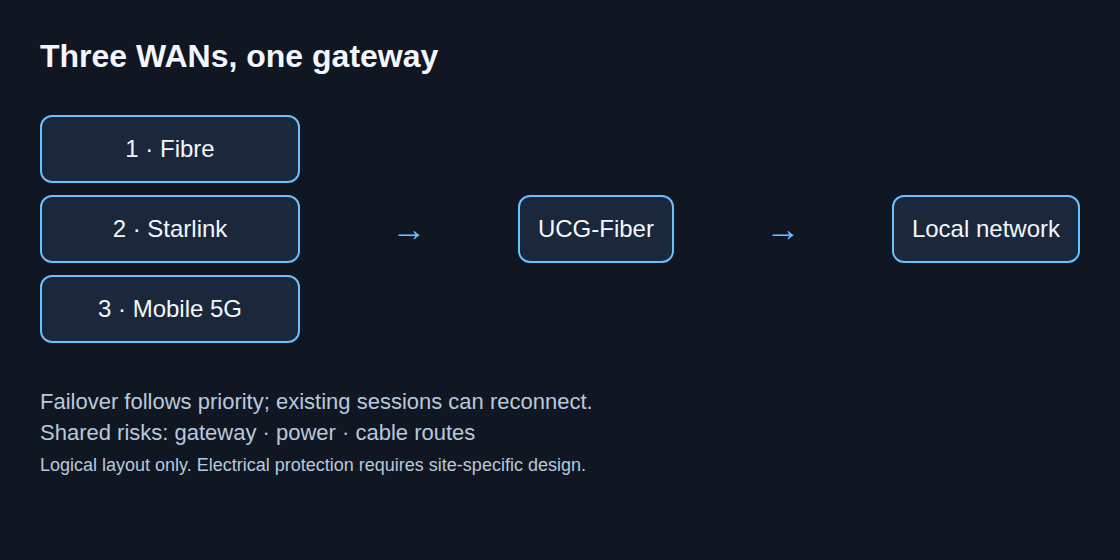
Multi-WAN uses more than one internet connection. Failover switches to a backup after a detected fault; load balancing distributes new connections across available links. Neither arrangement guarantees 100% uptime or uninterrupted calls. A common gateway, power supply or cable route can still fail.
Example: fibre, satellite and mobile backup
The example prioritizes Toya fibre, then Starlink, then a ZTE 5G connection. Actual latency, throughput and independence need measurement at the installation site. Starlink reduces dependence on the local access line but still relies on power, a clear view of the sky and the provider network.
Hardware and provider requirements
Hardware terms: WAN refers to the internet-facing connection; LAN is the local network. The gateway connects these networks. An ONT terminates the provider’s fibre connection and supplies a usable network connection. An SFP is a pluggable interface module; a matching connector alone does not make it a compatible ONT replacement. PoE carries power and data over Ethernet, and an injector supplies that power to the cable.
Address translation: NAT translates between local and external IP addresses. CGNAT performs another translation within the provider network, often sharing one public address among several customers. Removing local NAT does not remove that provider layer.
The UCG-Fiber supports multiple WAN ports; the current specification lists a maximum of six. Three connections therefore require appropriate port assignments and enough remaining LAN connectivity. A fibre subscription does not imply that an arbitrary SFP module can replace the provider ONT: optics, authentication and provider settings must match.
Bridge mode or IP passthrough can remove an extra local NAT layer, but is not essential for every outbound application. Neither mode creates a public IPv4 address or removes provider-side CGNAT. Incoming services require a separate addressing and firewall design.
- Starlink: Router 3 has Ethernet LAN ports and supports bypass mode. The exact kit determines wiring and adapter needs; Performance kits may connect a third-party router at the power supply instead. Bypass does not change the service plan’s IP policy.
- ZTE MC889: an outdoor unit with PoE Ethernet. Bridge or passthrough availability needs checking against the actual firmware and operator documentation. The approved injector and cable arrangement matter; a PoE label alone does not prove compatibility with a particular switch.
Outdoor installation and electrical protection
Roof mounting requires a protection design appropriate to the building and local rules. A qualified electrical or lightning-protection specialist determines earthing, bonding, separation distances, conductor routing and surge-protection placement. A generic instruction to connect every mast directly with 16 mm² copper is insufficient.
Outdoor cable suitability includes UV exposure, moisture, shielding and the equipment manufacturer’s installation requirements. A surge protector at the basement rack alone is not a complete building-entry protection design. PoE compatibility and bonding of protective devices also need verification. Surge protection does not guarantee survival of a direct lightning strike.
Configuration and acceptance test
Connection settings: DHCP obtains an address automatically; a static address is entered explicitly. A VLAN separates traffic logically on a shared network. PPPoE establishes a provider connection using a login. Required values come from the provider. DNS translates names such as website addresses into IP addresses; a ping checks whether a target responds. Latency is the delay, jitter is variation in that delay, and packet loss means that some transmitted packets do not arrive. An SLA threshold here is a configured limit for judging link quality.
- Under Settings > Internet, each provider connection receives a WAN port and the required DHCP, static-address, VLAN or PPPoE settings.
- Failover uses an explicit priority: fibre, Starlink, mobile. Load balancing is a separate choice and can consume metered backup data during normal operation.
- Health checks assess the usable route beyond the modem. The documented Auto policy combines ping and DNS probes; custom SLA thresholds can evaluate packet loss, latency and jitter. Menu labels depend on the installed Network version.
- A maintenance-window test covers loss and restoration of each link, real application traffic, DNS, VPN reconnection and data usage. Monitoring the backup alone does not prove the full switchover works.
Load-balancing weights distribute new connections rather than combining all links into one faster download. A connection normally stays on its chosen WAN. Failover can change the public address and interrupt existing sessions; application recovery needs testing.
Routing selected traffic
Policy-Based Routing can assign a device or VLAN to a WAN. For example, guest traffic can use Starlink while backups use fibre. An enabled Kill Switch stops matching traffic when that route is unavailable; disabled, fallback follows the remaining routing rules. A stopped backup may fail or need restarting rather than pause cleanly.
The documented menu in Network 9.4 is Settings > Policy Table > Create New Policy > Route. Domain-based rules require clients to use the gateway for DNS. A dedicated WAN should follow Ubiquiti’s documented Failover or Backup role rather than remain an active load-balancing member.
Questions and answers
Can health checks detect a slow link?
Latency, jitter and loss thresholds can detect degradation before a complete outage. Small probe responses do not measure available download capacity; healthy probes can coexist with poor application throughput.
Why can a usable WAN be marked down?
A probe target or route can fail while other destinations remain reachable. Diverse targets, suitable thresholds and a useful evaluation window reduce false alarms without eliminating the need for diagnosis.
Does failover preserve every VPN or call?
No. The application, protocol and change of external address determine recovery. Acceptance testing needs to include the actual services and both failover and return to the preferred link.
Related articles