

 English
 Deutsch
 Polski
Tutorial: Hardening a Docker Compose File for Unattended Operation on a Raspberry Pi

Management Summary
Docker Compose describes how applications run together on a server. On a Raspberry Pi left operating without regular attention, these settings can limit memory use, prevent endless log growth and restrict what each application may access. This helps keep one service's problems from consuming the whole device. Fixed software versions make updates more controlled, while restart rules help with some interruptions. They do not replace backups or recovery planning, and a reported health problem does not automatically trigger a repair.
Contents
A Docker Compose file can reduce common operating risks, but a few settings do not guarantee a year of unattended service. Restart behavior, health reporting, log retention, resource limits and image updates solve different problems. Backups, monitoring and tested recovery remain separate requirements.
A starting point for a long-running application
The following example targets a Linux Docker Engine with current Compose. The application image must support UID/GID 1000, a read-only root filesystem and the specified health endpoint, and must contain curl. UID and GID are the numeric user and group identifiers used for file permissions. The image reference comes from APP_IMAGE and must include a verified digest. The resource values are illustrative, not sizing recommendations for every Raspberry Pi.
services:
  app:
    image: "${APP_IMAGE:?verified image reference required}"
    restart: unless-stopped
    healthcheck:
      test: ["CMD", "curl", "-fsS", "--max-time", "4", "http://localhost:8080/health"]
      interval: 30s
      timeout: 5s
      retries: 3
      start_period: 60s
    logging:
      driver: json-file
      options:
        max-size: "10m"
        max-file: "3"
    mem_limit: 512m
    cpus: 1.5
    pids_limit: 128
    read_only: true
    tmpfs:
      - /tmp:size=64m,mode=1777
    security_opt:
      - no-new-privileges:true
    user: "1000:1000"
The image’s required data directories need explicit writable volumes or bind mounts. A volume is storage managed by Docker; a bind mount makes a chosen host directory available inside the container. The example deliberately contains no database or persistent application data. A service that needs different permissions, ports, temporary directories or resources requires a corresponding configuration; copying these settings into an arbitrary image is not sufficient.
Restarting and reporting health
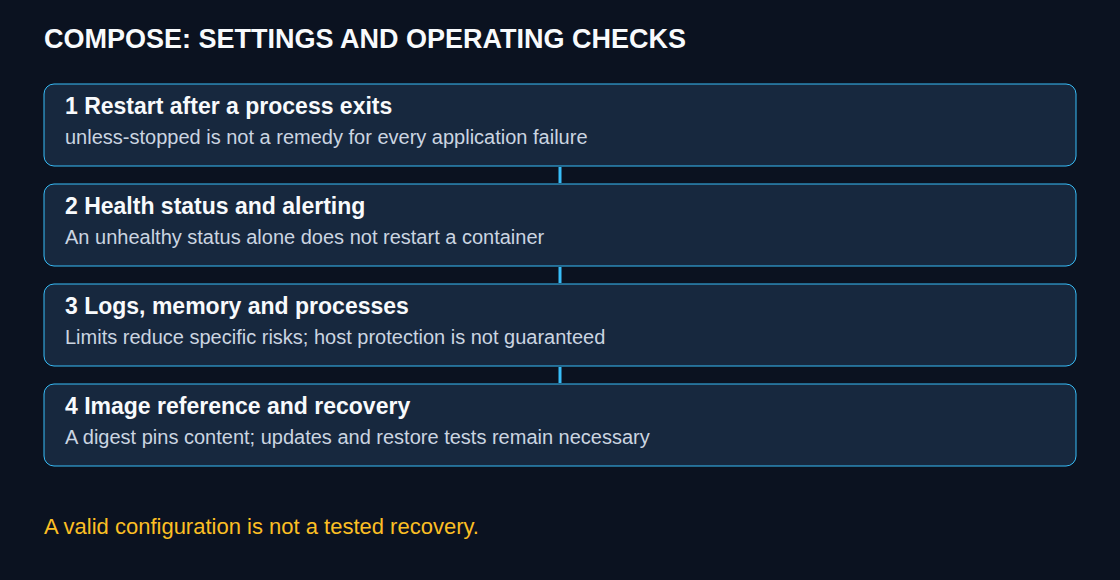
unless-stopped restarts a terminated long-running container according to Docker’s policy while preserving an intentional stop across daemon restarts. With always, a manually stopped container can return after the daemon restarts; it does not immediately restart merely because the stop command completed. The default no disables automatic restarting. One-shot jobs may legitimately use a different policy.
A restart policy does not restart a process merely because the container is unhealthy. In ordinary Compose operation, a healthcheck records status; recovery needs an application exit or a separately designed controller. Backoff means increasing the wait between restart attempts. This reduces restart frequency but does not eliminate resource consumption or replace an alert.
The example probes an application-specific endpoint inside the container. A missing curl executable, wrong URL, failed dependency or slow response can all produce unhealthy status; that status does not uniquely diagnose a hang. A readiness check may include essential dependencies, while an automatic restart decision needs care to avoid restarting every service during a shared database outage.
start_period allows startup failures without immediately counting them toward the retry threshold. A successful probe during that period ends this grace behavior for subsequent failures. Probe duration and scheduling also affect timing, so three retries at 30-second intervals are not an exact 90-second startup allowance.
For a database dependency, the service_healthy condition under depends_on for service db belongs in the application service, with a real healthcheck on the database service. This gates startup managed by Compose. It is not continuous dependency supervision and is not rerun as a Compose readiness gate when Docker independently restarts containers after a host reboot. Applications still need bounded retries and reconnection logic.
Bounded logs and resource use
Docker’s default json-file driver has no rotation unless configured. The example keeps up to three rotated log files of approximately 10 MB each per container. Replicas multiply that budget; application files, volumes and other host logs are outside it. Neither 30 MB nor a retention duration is universally sufficient. Docker also recommends the local driver for many installations because rotation is enabled by default.
Daemon-wide defaults belong in the existing daemon configuration, merged with other settings. After the daemon applies the new defaults, existing containers retain their old logging configuration until recreated. The journald driver is another option, but it does not itself make logs memory-only: Storage=volatile stores new journal data under /run/log/journal, which is lost on reboot. Existing persistent journal files are not automatically deleted, and remote retention needs separate configuration.
mem_limit, cpus and pids_limit bound different resources. Memory pressure can kill a process inside a container; the whole container only restarts if its main process exits and the restart policy applies. Limits do not guarantee that the host or other services remain unaffected. Aggregate budgets need room for the operating system, Docker, caches and workload peaks. Tmpfs stores temporary files in memory, consumes part of the memory budget and does not preserve files when the container stops.
Raspberry Pi OS does not justify a universal claim that memory control is disabled. Support depends on the kernel, cgroup setup, OS version and operating mode. docker info, the effective container configuration and a controlled test on a disposable workload establish actual behavior. Boot parameters need changes only when the installed system’s documentation and diagnostics require them. In cmdline.txt, parameters stay on one logical line: a split can hide later parameters, but an ordinary terminating newline does not inevitably make the system unbootable.
Image identity and privileges
Restarting an existing container does not pull a new image. Recreating a container may use a newer local or downloaded image, depending on the pull policy and cache. A tag can move; a digest identifies fixed image content. Pinning therefore needs a deliberate update process, including reviewed digest changes, platform compatibility and rollback planning. A fixed image does not freeze volume contents, external services or database schema.
docker buildx imagetools inspect IMAGE:TAG shows registry metadata. A multi-platform index digest references several platform manifests; a platform-specific manifest digest fixes one variant. Both can be valid for a deliberate deployment. A local RepoDigests entry is not a universal guarantee of an index digest, and locally built images may have no repository digest. The selected Pi architecture must actually exist in the index. Mismatches can fail during selection, creation or execution depending on platform settings and emulation.
user: "1000:1000" selects an identity; compatibility depends on image startup behavior and volume permissions. no-new-privileges blocks acquiring additional privileges through mechanisms such as setuid executables, but does not remove privileges already granted or turn root into a non-root user. Read-only root filesystems leave explicitly writable mounts writable. These controls require application tests, not a promise that every application will keep working unchanged.
Configuration checks with an explicit policy
docker compose config -q validates and resolves the Compose model without printing it. Unset ordinary variables normally cause a warning and an empty substitution; ${VAR:?message} instead rejects unset or empty required values. Resolved output can contain secrets and needs protected storage.
The following checker is saved as check-compose.py. It enforces the narrow example policy: every listed service is long-running, explicitly declares an active healthcheck and the shown JSON rotation, and has a SHA-256 image reference. Inherited image healthchecks, host logging defaults and other valid policies are deliberately not inferred.
import json
import re
import sys

stack = json.load(sys.stdin)
failed = False
for name, svc in stack.get("services", {}).items():
    issues = []
    if svc.get("restart") not in ("always", "unless-stopped"):
        issues.append("restart policy needs review")
    health = svc.get("healthcheck") or {}
    test = health.get("test") or []
    if health.get("disable") or not test or test[0] == "NONE":
        issues.append("explicit active healthcheck missing")
    log = svc.get("logging") or {}
    opts = log.get("options") or {}
    if log.get("driver") != "json-file":
        issues.append("logging differs from this example policy")
    elif opts.get("max-size") != "10m" or str(opts.get("max-file")) != "3":
        issues.append("example log rotation limits missing")
    if not re.search(r"@sha256:[0-9a-f]{64}$", svc.get("image", "")):
        issues.append("SHA-256 image reference missing")
    result = "; ".join(issues) if issues else "example policy matched"
    print("{}: {}".format(name, result))
    failed = failed or bool(issues)
if not stack.get("services"):
    print("no services found", file=sys.stderr)
    sys.exit(2)
sys.exit(1 if failed else 0)
umask 077
docker compose config --format json > resolved.json && python3 check-compose.py < resolved.jsonA zero exit status means only that this policy matched the resolved model. It does not verify the digest in a registry, probe the application, prove resource enforcement or certify security. The checker reports issues with exit status 1; empty service input returns 2. The preceding Compose command must succeed before checking its output.
Recovery tests and useful signals
A controlled maintenance test covers application exit, dependency outage, host reboot, intentionally stopped services and restoration from a backup. Merely restarting a container does not test data recovery. Container state, increasing restart count, health output, disk space, memory pressure and an external availability probe provide complementary evidence. An alert should identify a sustained problem rather than notify on every harmless state change.
Does unhealthy mean that Docker will repair the service?
No. Health status is diagnostic information in this Compose setup. A failed probe and its cause require inspection; automatic recovery needs an explicit strategy.
Are pinned images incompatible with automatic updates?
No. An updater can propose or apply a reviewed digest change. Repeatedly pulling the same digest alone does not select a new version, and updater success behavior depends on the tool.
Why can hardening prevent startup?
An entrypoint may need writable paths or an initial permission adjustment. The image’s documented runtime user and required mounts determine the solution. Arbitrarily changing host ownership is not a universal fix.
Sources
- Docker: Start containers automatically
- Docker: Resource constraints
- Docker Compose: Control startup and shutdown order
- Docker Compose: Interpolation
- Docker: JSON File logging driver
- Docker: Configure logging drivers
- Dockerfile reference: HEALTHCHECK
- Docker Buildx: imagetools inspect
- Docker Compose: Services reference
- Docker Compose: config command
- systemd: journald.conf and Storage
- Raspberry Pi: Kernel command line configuration
- Docker: container run security options
Related articles


